
CoreAnimation--CALayer的动画
CoreAnimation--CALayer的动画
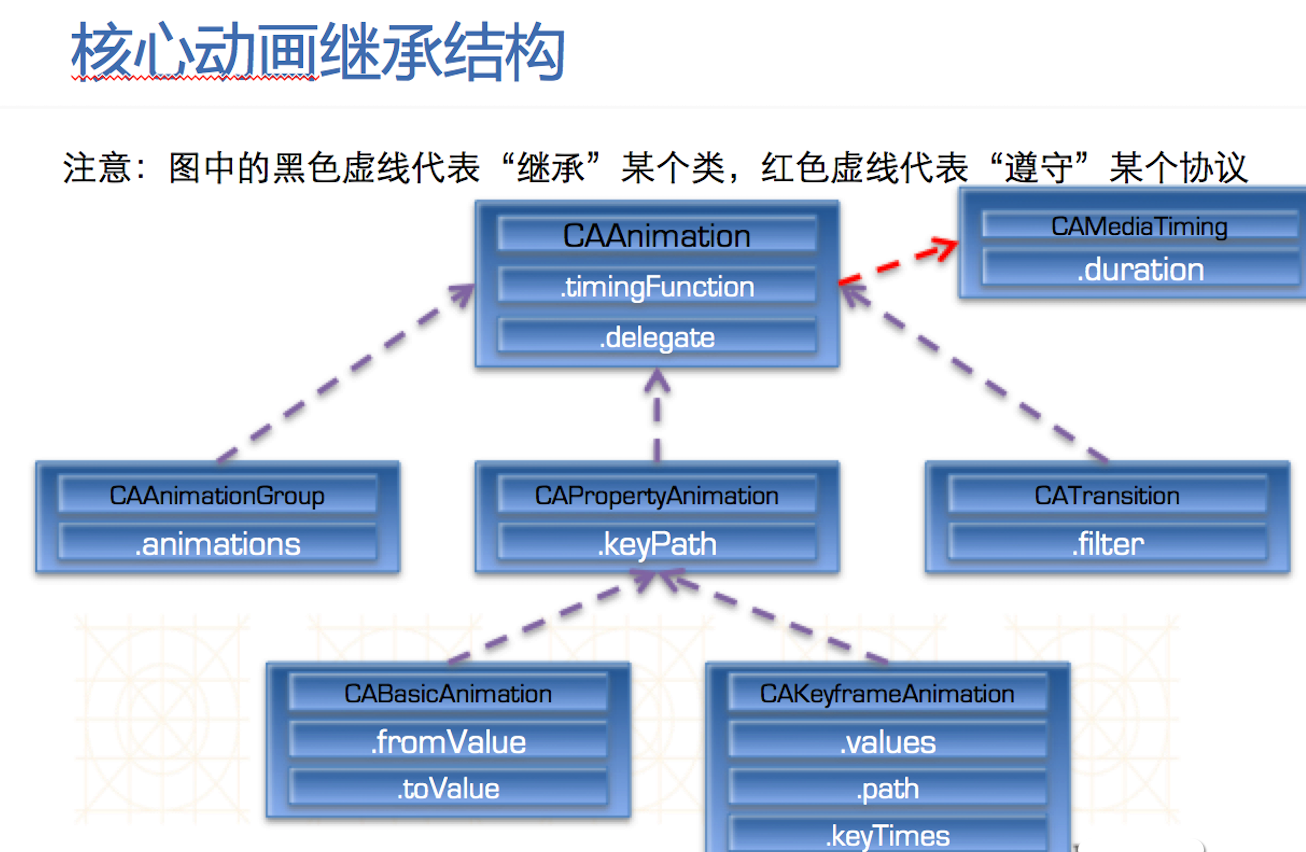
核心动画中所有类都遵守CAMediaTiming
CAAnaimation和CAPropertyAnimation都是抽象类,本身不具备动画效果,必须用它的子类才有动画效果。
CAAnimationGroup是个动画组,可以同时进行缩放,旋转。
CABasicAnimation基本动画,做一些简单效果。
CAKeyframeAnimation帧动画,做一些连续的流畅的动画。
CATransition是转场动画,界面之间跳转都可以用转场动画。
ios layer 动画-(transform.scale篇)
CABasicAnimation *theAnimation;
theAnimation=[CABasicAnimation animationWithKeyPath:@"transform.scale.x"];
theAnimation.duration=8;
theAnimation.removedOnCompletion = YES;
theAnimation.fromValue = [NSNumber numberWithFloat:1];
theAnimation.toValue = [NSNumber numberWithFloat:0.5];
[yourView.layer addAnimation:theAnimation forKey:@"animateTransform"];
y轴缩放:
CABasicAnimation *theAnimation;
theAnimation=[CABasicAnimation animationWithKeyPath:@"transform.scale.y"];
theAnimation.duration=8;
theAnimation.removedOnCompletion = YES;
theAnimation.fromValue = [NSNumber numberWithFloat:1];
theAnimation.toValue = [NSNumber numberWithFloat:0.5];
[yourView.layer addAnimation:theAnimation forKey:@"animateTransform"];
x轴,y轴同时按比例缩放:
CABasicAnimation *theAnimation;
theAnimation=[CABasicAnimation animationWithKeyPath:@"transform.scale"];
theAnimation.duration=8;
theAnimation.removedOnCompletion = YES;
theAnimation.fromValue = [NSNumber numberWithFloat:1];
theAnimation.toValue = [NSNumber numberWithFloat:0.5];
[yourView.layer addAnimation:theAnimation forKey:@"animateTransform"];
以上缩放是以view的中心点为中心缩放的,如果需要自定义缩放点,可以设置卯点:
//中心点
[yourView.layer setAnchorPoint:CGPointMake(0.5, 0.5)];
//左上角
[yourView.layer setAnchorPoint:CGPointMake(0, 0)];
//右下角
[yourView.layer setAnchorPoint:CGPointMake(1, 1)];
ios layer 动画-(transform.rotation篇)
CABasicAnimation *theAnimation;
theAnimation=[CABasicAnimation animationWithKeyPath:@"transform.rotation.x"];
theAnimation.duration=8;
theAnimation.removedOnCompletion = YES;
theAnimation.fromValue = [NSNumber numberWithFloat:0];
theAnimation.toValue = [NSNumber numberWithFloat:3.1415926];
[yourView.layer addAnimation:theAnimation forKey:@"animateTransform"];
y轴旋转:
CABasicAnimation *theAnimation;
theAnimation=[CABasicAnimation animationWithKeyPath:@"transform.rotation.y"];
theAnimation.duration=8;
theAnimation.removedOnCompletion = YES;
theAnimation.fromValue = [NSNumber numberWithFloat:0];
theAnimation.toValue = [NSNumber numberWithFloat:3.1415926];
[yourView.layer addAnimation:theAnimation forKey:@"animateTransform"];
z轴旋转:
CABasicAnimation *theAnimation;
theAnimation=[CABasicAnimation animationWithKeyPath:@"transform.rotation.z"];
theAnimation.duration=8;
theAnimation.removedOnCompletion = YES;
theAnimation.fromValue = [NSNumber numberWithFloat:0];
theAnimation.toValue = [NSNumber numberWithFloat:3.1415926];
[yourView.layer addAnimation:theAnimation forKey:@"animateTransform"];
以上缩放是以view的中心点为中心缩放的,如果需要自定义缩放点,可以设置卯点:
//中心点
[yourView.layer setAnchorPoint:CGPointMake(0.5, 0.5)];
//左上角
[yourView.layer setAnchorPoint:CGPointMake(0, 0)];
//右下角
[yourView.layer setAnchorPoint:CGPointMake(1, 1)];
可设参数:
theAnimation.repeatCount = 0;
theAnimation.autoreverses = NO;
旋转的另一种实现:(以下代码绕z轴旋转180度)
[self.topViewController.view.layer setAnchorPoint:CGPointMake(0.5, 0.5)];
[self.topViewController.view.layer setTransform:CATransform3DMakeRotation(0, 0, 0, 1)];
[UIView animateWithDuration:8 delay:0.0f options:UIViewAnimationOptionAllowUserInteraction | UIViewAnimationCurveEaseIn animations:^{
[self.topViewController.view.layer setTransform:CATransform3DMakeRotation(3.1415926, 0, 0, 1)];
} completion:^(BOOL finished) {
}];
CATransition 过渡动画
CATransition *animation = [CATransition animation];
animation.duration = 0.3;
animation.type = @"cube"; //转场动画type见后文
animation.subtype = kCATransitionFromLeft;
[[self.tableView layer] addAnimation:animation forKey:@"myAnimation"];
animation.fillMode = kCAFillModeBackwards;
animation.startProgress = 0.01;
animation.endProgress = 0.99;
使用过渡动画,实现在同一个view上,左推,右推等各种动画,节省一个view;
参数说明:
setType:可以返回四种类型:
kCATransitionFade淡出
kCATransitionMoveIn覆盖原图
kCATransitionPush推出
kCATransitionReveal底部显出来
setSubtype:也可以有四种类型:
kCATransitionFromRight;
kCATransitionFromLeft(默认值)
kCATransitionFromTop;
kCATransitionFromBottom
[animation setType:@"type类型"]; 可用的type类型主要有:
pageCurl 向上翻一页
pageUnCurl 向下翻一页
rippleEffect 滴水效果
suckEffect 收缩效果,如一块布被抽走
cube 立方体效果
oglFlip 上下翻转效果
/** 转场动画type一览表 **/
fade 交叉淡化过渡
push 新视图把旧视图推出去
moveIn 新视图移到旧视图上面
reveal 将旧视图移开,显示下面的新视图
cube 立方体翻滚效果
oglFlip 上下左右翻转效果
suckEffect 收缩效果,如一块布被抽走
rippleEffect 水滴效果
pageCurl 向上翻页效果
pageUnCurl 向下翻页效果
cameraIrisHollowOpen 相机镜头打开效果
cameraIrisHollowClose 相机镜头关闭效果
转自:http://blog.163.com/it__man/blog/static/137199904201301722556447/
CoreAnimation--CALayer的动画的更多相关文章
- CoreAnimation (CALayer 动画)
CoreAnimation基本介绍: CoreAnimation动画位于iOS框架的Media层 CoreAnimation动画实现需要添加QuartzCore.Framework CoreAnima ...
- iOS 用CALayer实现动画
与动画有关的几个类的继承关系 涉及到动画的类主要有6个,看一下它们的基本用途: 1. CAAnimation 动画基类 2. CAAnimationGroup 组合多个动画 3. CAPropert ...
- CALayer帧动画
CALayer帧动画 _sunLayer = [[CALayer alloc]init]; _sunLayer.contents = (id)[UIImage imageNamed:@"su ...
- Quartz2D复习(四) --- 图层CALayer和动画CAAnimation
1.CALayer 1).在ios中,能看得见摸得着的东西基本上都是UIView, 比如按钮.文本标签.文本输入框.图标等,这些都是UIView 2).UIView之所以能显示在屏幕上,完全是因为它内 ...
- CoreAnimation —— CALayer
概述 如上篇博文讲述,UIView中封装了很多系统方法,可以满足我们的大部分需求.但是,其也有很多限制.那些方法产生的动画基本单元为UIView,是非常重量级的对象,而且也不支持三维布局,大部分是对视 ...
- [iOS Animation]-CALayer 定时器动画
定时器的动画 我可以指导你,但是你必须按照我说的做. -- 骇客帝国 在第10章“缓冲”中,我们研究了CAMediaTimingFunction,它是一个通过控制动画缓冲来模拟物理效果例如加速或者减速 ...
- [iOS Animation]-CALayer 显示动画
显式动画 如果想让事情变得顺利,只有靠自己 -- 夏尔·纪尧姆 上一章介绍了隐式动画的概念.隐式动画是在iOS平台创建动态用户界面的一种直接方式,也是UIKit动画机制的基础,不过它并不能涵盖所有的动 ...
- CoreAnimation中layer动画闪烁的原因及解决
大熊猫猪·侯佩原创或翻译作品.欢迎转载,转载请注明出处. 如果觉得写的不好请多提意见,如果觉得不错请多多支持点赞.谢谢! hopy ;) 网上有一段Core Animation层动画的例子,是将vie ...
- iOS:CALayer核心动画层
CALayer:核心动画层 简介: Core Animation 是跨平台的,支持iOS环境和Mac OS X环境 学习核心动画之前,需要先理解CALayer,因为核心动画操作的对象不是UIView, ...
- iOS:CALayer核心动画层上绘图
在CALayer上绘图: •要在CALayer上绘图,有两种方法: 1.创建一个CALayer的子类,然后覆盖drawInContext:方法,可以使用Quartz2D API在其中进行绘图 2.设置 ...
随机推荐
- 科技部专家王涌天:移动AR头显将“让人类重新站起来”
目前,业内普遍认为VR和AR技术将是继移动手机之后的下一代计算平台,将给社会的方方面面带来全新的改变.近日,北京理工大学信息与电子学部主任.科技部863信息技术领域专家组成员王涌天教授对头戴式增强现实 ...
- POJ 1845 (约数和+二分等比数列求和)
题目链接: http://poj.org/problem?id=1845 题目大意:A^B的所有约数和,mod 9901. 解题思路: ①整数唯一分解定理: 一个整数A一定能被分成:A=(P1^K1) ...
- 51Nod 1046 A^B Mod C Label:快速幂
给出3个正整数A B C,求A^B Mod C. 例如,3 5 8,3^5 Mod 8 = 3. Input 3个正整数A B C,中间用空格分隔.(1 <= A,B,C <= 10^ ...
- 原生js自动触发事件
熟悉jquery的童鞋都知道在jq中有一个方法可以自动触发事件,那就是trigger(),那么通过原生js又怎么模拟触发呢? js中添加一个主动触发事件的方法有dispatch.该方法能模拟用户行为, ...
- 【POJ】3243 Clever Y
http://poj.org/problem?id=3243 题意:求$a^y \equiv b \pmod{p}$最小的$y$.(0<=x, y, p<=10^9) #include & ...
- css比较容易搞混的三个选择器
直接后代选择器:> .grid>input[type="button"] 所有后代选择器:空格 .grid input[type="button"] ...
- Windows 下安装使用docker swarm machine docker toolbox
下载docker 集成安装环境 http://get.daocloud.io/#install-toolbox 这个网站很不错,下载 这个集成了 docker docker-machine ,还有gi ...
- C程序编译过程
1.1程序被其他程序翻译成不同的格式 1.hello.c #include <stdio.h> int main() { printf("hello world\n") ...
- Jquery局部刷新小案列
/* 调用showTest()方法去后台拿到处理数据后返回到part.jsp页面,main.jsp再调用html()方法 和显示的结果集show()方法把part.jsp显示到当前的页面,实现局部页面 ...
- 拿到添加对象的id号方法
以前Hibernate添加对象,想拿到id号的时候都是根据id排序拿到第一条 ,才知道 这样也可以 /** * @Description: 添加一个角色信息 * @ret ...