
3.9 run_main.py源码(兼容python2和3)
3.9 run_main.py源码(兼容python2和3)
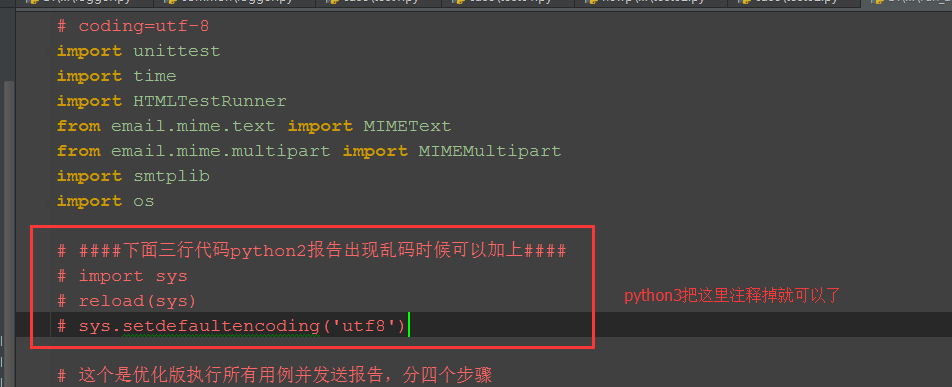
以下代码在python2和python3上都跑通过,python3只需注释掉上面红色框框区域代码就行(最后一步发送邮箱代码,我注释掉了)。

# coding=utf-8

import unittest

import time

import HTMLTestRunner

from email.mime.text import MIMEText

from email.mime.multipart import MIMEMultipart

import smtplib

import os

####下面三行代码python2报告出现乱码时候可以加上####

import sys

reload(sys)

sys.setdefaultencoding('utf8')

# 这个是优化版执行所有用例并发送报告,分四个步骤

# 第一步加载用例

# 第二步执行用例

# 第三步获取最新测试报告

# 第四步发送邮箱 (这一步不想执行的话,可以注释掉最后面那个函数就行)

def add_case(case_path, rule):

    '''加载所有的测试用例'''

    testunit = unittest.TestSuite()

    # 定义discover方法的参数

    discover = unittest.defaultTestLoader.discover(case_path,

                                                  pattern=rule,

                                                  top_level_dir=None)

    # discover方法筛选出来的用例,循环添加到测试套件中

    # for test_suite in discover:

    #     for test_case in test_suite:

    #         testunit.addTests(test_case)

    #         print testunit

    testunit.addTests(discover)  # 直接加载discover

    print(testunit)

    return testunit

def run_case(all_case, report_path):

    '''执行所有的用例, 并把结果写入测试报告'''

    now = time.strftime("%Y_%m_%d %H_%M_%S")

    report_abspath = os.path.join(report_path, now+"result.html")

    # report_abspath = "D:\\web_project\\report\\"+now+"result.html"

    fp = open(report_abspath, "wb")

    runner = HTMLTestRunner.HTMLTestRunner(stream=fp,

                                           title=u'自动化测试报告,测试结果如下:',

                                           description=u'用例执行情况:')

    # 调用add_case函数返回值

    runner.run(all_case)

    fp.close()

def get_report_file(report_path):

    '''获取最新的测试报告'''

    lists = os.listdir(report_path)

    lists.sort(key=lambda fn: os.path.getmtime(os.path.join(report_path, fn)))

    print (u'最新测试生成的报告: '+lists[-1])

    # 找到最新生成的报告文件

    report_file = os.path.join(report_path, lists[-1])

    return report_file

def send_mail(sender, psw, receiver, smtpserver, report_file):

    '''发送最新的测试报告内容'''

    # 读取测试报告的内容

    with open(report_file, "rb") as f:

        mail_body = f.read()

    # 定义邮件内容

    msg = MIMEMultipart()

    body = MIMEText(mail_body, _subtype='html', _charset='utf-8')

    msg['Subject'] = u"自动化测试报告"

    msg["from"] = sender

    msg["to"] = psw

    # 加上时间戳

    # msg["date"] = time.strftime('%a, %d %b %Y %H_%M_%S %z')

    msg.attach(body)

    # 添加附件

    att = MIMEText(open(report_file, "rb").read(), "base64", "utf-8")

    att["Content-Type"] = "application/octet-stream"

    att["Content-Disposition"] = 'attachment; filename= "report.html"'

    msg.attach(att)

    # 登录邮箱

    smtp = smtplib.SMTP()

    # 连接邮箱服务器

    smtp.connect(smtpserver)

    # 用户名密码

    smtp.login(sender, psw)

    smtp.sendmail(sender, receiver, msg.as_string())

    smtp.quit()

    print('test report email has send out !')

if __name__ == "__main__":

    # 测试用例的路径、匹配规则

    case_path = "D:\\test\\newp\\case"

    rule = "test*.py"

    all_case = add_case(case_path, rule)   # 1加载用例

    # 生成测试报告的路径

    report_path = "D:\\test\\newp\\report"

    run_case(all_case, report_path)        # 2执行用例

    # 获取最新的测试报告文件

    report_file = get_report_file(report_path)  # 3获取最新的测试报告

    #邮箱配置

    sender = "yoyo@xxx.com"

    psw = "xxx"

    # 收件人多个时,中间用逗号隔开,如'a@xx.com,b@xx.com'

    receiver = "yoyo@xxx.com"

    smtp_server = 'smtp.xxx.com'

    # send_mail(sender, psw, receiver, smtp_server, report_file)  # 4最后一步发送报告,需要发邮件就取消注释。
3.9 run_main.py源码(兼容python2和3)的更多相关文章
- daily news新闻阅读客户端应用源码(兼容iPhone和iPad)
daily news新闻阅读客户端应用源码(兼容iPhone和iPad),也是一款兼容性较好的应用,可以支iphone和ipad的阅读阅读器源码,设计风格和排列效果很不错,现在做新闻资讯客户端的朋友可 ...
- Django框架base.py源码
url.py文件 from django.conf.urls import url from django.contrib import admin from app_student import v ...
- Python逆向(四)—— Python内置模块dis.py源码详解
一.前言 上一节我们对Python编译及反汇编做了讲解,大家知道dis模块可以将编译好的pyc文件中提取出来的PyCodeObject反汇编为可以阅读字节码形式.本节我们对dis模块中的源码进行详细的 ...
- r-cnn学习(四):train_faster_rcnn_alt_opt.py源码学习
论文看的云里雾里,希望通过阅读其代码来进一步了解. 参考:http://blog.csdn.net/sloanqin/article/details/51525692 首先是./tools/train ...
- 深度学习入门-4.1 AND.py 源码分析
源代码 ------------------------------------------------------------------------------------------------ ...
- 获得PyInstaller打包exe的py源码
参考链接:https://laucyun.com/33359ed9f725529ac9b606d054c8459d.html way1:pyi-archive_viewer 提取pyc,uncomp ...
- python string.py 源码分析 三:maketrans
l = map(chr, xrange(256)) #将ascii转为字符串 _idmap = str('').join(l) del l # Construct a translation stri ...
- python string.py 源码分析 二:capwords
def capwords(s, sep=None): """capwords(s [,sep]) -> string Split the argument into ...
- python string.py 源码分析 一
# Some strings for ctype-style character classification c风格字符串 whitespace = ' \t\n\r\v\f' #空白字符 \t 制 ...
随机推荐
- 43. Multiply Strings字符串相乘
网址:https://leetcode.com/problems/multiply-strings/submissions/ 参考:https://leetcode.com/problems/mult ...
- Linux桌面系统常用软件和笔记(更新)
(一).下文涉及到的环境 manjaro.deepin.Arch等 有些可以通用 有些不可以通用 (二).常用软件下载 一.桌面美化软件 1.桌面壁纸下载软件: varirety 下载方式:可以在多个 ...
- mac下idea搭建maven项目的一些问题总结
1.关于版本 目标原版与原发行版本不一致 <build> <finalName>comment</finalName> <plugins> <pl ...
- vue 修饰符
Vue.js 为 v-on 提供了事件修饰符来处理 DOM 事件细节,如:event.preventDefault() 或 event.stopPropagation(). Vue.js通过由点(.) ...
- 微信中扫描二维码自动打开手机系统默认浏览器下载APP(APK)
很多朋友问我怎么解决微信内点击链接或扫描二维码可以直接跳出微信在外部浏览器打开网页链接,其实这并不难,只要我们实现微信跳转功能即可.下面给大家介绍这个功能 功能目的 生成微信跳转链接,实现微信内置浏览 ...
- 常见类 Object
1.在Java类继承结构中Java.lang.Object类位于顶端 2.如果定义一个Object类没有使用extends关键字声明其父类,则其父类为Java.lang.Object类 3.Objec ...
- 【推荐】HTML5 Word Cloud——中文词云
在线工具: http://timdream.org/wordcloud/# 源码: https://github.com/timdream/wordcloud
- C#连接sql server windows 和 sqlserver 身份验证的两种连接字符串
//sql server 身份验证 连接字符串 private string ConnstrSqlServer = "server=服务器名称;uid=登录名称;pwd=登录密码;datab ...
- 第九次作业——K-means算法应用:图片压缩
一.读取一张示例图片或自己准备的图片,观察图片存放数据特点. 根据图片的分辨率,可适当降低分辨率. 再用k均值聚类算法,将图片中所有的颜色值做聚类. 然后用聚类中心的颜色代替原来的颜色值. 形成新的图 ...
- JAVA面向对象之继承
继承: 子类继承父类的特征和行为,使得子类对象(实例)具有父类的实例域和方法 class 子类 extends 父类 { } 继承的特性: 子类拥有父类非private的属性,方法. 子类可以拥有自己 ...