
自定义微信小程序导航(兼容各种手机)
详细代码请见github,请点击地址,其中有原生小程序的实现,也有wepy版本的实现
了解小程序默认导航
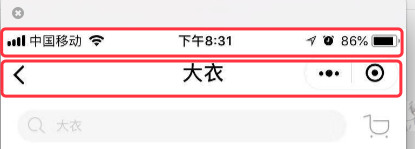
如上图所示,微信导航分为两部分,第一个部分为statusBarHeight,刘海屏手机(iPhone X,小米8等)会比其他的手机高很多,第二部分为titleBarHeight,安卓和IOS的高度不同,但是IOS高度是一样的,IOS高度是一样的,
所以我们要实现一个兼容不同手机的导航必须要根据不同的手机实现statusBarHeight和titleBarHeight
第一步:全局设置
把app.json中的window中的navigationStyle设置为custom,官方文档链接
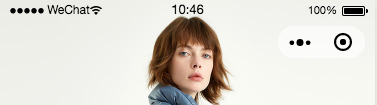
设置完之后发现导航栏变成了如下图所示,只剩下了右上角胶囊按钮
第二步:确定导航栏两部分的高度
(1)确定第一部分statusBarHeight的高度,这部分是手机用来展示时间,信号和手机电量的,我们可以从wx.getSystemInfo从获得
wx.getSystemInfo({

  success: function(res) {

    console.log(res.statusBarHeight)

  }

})
(2)第二部分titleBarHeight为小程序导航栏的高度,经过我查询无数文档和实践得知,在iPhone上titleBarHeight=44px,在安卓上titleBarHeight = 48px
(3)最后总结一下微信小程序的高度代码为
wx.getSystemInfo({

  success: function(res) {

    let titleBarHeight = 0

    if (res.model.indexOf('iPhone') !== -1) {

      titleBarHeight = 44

    } else {

      titleBarHeight = 48

    }

    that.setData({

      statusBarHeight: res.statusBarHeight,

      titleBarHeight: titleBarHeight

    });

  },

  failure() {

    that.setData({

      statusBarHeight: 0,

      titleBarHeight: 0

    });

  }

})
第三步:编写Navigation组件
(1)Navigation.js
const app = getApp();

Component({

  properties: {

    //小程序页面的标题

    title: {

      type: String,

      default: '默认标题'

    },

    //是否展示返回和主页按钮

    showIcon: {

      type: Boolean,

      default: true

    }

  },

  data: {

    statusBarHeight: 0,

    titleBarHeight: 0,

  },

  ready: function () {

    // 因为每个页面都需要用到这连个字段,所以放到全局对象中

    if (app.globalData && app.globalData.statusBarHeight && app.globalData.titleBarHeight) {

      this.setData({

        statusBarHeight: app.globalData.statusBarHeight,

        titleBarHeight: app.globalData.titleBarHeight

      });

    } else {

      let that = this

      wx.getSystemInfo({

        success: function(res) {

          if (!app.globalData) {

            app.globalData = {}

          }

          if (res.model.indexOf('iPhone') !== -1) {

            app.globalData.titleBarHeight = 44

          } else {

            app.globalData.titleBarHeight = 48

          }

          app.globalData.statusBarHeight = res.statusBarHeight

          that.setData({

            statusBarHeight: app.globalData.statusBarHeight,

            titleBarHeight: app.globalData.titleBarHeight

          });

        },

        failure() {

          that.setData({

            statusBarHeight: 0,

            titleBarHeight: 0

          });

        }

      })

    }

  },

  methods: {

    headerBack() {

      wx.navigateBack({

        delta: 1,

        fail(e) {

          wx.switchTab({

            url: '/pages/main/main'

          })

        }

      })

    },

    headerHome() {

      wx.switchTab({

        url: '/pages/main/main'

      })

    }

  }

})
(2) Navigation.wxml
<view style="height:{{titleBarHeight}}px;padding-top:{{statusBarHeight}}px">

  <view class="header" style="height:{{titleBarHeight}}px;padding-top:{{statusBarHeight}}px">

    <view wx:if="{{showIcon}}" class="title-bar">

      <view class="back" bindtap="headerBack"><image src="https://dn-testimage.qbox.me/Files/08/6b/086b8e19c7a5aa031dc4df31ca8b53ac2ed32212_644.png"></image></view>

      <view class="line"></view>

      <view class="home" bindtap="headerHome"><image src="https://dn-testimage.qbox.me/Files/fc/49/fc4958729bf1937667b68c78f495edeafe30f339_1030.png"></image></view>

    </view>

    <view class="header-title">{{title}}</view>

  </view>

</view>
css就不贴了,有点多,需要的朋友可以去的github上拿 点击地址
第四步:展示效果
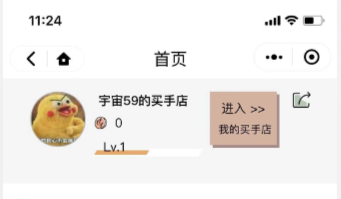
iPhone X展示效果 iPhone 7展示效果

小米8展示效果
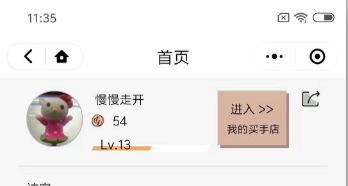
用我们公司的测试机基本上都试了一遍,基本上都能正常显示,别问我为什么样式和右边这么相似,因为我是叫公司设计给了我样式
解决下拉刷新的问题

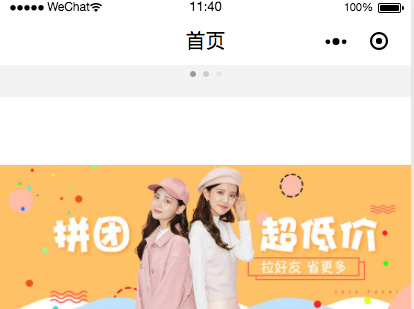
图一为默认导航下的下拉刷新,显示正常,图二为自定义导航栏下的下拉刷新,显示异常,中间有一大块空白。
如果解决这个问题,我们自定义一个加载动画,藏在导航底下
(1)把app.json中的window设置为如下,这样加载动画就隐藏了,因为加载动画必须要设置window的backgroundTextStyle=black和backgroundColor=#F3F3F3才会显示如上图所示
window: {
"navigationStyle": "custom",
"backgroundTextStyle": "light",
"navigationBarBackgroundColor": "#fff",
"navigationBarTitleText": "ICY买手店",
"navigationBarTextStyle": "black"
}
(2)修改Navigation.wxml
<view style="height:{{titleBarHeight}}px;padding-top:{{statusBarHeight}}px">

  <view class="header" style="height:{{titleBarHeight}}px;padding-top:{{statusBarHeight}}px">

    <view wx:if="{{showIcon}}" class="title-bar">

      <view class="back" bindtap="headerBack"><image src="https://dn-testimage.qbox.me/Files/08/6b/086b8e19c7a5aa031dc4df31ca8b53ac2ed32212_644.png"></image></view>

      <view class="line"></view>

      <view class="home" bindtap="headerHome"><image src="https://dn-testimage.qbox.me/Files/fc/49/fc4958729bf1937667b68c78f495edeafe30f339_1030.png"></image></view>

    </view>

    <view class="header-title">{{title}}</view>

  </view>

  <view class="loading-wrap"><image class="loading-gif" src="https://dn-testimage.qbox.me/Files/e0/35/e03562502eae6d5944bed747b7c21a3c2cce1ff8_1250.gif"></image></view>

</view>
效果如下图,加载动画我可能写的不太好看

问题:这样做在iPhone上是能正常展示的,但是在安卓上还有一点小问题,自定义导航栏的标题和图标有一起滑动
注意点
(1)安卓手机下拉刷新还是会有一点点展示问题
(2)项目所有fixed的元素都需要改,top需要加上导航栏的高度
目前哪些小程序在用自定义导航栏
我所知道的有 “bilibili”,"票圈长视频",我们公司的小程序也在计划用
自定义微信小程序导航(兼容各种手机)的更多相关文章
- 微信小程序导航:官方工具+精品教程+DEMO集合(1月7更新)
1:官方工具:https://mp.weixin.qq.com/debug/w ... tml?t=14764346784612:简易教程:https://mp.weixin.qq.com/debug ...
- 微信小程序例子-保存图片到手机相册
微信小程序例子-保存图片到手机相册 1.关键代码 1)WXML文件 2)JS文件 saveImgToPhotosAlbumTap: function(){ // 图片必须是 https 的 var I ...
- 微信小程序-导航 & 路由
微信小程序-导航 & 路由 页面跳转 页面路由 页面栈, 框架以栈的形式维护了当前的所有页面. https://developers.weixin.qq.com/miniprogram/dev ...
- 微信小程序——导航栏组件
组件内属性详解 属性 类型 默认值 必填 说明 nav-postion String relative 否 导航栏(包含导航栏以及状态栏)的position,可取值relative.fixed.a ...
- 个人也能申请微信小程序获得APPID和手机测试效果
微信小程序昨晚火爆公测,我也第一时间注册了小程序账号开启公测之旅. 注册过程可以看文档:https://my.oschina.net/imhoodoo/blog/780901 进入后台之后我们其实主要 ...
- 如何自定义微信小程序swiper轮播图面板指示点的样式
https://www.cnblogs.com/myboogle/p/6278163.html 微信小程序的swiper组件是滑块视图容器,也就是说平常我们看到的轮播图就可以用它来做,不过这个组件有很 ...
- 自定义微信小程序swiper轮播图面板指示点的样式
微信小程序的swiper组件是滑块视图容器,也就是说平常我们看到的轮播图就可以用它来做,不过这个组件有很多样式是固定的,但是,有时候我们的设计稿的面板指示点是需要个性化的,那么如何去修改swiper组 ...
- 微信小程序 导航(a 连接)自定义组件
导航:navigator 组件 组件上的属性: target:跳到其他小程序( 默认是当前小程序 ),当属性值为 miniProgram 时,跳到别的小程序(如果要跳到别的小程序,需要填写 appid ...
- 微信小程序------导航栏样式、tabBar导航栏
一:导航栏样式设置 小程序的导航栏样式在app.json中定义. 这里设置导航,背景黑色,文字白色,文字内容测试小程序 app.json内容: { "pages":[ " ...
随机推荐
- 关闭或启动linux防火墙后,docker启动容器报错
# docker启动报错 # 解决办法:重建docker0网络恢复 #按照进程名杀死docker进程 [root@localhost mysqlconf]# pkill docker #清空防 ...
- BZOJ.2054.疯狂的馒头(并查集)
BZOJ 倒序处理,就是并查集傻题了.. 并查集就是确定下一个未染色位置的,直接跳到那个位置染.然而我越想越麻烦=-= 以为有线性的做法,发现还是要并查集.. 数据随机线段树也能过去. //18400 ...
- Django合集
Django基础 Django--简介 Django--web框架简介 浅析uWSGI.uwsgi.wsgi Django--url(路由)配置 Django--模板层 Django--视图层 Dja ...
- centos7搭建zabbix3.0监控系统
关闭防火墙和selinux systemctl stop firewalld.service (停止防火墙) systemctl disable firewalld.se ...
- react.JS基础
1.ReactDOM.render() React.render 是 React 的最基本方法,用于将模板转为 HTML 语言,并插入指定的 DOM 节点. <!DOCTYPE html> ...
- linux学习:用户管理
一.管理用户(user) 主要工具命令 useradd 注:添加用户 adduser 注:添加用户 passwd 注:为用户设置密码 usermod 注:修改用户命令,可以通 ...
- 树莓派3B+上运行.Net Core项目
最近买了个树莓派3B+,准备把自己写的一个.Net Core爬虫挂在上面跑 买之前没有想到树莓派因为是今年新出的,导致驱动以及系统啥的都不是很完善,导致走了很多弯路,早知道买树莓派3就不用那么多折腾了 ...
- Document APIs
本节首先简要介绍Elasticsearch的数据复制模型,然后详细描述以下CRUD API: Single document APIs Index API Get API Delete API Upd ...
- 手把手教你在CSDN博客中插入图片之剑走偏锋系列
1.在博客园注册账号.你没有看错,就是博客园,在图像上传方面博客园比CSDN这个垃圾强太多了. 2.在博客园进入随笔撰写编辑模块,点击上传图像按钮(点最黄的那个,别点错了). 3.弹出如下窗口 ,点击 ...
- [Swift]LeetCode709. 转换成小写字母 | To Lower Case
Implement function ToLowerCase() that has a string parameter str, and returns the same string in low ...