
2D游戏编程1--windows编程模型
一.创建一个windows程序步骤
1.创建一个windows类
2.创建一个事件处理程序
3.注册windows类
4.用之前创建的windows类创建一个窗口
5.创建一个主事件循环
二.存储windows类信息的数据结构:
typedef struct _WNDCLASSEX

{

        UINT    cbSize;        // size of this structure

        UINT    style;         // style flags

        WNDPROC lpfnWndProc;   // function pointer to handler

        int     cbClsExtra;    // extra class info

        int     cbWndExtra;    // extra window info

        HANDLE  hInstance;     // the instance of the application

        HICON   hIcon;         // the main icon

        HCURSOR hCursor;       // the cursor for the window

        HBRUSH  hbrBackground; // the background brush to paint the window

        LPCTSTR lpszMenuName;  // the name of the menu to attach

        LPCTSTR lpszClassName; // the name of the class itself

        HICON   hIconSm;       // the handle of the small icon

}  WNDCLASSEX
cbSize=sizeof(WNDCLASSEX);
style值:
winclass.style = CS_VREDRAW | CS_HREDRAW | CS_OWNDC | CS_DBLCLICKS;
CS_HREDRAW
Redraws the entire window if a movement or size adjustment changes the width of the window.
CS_VREDRAW
Redraws the entire window if a movement or size adjustment changes the height of the window.
CS_OWNDC
Allocates a unique device context for each window in the class (more on this later in the chapter).
CS_DBLCLKS
Sends a double-click message to the window procedure when the user double-clicks the mouse while the cursor is in a window belonging to the class.
CS_PARENTDC
Sets the clipping region of the child window to that of the parent window so that the child can draw on the parent.
CS_SAVEBITS
Saves the client image in a window so you don't have to redraw it every time the window is obscured, moved, etc. However, this takes up more memory and is slower that doing it yourself.
CS_NOCLOSE
Disables the Close command on the system menu.
Note: The most commonly used flags are highlighted.
lpfnWndProc窗口事件处理函数指针:
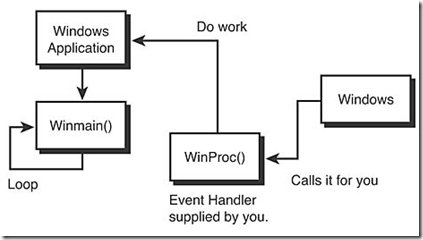
完整定义:
WNDCLASSEX winclass; // this will hold the class we create
// first fill in the window class structure
inclass.cbSize = sizeof(WNDCLASSEX);
winclass.style = CS_DBLCLKS | CS_OWNDC | CS_HREDRAW | CS_VREDRAW;
winclass.lpfnWndProc = WindowProc;
winclass.cbClsExtra = 0;
winclass.cbWndExtra = 0;
winclass.hInstance = hinstance;
winclass.hIcon = LoadIcon(NULL, IDI_APPLICATION);
winclass.hCursor = LoadCursor(NULL, IDC_ARROW);
winclass.hbrBackground = GetStockObject(BLACK_BRUSH);
winclass.lpszMenuName = NULL;
winclass.lpszClassName = "WINCLASS1";
winclass.hIconSm = LoadIcon(NULL, IDI_APPLICATION);
三.注册windows类
RegisterClassEx(&winclass);
四.创建窗口
HWND CreateWindowEx(
DWORD dwExStyle, // extended window style
LPCTSTR lpClassName, // pointer to registered class name
LPCTSTR lpWindowName, // pointer to window name
DWORD dwStyle, // window style
int x, // horizontal position of window
int y, // vertical position of window
int nWidth, // window width
int nHeight, // window height
HWND hWndParent, // handle to parent or owner window
HMENU hMenu, // handle to menu, or child-window identifier
HINSTANCE hInstance, // handle to application instance
LPVOID lpParam); // pointer to window-creation data
HWND hwnd; // window handle

// create the window, bail if problem

if (!(hwnd = CreateWindowEx(NULL, // extended style

                  "WINCLASS1",            // class

                  "Your Basic Window",    // title

                  WS_OVERLAPPEDWINDOW | WS_VISIBLE,

                  0,0,       // initial x,y

                  400,400,   // initial width, height

                  NULL,      // handle to parent

                  NULL,      // handle to menu

                  hinstance, // instance of this application

                  NULL)))    // extra creation parms

return(0);
Once the window has been created, it may or may not be visible. However, in this case, we added the style flag WS_VISIBLE, which does this automatically. If this flag isn't added, use the following function call to manually display the window:
// this shows the window

ShowWindow(hwnd, ncmdshow);
五.事件处理程序
WinProc原型:
LRESULT CALLBACK WindowProc(
HWND hwnd, // window handle of sender
UINT msg, // the message id
WPARAM wparam, // further defines message
LPARAM lparam); // further defines message
实例:
LRESULT CALLBACK WindowProc(HWND hwnd,

                            UINT msg,

                            WPARAM wparam,

                            LPARAM lparam)

{

// this is the main message handler of the system

PAINTSTRUCT        ps;    // used in WM_PAINT

HDC                        hdc;    // handle to a device context

// what is the message

switch(msg)

    {

    case WM_CREATE:

        {

    // do initialization stuff here

       // return success

       return(0);

    } break;

       case WM_COMMAND:

       {

       switch(LOWORD(wparam))

             {

             // handle the FILE menu

             case MENU_FILE_ID_OPEN:

             {

             // do work here

             } break;

             case MENU_FILE_ID_CLOSE:

             {

              // do work here

             } break;

             case MENU_FILE_ID_SAVE:

             {

             // do work here

             } break;

             case MENU_FILE_ID_EXIT:

             {

             // do work here

             } break;

             // handle the HELP menu

             case MENU_HELP_ABOUT:

             {

             // do work here

             } break;

             default: break;

             } // end switch wparam

        } break; // end WM_COMMAND

    case WM_PAINT:

    {

    // simply validate the window

    hdc = BeginPaint(hwnd,&ps);

    // you would do all your painting here

       EndPaint(hwnd,&ps);

       // return success

    return(0);

    } break;

    case WM_DESTROY:

    {

    // kill the application, this sends a WM_QUIT message

    PostQuitMessage(0);

        // return success

    return(0);

    } break;

       default:break;

    } // end switch

// process any messages that we didn't take care of

 return (DefWindowProc(hwnd, msg, wparam, lparam));

} // end WinProc
六.主事件循环
// enter main event loop
while(GetMessage(&msg,NULL,0,0))
{
// translate any accelerator keys
TranslateMessage(&msg);
// send the message to the window proc
DispatchMessage(&msg);
} // end while
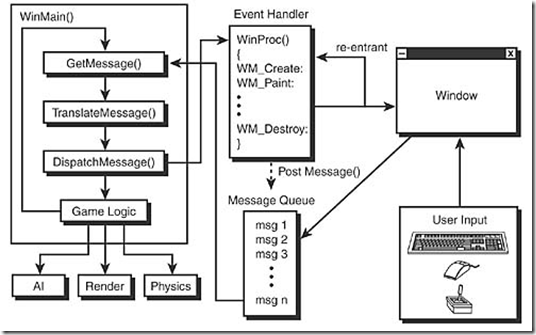
事件循环处理消息机制流程图:
2D游戏编程1--windows编程模型的更多相关文章
- C++,C++编程,Windows编程,MFC
编程 我们日常生活中接触到的电子类产品中的应用都是由编程而来 为什么编程,偷懒 我们通过编程驱使(指挥,命令)的是电信号 为什么上面说编程是偷懒,电的发现,给人们带来了便利,人们在各个方面驱使(换成“ ...
- Windows编程
本文整理自百科.知乎与 科学家的世界 问题一:为什么开发windows应用程序不用c 而用.net,java,c++? 用 c+windows API 开发windows 应用程序 比用.net, ...
- 《Windows编程零基础学》第零节
首先很开心申请到了这一个专栏<Windows编程零基础学> 这是第一篇文章,在这里,我将讲述一些基础的知识. 什么是Windows编程 所谓Windows编程就是在Windows平台上开发 ...
- MFC-01-Chapter01:Hello,MFC---1.1 Windows 编程模型
1.1 Windows编程模型 为传统的操作系统编写的程序使用的是过程化模型,即程序从头到尾按顺序执行.例如C程序,从main函数入口开始执行,中间调用不同的函数一直到程序结束返回,这种过程是程序本身 ...
- Direct3D 10学习笔记(四)——Windows编程
本篇将简单整理基本的Windows应用程序的实现,并作为创建Direct3D 10应用程序的铺垫.具体内容参照< Introduction to 3D Game Programming with ...
- 原创教程“ActionScript3.0游戏中的图像编程”開始连载啦!
经过近两年的不懈努力,笔者的原创教程"ActionScript3游戏中的图像编程"最终在今日划上了完美的句号!这其中记录着笔者多年来在游戏制作,尤其是其中图像处理方 ...
- 有一定基础的 C++ 学习者该怎样学习 Windows 编程?
人的心理有个奇异的特性:一项知识一旦学会之后,学习过程中面临的困惑和不解非常快就会忘得干干净净,似乎一切都是自然而然,本来就该这种.因此,关于「怎样入门」这类问题,找顶尖高手来回答,未必能比一个刚入门 ...
- .NET “底层”异步编程模式——异步编程模型(Asynchronous Programming Model,APM)
本文内容 异步编程类型 异步编程模型(APM) 参考资料 首先澄清,异步编程模式(Asynchronous Programming Patterns)与异步编程模型(Asynchronous Prog ...
- windows编程经典书籍
本人是刚刚开始学习windows编程的,感觉看雪学院的大牛很NB.想找一些书籍来看学习学习,可是不知道看哪些书好.驱动,对菜鸟们来说真是一个很深奥的话题,所以 ,我找来了这篇文章供大家分享,以后大家发 ...
- windows编程入门最重要的
要入门 Windows 编程,最重要的不是阅读什么教材,使用什么工具,而是先必须把以下几个对于初学者来说非常容易困惑的重要概念搞清楚: 1. 文字的编码和字符集.这部分需要掌握 ANSI 模式和 Un ...
随机推荐
- Codevs 1074 食物链 2001年NOI全国竞赛
1074 食物链 2001年NOI全国竞赛 时间限制: 3 s 空间限制: 64000 KB 题目等级 : 钻石 Diamond 传送门 题目描述 Description 动物王国中有三类动物 A,B ...
- OpenJudge 2749 分解因数
1.链接地址: http://bailian.openjudge.cn/practice/2749/ 2.题目: 总时间限制: 1000ms 内存限制: 65536kB 描述 给出一个正整数a,要求分 ...
- uboot下 Nand flash 启动 内核与根文件系统
u-boot版本: u-boot-2010.03_tekkamanninja修改的u-boot 1.将uboot通过j-link烧写到norflash,启动后 saveenv 将参数保存到 nandf ...
- 每天一条linux命令——crontab
crontab命令被用来提交和管理用户的需要周期性执行的任务,与windows下的计划任务类似,当安装完成操作系统后,默认会安装此服务工具,并且会自动启动crond进程,crond进程每分钟会定期检查 ...
- ES6笔记-字符串方法
字符串检索方法,indexOf(searchValue,fromIndex)//参数1必需,检索查询的字符串或者值,参数2选题,规定检索的起始位置,不设置默认从0开始 indexOf()方法返回检索字 ...
- 更新ACCESS数据库出现“字段太小而不能接受所要添加的数据的数量。试着插入或粘贴较少的数据。”的解决方法
今天进行数据调试时出现“字段太小而不能接受所要添加的数据的数量.试着插入或粘贴较少的数据.”,跟踪发现是在更新数据库的数据时出现的. 打开数据库表格发现出错的数据字段类型被定义为“文本”,也就是数据最 ...
- ThinkPHP下使用Ueditor
在做课程设计的时候想到用百度的Ueditor,可在配置的时候出现了一些问题 Ueditor感觉不是很难,以前有个人定制的,现在取消了这项服务,但是我们可以自己进行配置 下载地址:http://uedi ...
- 一个小程序[Socrates]中学到的Perl点滴
1. 抓取网页源文件,只要三行代码 use LWP::Simple; $url='http://music.baidu.com/top/dayhot'; $page=get($url) or die ...
- oracle 查看表的定义
select t.table_name 表名, c.comments 字段名称, t.column_name 字段编码, t.data_type || '(' || to_char(t.data_le ...
- chmod 命令 set uid ,set gid,sticky bit 说明
permission的符号模式表: 模式 名字 说明 r 读 设置为可读权限 w 写 设置为可写权限 x 执行权限 设置为可执行权限 X 特殊执行权限 只有当文件为目录文件,或者其他类型的用户有可执行 ...