
ueditor使用小结
一、简介
ueditor是百度编辑器,官网地址:http://ueditor.baidu.com/website/
完整的功能演示,可以参考:http://ueditor.baidu.com/website/onlinedemo.html
为了方便开发学习,我们下载它的完整版和.net版。
ueditor_release_ueditor1_4_3_1-src.zip
ueditor_release_ueditor1_4_3_1-gbk-net.zip
二、如何引入ueditor编辑器
下载包的index.html是编辑器示例,主要几处代码如下:
<head>
……
<!--编辑器基本配置-->
<script type="text/javascript" charset="gbk" src="ueditor.config.js"></ script>
<!--编辑器完整代码-->
<script type="text/javascript" charset="gbk" src="ueditor.all.js"> </script >
……
</head>
<body>
<div>
<script id="editor" type="text/plain"></ script>
</div>
<script type="text/javascript">
//实例化编辑器
var ue = UE.getEditor( 'editor', {
autoHeightEnabled: true,
autoFloatEnabled: true,
initialFrameWidth: 690,
initialFrameHeight:483
});
</script>
三、如何调整ueditor工具栏
ueditor功能强大,但是有些功能我们是用不到的,可以在ueditor.config.js中配置。搜索"toolbars"找到工具栏配置项,删掉不必要的功能就可以了。
,toolbars: [[
'undo', 'redo' , '|',
'bold', 'forecolor' , 'removeformat', 'autotypeset', 'pasteplain' , '|', '|',
'justifyleft', 'justifycenter' , '|',
'link', 'unlink' , '|',
'insertimage', 'insertvideo' , '|',
'wordimage', '|' ,
'inserttable', 'insertrow' , 'deleterow', 'insertcol', 'deletecol' , 'mergecells', 'splittocells', '|' , 'mybtn1','mydialog1'
]]
四、如何修改ueditor默认样式
如果想修改编辑器默认的字体等,可以找打开ueditor.all.js,搜索editor.js中的"render:"方法,修改以下部分:
var html = ( ie && browser.version < 9 ? '' : '<!DOCTYPE html>') +
'<html xmlns=\'http://www.w3.org/1999/xhtml\' class=\'view\' ><head>' +
'<style type=\'text/css\'>' +
//设置四周的留边
'.view{padding:0;word-wrap:break-word;cursor:text;height:90%;}\n' +
//设置默认字体和字号
//font-family不能呢随便改,在safari下fillchar会有解析问题
'body{margin:8px;font-family:sans-serif;font-size:16px;}' +
//设置段落间距
'p{margin:5px 0;}</style>' +
( options.iframeCssUrl ? '<link rel=\'stylesheet\' type=\'text/css\' href=\'' + utils.unhtml(options.iframeCssUrl) + '\'/>' : '' ) +
(options.initialStyle ? '<style>' + options.initialStyle + '</style>' : '') +
'</head><body class=\'view\' ></body>' +
'<script type=\'text/javascript\' ' + (ie ? 'defer=\'defer\'' : '' ) +' id=\'_initialScript\'>' +
'setTimeout(function(){editor = window.parent.UE.instants[\'ueditorInstant' + me.uid + '\'];editor._setup(document);},0);' +
'var _tmpScript = document.getElementById(\'_initialScript\');_tmpScript.parentNode.removeChild(_tmpScript);</script></html>';
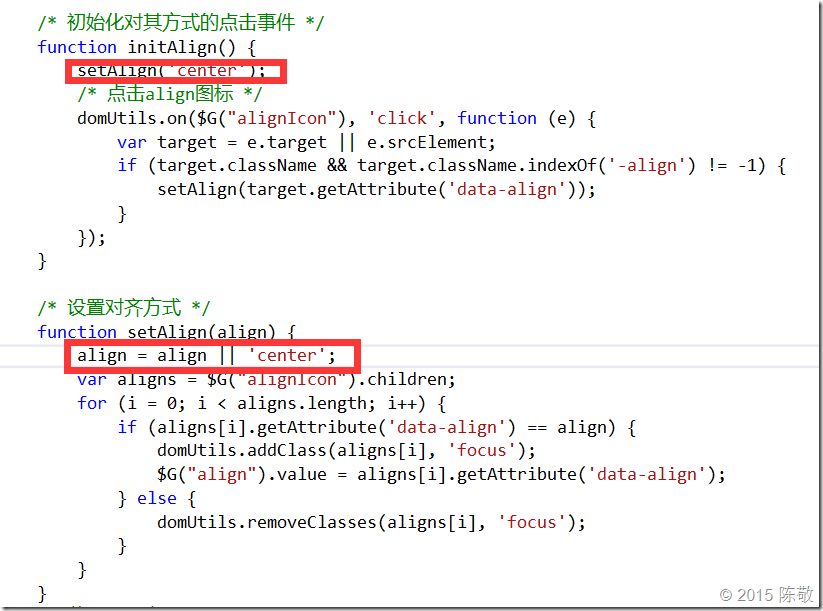
五、ueditor上传图片插入正文后如何默认居中
修改\dialogs\image\image.js文件的initAlign()和setAlign方法。
六、ueditor如何自定义工具栏按钮
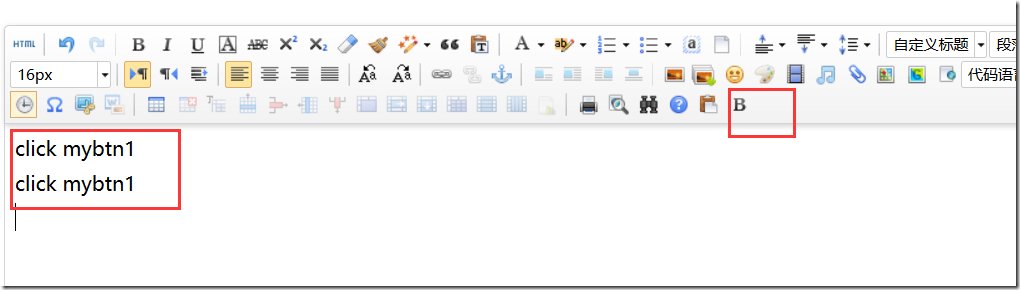
如果现有的功能不能满足需求,我们想在工具栏上新增一个自定义按钮,该如何实现呢?
1.首先修改ueditor.config.js,为toolbars添加'mybtn1';
,toolbars: [[
'undo', 'redo' , '|',
'bold', 'forecolor' , 'removeformat', 'autotypeset', 'pasteplain' , '|', '|',
'justifyleft', 'justifycenter' , '|',
'link', 'unlink' , '|',
'insertimage', 'insertvideo' , '|',
'wordimage', '|' ,
'inserttable', 'insertrow' , 'deleterow', 'insertcol', 'deletecol' , 'mergecells', 'splittocells', '|' , 'mybtn1'
]]
2.然后修改ueditor.all.js,找到变量btnCmds,添加'mybtn1';
var btnCmds = ['undo' , 'redo', 'formatmatch',
'bold', 'italic' , 'underline', 'fontborder', 'touppercase' , 'tolowercase',
'strikethrough', 'subscript' , 'superscript', 'source', 'indent' , 'outdent',
'blockquote', 'pasteplain' , 'pagebreak',
'selectall', 'print' ,'horizontal', 'removeformat', 'time' , 'date', 'unlink',
'insertparagraphbeforetable', 'insertrow' , 'insertcol', 'mergeright', 'mergedown' , 'deleterow',
'deletecol', 'splittorows' , 'splittocols', 'splittocells', 'mergecells' , 'deletetable', 'drafts', 'mybtn1' ];
3.最后在ueditor.all.js,新增mybtn1命令执行的代码:
UE.commands['mybtn1'] = {
execCommand: function (cmdName, align) {
var range = this .selection.getRange();
this.execCommand('inserthtml' , '<p>click mybtn1</p>');
return true ;
}
};
这样就完成了对工具栏功能的扩展。
七 ueditor如何自动抓取远程图片
如果想实现粘贴网页时,直接将其中的图片上传到自己的图片服务器,该怎么做呢?这其中主要用到的js是plugins/catchremoteimage.js。
首先设置编辑器选项:catchRemoteImageEnable:true。这样便开启了自动抓取图片的功能。
如果想自定义图片上传方式,而不用ueditor默认的图片上传地址,那么需要修改catchremoteimage.js这里:
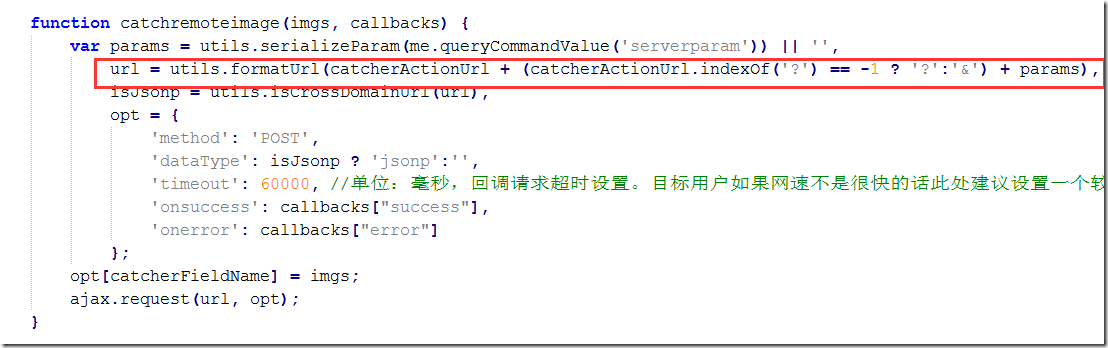
把这里的url改成自定义的ashx文件地址即可。
八 ueditor上传图片窗口,如何实现选择图片后自动上传
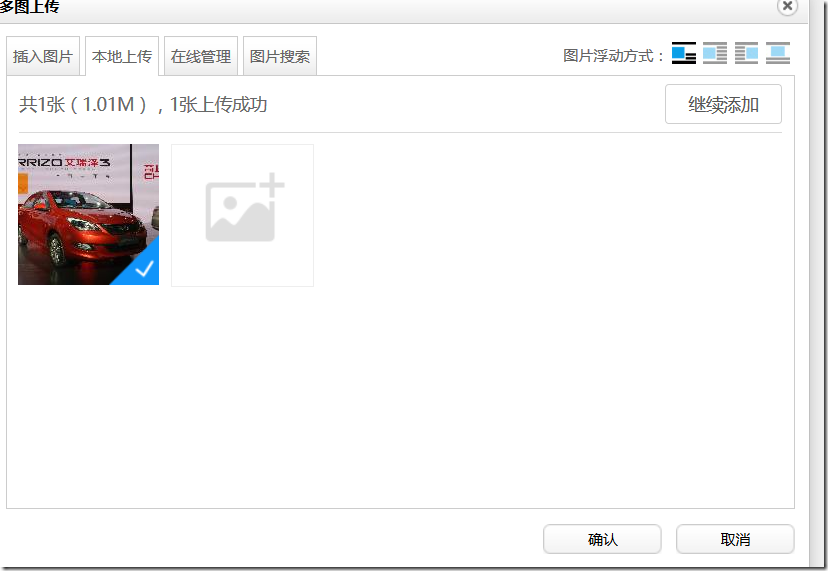
上传图片窗口操作需要先选择图片,点击“开始上传”,然后插入图片。操作过程略显繁琐,其实可以去掉“开始上传”,在选中图片后自动上传。
首先找到dialogs/image/image.html,隐藏image.html的“开始上传”按钮。
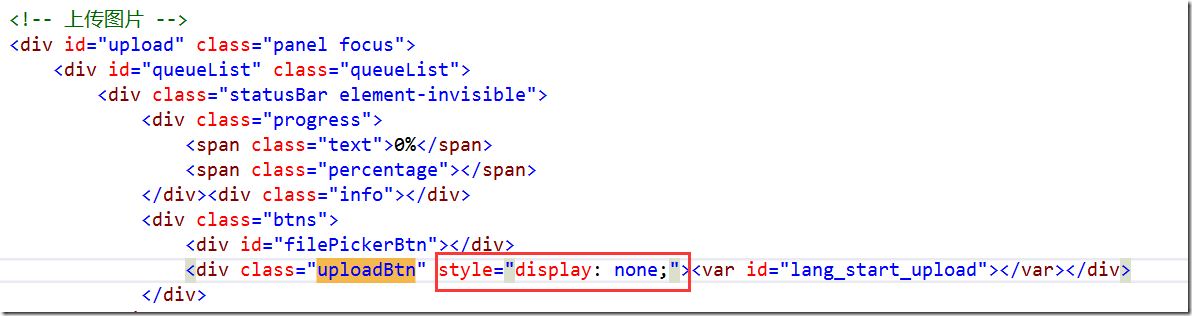
然后修改dialogs/image/image.js文件,找到addFile方法,然后在方法结尾添加以下代码:
function addFile(file) {
……
//自动上传
clickUpload = function () {
$upload.click();
}
setTimeout("clickUpload()", 200);
}
ueditor使用小结的更多相关文章
- 百度富文本ueditor使用小结
最近因工作需要使用了ueditor,根据自己的需求将开发使用时遇到的问题小结分享下. 1.可到官网根据自身情况下载最新版本,https://ueditor.baidu.com/website/ 2.h ...
- ueditor使用小结【来源网络】
原文地址:http://www.cnblogs.com/janes/p/5072496.html ueditor是百度编辑器,官网地址:http://ueditor.baidu.com/website ...
- ueditor编辑器使用总结
ueditor使用小结 一.简介 ueditor是百度编辑器,官网地址:http://ueditor.baidu.com/website/ 完整的功能演示,可以参考:http://ueditor.ba ...
- Ueditor设置默认字体、字号、行间距,添加字体种类(转)
Ueditor默认字体.字号.行间距的修改: ueditor默认字号是16号,默认字体为sans-serif,默认行间距为5px,如下图所示: 首先,修改ueditor.all.js文件中如上图红框中 ...
- 使用ueditor小结
1. 导入 js: ueditor.config.js ueditor.all.js css/images/plugin: themes lang dialog(可选) third-party(可选) ...
- Node + Express + Mysql的CMS小结
因为之前用过上述的组合完成过很多系统,而这一次是为了实现一个帮助系统的静态网页发布.因为很久不写,重点说遇到的几个坑: 1.库版本的问题 比如mysql连接数据库一直报错,因为系统重装过,所以重新安装 ...
- Java-Maven项目引入UEditor图片上传组件jar包类库的5种方式
最近,硬是和百度的UEditor组件杠上了.自己的个人官网项目,很容易就搞定了,公司的项目,尼玛,各种问题.项目多了,环境复杂了,解决问题的方法也得不断调整. 项目用Maven管理jar包,用到了UE ...
- springboot+layui 整合百度富文本编辑器ueditor入门使用教程(踩过的坑)
springboot+layui 整合百度富文本编辑器ueditor入门使用教程(踩过的坑) 写在前面: 富文本编辑器,Multi-function Text Editor, 简称 MTE, 是一 ...
- springboot整合ueditor实现图片上传和文件上传功能
springboot整合ueditor实现图片上传和文件上传功能 写在前面: 在阅读本篇之前,请先按照我的这篇随笔完成对ueditor的前期配置工作: springboot+layui 整合百度富文本 ...
随机推荐
- openlayers 3 简书
1. 简书http://www.jianshu.com/p/6785e755fa0d 2. 文档 http://anzhihun.coding.me/ol3-primer/ch03/03-02.htm ...
- 脚本调用脚本时.与bash的差别
在做项目时,发现脚本调用脚本时,会意外退出任务. 下面的脚本是父脚本: #!/bin/bash . ./data/child.sh echo 123sds echo "45gfdg" ...
- SqlBulkCopy批量添加数据
var sqlconn = ConfigurationManager.ConnectionStrings["SQLConnStringRead"].ConnectionString ...
- 据说年薪30万的Android程序员必须知道的帖子
Android中国开发精英 目前包括: Android开源项目第一篇--个性化控件(View)篇 包括ListView.ActionBar.Menu.ViewPager.Gallery.G ...
- Nginx添加到windows服务
在windows平台,把Nginx注册到服务,又可以启动.停止和重启的方法,网上并没找到好的办法. 既然如此,唯有自己写程序实现了 使用C#进行编写,有兴趣的可以下载源码自己改:源码下载(2016-1 ...
- 关于OJ1028的参考解法
其中运用了最小公倍数与最大公约数乘积等于两数相乘的定理. #include <stdio.h> int main(int argc, char *argv[]) { int a,b,c,d ...
- 关于String str =new String("abc")和 String str = "abc"的比较
String是一个非常常用的类,应该深入的去了解String 如: String str =new String("abc") String str1 = "abc&qu ...
- Codeforces 722D. Generating Sets
D. Generating Sets time limit per test 2 seconds memory limit per test 256 megabytes input standard ...
- Meta标签用法大全
meta是html文档在head标签里定义的一个对文档进行描述的功能性标签 meta标签有下面的作用: 1.搜索引擎优化(SEO) 2.定义页面使用语言 3.自动刷新并指向新的页面 4.实现网页转换时 ...
- python与C++交互
python和C++能进行有效的交互,c++调用Python的一些小用法 写了一个python脚本导入发生异常,可能是编码问题(如存在中文),Python默认的是ASCII可加上:#!/usr/bin ...