
Asp.Net工作原理
1. ASP.NET页面的的一般处理过程:
- 客户请求WEB页面
- WEB服务寻找指令文件(.ASPX)
- ASP.NET代码被发送给CLR进行编译
- HTML流返回给浏览器和指令
- 浏览器处理HTML并显示页面
2. ASP.NET详细处理过程:(请求的处理过程是基于管道模型的)

3. ISAPI筛选器
IIS默认不会处理动态页面,只能处理html页面,于是就需要对IIS进行扩展,这些扩展要注册到IIS中,和特定的后缀名绑定,这样以后每当IIS遇到了某个后缀名,就把他发送给响应的扩展来处理,这些筛选器处理完之后,把结果返回给IIS,IIS就把这个结果返回给客户。比如对于ASP,就要用ASP_ISAPI.DLL来处理,对于ASP.NET就要使用ASPNET.ISAPI.DLL来处理。扩展的方法有两种:ISAPI Filter和 ISAPI Extension两种。其中HttpModule就是筛选器;HttpHandler就是Http Extension。
4. HttpModule
1) HttpModule工作原理
当一个HTTP请求到达HttpModule时,整个ASP.NET Framework系统还并没有对这个HTTP请求做任何处理,也就是说此时对于HTTP请求来讲,HttpModule是一个HTTP请求的“必经之路”,所以可以在这个HTTP请求传递到真正的请求处理中心(HttpHandler)之前附加一些需要的信息在这个HTTP请求信息之上,或者针对截获的这个HTTP请求信息作一些额外的工作,或者在某些情况下干脆终止满足一些条件的HTTP请求,从而可以起到一个Filter过滤器的作用。
示例1:
using System;
using System.Collections.Generic;
using System.Text;
using System.Web;
namespace MyHttpModule
{
public class MyFirstHttpModule : IHttpModule
{
private void Application_BeginRequest(object sender, EventArgs e)
{
HttpApplication application = (HttpApplication)sender;
HttpContext context = application.Context;
HttpRequest request = application.Request;
HttpResponse response = application.Response;
response.Write("我来自自定义HttpModule中的BeginRequest<br />");
}
private void Application_EndRequest(object sender, EventArgs e)
{
HttpApplication application = (HttpApplication)sender;
HttpContext context = application.Context;
HttpRequest request = application.Request;
HttpResponse response = application.Response;
response.Write("我来自自定义HttpModule中的EndRequest<br />");
}
#region IHttpModule 成员
public void Dispose()
{}
public void Init(HttpApplication application)
{
application.BeginRequest += new EventHandler(Application_BeginRequest);
application.EndRequest += new EventHandler(Application_EndRequest);
}
#endregion
}
}
在Web.config进行如下配置
<add name="MyFirstHttpModule" type="MyHttpModule.MyFirstHttpModule,MyHttpModule"/>

2) 深入了解HttpModule
一个HTTP请求在HttpModule容器的传递过程中,会在某一时刻(ResolveRequestCache事件)将这个HTTP请求传递给HttpHandler容器。在这个事件之后,HttpModule容器会建立一个HttpHandler的入口实例,但是此时并没有将HTTP请求控制权交出,而是继续触发AcquireRequestState事件以及PreRequestHandlerExcute事件。在PreRequestHandlerExcute事件之后,HttpModule窗口就会将控制权暂时交给HttpHandler容器,以便进行真正的HTTP请求处理工作。
而在HttpHandler容器内部会执行ProcessRequest方法来处理HTTP请求。在容器HttpHandler处理完毕整个HTTP请求之后,会将控制权交还给HttpModule,HttpModule则会继续对处理完毕的HTTP请求信息流进行层层的转交动作,直到返回到客户端为止。

示例2:验证HttpModule生命周期
using System;
using System.Collections.Generic;
using System.Text;
using System.Web;
namespace MyHttpModule
{
public class ValidaterHttpModule : IHttpModule
{
#region IHttpModule 成员
public void Dispose()
{}
public void Init(HttpApplication application)
{
application.BeginRequest += new EventHandler(application_BeginRequest);
application.EndRequest += new EventHandler(application_EndRequest);
application.PreRequestHandlerExecute += new EventHandler(application_PreRequestHandlerExecute);
application.PostRequestHandlerExecute += new EventHandler(application_PostRequestHandlerExecute);
application.ReleaseRequestState += new EventHandler(application_ReleaseRequestState);
application.AcquireRequestState += new EventHandler(application_AcquireRequestState);
application.AuthenticateRequest += new EventHandler(application_AuthenticateRequest);
application.AuthorizeRequest += new EventHandler(application_AuthorizeRequest);
application.ResolveRequestCache += new EventHandler(application_ResolveRequestCache);
application.PreSendRequestHeaders += new EventHandler(application_PreSendRequestHeaders);
application.PreSendRequestContent += new EventHandler(application_PreSendRequestContent);
}
void application_PreSendRequestContent(object sender, EventArgs e)
{
HttpApplication application = (HttpApplication)sender;
application.Context.Response.Write("application_PreSendRequestContent<br/>");
}
void application_PreSendRequestHeaders(object sender, EventArgs e)
{
HttpApplication application = (HttpApplication)sender;
application.Context.Response.Write("application_PreSendRequestHeaders<br/>");
}
void application_ResolveRequestCache(object sender, EventArgs e)
{
HttpApplication application = (HttpApplication)sender;
application.Context.Response.Write("application_ResolveRequestCache<br/>");
}
void application_AuthorizeRequest(object sender, EventArgs e)
{
HttpApplication application = (HttpApplication)sender;
application.Context.Response.Write("application_AuthorizeRequest<br/>");
}
void application_AuthenticateRequest(object sender, EventArgs e)
{
HttpApplication application = (HttpApplication)sender;
application.Context.Response.Write("application_AuthenticateRequest<br/>");
}
void application_AcquireRequestState(object sender, EventArgs e)
{
HttpApplication application = (HttpApplication)sender;
application.Context.Response.Write("application_AcquireRequestState<br/>");
}
void application_ReleaseRequestState(object sender, EventArgs e)
{
HttpApplication application = (HttpApplication)sender;
application.Context.Response.Write("application_ReleaseRequestState<br/>");
}
void application_PostRequestHandlerExecute(object sender, EventArgs e)
{
HttpApplication application = (HttpApplication)sender;
application.Context.Response.Write("application_PostRequestHandlerExecute<br/>");
}
void application_PreRequestHandlerExecute(object sender, EventArgs e)
{
HttpApplication application = (HttpApplication)sender;
application.Context.Response.Write("application_PreRequestHandlerExecute<br/>");
}
void application_EndRequest(object sender, EventArgs e)
{
HttpApplication application = (HttpApplication)sender;
application.Context.Response.Write("application_EndRequest<br/>");
}
void application_BeginRequest(object sender, EventArgs e)
{
HttpApplication application = (HttpApplication)sender;
application.Context.Response.Write("application_BeginRequest<br/>");
}
#endregion
}
}

3) 多个自定义的HttpModule的运作
从运行结果可以看到,在web.config文件中引入自定义HttpModule的顺序就决定了多个自定义HttpModule在处理一个HTTP请求的接管顺序。注:系统默认那几个HttpModule是最先衩ASP.NET Framework所加载上去的。
示例3:(代码类同示例2)

4) 在HttpModule中终止此次HTTP请求
可以利用HttpModule通过调用HttpApplication.CompleteRequest()方法实现当满足某一个条件时终止此次的HTTP请求。
需要注意的是,即使调用了HttpApplication.CompleteRequest()方法终止了一个HTTP请求,ASP.NET Framework仍然会触发HttpApplication后面的这3个事件:EndRequest事件、PreSendRequestHeaders事件、PreSendRequestContent事件。
如果存在多个自定义的HttpModule的话,当Module1终止了一个HTTP请求,这个HTTP请求将不会再触发Module2中相应的事件了,但Module2的最后三个事件仍会被触发。
示例4:
using System;
using System.Collections.Generic;
using System.Text;
using System.Web;
namespace MyHttpModule
{
public class CompleteRequestHttpModule : IHttpModule
{
#region IHttpModule 成员
public void Dispose()
{}
public void Init(HttpApplication application)
{
application.BeginRequest += new EventHandler(Application_BeginRequest);
}
void Application_BeginRequest(object sender, EventArgs e)
{
HttpApplication application = (HttpApplication)sender;
application.CompleteRequest();
application.Context.Response.Write("请求被终止。");
}
#endregion
}
}

5. HttpHandler工作原理
1) 概述
HttpHandler是一个HTTP请求的真正处理中心,也正是在这个HttpHandler容器中,ASP.NET Framework才真正地对客户端请求的服务器页面做出编译和执行,并将处理过后的信息附加在HTTP请求信息流中再次返回到HttpModule中。
2) IHttpHandlerd定义
IHttpHandler定义了如果要实现一个HTTP请求的处理所必需实现的一些系统约定。HttpHandler与HttpModule不同,一旦定义了自己的HttpHandler类,那么它对系统的HttpHandler的关系将是“覆盖”关系。
3) IHttpHandlerd如何处理HTTP请求
当一个HTTP请求经同HttpModule容器传递到HttpHandler容器中时,ASP.NET Framework会调用HttpHandler的ProcessRequest成员方法来对这个HTTP请求进行真正的处理。以一个ASPX页面为例,正是在这里一个ASPX页面才被系统处理解析,并将处理完成的结果继续经由HttpModule传递下去,直至到达客户端。
对于ASPX页面,ASP.NET Framework在默认情况下是交给System.Web.UI.PageHandlerFactory这个HttpHandlerFactory来处理的。所谓一个HttpHandlerFactory,所谓一个HttpHandlerFactory,是指当一个HTTP请求到达这个HttpHandler Factory时,HttpHandlerFactory会提供出一个HttpHandler容器,交由这个HttpHandler容器来处理这个HTTP请求。
一个HTTP请求都是最终交给一个HttpHandler容器中的ProcessRequest方法来处理的。

4) 一个简单的 HttpHandler容器
通过实现IHttpHandler接口可以创建自定义HTTP处理程序,该接口只包含两个方法。通过调用IsReusable,IHttpHandlerFactory可以查询处理程序以确定是否可以使用同一实例为多个请求提供服务。ProcessRequest方法将HttpContext实例用作参数,这使它能够访问Request和Response内部对象。在一个HttpHandler容器中如果需要访问Session,必须实现IRequiresSessionState接口,这只是一个标记接口,没有任何方法。
示例1:
using System;
using System.Collections.Generic;
using System.Text;
using System.Web;
using System.Web.SessionState;
namespace MyHandler
{
public class MyFirstHandler : IHttpHandler,IRequiresSessionState
{
#region IHttpHandler 成员
public bool IsReusable
{
get { return true; }
}
public void ProcessRequest(HttpContext context)
{
context.Response.Write("<h1><b>Hello HttpHandler</b></h1>");
context.Session["Test"] = "测试HttpHandler容器中调用Session";
context.Response.Write(context.Session["Test"]);
}
#endregion
}
}
在Web.config中加入如下配置:
<httpHandlers>
<add verb="*" path="*" type="MyHandler.MyFirstHandler, MyHandler"/>
</httpHandlers>
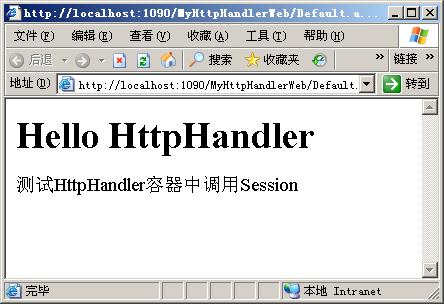
5) IHttpHandler 工厂
ASP.NET Framework实际不直接将相关的页面资源HTTP请求定位到一个其内部默认的IHttpHandler容器之上,而定位到了其内部默认的IHttpHandler工厂上。IHttpHandler工厂的作用是对IHttpHandler容器进行调度和管理。
IHttpHandlerFactory接口包含两个方法。GetHandler返回实现IHttpHandler接口的类的实例,ReleaseHandler使工厂可以重用现有的处理程序实例。
示例2:
2 using System.Collections.Generic;
3 using System.Text;
4 using System.Web;
5
6 namespace MyHandler
7 {
8 public class MyHandlerFactory : IHttpHandlerFactory
9 {
10 #region IHttpHandlerFactory 成员
11
12 public IHttpHandler GetHandler(HttpContext context, string requestType, string url, string pathTranslated)
13 {
14 string fname = url.Substring(url.IndexOf('/') + 1);
15 while (fname.IndexOf('/') != -1)
16 fname = fname.Substring(fname.IndexOf('/') + 1);
17 string cname = fname.Substring(0, fname.IndexOf('.'));
18 string className = "MyHandler." + cname;
19 object h = null;
20 try
21 {
22 // 采用动态反射机制创建相应的IHttpHandler实现类。
23 h = Activator.CreateInstance(Type.GetType(className));
24 }
25 catch (Exception e)
26 {
27 throw new HttpException("工厂不能为类型"+cname+"创建实例。",e);
28 }
29 return (IHttpHandler)h;
30 }
31
32 public void ReleaseHandler(IHttpHandler handler)
33 {
34
35 }
36
37 #endregion
38 }
39
40 public class Handler1 : IHttpHandler
41 {
42 #region IHttpHandler 成员
43
44 public bool IsReusable
45 {
46 get { return true; }
47 }
48
49 public void ProcessRequest(HttpContext context)
50 {
51 context.Response.Write("<html><body><h1>来自Handler1的信息。</h1></body></html>");
52 }
53
54 #endregion
55 }
56
57 public class Handler2 : IHttpHandler
58 {
59 #region IHttpHandler 成员
60
61 public bool IsReusable
62 {
63 get { return true; }
64 }
65
66 public void ProcessRequest(HttpContext context)
67 {
68 context.Response.Write("<html><body><h1>来自Handler2的信息。</h1></body></html>");
69 }
70
71 #endregion
72 }
73 }


Asp.Net工作原理的更多相关文章
- IIS站点工作原理与ASP.NET工作原理
IIS站点工作原理与ASP.NET工作原理 一.IIS IIS 7.0工作原理图 两种模式: 1.用户模式(User Mode)(运行用户的程序代码.限制在特定的范围内活动.有些操作必须要受到Ker ...
- JavaWeb与Asp.net工作原理比较分析
一.概述 不管是什么语言开发的web应用程序,都是在解决一个问题,那就是用户输入url怎么把对应的页面响应出来,如何通过url映射到响应的类,由于自己做asp.net的时间也不短了,还算是对asp.n ...
- .NET总结--ASP.NET工作原理
前言 前前后后写了不少关于某些技术啥的博客,一直在追新求深,而真正使用上的时候才发现了解的太少太少了,从事.net开发三年有余了不是它不行了而是我坚持不住了,如今不得不向生活低头,这个系列作为三年技术 ...
- ASP.NET和IIS工作原理
图为iis6.0运行asp.net的原理. browser向iis发送HTTP请求,HTTP.SYS将其分发给W3SVC(World Wide Web Publishing Service),后者解析 ...
- Asp.net 的工作原理
转:http://www.cnblogs.com/linjiancun/archive/2010/09/14/1825662.html 1.1.1 Asp.net 的工作原理 ...
- 简述ASP.NET Web网页的工作原理。
ASP.NET的工作原理是:首先,有一个HTTP请求发送到Web服务器要求访问一个Web网页. Web服务器通过分析客户的HTTP请求来定位所请求网页的位置.如果所请求的网页的文件名的后缀是 aspx ...
- (24)ASP.NET Core EF查询(查询的工作原理、跟踪与非跟踪查询)
1.查询生命周期 在进入正题时候,我们先来了解EF Core查询的生命周期. 1.1LINQ查询会由Entity Framework Core处理并生成给数据库提供程序可处理的表示形式(说白了就是生成 ...
- MVC中RenderBody的工作原理
A)什么是RenderBody 根据MSDN的解释(http://msdn.microsoft.com/query/dev10.query?appId=Dev10IDEF1&l=EN-US& ...
- 简述ASP.NET MVC原理
1.为什么ASP.NET需要MVC? 因为随着网站的的数量级越来越大,原始的网站方式,这里指的是WebForm,在运行速度和维护性方面,以及代码量上面,越来越难以满足日益庞大的网站维护成本.代码的重构 ...
随机推荐
- JavaScript 学习笔记(一)
1.javascript中,值包括原始值和对象,原始值包括布尔值.数字.字符串.null和undefined,其他的值为对象. 原始值的特点:(1)按值进行比较:3===3> true; 'ab ...
- 一个简单的RMAN自动备份脚本
rman备份脚本: #!/bin/bashsource /home/oracle/.bash_profile rman target / << EOFrun {allocate chann ...
- hadoop+hive使用中遇到的问题汇总
问题排查方式 一般的错误,查看错误输出,按照关键字google 异常错误(如namenode.datanode莫名其妙挂了):查看hadoop($HADOOP_HOME/logs)或hive日志 h ...
- phpmyadmin Wrong permissions on configuration file, should not be world writable!
巴拉巴拉,实际场景是这样,因为有需要,所以想用django 做个rest服务给其他平台提供服务,发现以前正常的页面都无法运行,奇怪发现有一个页面提示连接不上mysql 难道mysql挂了,打开phpm ...
- C#中的线程二(Cotrol.BeginInvoke和Control.Invoke)
C#中的线程二(Cotrol.BeginInvoke和Control.Invoke) 原文地址:http://www.cnblogs.com/whssunboy/archive/2007/06/07/ ...
- MySQL7:视图
什么是视图 数据库中的视图是一个虚拟表.视图是从一个或者多个表中导出的表,视图的行为与表非常相似,在视图中用户可以使用SELECT语句查询数据,以及使用INSERT.UPDATE和DELETE修改记录 ...
- 每周一书-2016年8月15日到21日(bootstrap基础教程)获奖读者公布
本次赠书 由微信昵称为“………….”的网友以10个赞获得. 请这位网友,订阅号回复你的联系方式,明天给你邮递这本书.谢谢!同时感谢<把时间当朋友>的获奖者“永梅”为<bootsrap ...
- ECSHOP农行支付接口开发(含手机端)
对于ECSHOP来说,支付是以接口的形式存在的.于是: 1:首先添加接口文件 includes\modules\payment下,增加abcbank.php,代码如下: <?php /** * ...
- js模版引擎handlebars.js实用教程——由于if功力不足引出的Helper
返回目录 <!DOCTYPE html> <html> <head> <META http-equiv=Content-Type content=" ...
- Java中测试异常的多种方式
使用JUnit来测试Java代码中的异常有很多种方式,你知道几种? 给定这样一个class. Person.java 1 2 3 4 5 6 7 8 9 10 11 12 13 14 15 16 17 ...