
怎样获取Windows平台下SQL server性能计数器值
转载自工作伙伴Garrett, Helen “SQL Server Performance Counter captures”
Capturing Windows Performance Counters for SQL Server
SQL Server Performance Counters
The following counters are the recommended list to capture baseline performance metrics for SQL Server:
- Memory Available Mbytes (already added above)
- Memory Page Faults/sec (already added above)
- Memory Page Reads/sec (already added above)
- Memory Page Writes/sec (already added above)
- Paging File % Usage (_Total) (already added above)
- Processor % Privileged Time (_Total)
- Processor % Processor Time (_Total)
- Processor % User Time (_Total)
- Physical Disk % Idle Time (_Total)
- Physical Disk Avg. Disk Queue Length (_Total)
- Physical Disk Avg. Disk sec/Read (_Total)
- Physical Disk Avg. Disk sec/Transfer (_Total)
- Physical Disk Avg. Disk sec/Write (_Total)
- SQL Server: Access Methods/Page Splits/sec
- SQL Server: Buffer Manager Buffer Cache Hit Ratio
- SQL Server: Buffer Manager Page Life Expectancy
- SQL Server: Buffer Manager Page Lookups/sec
- SQL Server: Buffer Manager Page Reads/sec
- SQL Server: Buffer Manager Page Writes/sec
- SQL Server: General Statistics User Connections
- SQL Server: Memory Manager Memory Grants Pending
- SQL Server: SQL Statistics Batch Requests/sec
- SQL Server: SQL Statistics SQL Compilations/sec
- SQL Server: SQL Statistics SQL Recompilations/sec
- SQL Server: Wait Statistics Memory Grant Queue Waits <all instances>
- SQL Server: Wait Statistics Network IO Waits <all instances>
- SQL Server: Wait Statistics Non-Page Latch Waits <all instances>
- SQL Server: Wait Statistics Page IO Latch Waits <all instances>
- SQL Server: Wait Statistics Page Latch Waits <all instances>
- System Processor Queue Length
TypePerf
Microsoft provides a command line utility “TypePerf” which allows capturing counters from a remote system to a monitoring system and logging these either to the command window or a log file.
More information about the TypePerf command can be found at:
https://www.microsoft.com/resources/documentation/windows/xp/all/proddocs/en-us/nt_command_typeperf.mspx?mfr=true
Using TypePerf with an Input File
Create a folder on the monitoring server named “TypePerf”.
Create a new file in the TypePerf folder named
TypePerf_SQLCounters.txt.
Edit the TypePerf_SQLCounters.txt file by copying the following
contents into the file:
\\SERVERNAME\Memory\Available Bytes
\\SERVERNAME\Memory\Page Reads/sec
\\SERVERNAME\Memory\Page Writes/sec
\\SERVERNAME\Paging File(_Total)\% Usage
\\SERVERNAME\PhysicalDisk(_Total)\% Disk Time
\\SERVERNAME\PhysicalDisk(_Total)\Avg. Disk Queue Length
\\SERVERNAME\PhysicalDisk(_Total)\Avg. Disk sec/Read
\\SERVERNAME\PhysicalDisk(_Total)\Avg. Disk sec/Transfer
\\SERVERNAME\PhysicalDisk(_Total)\Avg. Disk sec/Write
\\SERVERNAME\Processor(_Total)\% Privileged Time
\\SERVERNAME\Processor(_Total)\% Processor Time
\\SERVERNAME\Processor(_Total)\% User Time
\\SERVERNAME\SQLServer:Access Methods\Page Splits/sec
\\SERVERNAME\SQLServer:Buffer Manager\Buffer cache hit ratio
\\SERVERNAME\SQLServer:Buffer Manager\Page life expectancy
\\SERVERNAME\SQLServer:Buffer Manager\Page lookups/sec
\\SERVERNAME\SQLServer:General Statistics\User Connections
\\SERVERNAME\SQLServer:Memory Manager\Memory Grants Pending
\\SERVERNAME\SQLServer:SQL Statistics\Batch Requests/sec
\\SERVERNAME\SQLServer:SQL Statistics\SQL Compilations/sec
\\SERVERNAME\SQLServer:SQL Statistics\SQL Re-Compilations/sec
\\SERVERNAME\SQLServer:Wait Statistics(*)\Memory grant queue
waits
\\SERVERNAME\SQLServer:Wait Statistics(*)\Network IO waits
\\SERVERNAME\SQLServer:Wait Statistics(*)\Page IO latch waits
\\SERVERNAME\SQLServer:Wait Statistics(*)\Page latch waits
\\SERVERNAME\System\Processor Queue Length

Perform a global replace of the SERVERNAME to match the actual server
name for the SQL Server that is to be monitored. Save the file and Close.
--------------------------------------------------------------分割线---------------------------------------------------------------------------
Go to the Start menu -> Command Prompt.

Change the directory to the location where the TypePerf directory was created.
At the command prompt, modify the next command to match the information for the SQL Server being monitored:
TYPEPERF -cf F:\TypePerf\TypePerf_SQLCounters.txt -f csv -o F:\TypePerf\MSLAB2191_yyyymmdd_hhmm.csv -s BRTC_MSLAB2191
-cf Name of the file that contains the list of counters to capture
-f format of the log file, defaults to csv
-o Path\name of output file
-s Name of server to collect the counters from if one does not exist in the counter file
EXAMPLE:
TYPEPERF -cf F:\TypePerf\TypePerf_SQLCounters.txt -f csv -o F:\TypePerf\MSLAB2191_20161020_2025.csv -s BRTC_MSLAB2191
Press Enter to start the counter collection…

The [\] will run the command and capture the counters every second.
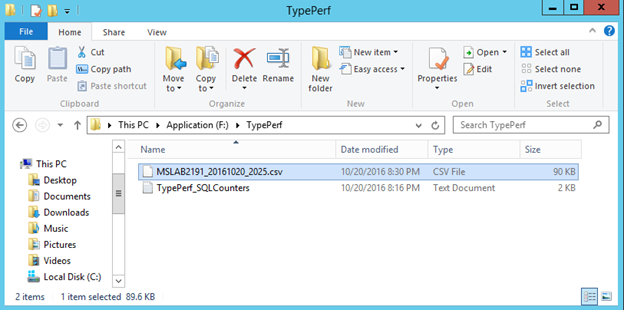
Verify the file you specified for the output was created and is growing:
-------------------------------------------------------分割线-----------------------------------------------------------------------
When you have completed the SQL Server test, Press CTRL-C to stop the counter collection.
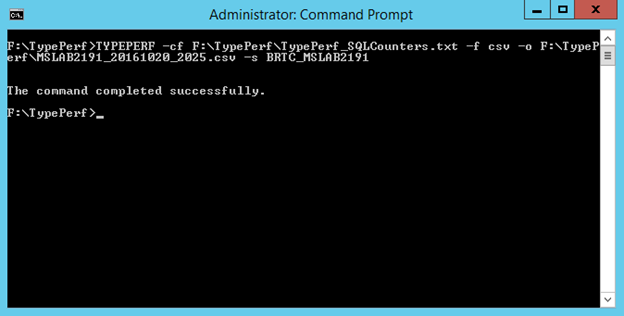
Close the Command Prompt window.
怎样获取Windows平台下SQL server性能计数器值的更多相关文章
- Windows平台下MySQL常用操作与命令
Windows平台下MySQL常用操作与命令 Windows平台下MySQL常用操作与命令,学习mysql的朋友可以参考下. 1.导出整个数据库 mysqldump -u 用户名 -p --defau ...
- Windows平台下Git服务器搭建
第一步:下载Java,下载地址:http://www.java.com/zh_CN/ 第二步:安装Java.安装步骤不再详述. 第三步:配置Java环境变量. 右键”计算机” => ”属性” = ...
- Windows 平台下Git 服务器搭建
由于项目中一直在使用git作为版本管理,自己对git的理解.使用都还不是怎么的熟悉,所以准备深入了解一下git及一些常用命令的使用,于是干脆把服务端架上,通过自己的PC作为服务端同时作为客户端的角色进 ...
- windows平台下VLC2.0.5编译
windows平台下VLC2.0.5编译说明 时隔一年多,又要搞流媒体了,不过这次是要做流媒体服务器. 暂时决定使用vlc+ffmpeg+live555,虽然听有些前辈说这个组合的性能较差,只能作为学 ...
- 【转】Windows平台下Git服务器搭建
Windows平台下Git服务器搭建 Posted on 2015-05-18 21:29 阿祥当码农 阅读(7637) 评论(0) 编辑 收藏 该文章转自:http://www.codeceo.co ...
- Windows平台下的node.js安装
Windows平台下的node.js安装 直接去nodejs的官网http://nodejs.org/上下载nodejs安装程序,双击安装就可以了 测试安装是否成功: 在命令行输入 node –v 应 ...
- windows平台下nginx+PHP环境安装
因为日常工作在windows下,为方便在window是下进行PHP开发,需要在windows平台下搭建PHP开发环境,web服务器选择nginx,不过windows版本的nginx性能要比Linux/ ...
- Windows平台下Oracle实例启动过程中日志输出
Windows平台下Oracle实例启动过程中日志输出记录. 路径:D:\app\Administrator\diag\rdbms\orcl\orcl\trace\alert_orcl.log 输出内 ...
- windows系统与SQL SERVER 2008数据库服务性能监控分析简要
软件系统性能测试体系流程介绍之windows系统与SQL SERVER 2008数据库服务性能监控分析简要 目前大部分测试人员对操作系统资源.中间件.数据库等性能监控分析都是各自分析各自的监控指标方式 ...
随机推荐
- python类型转换
1.数字转字符串 str(42) == "42" 2.字符串转数字 int("42") == 42 3.字符转ascii码 ord("a") ...
- maxscale
一.maxscale简介1.MaxScale是maridb开发的一个mysql数据中间件,其配置简单,能够实现读写分离,并且可以根据主从状态实现写库的自动切换.2.官网:https://mariadb ...
- vmstat和iostat
一.vmstat1.命令示例#vmstat 5每5秒输出一次 2.输出详解procs -----------memory---------- ---swap-- -----io---- --syste ...
- 简单而兼容性好的Web自适应高度布局,纯CSS
纯CSS实现的自适应高度布局,中间内容不符自动滚动条.兼容IE9以上.chrome.FF.关键属性是box-sizing: border-box. 不废话,直接上代码: <!doctype ht ...
- GDB调试32位汇编堆栈分析
GDB调试32位汇编堆栈分析 测试源代码 #include <stdio.h> int g(int x){ return x+5; } int f(int x){ return g(x)+ ...
- c语言中的副作用!!千万小心!
今天刚看完书上的副作用,博主觉得呢,副作用其实就在改变变量的值,也就是一个赋值操作!不过刚刚在知道上还是犯了错!!尴尬啊!! 大家都知道,c语言中的赋值操作符是自右向左结合的!! 下面有一个关于赋值中 ...
- 第二篇:白话tornado源码之待请求阶段
上篇<白话tornado源码之一个脚本引发的血案>用上帝视角多整个框架做了一个概述,同时也看清了web框架的的本质,下面我们从tornado程序的起始来分析其源码. 概述 上图是torna ...
- linq 左连接
var list = (from item in vall join item3 in v1 on new { item.FItemID, item.FAuxPropID } equals new { ...
- 记在virtualbox下挂载共享文件夹的方法
sudo mount -t vboxsf share /usr/share sudo mount -t vboxsf 共享文件夹名称(在设置页面设置的) 挂载的目录
- 使用WKWebView遇到的坑
苹果从iOS8开始推出了WKWebView,大有替换UIWebView的意思(尽管Xcode中还没给UIWebView标记过期版本),所以决定将项目进行适配,iOS8及以上版本,改用WKWebView ...