
ASP.NET mvc 验证码 (转)
ASP.net 验证码(C#) MVC
http://blog.163.com/xu_shuhao/blog/static/5257748720101022697309/
网站添加验证码,主要为防止机器人程序批量注册,或对特定的注册用户用特定程序暴力破解方式,以进行不断的登录、灌水等危害网站的操作。验证码被广泛应用在注册、登录、留言等提交信息到服务器端处理的页面中。
在ASP.NET网站中应用验证码是很容易的,网上有很多的解决方案。最近在做一个OA项目,因系统采用的ASP.NET MVC框架,同样在登录页中需用到验证码,故需将原来在ASP.NET网站中使用的验证码移植到ASP.NET MVC中。
原ASP.NET网站用来生成验证码的类文件ValidateCode.cs:

using System;
using System.Drawing;
using System.Drawing.Imaging;
using System.Web.UI;
using System.Drawing.Drawing2D;
using System.IO;
namespace SeniOA.MVC
{
/// <summary>
/// 生成验证码的类
/// </summary>
public class ValidateCode
{
public ValidateCode()
{
}
/// <summary>
/// 验证码的最大长度
/// </summary>
public int MaxLength
{
get { return 10; }
}
/// <summary>
/// 验证码的最小长度
/// </summary>
public int MinLength
{
get { return 1; }
}
/// <summary>
/// 生成验证码
/// </summary>
/// <param name="length">指定验证码的长度</param>
/// <returns></returns>
public string CreateValidateCode(int length)
{
int[] randMembers = new int[length];
int[] validateNums = new int[length];
string validateNumberStr = "";
//生成起始序列值
int seekSeek = unchecked((int)DateTime.Now.Ticks);
Random seekRand = new Random(seekSeek);
int beginSeek = (int)seekRand.Next(0, Int32.MaxValue - length * 10000);
int[] seeks = new int[length];
for (int i = 0; i < length; i++)
{
beginSeek += 10000;
seeks[i] = beginSeek;
}
//生成随机数字
for (int i = 0; i < length; i++)
{
Random rand = new Random(seeks[i]);
int pownum = 1 * (int)Math.Pow(10, length);
randMembers[i] = rand.Next(pownum, Int32.MaxValue);
}
//抽取随机数字
for (int i = 0; i < length; i++)
{
string numStr = randMembers[i].ToString();
int numLength = numStr.Length;
Random rand = new Random();
int numPosition = rand.Next(0, numLength - 1);
validateNums[i] = Int32.Parse(numStr.Substring(numPosition, 1));
}
//生成验证码
for (int i = 0; i < length; i++)
{
validateNumberStr += validateNums[i].ToString();
}
return validateNumberStr;
}
/// <summary>
/// 创建验证码的图片
/// </summary>
/// <param name="containsPage">要输出到的page对象</param>
/// <param name="validateNum">验证码</param>
public void CreateValidateGraphic(string validateCode)
{
Bitmap image = new Bitmap((int)Math.Ceiling(validateCode.Length * 12.0), 22);
Graphics g = Graphics.FromImage(image);
try
{
//生成随机生成器
Random random = new Random();
//清空图片背景色
g.Clear(Color.White);
//画图片的干扰线
for (int i = 0; i < 25; i++)
{
int x1 = random.Next(image.Width);
int x2 = random.Next(image.Width);
int y1 = random.Next(image.Height);
int y2 = random.Next(image.Height);
g.DrawLine(new Pen(Color.Silver), x1, y1, x2, y2);
}
Font font = new Font("Arial", 12, (FontStyle.Bold | FontStyle.Italic));
LinearGradientBrush brush = new LinearGradientBrush(new Rectangle(0, 0, image.Width, image.Height),
Color.Blue, Color.DarkRed, 1.2f, true);
g.DrawString(validateCode, font, brush, 3, 2);
//画图片的前景干扰点
for (int i = 0; i < 100; i++)
{
int x = random.Next(image.Width);
int y = random.Next(image.Height);
image.SetPixel(x, y, Color.FromArgb(random.Next()));
}
//画图片的边框线
g.DrawRectangle(new Pen(Color.Silver), 0, 0, image.Width - 1, image.Height - 1);
//保存图片数据
MemoryStream stream = new MemoryStream();
image.Save(stream, ImageFormat.Jpeg);
//输出图片流
containsPage.Response.Clear();
containsPage.Response.ContentType = "image/jpeg";
containsPage.Response.BinaryWrite(stream.ToArray());
}
finally
{
g.Dispose();
image.Dispose();
}
}
/// <summary>
/// 得到验证码图片的长度
/// </summary>
/// <param name="validateNumLength">验证码的长度</param>
/// <returns></returns>
public static int GetImageWidth(int validateNumLength)
{
return (int)(validateNumLength * 12.0);
}
/// <summary>
/// 得到验证码的高度
/// </summary>
/// <returns></returns>
public static double GetImageHeight()
{
return 22.5;
}
}
}
为适合ASP.NET MVC框架,修改其输出图片流的方法CreateValidateGraphic为:
/// <summary>
/// 创建验证码的图片
/// </summary>
/// <param name="containsPage">要输出到的page对象</param>
/// <param name="validateNum">验证码</param>
public byte[] CreateValidateGraphic(string validateCode)
{
Bitmap image = new Bitmap((int)Math.Ceiling(validateCode.Length * 12.0), 22);
Graphics g = Graphics.FromImage(image);
try
{
//生成随机生成器
Random random = new Random();
//清空图片背景色
g.Clear(Color.White);
//画图片的干扰线
for (int i = 0; i < 25; i++)
{
int x1 = random.Next(image.Width);
int x2 = random.Next(image.Width);
int y1 = random.Next(image.Height);
int y2 = random.Next(image.Height);
g.DrawLine(new Pen(Color.Silver), x1, y1, x2, y2);
}
Font font = new Font("Arial", 12, (FontStyle.Bold | FontStyle.Italic));
LinearGradientBrush brush = new LinearGradientBrush(new Rectangle(0, 0, image.Width, image.Height),
Color.Blue, Color.DarkRed, 1.2f, true);
g.DrawString(validateCode, font, brush, 3, 2);
//画图片的前景干扰点
for (int i = 0; i < 100; i++)
{
int x = random.Next(image.Width);
int y = random.Next(image.Height);
image.SetPixel(x, y, Color.FromArgb(random.Next()));
}
//画图片的边框线
g.DrawRectangle(new Pen(Color.Silver), 0, 0, image.Width - 1, image.Height - 1);
//保存图片数据
MemoryStream stream = new MemoryStream();
image.Save(stream, ImageFormat.Jpeg);
//输出图片流
return stream.ToArray();
}
finally
{
g.Dispose();
image.Dispose();
}
}
在Controller.cs中,添加Action,用来设置将生成的验证码存入Session,并输出验证码图片:
public ActionResult GetValidateCode()
{
ValidateCode vCode = new ValidateCode();
string code = vCode.CreateValidateCode(5);
Session["ValidateCode"] = code;
byte[] bytes = vCode.CreateValidateGraphic(code);
return File(bytes, @"image/jpeg");
}
调用方式为:在需要使用验证码的页面中,加入<img>标签:
<img id="valiCode" style="cursor: pointer;" src="../Account/GetValidateCode" alt="验证码" />
效果如下图: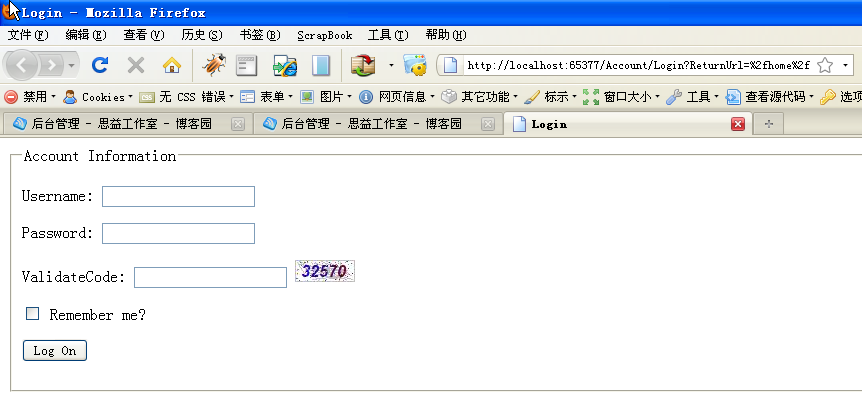
到于Account/Login这个Action中的处理,只需加入对Session中验证码的判断:
[AcceptVerbs(HttpVerbs.Post)]
public ActionResult Login(string userName, string password, bool rememberMe, string returnUrl,string code)
{
if (Session["ValidateCode"].ToString() != code)
{
ModelState.AddModelError("code", "validate code is error");
return View();
}
//此处验证用户名、密码
if (!ValidateLogOn(userName, password))
{
return View();
}
//验证成功
FormsAuthentication.SetAuthCookie(userName, rememberMe);
if (!String.IsNullOrEmpty(returnUrl))
{
return Redirect(returnUrl);
}
else
{
return RedirectToAction("Index", "Home");
}
}
为实现登录页中,点击图片切换验证码,可以登录页中加入此JS代码实现刷新验证码:
<script type="text/javascript" src="http://www.cnblogs.com/Scripts/jquery-1.3.2-vsdoc.js"></script>
<script type="text/javascript">
$(function() {
$("#valiCode").bind("click", function() {
this.src = "../Account/GetValidateCode?time=" + (new Date()).getTime();
});
//alert("good");
});
</script>
至此,ASP.NET MVC中已成功实现验证码功能。
ASP.NET mvc 验证码 (转)的更多相关文章
- ASP.NET MVC验证码演示(Ver2)
前一版本<ASP.NET MVC验证码演示>http://www.cnblogs.com/insus/p/3622116.html,Insus.NET还是使用了Generic handle ...
- ASP.NET MVC验证码演示
我们在网站登录或理一个评论时,可以放置一个验证码(Captcha),可以为系统免去那些恶意刷新等功能. 今次Insus.NET在asp.net mvc应用程序实现与演示验证码的产生以及应用等 . 前天 ...
- asp.net mvc 验证码
效果图 验证码类 namespace QJW.VerifyCode { //用法: //public FileContentResult CreateValidate() //{ // Validat ...
- 简单C#、asp.net mvc验证码的实现
using System;using System.Collections.Generic;using System.Linq;using System.Web;using System.Text;u ...
- ASP.Net MVC 生成安全验证码
---------html <td>验证码:</td> <td> <img src="/Logi ...
- ASP.NET MVC+EF框架+EasyUI实现权限管理系列(11)-验证码实现和底层修改
原文:ASP.NET MVC+EF框架+EasyUI实现权限管理系列(11)-验证码实现和底层修改 ASP.NET MVC+EF框架+EasyUI实现权限管系列 (开篇) (1):框架搭建 ...
- 在ASP.NET MVC下通过短信验证码注册
以前发短信使用过短信猫,现在,更多地是使用第三方API.大致过程是: → 用户在页面输入手机号码→ 用户点击"获取验证码"按钮,把手机号码发送给服务端,服务端产生几位数的随机码,并 ...
- ASP.NET MVC实现网站验证码功能
网站添加验证码,主要为防止机器人程序批量注册,或对特定的注册用户用特定程序暴力破解方式,以进行不断的登录.灌水等危害网站的操作.验证码被广泛应用在注册.登录.留言等提交信息到服务器端处理的页面中. 在 ...
- ASP.NET MVC生成安全验证码
html部分: <!DOCTYPE html> <html lang="en"> <head> <meta charset="U ...
随机推荐
- ife task0001页面实现细节问题总结
好久没写css了,突然对重构页面陌生了许多.不过也没什么,前面几个月一直扩充知识面,偏重了理论技术学习,结果还不算遗憾.昨天重拾css,针对问题做点总结: 一.语义化方面 1.HTML5新标签使用 标 ...
- Maven工程红色感叹号,且工程无红叉错误
很可能是jar包不对,可以将maven库里的jar包删除,从 http://mvnrepository.com/ 根据jar包版本号下载到本地maven库,并在pom.xml里引入jar依赖 这次ja ...
- 【坑】自动化测试之Excel表格
参考一位大神的博客项目架构,把元素和数据都参数化,但是总是被excel表格坑 1.无法下拉 动作列通过下拉列表来控制,点击下拉列表无反应 解决方案:不知道是不是中间动了什么,因为Excel版本的问题, ...
- 【SoapUI】http接口测试
一.接口介绍 API(Application Programming Interface,应用程序编程接口) 1.硬件接口 USB接口 硬盘接口 SD卡接口 LAN口和WAN口 CONSOLE口 .. ...
- 【XShell】xshell 中“快速命令集”的使用
突然看到朋友的xshell比我多一个按钮,且一点,哈哈哈 ,实现了很炫酷的功能,耐不住好奇,问了一句,原来是快速命令集! 1.选择快速命令集(两种方法a&b) a:文件 > 属性 > ...
- mvc 页面简单get获取后台数据
后台方法 public ActionResult Linq() { var lt = UserSys.FindAll(); Hashtable ht = new Hashtable(); ht.Add ...
- 数据库mysql中编码自动生成
call PrGetRuleCodeNoDate('Table_Name'); call PrGetRuleCode('Table_Name');
- GUI应用程序架构的十年变迁:MVC,MVP,MVVM,Unidirectional,Clean
十年前,Martin Fowler撰写了 GUI Architectures 一文,至今被奉为经典.本文所谈的所谓架构二字,核心即是对于对于富客户端的 代码组织/职责划分 .纵览这十年内的架构模式变迁 ...
- oracle之数据同步:Oracle Sql Loader使用说明(大批量快速插入数据库记录)
1.准备表数据 select * from emp10; create sequence seq_eseq increment start maxvalue ; --得到序列的SQL语句 select ...
- 微信小程序问题总结
1.navigator不能跳转到tabBar所包含的页面 例如: tabbar包含center页面,不包含page1页面,使用如下跳转: <navigator url='../center/ce ...