
Python之购物商场
作业:购物商场
1、流程图
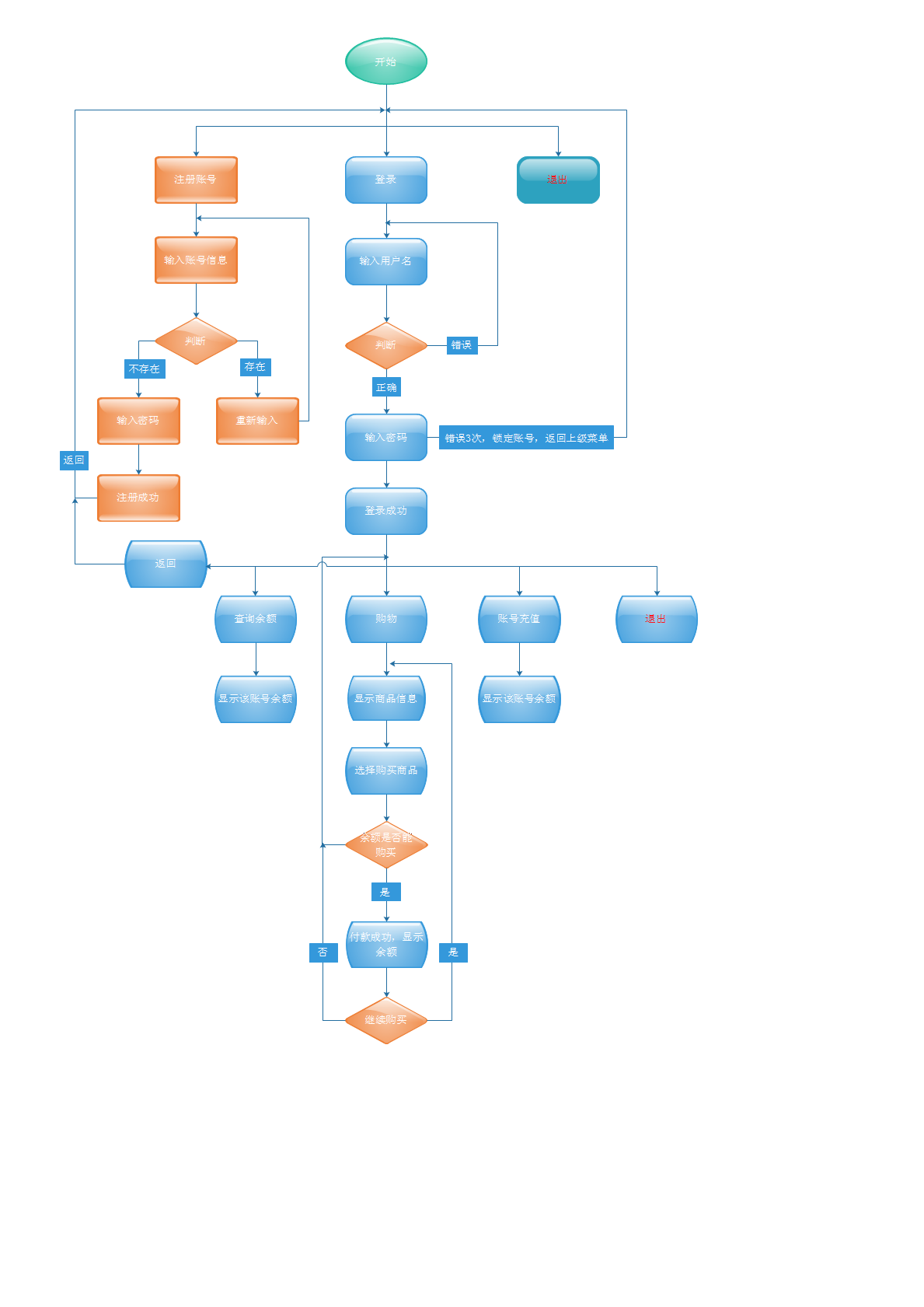
2、初始化用户账号存储文件
初始化存储一个空的用户账号字典,保存到文件 user.pkl。执行如下代码,即可初始化完成。
#!/usr/bin/env python

# -*- coding:utf-8 -*-

# Version:Python3.5.0

import pickle

def init_user():

    '''

    构造一个空的用户字典,格式:{'用户名':['密码',账号被锁状态,余额]}

    :return:None

    '''

    # 先构造一个空字典,存储用户信息的文件 user.pkl

    user_dict = {}

    with open('user.pkl','wb') as f:

        pickle.dump(user_dict,f)

    print('init user info finish!')

    return None

if __name__ == '__main__':

    init_user()
3、管理用户账号脚本
用来解锁被锁的账号,以及可以修改账号密码
#!/usr/bin/env python

# -*- coding:utf-8 -*-

# Version:Python3.5.0

import pickle

def unlock_user():

    '''

    输入解锁的账号,即可解锁

    :return: None

    '''

    while True:

        # 输入解锁的账号

        user = input('Please input unlock the user: ').strip()

        # 判断该账号是否存在

        if user in user_dict:

            # 把锁状态标志3 修改为 0

            user_dict[user][1] = 0

            with open('user.pkl','wb') as f:

                # 更新解锁后的账号信息,保存到user.pkl文件中

                pickle.dump(user_dict,f)

                print('The %s unlock successfully!' % user)

                break

        else:

             print('Account does not exist, try again!')

             continue

    return None

def change_pwd():

    '''

    输入要修改密码的账号,然后更新密码

    :return: None

    '''

    while True:

        # 输入解锁的账号

        user = input('Please input the user of change password: ').strip()

        # 判断该账号是否存在

        if user in user_dict:

            # 输入新的密码

            new_pwd = input('Please input the %s new password: ' % user).strip()

            user_dict[user][0] = new_pwd

            with open('user.pkl','wb') as f:

                # 更新密码后的账号信息,保存到user.pkl文件中

                pickle.dump(user_dict,f)

                print('The %s change password successfully!' % user)

                break

        else:

             print('Account does not exist, try again!')

             continue

    return None

if __name__ == '__main__':

    # 设置界面功能选项列表

    choose = [['1','unlock user'], ['2','change password'], ['3', 'exit']]

    # 读取账号文件 user.pkl

    with open('user.pkl','rb') as f:

        user_dict = pickle.load(f)

    while True:

        # 打印界面功能选项

        print('=' * 50)

        for i in choose:

            for j in i:

                print(j, end= ' ')

            print('')

        input_choose = input('Please choose the index: ').strip()

        # 选择解锁功能

        if input_choose == '1':

            unlock_user()

        # 选择修改密码

        elif input_choose == '2':

            change_pwd()

        # 选择退出界面

        elif input_choose == '3':

            break

        else:

            print('You input error, try again!')

            print('-' * 30)

            continue
4、主程序购物商城
第一次运行,默认没有账号,需要注册一个账号(新账号余额为)。
登录成功后,要充值后,才可以购买商品。
#!/usr/bin/env python3

# -*- coding:utf-8 -*-

# Version:Python3.5.0

import pickle

def product_info():

    '''

    商品信息,返回一个商品信息的字典

    :return:product_list 和 product_list_index

    '''

    # 初始化商品列表

    product_dict = {'bike': 688, 'iphone6s': 5088, 'coffee': 35,

                    'car':88888, 'iPad Air': 3500, 'jacket': 300,

                    'MacBook pro': 12345, 'hamburger': 80}

    # 给商品添加索引

    product_list_index = [(index+1, key, product_dict[key]) for index, key in enumerate(product_dict)]

    return product_dict,product_list_index

def register():

    '''

    注册新用户

    :return: None

    '''

    while True:

        # 输入注册账号

        username = input('Please input registered account: ').strip()

        # 输入为空,重新输入

        if username == '':continue

        if username in user_dict:

            print('Account already exists, please input again!')

            continue

        else:

            pwd = input('Please input password: ')

            user_dict[username] = [pwd, 0, 0]

            print('Registered successfully!')

            # 把更新后的账号字典保存到文件 user.pkl

            with open('user.pkl', 'wb') as f:

                pickle.dump(user_dict, f)

                break

def login():

    '''

    用户登录,验证账号密码是否正确,密码输入3次则锁定账号

    :return: None

    '''

    flag = False

    # 初始化尝试的次数

    try_count = 0

    while True:

        username = input('Please input the user: ').strip()

        # 输入为空,重新输入

        if username == '':

            continue

        # 如果账号存在

        if username in user_dict:

            # 读取用户字典里面账号输错次数,count为输错次数

            count = user_dict[username][1]

            while True:

                if count < 3:

                    pwd = input('Please input password: ')

                    # 验证密码是否正确

                    if user_dict[username][0] == pwd:

                        print('Login successfully!')

                        # 进入二级菜单选项界面

                        flag = login_module(username)

                        if flag:

                            break

                    else:

                        # 密码错误次数 count 加 1

                        count += 1

                        print('Password error! You have %s times,try again!' % (3-count))

                        continue

                else:

                    # 输错3次后,账号被锁定

                    print('the %s is locked!' % username)

                    # 把该账号的错误次数更新到用户字典中

                    user_dict[username][1] = 3

                    with open('user.pkl', 'wb') as f:

                        # 重新写入到文件user.pkl

                        pickle.dump(user_dict, f)

                    # 账号被锁定后,返回上级菜单

                    break

        else:

            try_count += 1

            # 若果尝试3次后,则返回上级菜单

            if try_count == 3:

                break

            else:

                # 账号不存在,则重新输入,有3次机会

                print('Account does not exist.you have %s times,try again!' %(3-try_count))

                continue

        # 返回上级菜单

        if flag:

            break

def shopping(user):

    '''

    显示商品信息,选择商品索引号,即可加入购物车

    :param user: 登录账号

    :return:

    '''

    # 调用商品信息函数,获取商品信息字典以及索引

    product, product_index = product_info()

    # 读取user_dict字典,记录登录的账号拥有的余额

    money = user_dict[user][2]

    print('Your own %s YUAN'.center(35) % money)

    print('-' * 35)

    # 初始化一个空商品列表,记录购买的商品

    shopping_list = []

    # 初始化购买商品总件数

    total_number = 0

    # 初始化花费金额

    total_cost = 0

    # 记录商品最低价格

    mix_price = min(product.values())

    while True:

        for i in product_index:

            # 打印索引号,添加两个空格显示

            print(i[0],end='  ')

            # 设置商品名称长度13,左对齐显示

            print(i[1].ljust(13),end='')

             # 打印商品价格

            print(i[2])

        choose = input('Please choose the index of the product: ').strip()

        if choose.isdigit():

            # 判断输入的索引是否正确,设置索引从1开始

            if int(choose) in range(1, len(product_index)+1):

                # 记录购买商品名称,choose-1 为 该商品在product_index 列表中的索引

                choose_product = product_index[int(choose)-1][1]

                # 判断余额是否大于等于产品的价格

                if money >= product[choose_product]:

                    # 把商品加入购买清单

                    shopping_list.append(choose_product)

                    # 计算花费的金额

                    total_cost += product[choose_product]

                # 余额可以购买最低价的商品

                elif  money >= mix_price:

                    print('Your own %s YUAN, please choose other product.' % money)

                else:

                    print('Your own money can not pay for any product,bye bye!')

                    break

            else:

                print('Input the index error,try again!')

                continue

            # 标记退出

            flag = False

            while True:

                print('Your rest money is %s.' % (money-total_cost))

                continue_shopping = input('Continue shopping?y or n: ').strip()

                if continue_shopping == 'y':

                    break

                elif continue_shopping == 'n':

                    flag = True

                    break

                else:

                    continue

            if flag:

                break

        else:

            print('Input error,try again!')

            continue

    product_set = set(shopping_list)

    print('*' * 35)

    # 打印购物单表头信息

    print('Your shopping list'.center(35))

    print('Product'.ljust(15),'Price'.ljust(7),'Number'.ljust(5),'cost'.ljust(7))

    print('-' * 35)

    for i in product_set:

        number = shopping_list.count(i)

        total_number += number

        cost = product[i] * number

        print('%s %s %s  %s' % (i.ljust(15),str(product[i]).ljust(7),

                            str(number).ljust(5), str(cost).ljust(7)))

    print('-' * 35)

    print('''All number: %s All cost: %s'''

          % (str(total_number).ljust(7), str(total_cost).ljust(7)))

    print('Your rest money is %s.' % (money-total_cost))

    with open('user.pkl','wb') as f:

        # 更新账号的余额,保存到文件user.pkl

        user_dict[user][2] = money-total_cost

        pickle.dump(user_dict, f)

def  rechange(user):

    '''

    新注册的账号默认余额都是0元,登录系统后需要进行充值才可以购买商品

    :param user: 登录账号

    :return: None

    '''

    # 获取参数user

    input_money = input('Please input the money of yourself: ').strip()

    while True:

        if input_money.isdigit():

            user_dict[user][2] = int(input_money)

            with open('user.pkl','wb') as f:

                # 更新账号的余额,保存到文件user.pkl

                pickle.dump(user_dict, f)

            print('Rechange successfully!')

            break

        else:

            print('Input error,try again!')

            continue

def  query_balance(user):

    '''

    查询自己的余额

    :param user: 登录账号

    :return: None

    '''

    # 打印余额

    print('Your own money %s YUAN.'% user_dict[user][2])

def login_module(user):

    '''

    显示登录成功后的界面

    :param user: 登录账号

    :return: True

    '''

    # 登录后显示界面的选项信息

    second_menu = [['1', 'rechange'], ['2','query_balance'], ['3', 'shopping'],

                   ['4', 'return'], ['5', 'exit']]

    while True:

        print('*' * 35)

        # 打印二级菜单选项

        for i in second_menu:

            for j in i:

                print(j, end=' ')

            print('')

        choose = input('Please input the index: ').strip()

        if choose == '':

            continue

        # 选择充值索引,执行充值函数

        if choose == '1':

            rechange(user)

        # 选择查询余额索引,执行查询余额函数

        elif choose == '2':

            query_balance(user)

        # 选择购物索引,执行购物函数

        elif choose == '3':

            shopping(user)

        # 返回上级菜单

        elif choose == '4':

            break

        # 结束程序

        elif choose == '5':

            exit()

        # 输入不匹配,重新输入

        else:

            print('Input error, try again!')

            continue

    return True

if __name__ == '__main__':

    # 预读取账号信息文件 user.pkl,给函数调用

    with open('user.pkl', 'rb') as f:

        # 读取用户信息

        user_dict = pickle.load(f)

    # 构造主菜单列表选项

    main_menu = [['1', 'register'], ['2','login'], ['3', 'exit']]

    while True:

        print('**** Welcome to mall ****')

        # 打印主菜单选项

        for i in main_menu:

            for j in i:

                print(j, end=' ')

            print('')

        choose = input('Please input the index: ').strip()

        if choose == '':

            continue

        # 选择注册索引,执行注册函数

        if choose == '1':

            register()

        # 选择登录索引,执行登录函数

        elif choose == '2':

            login()

        # 选择退出,则程序运行结束

        elif choose == '3':

            print('Good bye!')

            break

        # 输入不匹配,重新输入

        else:

            print('Input error, try again!')

            continue
Python之购物商场的更多相关文章
- python ATM购物程序
需求: 模拟实现一个ATM + 购物商城程序 额度 15000或自定义 实现购物商城,买东西加入 购物车,调用信用卡接口结账 可以提现,手续费5% 每月22号出账单,每月10号为还款日,过期未还,按欠 ...
- python day19 : 购物商城作业,进程与多线程
目录 python day 19 1. 购物商城作业要求 2. 多进程 2.1 简述多进程 2.2 multiprocessing模块,创建多进程程序 2.3 if name=='main'的说明 2 ...
- Python编写购物小程序
购物车要求: 用户名和密码存放于文件中 启动程序后,先登录,登录成功则让用户输入工资,然后打印商品列表,失败则重新登录,超过三次则退出程序 允许用户根据商品编号购买商品 用户选择商品后,检测余额是否够 ...
- python 的 购物小程序
money = input('请输入您的工资:') shop = [("iphone",5800),("ipod",3000),("book" ...
- Python 实现购物商城,含有用户入口和商家入口
这是模拟淘宝的一个简易的购物商城程序. 用户入口具有以下功能: 登录认证 可以锁定用户 密码输入次数大于3次,锁定用户名 连续三次输错用户名退出程序 可以选择直接购买,也可以选择加入购物车 用户使用支 ...
- HTML实例 - 购物商场页面
效果图 代码 https://coding.net/u/James_Lian/p/Shopping-page/git 示例 https://coding.net/u/James_Lian/p/Shop ...
- Python实现购物小程序
一.需求 1.登录 { ‘xxx1’:{'passwd':'123','role':1,'moeny':10000,"carts":['mac']}, 'xxx1':{'passw ...
- Python 简单购物程序
# Author:Eric Zhao# -*- coding:utf-8 -*-'''需求:启动程序后,让用户输入工资,然后打印商品列表允许用户根据商品编号购买商品用户选择商品后,检测余额是否够,够就 ...
- Python开发程序:ATM+购物商城
一.程序要求 模拟实现一个ATM + 购物商城程序 额度 15000或自定义 实现购物商城,买东西加入 购物车,调用信用卡接口结账 可以提现,手续费5% 每月22号出账单,每月10号为还款日,过期未还 ...
随机推荐
- 查看SQLServer的最大连接数
如何查看SQLServer的最大连接数?相信很多人对个很有兴趣,一下就给出两种方法: 1. 查询服务器属性 默认服务设置为0(表示不受限制). 2. SQL查看最大连接数 这里的32767就是服务器的 ...
- vue: data binding
1.文本 第一种“Mustache” 语法(双大括号)写法第二种 用v-text的指今写法第三种和第四是对es6写法的拓展写法,称模板字符串 <template> <div> ...
- 2017.11.16 STM8L052 温度控制器
1 J-link和ST-link的兼容性 STM8只能用ST-link.J-link兼容所有的(大部分而已)的ARM内核IC mark: http://bbs.eeworld.com.cn/thre ...
- 【git】新建一个git仓库的方法
1.在github上登陆,新建一个远程仓库 2.在本地创建仓库 3.本地仓库关联到远程仓库 git remote add origin(仓库名) git@github.com:yesuuu/test. ...
- NODE 性能优化
五个手段 “如果你的 node 服务器前面没有 nginx, 那么你可能做错了.”—Bryan Hughes Node.js 是使用 最流行的语言— JavaScript 构建服务器端应用的领先工具 ...
- Android event logcat的研究
经常有这样的需求:在程序A启动之后,在这个程序上覆盖一个界面,让用户输入密码后才能启动程序A,这类场景主要集中在安全软件中. 那应该怎样得知某某程序启动了,系统没有相应的广播,这很难知道程序启动了. ...
- 2017年国内已经开设机器人工程专业(080803T)高校名单
相关资料来源于教育部公布的2014年度和2016年度普通高等院校本科专业备案或审批结果的通知: 2014年批次 http://www.moe.edu.cn/publicfiles/business/h ...
- Fedora14使用yum安装mysql
linux下使用yum安装mysql 1.安装 查看有没有安装过: yum list installed mysql* rpm -qa | grep mys ...
- LOJ#2351. 「JOI 2018 Final」毒蛇越狱
LOJ#2351. 「JOI 2018 Final」毒蛇越狱 https://loj.ac/problem/2351 分析: 首先有\(2^{|?|}\)的暴力非常好做. 观察到\(min(|1|,| ...
- IQ信号理解
可参考http://wenku.baidu.com/link?url=Y3plyK9lgl96QowljJkWhgVaUGbH11j178DkId_vcl9z1V5cjl9ycTiB4Ym4iaypL ...