
RabbitMQ问题解决:TCP connection succeeded but Erlang distribution failed
说明
本来是要先把Hystrix 仪表盘更完的,但是出现了Turbine、Dashboard、RabbitMQ整合实现监控。
所以先在学RabbitMq的基本操作,在安装过程中出现了
E:\RabbitMQ Server\rabbitmq_server-3.6.5\sbin>rabbitmqctl status

Status of node 'rabbit@DESKTOP-T5RBR6M' ...

Error: unable to connect to node 'rabbit@DESKTOP-T5RBR6M': nodedown

DIAGNOSTICS

===========

attempted to contact: ['rabbit@DESKTOP-T5RBR6M']

rabbit@DESKTOP-T5RBR6M:

  * connected to epmd (port 4369) on DESKTOP-T5RBR6M

  * epmd reports node 'rabbit' running on port 25672

  * TCP connection succeeded but Erlang distribution failed

  * suggestion: hostname mismatch?

  * suggestion: is the cookie set correctly?

  * suggestion: is the Erlang distribution using TLS?

current node details:

- node name: 'rabbitmq-cli-27@DESKTOP-T5RBR6M'

- home dir: C:\Users\Administrator

- cookie hash: +Xg8GwzCRQiqRrJZqqF30A==
重点在TCP connection succeeded but Erlang distribution failed、suggestion: is the cookie set correctly?这两行,在网上看了两个小时了,发现很多都是不明所以弄成了就随便捊一下就写。。
有一些现在没有suggestion的输出,这不是很重要,这里我先恢复事故现场,大家一起踩坑
WorkArounds
问题复现
分别安装 Erlang (otp_win64_20.3.exe) 、RabbitMQ Server(rabbitmq-server-3.7.5.exe)
这里为了能看清晰问题是出在安装目录上还是其它,都装到D盘,其他不变
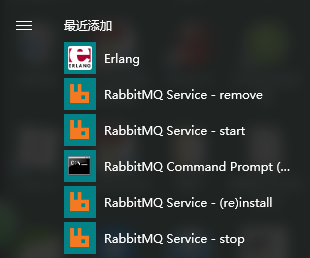
安装完成在菜单栏中会有这个显示,这里用win10演示(公司电脑)
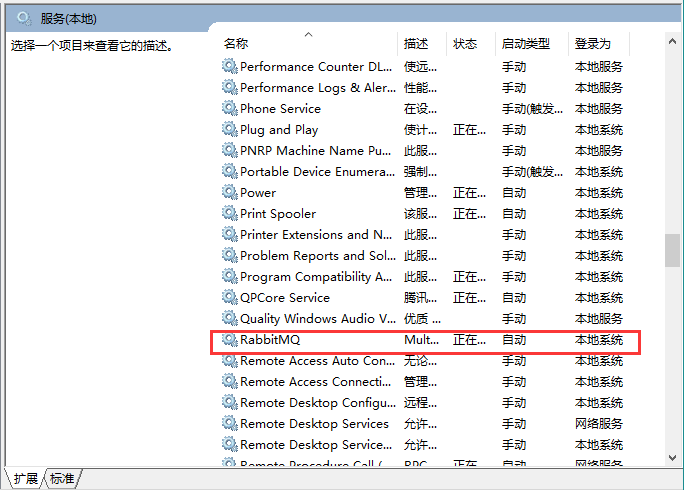
查看服务,服务已经正常启动
cmd命令cd到D:\RabbitMQ Server\rabbitmq_server-3.7.5\sbin (你实际的安装位置)
小提示:如果是默认的安装位置,用
可以直接定位到sbin下
输入rabbitmqctl status
D:\RabbitMQ Server\rabbitmq_server-3.7.5\sbin>rabbitmqctl status

Status of node rabbit@DESKTOP-T5RBR6M ...

Error: unable to perform an operation on node 'rabbit@DESKTOP-T5RBR6M'. Please see diagnostics information and suggestions below.

Most common reasons for this are:

 * Target node is unreachable (e.g. due to hostname resolution, TCP connection or firewall issues)

 * CLI tool fails to authenticate with the server (e.g. due to CLI tool's Erlang cookie not matching that of the server)

 * Target node is not running

In addition to the diagnostics info below:

 * See the CLI, clustering and networking guides on http://rabbitmq.com/documentation.html to learn more

 * Consult server logs on node rabbit@DESKTOP-T5RBR6M

DIAGNOSTICS

===========

attempted to contact: ['rabbit@DESKTOP-T5RBR6M']

rabbit@DESKTOP-T5RBR6M:

  * connected to epmd (port 4369) on DESKTOP-T5RBR6M

  * epmd reports node 'rabbit' uses port 25672 for inter-node and CLI tool traffic

  * TCP connection succeeded but Erlang distribution failed

  * Authentication failed (rejected by the remote node), please check the Erlang cookie

Current node details:

 * node name: 'rabbitmqcli49@DESKTOP-T5RBR6M'

 * effective user's home directory: C:\Users\Administrator

 * Erlang cookie hash: joVCp1tjZbhK/nWhgoYyjQ==
问题复现。
Authentication failed (rejected by the remote node), please check the Erlang cookie是重点,说明cookie可能有问题。
问题解决
这里直接告诉大家问题出在哪吧,是Erlang新版本的cookie位置换了!
两种解决办法:
- 使用旧版本Erlang
- cookie替换到正确的位置
打开路径C:\Windows\System32\config\systemprofile
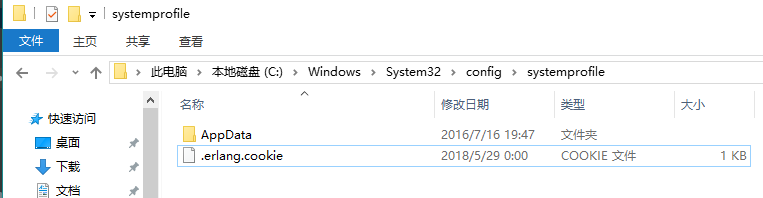
我们看到了这里有一个.erlang.cookie,复制这个文件到C:\Users\你的用户名下
如果没有这个文件,请打开菜单栏的Erlang快捷方式,出现白色窗口的时候,
C:\Windows\System32\config\systemprofile这个目录下就会出现这个文件,可能会慢一些耐心等
要确保C:\Windows\System32\config\systemprofile和C:\Users\你的用户名下的cookie是同一个文件!
替换完成后,无需重启服务,直接rabbitmqctl status,如图这样就成功了。
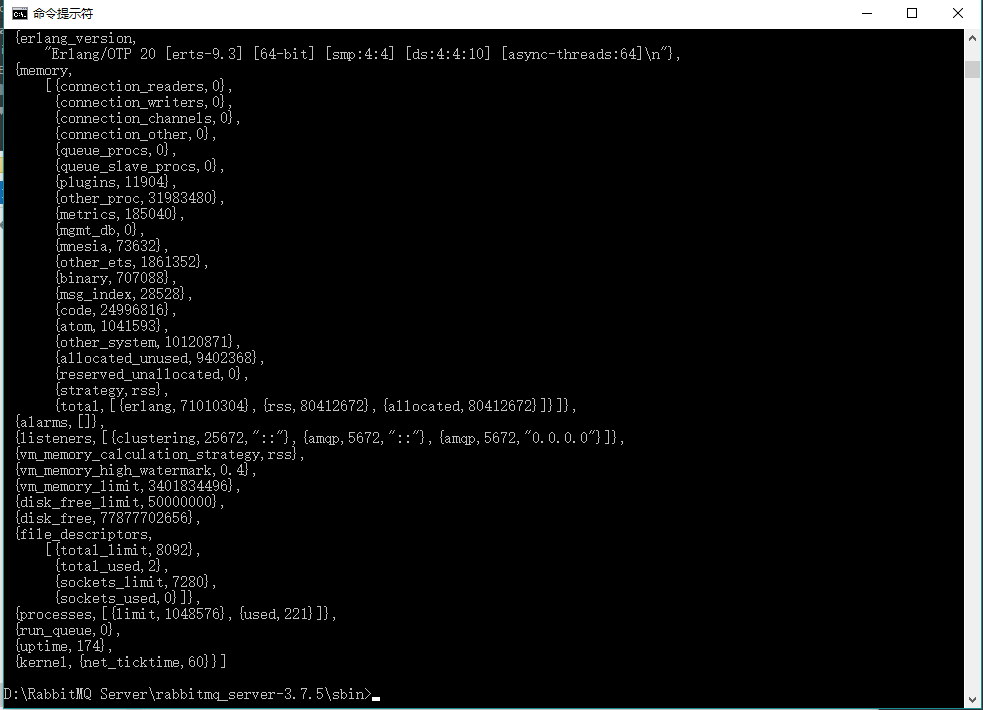
以上
RabbitMQ问题解决:TCP connection succeeded but Erlang distribution failed的更多相关文章
- [RabbitMQ]Windows环境下rabbitmqclt(Command Line Tools)出现Erlang distribution failed错误的解决方法
摘要 当使用rabbitmqctl时出现Erlang distribution failed,把%SystemRoot%Windows\System32\config\systemprofile下的. ...
- TCP connection status
A TCP connection progresses through a series of states during its lifetime. The following diagram il ...
- linux上TCP connection timeout的原因查找
linux上TCP connection timeout的原因查找 好久没有写文章了, 今天解决了一个网络连接超时的问题, 记录以备查看. 最近在线上nginx经常出现输出connection tim ...
- TCP Connection Establishment and Termination
Three-Way Handshake The following scenario occurs when a TCP connection is established: The server m ...
- RT:How HTTP use TCP connection
In HTTP/0.9 (not used anymore), each request uses a separate TCP connection, and the end of a respon ...
- Caused by: com.rabbitmq.client.ShutdownSignalException: connection error
周五下午的时候升级了一个环境,跑了批处理sh升级脚本后,启动时报下列错误: INFO | jvm 1 | 2017/02/24 17:39:09 | java.io.IOException INFO ...
- tcp connection
三次握手与四次挥手的原因 https://yq.aliyun.com/articles/7435?spm=5176.8091938.0.0.N4v33a linux里的backlog详解 tcp co ...
- Exception in thread "RMI TCP Connection(idle)" java.lang.OutOfMemoryError: PermGen space
在Eclipse 调试 springside showcase项目中,tomcat报异常 Exception in thread "RMI TCP Connection(idle)" ...
- the age of the TCP connection TCP Slow Start
w防止网络过载和拥塞 HTTP The Definitive Guide The performance of TCP data transfer also depends on the age of ...
随机推荐
- VS2013的安装与C#进行简单单元测试(英文版教程)
这次安装这个软件可是花了我不少时间,其中遇到的问题不言而喻,下面讲解一下我完成这次作业以及分享一些个人体会吧! 第一步:提供下载地址(https://www.visualstudio.com/down ...
- <mvc:annotation-driven/>的作用
<mvc:annotation-driven>的作用是: 会自动注册DefaultAnnotationHandlerMapping与AnnotationMethodHandlerAdapt ...
- OSG学习:裁剪变换(1)
在OSG中,默认了6个裁剪平面以去除没有必要显示的物体.也可以自己定义其他的裁剪平面来确定裁剪. osg::ClipPlane类继承自osg::StateAttribute类,封装了OpenGL中的g ...
- 安装/卸载 修改Config
参考地址:https://docs.microsoft.com/zh-cn/nuget/create-packages/source-and-config-file-transformations
- 定时任务中的备份不同的数据库中的所有的表,每个表使用单独的sql备份文件
#! /bin/bash # 指定用户 USER=root # 指定密码 PASS=123456 # 指定主机地址 HOST=localhost # 指定备份的目录 BACKUP=/backup/sq ...
- APP端测试与web端测试的区别
想要知道APP端测试与web端测试的区别 ,那么我们就要先来了解,web和app的区别. web项目,一般都是b/s架构,基于浏览器的,而app则是c/s的,必须要有客户端.那么在系统测试测试的时候就 ...
- windows多线程(四) 关键段 CriticalSection
一.问题回顾 我们上一篇文章最后的程序的输出 g_Count 的值不是每次都正确,原因是没有对全局资源 g_Count 进行互斥访问(就是同一时刻只能由一个线程访问),接下来我们就来说一下使用关键段来 ...
- 图像分割——graph cuts
Graph cuts是一种基于图论的方法,它是一种能量优化算法,在计算机视觉领域应用于前景背景分割,立体视觉,抠图等. 这类方法首先使用无向图G=<V,E>表示要分割的图像,V和E分别是顶 ...
- 在tensorflow环境下安装matplotlib
在运行程序时,报错ImportError: No module named 'matplotlib',如图.经网上查询发现是没有安装matplotlib 因此记录一下在tensorflow环境下安装m ...
- 【Java并发编程】之六:Runnable和Thread实现多线程的区别
Java中实现多线程有两种方法:继承Thread类.实现Runnable接口,在程序开发中只要是多线程,肯定永远以实现Runnable接口为主,因为实现Runnable接口相比继承Thread类有如下 ...