
UIView使用UIMotionEffect效果
UIView使用UIMotionEffect效果
这个效果在模拟器上看不了,所以无法截图.
UIView+MotionEffect.h + UIView+MotionEffect.m
//

//  UIView+MotionEffect.h

//

//  Copyright (c) 2014年 Nick Jensen. All rights reserved.

//

#import <UIKit/UIKit.h>

@interface UIView (MotionEffect)

@property (nonatomic, strong) UIMotionEffectGroup  *effectGroup;

- (void)addXAxisWithValue:(CGFloat)xValue YAxisWithValue:(CGFloat)yValue;

- (void)removeSelfMotionEffect;

@end
//

//  UIView+MotionEffect.m

//

//  Copyright (c) 2014年 Nick Jensen. All rights reserved.

//

#import "UIView+MotionEffect.h"

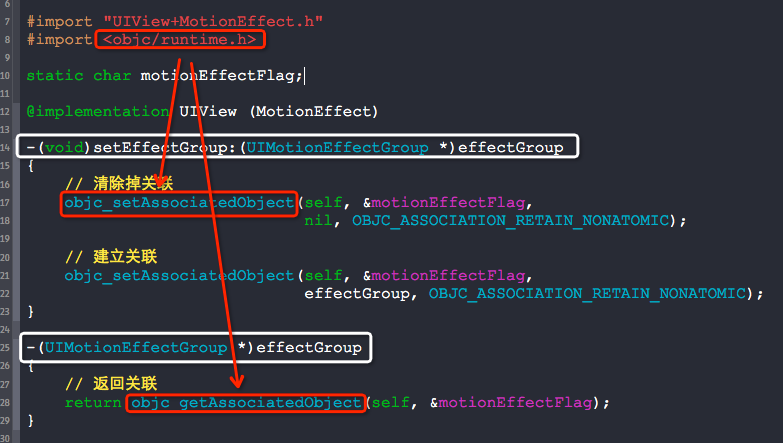
#import <objc/runtime.h>

static char motionEffectFlag;

@implementation UIView (MotionEffect)

-(void)setEffectGroup:(UIMotionEffectGroup *)effectGroup

{

    // 清除掉关联

    objc_setAssociatedObject(self, &motionEffectFlag,

                             nil, OBJC_ASSOCIATION_RETAIN_NONATOMIC);

    // 建立关联

    objc_setAssociatedObject(self, &motionEffectFlag,

                             effectGroup, OBJC_ASSOCIATION_RETAIN_NONATOMIC);

}

-(UIMotionEffectGroup *)effectGroup

{

    // 返回关联

    return objc_getAssociatedObject(self, &motionEffectFlag);

}

- (void)addXAxisWithValue:(CGFloat)xValue YAxisWithValue:(CGFloat)yValue

{

    NSLog(@"%p", &motionEffectFlag);

    if ((xValue >= ) && (yValue >= ))

    {

        UIInterpolatingMotionEffect *xAxis = [[UIInterpolatingMotionEffect alloc] initWithKeyPath:@"center.x" type:UIInterpolatingMotionEffectTypeTiltAlongHorizontalAxis];

        xAxis.minimumRelativeValue = @(-xValue);

        xAxis.maximumRelativeValue = @(xValue);

        UIInterpolatingMotionEffect *yAxis = [[UIInterpolatingMotionEffect alloc] initWithKeyPath:@"center.y" type:UIInterpolatingMotionEffectTypeTiltAlongVerticalAxis];

        yAxis.minimumRelativeValue = @(-yValue);

        yAxis.maximumRelativeValue = @(yValue);

        // 先移除效果再添加效果

        self.effectGroup.motionEffects = nil;

        [self removeMotionEffect:self.effectGroup];

        self.effectGroup.motionEffects = @[xAxis, yAxis];

        // 给view添加效果

        [self addMotionEffect:self.effectGroup];

    }

}

- (void)removeSelfMotionEffect

{

    [self removeMotionEffect:self.effectGroup];

}

@end
使用:
- (void)viewDidLoad {

    [super viewDidLoad];

    UIImageView *imageView = [[UIImageView alloc] initWithImage:[UIImage imageNamed:@"show"]];

    [self.view addSubview:imageView];

    imageView.center = self.view.center;

    imageView.effectGroup = [UIMotionEffectGroup new];

    [imageView addXAxisWithValue:.f YAxisWithValue:.f];

}
注意:
给类目添加属性需要重写setter.getter方法哦:)
UIView使用UIMotionEffect效果的更多相关文章
- IOS开发-UIView之动画效果的实现方法(合集)
http://www.cnblogs.com/GarveyCalvin/p/4193963.html 前言:在开发APP中,我们会经常使用到动画效果.使用动画可以让我们的APP更酷更炫,最重要的是优化 ...
- ios UIView常用动画效果
一 //调用 1 2 3 4 5 6 if(m_viewScenario.superview == nil)<br>{ m_viewScenario.alpha = 1.0; ...
- IOS启动页动画(uiview 淡入淡出效果 )2
Appdelegate里面右个这个函数,只要它没结束,你的等待界面就不会消失.以在启动的时候做些动画 - (BOOL)application:(UIApplication *)application ...
- iOS中UIView翻转效果实现
本文转载至 http://baishiyun.blog.163.com/blog/static/13057117920148228261747/ 新建一个view-based模板工程,在ViewCo ...
- iOS开发UIView.h简介
1.UICoordinateSpace不同坐标空间的坐标切换 @protocol UICoordinateSpace <NSObject> //将当前的坐标空间点转换到指定的坐标空间 - ...
- UI-切圆角、透明度、取消按钮点击高亮效果、按钮文字带下划线
一.切UIView的某个角为圆角 如果需要将UIView的4个角全部都为圆角,做法相当简单,只需设置其Layer的cornerRadius属性即可(项目需要使用QuartzCore框架).而若要指定某 ...
- iOS UIView 动画浅谈
UIView 等会效果简单实现,哪一个登录页面的demo来举例子吧. + (void)animateWithDuration:(NSTimeInterval)duration animations:( ...
- 怎样实现UIView的旋转
首先创建界面,在viewDidLoad创建view以及button 相关代码如下 -(void)viewDidLoad { [super viewDidLoad]; viewDemo = [[UIVi ...
- iOS开发——动画篇Swift篇&动画效果的实现
Swift - 动画效果的实现 在iOS中,实现动画有两种方法.一个是统一的animateWithDuration,另一个是组合出现的beginAnimations和commitAnimation ...
随机推荐
- 数据库-转换sql语句
文章描述:主要说明转换成SQL语句的过程.----必要信息(数据库名,表名,条件)转换成SQL语句 一些界面上数据增删改查的操作往往只需要输入一数据库名,表名,加条件就可以进行数据查询了,在这背后是怎 ...
- 在Linux系统安装Nodejs最简单步骤
一.去官网下载和自己系统匹配的文件 英文网址:https://nodejs.org/en/download/ 中文网址:http://nodejs.cn/download/ 通过 uname -a ...
- Java数据库连接池原理与简易实现
1.什么是数据库连接池 我们现在在开发中一定都会用到数据库,为了提高我们的系统的访问速度,数据库优化是一个有效的途径.我们现在开发中使用数据库一般都要经历以下的四个步骤:(1)加载数据库的驱动类,(2 ...
- SparkSQL简介
1.SparkSQL的发展历程 1.1 Hive and Shark SparkSQL的前身是Shark,给熟悉RDBMS但又不理解MapReduce的技术人员提供快速上手的工具,Hive应运而生,它 ...
- vue-webpack 做出来的项目部署到服务器上,点开是空白页(我这里把项目发布到git上)
总结1: 从网上下的很多demo,用npm run dev 就可以启动项目,比如:vue-cli,为什么?因为vue-cli自动帮我们安装了express服务器. 总结2: npm run dev 是 ...
- Ionic3 UI组件之 ImagePicker
ImagePicker插件实现设备上的多个图像选择的功能. 组件特性: 统一选择界面,避免不同设备选择界面不一样的问题: 支持多选,并且可以设置最多选择的张数: 选择数量超出设置时会提示: Camer ...
- Visual Basic了解
Visual Basic是一种由微软公司开发的结构化的.模块化的.面向对象的.包含协助开发环境的事件驱动为机制的可视化程序设计语言.这是一种可用于微软自家产品开发的语言.它源自于Basic编程语言.V ...
- css3 transition(转换)笔记
之前transition也用过,大都是ctrl+c,然后ctrl+v,没有了解太详细,这次对transition的应用源自侧边抽屉展开收起的动画效果需要. W3C标准中对css3的transition ...
- MyBatis和Hibernate的优缺点对比。
Hibernate的优点: 1.hibernate是全自动,hibernate完全可以通过对象关系模型实现对数据库的操作,拥有完整的JavaBean对象与数据库的映射结构来自动生成sql. 2.功能强 ...
- 在pom.xml中添加Spring依赖
<?xml version="1.0" encoding="UTF-8"?> <project xmlns="http://mave ...