
AS 代码模板 文件模板 Templates MD
修改 File and Code Templates
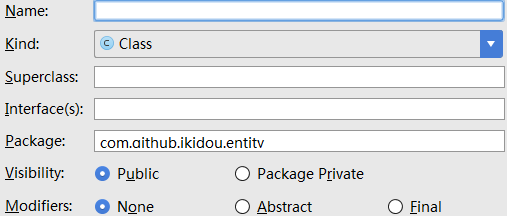
添加、修改文件模板 Files
#if (${PACKAGE_NAME} != "")package ${PACKAGE_NAME};#end

#if (${IMPORT_BLOCK} != "")${IMPORT_BLOCK}

#end

#parse("File Header.java")

#if (${VISIBILITY} == "PUBLIC")public #end #if (${ABSTRACT} == "TRUE")abstract #end #if (${FINAL} == "TRUE")final #end class ${NAME} #if (${SUPERCLASS} != "")extends ${SUPERCLASS} #end #if (${INTERFACES} != "")implements ${INTERFACES} #end {

}
添加、修改文件头 Includes【重要】
/**

 * 作者:<a href="http://www.cnblogs.com/baiqiantao">白乾涛</a><p>

 * 创建时间:${DATE} ${HOUR}:${MINUTE} <p>

 * 描述:

*/预定义的变量
- ${PACKAGE_NAME} //name of the package in which the new file is created
- ${USER} //current user system login name
- ${DATE} //current system date
- ${TIME} //current system time
- ${YEAR} //current year
- ${MONTH} //current month
- ${MONTH_NAME_SHORT} //first 3 letters of the current month name. Example: Jan, Feb, etc.
- ${MONTH_NAME_FULL} //full name of the current month. Example: January, February, etc.
- ${DAY} //current day of the month
- ${HOUR} //current hour
- ${MINUTE} //current minute
- ${PROJECT_NAME} //the name of the current project
添加代码模板 Live Templates【重要】
- Abbreviation:表示这个模板的快捷方式,你敲这些【字符+回车】后,模板就自动输出了
- Description:表示这个模板描述
- Template text:模板的内容
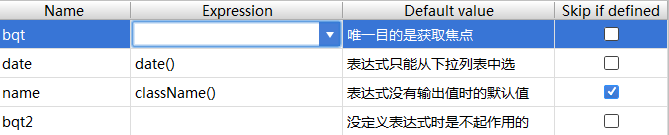
- bqt:可将鼠标定位在此位置
- date、name:点击下三角【选择】合适的方法,可自动生成日期和类名
- skip if defined:表示当自动生成的值不为空时,光标不停留在此方法处。建议选中
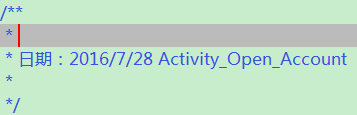
- 焦点首先在定位的第一个方法处,即bqt处;当我输入内容后按下回车,或不输入内容直按回车
- 焦点转移到下一个定义的方法处,即date处;当按下回车
- 这时焦点应该会转移到name处,但因为勾选了skip if defined,且此处有自动生成内容,所以焦点移到下一方法处
- 即转移到bqt2处,此时我再按下回车键,则焦点转移到整个模板的最后(不会添加换行符)
<wiz_tmp_tag id="wiz-table-range-border" contenteditable="false" style="display: none;">
附件列表
AS 代码模板 文件模板 Templates MD的更多相关文章
- eclipse的xml文件提示templates的模板.md
eclipse的xml文件提示templates的模板 <?xml version="1.0" encoding="UTF-8" standalone=& ...
- Django学习总结之模板templates
- django模板: templates - 模板分为两个过程: 1, 加载 : loader.get_template('xxx.html') 返回值是一个template对象 2, 渲染 : t ...
- ##xcode 文件模板自定义
xcode 文件模板自定义 在使用xcode内部模板创建C++类文件时,创建出来的头文件是.hpp结尾的,但是我想用.h结尾的, 所以就网上找了下资料看能不能自定义模板,这样还可以修改文档注释.在网上 ...
- 【Django笔记1】-视图(views)与模板(templates)
视图(views)与模板(templates) 1,视图(views) 将接收到的数据赋值给模板(渲染),再传递给浏览器.HTML代码可以直接放在views.py(文件名可任意更换),也可以放在t ...
- 模板templates的使用
目录 模板及其渲染 模板查找路径 DTL模板语法 常用的模板标签 DTL常用过滤器 模块结构优化 加载静态文件 模板及其渲染 视图函数只是直接返回文本,而在实际生产环境中其实很少这样用,因为实际的页面 ...
- ATL开发 ActiveX控件的 inf文件模板
ATL开发 ActiveX控件的 inf文件模板
- spring 文件模板下载多种实现方式
针对于文件的下载,我们有很多种实现方式.业务场景是这样子的,要实现Excel文件的导入和导出功能,问题对于java的POI操作没有问题,所以实现文件的下载就相对简单,只需要从数据库取出相关的数据,针对 ...
- Pycharm 自定义文件模板
Pycharm 自定义文件模板 每次新建文件都有相同的代码框架,每次重复敲浪费了程序员的寿命啊 按照下面方式自定义自己的模板:
- Jtester+unitils+testng:DAO单元测试文件模板自动生成
定位 本文适合于不愿意手工编写而想自动化生成DAO单元测试的筒鞋.成果是不能照搬的,但其中的"创建模板.填充内容.自动生成"思想是可以复用的.读完本文,可以了解 Python 读取 ...
随机推荐
- Java工具类- 跨域工具类
原本Spring MVC项目添加跨域: 在web.xml文件中配置: <!-- cors解决跨域访问问题 --> <filter> <filter-name>cor ...
- maven的统一版本管理实践
为什么要使用maven的统一版本管理? 在进行项目开发的时候,我们使用maven来做项目的构建和管理.为了方便项目中各个模块之间的复用,项目通常会有多个模块构成.不同的模块,会各自应用自己需要的jar ...
- Jenkins的Pipeline脚本在美团餐饮SaaS中的实践
一.背景 在日常开发中,我们经常会有发布需求,而且还会遇到各种环境,比如:线上环境(Online),模拟环境(Staging),开发环境(Dev)等.最简单的就是手动构建.上传服务器,但这种方式太过于 ...
- 模型构建<1>:模型评估-分类问题
对模型的评估是指对模型泛化能力的评估,主要通过具体的性能度量指标来完成.在对比不同模型的能力时,使用不同的性能度量指标可能会导致不同的评判结果,因此也就意味着,模型的好坏只是相对的,什么样的模型是较好 ...
- 【8.14校内测试】【DP专题】
nlogn做法,dp[i]表示当前长度为i的最长上升子序列末尾元素的值. 不会写lower_bound(qwq,贴一个以前的好看点的代码 #include<iostream>//使用low ...
- Shell 学习笔记之条件语句
条件语句 if # if if condition then command fi # if else if condition then command else command fi # if e ...
- UVALive 6262 Darts
Description Consider a game in which darts are thrown at a board. The board is formed by 10 circles ...
- HDU 1698 just a hook 线段树,区间定值,求和
Just a Hook Time Limit: 1 Sec Memory Limit: 256 MB 题目连接 http://acm.hdu.edu.cn/showproblem.php?pid=1 ...
- BZOJ 1192 鬼谷子的钱袋 数论
1192:鬼谷子的钱袋 Time Limit: 10 Sec Memory Limit: 162 MBSubmit: 1926 Solved: 1417 题目连接 http://www.lydsy ...
- Push导航栏黑影问题
解决方法可以在自定义的 TabbarViewController里 viewDidLoad方法里 self.view.backgroundColor = [UIColor whiteColor]; 如 ...