
Android设置RadioButton在文字的右边
效果图如下:
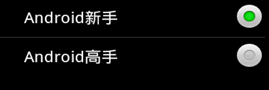
- <?xml version="1.0" encoding="utf-8"?>
- <LinearLayout xmlns:android="http://schemas.android.com/apk/res/android"
- android:layout_width="fill_parent"
- android:layout_height="fill_parent"
- android:orientation="vertical" >
- <TextView
- android:id="@+id/radiobutton_textview"
- android:layout_width="fill_parent"
- android:layout_height="50dip"
- android:background="@android:drawable/title_bar"
- android:gravity="center_vertical"
- android:textAppearance="?android:attr/textAppearanceLarge"
- android:textSize="18dip"
- android:textStyle="bold" />
- <RadioGroup
- android:id="@+id/group"
- android:layout_width="fill_parent"
- android:layout_height="wrap_content"
- android:orientation="vertical" >
- <RadioButton
- android:id="@+id/button1"
- android:layout_width="fill_parent"
- android:layout_height="50dip"
- android:button="@null"
- android:drawableRight="@android:drawable/btn_radio"
- android:paddingLeft="30dip"
- android:text="Android新手"
- android:textSize="20dip" />
- <View
- android:layout_width="fill_parent"
- android:layout_height="1px"
- android:background="?android:attr/listDivider" />
- <RadioButton
- android:id="@+id/button2"
- android:layout_width="fill_parent"
- android:layout_height="50dip"
- android:button="@null"
- android:drawableRight="@android:drawable/btn_radio"
- android:paddingLeft="30dip"
- android:text="Android高手"
- android:textSize="20dip" />
- </RadioGroup>
- </LinearLayout>
- package sdfasdf.sadf;
- import android.app.Activity;
- import android.os.Bundle;
- import android.widget.RadioGroup;
- import android.widget.RadioGroup.OnCheckedChangeListener;
- import android.widget.TextView;
- public class SdfsadfasdfasdffActivity extends Activity {
- private TextView textView;
- private RadioGroup group;
- @Override
- public void onCreate(Bundle savedInstanceState) {
- super.onCreate(savedInstanceState);
- setContentView(R.layout.main);
- textView = (TextView) findViewById(R.id.radiobutton_textview);
- group = (RadioGroup) findViewById(R.id.group);
- // 单选按钮组监听事件
- group.setOnCheckedChangeListener(new OnCheckedChangeListener() {
- @Override
- public void onCheckedChanged(RadioGroup group, int checkedId) {
- // 根据ID判断选择的按钮
- if (checkedId == R.id.button1) {
- textView.setText("Android新手");
- } else {
- textView.setText("Android高手");
- }
- }
- });
- }
- }
http://blog.csdn.net/furongkang/article/details/7272512
Android设置RadioButton在文字的右边的更多相关文章
- Android中如何设置RadioButton在文字的右边,图标在左边
from:http://blog.csdn.net/sunnyfans/article/details/7901592?utm_source=tuicool&utm_medium=referr ...
- android自定义radiobutton样式文字颜色随选中状态而改变
主要是写一个 color selector 在res/建一个文件夹取名color res/color/color_radiobutton.xml <selector xmlns:android= ...
- Android 自定义RadioButton实现
由于使用小米系统MIUI运行是RadioButton样式跟google Android API自定义的不一样,则我们可以定义任何想要的东东.没有做不到,只有想不到 Android 自定义RadioBu ...
- Android中代码设置RadioButton的高端技巧
不知道怎么起标题,就这样了. 目前主要讲两个方面内容: 代码方式 设置RadioButton的 android:button . android:background 等属性为 @null : 代码方 ...
- 【Android初级】使用TypeFace设置TextView的文字字体(附源码)
在Android里面设置一个TextView的文字颜色和文字大小,都很简单,也是一个常用的基本功能.但很少有设置文字字体的,今天要分享的是通过TypeFace去设置TextView的文字字体,布局里面 ...
- 转:android 自定义RadioButton样式
http://gundumw100.iteye.com/blog/1146527 上面这种3选1的效果如何做呢?用代码写? 其实有更简单的办法,忘了RadioButton有什么特性了吗? 我就用Ra ...
- 改变RadioButton的文字位置以及距离
在默认情况下,RadioButton的 文字位置和文字的距离是不变的,为了可以改变它,我们可以用以下的方法. 1.改变文字的位置 android:button="@null" // ...
- Android 自定义RadioButton样式
上面这种3选1的效果如何做呢?用代码写? 其实有更简单的办法,忘了RadioButton有什么特性了吗? 我就用RadioButton实现了如上效果,其实很简单的. 首先定义一张background ...
- Android实现自定义带文字和图片的Button
Android实现自定义带文字和图片的Button 在Android开发中经常会需要用到带文字和图片的button,下面来讲解一下常用的实现办法. 一.用系统自带的Button实现 最简单的一种办法就 ...
随机推荐
- Mybatis中 collection 和 association 的区别?
public class A{ private B b1; private List<B> b2;} 在映射b1属性时用association标签,(一对一的关系) 映射b2时用colle ...
- Linux下性能调试工具运维笔记
作为一名资深的linux运维工程师,为方便了解和追求服务器的高性能,如cpu.内存.io.网络等等使用情况,要求运维工程师必须要熟练运用一些必要的系统性能调试工具,liunx下提供了众多命令方便查看各 ...
- Linux内核及分析 第一周 计算机是如何工作的?
C语言代码: int g(int x) { return x + 5; } int f(int x) { return g(x); } int main(void) { return f(5) + 1 ...
- 《Linux内核分析》期终总结
作者:杨舒雯,原创作品转载请注明出处,<Linux内核分析>MOOC课程http://mooc.study.163.com/course/USTC-1000029000 目录: 1.通过简 ...
- 读<架构漫谈>系列有感
读了这一系列博文,我对架构也有了大致的了解.在简单的阅读之后,我解决了几个问题. 第一个问题,什么是架构? 要学习架构,首先要知道架构.那么,什么是架构呢?引用<架构漫谈(一)>里的话就是 ...
- Sprint 冲刺第三阶段第6-10天
这几天一直都在整理我们之前的内容,检查会不会有细节问题.例如界面跳转.颜色等. 因为一直没办法找到guitub存放位置.于是在这里存放一些主代码. MainActivity.java package ...
- slot 插槽的作用域用法(摘自vue.js 官网)
有的时候你希望提供的组件带有一个可从子组件获取数据的可复用的插槽.例如一个简单的 <todo-list> 组件的模板可能包含了如下代码: <ul> <li v-for=& ...
- Notepad++ 大小写转换
code_field_text 普通文本 code_field_user_id 用户ID code_field_customer_id 客户ID code_field_dict 数据字典 code_f ...
- 如何将数据库引擎配置为侦听多个 TCP 端口
SQL Server 2005 为 SQL Server 启用 TCP/IP 后,数据库引擎将侦听连接点上是否有传入的连接(由 IP 地址和 TCP 端口号组成).下列步骤将创建一个表 ...
- mysql 表注释的添加、查看 、修改
表创建时添加注释: create table user( id int not null default 0 comment '用户id', account varchar(20) not nul ...