
zw版【转发·台湾nvp系列Delphi例程】HALCON 3D Position Of Circles
zw版【转发·台湾nvp系列Delphi例程】HALCON 3D Position Of Circles
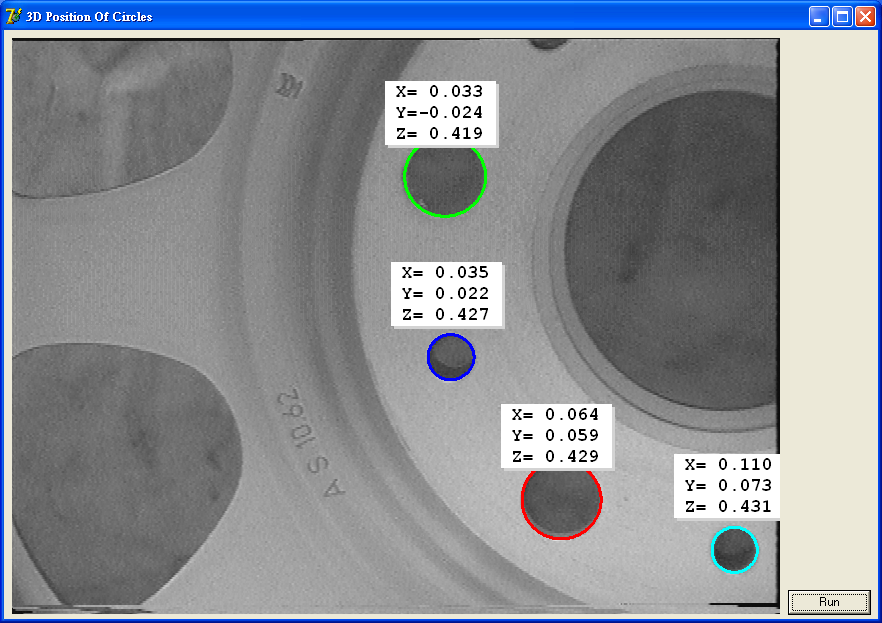
procedure TForm1.action();
var
ho_Image, ho_EllipseContoursLarge : HUntypedObjectX;
ho_EllipseContoursSmall, ho_EllipseContours : HUntypedObjectX;
hv_Width, hv_Height : OleVariant;
hv_WindowHandle, hv_NumberLarge : OleVariant;
hv_NumberSmall, hv_RadiusLarge : OleVariant;
hv_RadiusSmall, hv_CamParam : OleVariant;
hv_Pose1, hv_Pose2, hv_CenterNormal1 : OleVariant;
hv_CenterNormal2, hv_ClusterP1 : OleVariant;
hv_ClusterP2, hv_ClusterCN1 : OleVariant;
hv_ClusterCN2, hv_HomMat3D : OleVariant;
hv_i : Longint;
hv_Qx, hv_Qy, hv_Qz : OleVariant;
hv_Row, hv_Column : OleVariant;
val1, val2 : double;
begin
hv_WindowHandle := HWindowXCtrl1.HalconWindow.HalconID;
Op.ReadImage(ho_Image, 'rim');
Op.GetImageSize(ho_Image, hv_Width, hv_Height);
Op.SetPart(hv_WindowHandle, 0, 0, hv_Height - 1, hv_Width - 1);
set_display_font(hv_WindowHandle, 16, 'courier', 'true', 'false');
Op.DispObj(ho_Image, hv_WindowHandle);
Op.SetLineWidth(hv_WindowHandle, 3);
p_determine_ellipse_contours(hv_WindowHandle, ho_Image, ho_EllipseContoursLarge, ho_EllipseContoursSmall, 0, hv_NumberLarge, hv_NumberSmall);
Op.ConcatObj(ho_EllipseContoursLarge, ho_EllipseContoursSmall, ho_EllipseContours);
hv_RadiusLarge := Tuple.TupleDiv(10.25, 1000.0);
hv_RadiusSmall := Tuple.TupleDiv(5.91, 1000.0);
val1 := 0.00000739;
val2 := 0.0000074;
hv_CamParam := Tuple.TupleConcat(Tuple.TupleConcat(Tuple.TupleConcat(Tuple.TupleConcat(Tuple.TupleConcat(Tuple.TupleConcat(Tuple.TupleConcat(0.0122, -261.04), val1), val2), 303.12), 234.17), 652), 494);
Op.GetCirclePose(ho_EllipseContours, hv_CamParam, Tuple.TupleConcat(Tuple.TupleGenConst(hv_NumberLarge, hv_RadiusLarge), Tuple.TupleGenConst(hv_NumberSmall, hv_RadiusSmall)), 'pose', hv_Pose1, hv_Pose2);
Op.GetCirclePose(ho_EllipseContours, hv_CamParam, Tuple.TupleConcat(Tuple.TupleGenConst(hv_NumberLarge, hv_RadiusLarge), Tuple.TupleGenConst(hv_NumberSmall, hv_RadiusSmall)), 'center_normal', hv_CenterNormal1, hv_CenterNormal2);
p_cluster_normals(hv_Pose1, hv_Pose2, hv_CenterNormal1, hv_CenterNormal2, hv_ClusterP1, hv_ClusterP2, hv_ClusterCN1, hv_ClusterCN2);
Op.DispObj(ho_Image, hv_WindowHandle);
Op.SetColored(hv_WindowHandle, 12);
Op.DispObj(ho_EllipseContours, hv_WindowHandle);
for hv_i := 0 to Longint(Tuple.TupleSub(Tuple.TupleAdd(hv_NumberLarge, hv_NumberSmall), 1)) do
begin
Op.PoseToHomMat3d(Tuple.TupleSelectRange(hv_ClusterP1, Tuple.TupleMult(hv_i, 7), Tuple.TupleAdd(Tuple.TupleMult(hv_i, 7), 6)), hv_HomMat3D);
Op.AffineTransPoint3D(hv_HomMat3D, 0, 0, 0, hv_Qx, hv_Qy, hv_Qz);
Op.Project3DPoint(hv_Qx, hv_Qy, hv_Qz, hv_CamParam, hv_Row, hv_Column);
hv_Row := Tuple.TupleSub(hv_Row, 95);
hv_Column := Tuple.TupleSub(hv_Column, 60);
disp_message(hv_WindowHandle, Tuple.TupleConcat(Tuple.TupleConcat(Tuple.TupleAdd('X=', Tuple.TupleString(Tuple.TupleSelect(hv_ClusterCN1, Tuple.TupleMult(hv_i, 6)), '6.3f')), Tuple.TupleAdd('Y=', Tuple.TupleString(Tuple.TupleSelect(hv_ClusterCN1, Tuple.TupleAdd(Tuple.TupleMult(hv_i, 6), 1)), '6.3f'))), Tuple.TupleAdd('Z=', Tuple.TupleString(Tuple.TupleSelect(hv_ClusterCN1, Tuple.TupleAdd(Tuple.TupleMult(hv_i, 6), 2)), '6.3f'))), 'window', hv_Row, hv_Column, 'black', 'true');
end;
end;
zw版【转发·台湾nvp系列Delphi例程】HALCON 3D Position Of Circles的更多相关文章
- zw版【转发·台湾nvp系列Delphi例程】HALCON DirectShow (Delphi Prism)
zw版[转发·台湾nvp系列Delphi例程]HALCON DirectShow (Delphi Prism) namespace DirectShow_Prism;interfaceuses Sys ...
- zw版【转发·台湾nvp系列Delphi例程】HALCON HImage与Bitmap格式转换
zw版[转发·台湾nvp系列Delphi例程]HALCON HImage与Bitmap格式转换 (Delphi Prism)namespace HImage_Bitmap_Prism;interfac ...
- zw版【转发·台湾nvp系列Delphi例程】.NET调用HALCON COM控件内存释放模式
zw版[转发·台湾nvp系列Delphi例程].NET调用HALCON COM控件内存释放模式 ------------------------------------方法一 :Imports Sys ...
- zw版【转发·台湾nvp系列Delphi例程】HALCON HWindow Overlayer 1
zw版[转发·台湾nvp系列Delphi例程]HALCON HWindow Overlayer 1 ------------------------------------HALCON HWindow ...
- zw版【转发·台湾nvp系列Delphi例程】HALCON DirectFile
zw版[转发·台湾nvp系列Delphi例程]HALCON DirectFile unit Unit1;interfaceuses Windows, Messages, SysUtils, Varia ...
- zw版【转发·台湾nvp系列Delphi例程】HALCON DirectShow
zw版[转发·台湾nvp系列Delphi例程]HALCON DirectShow unit Unit1;interfaceuses Windows, Messages, SysUtils, Varia ...
- zw版【转发·台湾nvp系列Delphi例程】Delphi 使用 HALCON库件COM控件数据格式转换
zw版[转发·台湾nvp系列Delphi例程]Delphi 使用 HALCON库件COM控件数据格式转换 Delphi 使用 HALCON库件COM控件数据格式转换,与IHObjectX接口有关 va ...
- zw版【转发·台湾nvp系列Delphi例程】HALCON AddNoiseWhite
zw版[转发·台湾nvp系列Delphi例程]HALCON AddNoiseWhite unit Unit1;interfaceuses Windows, Messages, SysUtils, Va ...
- zw版【转发·台湾nvp系列Delphi例程】HALCON CheckDifference
zw版[转发·台湾nvp系列Delphi例程]HALCON CheckDifference unit Unit1;interfaceuses Windows, Messages, SysUtils, ...
- zw版【转发·台湾nvp系列Delphi例程】HALCON BinThreshold
zw版[转发·台湾nvp系列Delphi例程]HALCON BinThreshold unit Unit1;interfaceuses Windows, Messages, SysUtils, Var ...
随机推荐
- .NET:OrderBy和ThenBy
.NET中OrderBy和ThenBy的语义是不同的,如:list.OrderBy(x=>x.A).OrderBy(x=>x.B),那么最终只会根据B进行排序:list.OrderBy(x ...
- 更改Magento的base url
Magento的Base URL是用于访问商店页面的URL,您也可以为单独一个store view设置一个Base Url.在改这项值之前请确保您的域名已经指向了网站所在服务器的IP,DNS解析完成后 ...
- Magento - Rewrite机制一窥
看一个url例子 http://localhost/magento/index.php/customer/account/login 这里假定http://localhost/magento/ 是ma ...
- 如何设置启动页 LaunchImage
- 好网站:字体转换器在线转换 http://www.diyiziti.com/
偶然间发现这个网站,它可以将文字设置字体并做成图片,也有很多好的字体下载如瘦金体. 下载下来的ttf文件在win7里可以右键点击install,在vista和xp里可以直接拷贝到window\font ...
- Swift闭包
把Swift中的 block 常见的声明和写法作一个总结.以免后续忘了,好查阅. // // blockDemo.swift // swiftDemo // // Created by appl ...
- 微信小店分类ID列表
一级分类 { , "errmsg": "ok", "cate_list": [ { ", "name": &q ...
- Android Service和Thread的关系
不少Android初学者都可能会有这样的疑惑,Service和Thread到底有什么关系呢?什么时候应该用Service,什么时候又应该用Thread?答案可能会有点让你吃惊,因为Service和Th ...
- thinkphp文章列表及删除文章
出师不利,数据一次删完了... 教程:http://www.thinkphp.cn/topic/9757.html 首先要构造mysql数据库 模板代码 </head> <body& ...
- HQL的语言
HQL: 是Hibernate Query Language的缩写 1.HQL查询 特点: 与SQL相似,SQL中的语法基本上都可以直接使用 SQL查询的是表和表中的列而HQL查询的是对象或者对象中的 ...