
Sitemesh 3 的使用及配置
1 . Sitemesh 3 简介
Sitemesh 是一个网页布局和修饰的框架,基于 Servlet 中的 Filter,类似于 ASP.NET 中的‘母版页’技术。参考:百度百科,相关类似技术:Apache Tiles。
官网:http://wiki.sitemesh.org/wiki/display/sitemesh/Home 。

2 . Sitemesh 3 下载
最新版本:3.0.0-SNAPSHOT
① GitHub 地址:https://github.com/sitemesh/sitemesh3
② maven:
1 <dependency>

2   <groupId>org.sitemesh</groupId>

3   <artifactId>sitemesh</artifactId>

4   <version>3.0.0</version>

5 </dependency>
3 . 配置 Sitemesh 3 过滤器
在 web.xml 中添加 Sitemesh Filter:

 1 <web-app>

 2

 3   ...

 4

 5   <filter>

 6     <filter-name>sitemesh</filter-name>

 7     <filter-class>org.sitemesh.config.ConfigurableSiteMeshFilter</filter-class>

 8   </filter>

 9   <filter-mapping>

10     <filter-name>sitemesh</filter-name>

11     <url-pattern>/*</url-pattern>

12   </filter-mapping>

13

14 </web-app>
4 . 准备两个页面:demo.html 和 decorator.html
① demo.html - “被装饰的页面”,实际要呈现的内容页。
1 <!DOCTYPE html>

2 <html>

3 <head>

4     <title>内容页的标题</title>

5 </head>

6 <body>

7     内容页的body部分

8 </body>

9 </html>
② decorator.html - “装饰页面”,所谓的“母版页”。
 1 <!DOCTYPE html>

 2 <html>

 3 <head>

 4 <title>

 5     <sitemesh:write property='title' /> - ltcms

 6 </title>

 7 <sitemesh:write property='head' />

 8 </head>

 9 <body>

10     <header>header</header>

11     <hr />

12     demo.html的title将被填充到这儿:

13     <sitemesh:write property='title' /><br />

14     demo.html的body将被填充到这儿:

15     <sitemesh:write property='body' />

16     <hr />

17     <footer>footer</footer>

18 </body>

19 </html>
5 . 添加 /WEB-INF/sitemesh3.xml
1 <?xml version="1.0" encoding="UTF-8"?>

2 <sitemesh>

3     <!-- 指明满足“/*”的页面,将被“/WEB-INF/views/decorators/decorator.html”所装饰 -->

4     <mapping path="/*" decorator="/WEB-INF/views/decorators/decorator.html" />

5

6     <!-- 指明满足“/exclude.jsp*”的页面,将被排除,不被装饰 -->

7     <mapping path="/exclude.jsp*" exclue="true" />

8 </sitemesh>
6 . 运行效果
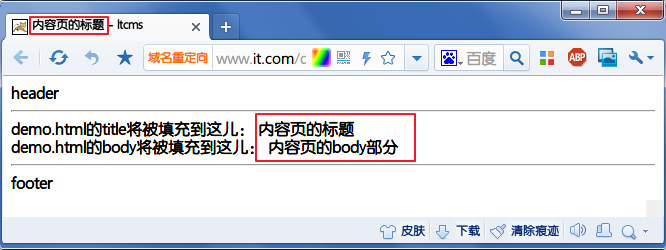
访问 demo.html 页面,实际效果如下:
7 . sitemesh3.xml 配置详解
 1 <sitemesh>

 2     <!--默认情况下,

 3         sitemesh 只对 HTTP 响应头中 Content-Type 为 text/html 的类型进行拦截和装饰,

 4         我们可以添加更多的 mime 类型-->

 5   <mime-type>text/html</mime-type>

 6   <mime-type>application/vnd.wap.xhtml+xml</mime-type>

 7   <mime-type>application/xhtml+xml</mime-type>

 8   ...

 9

10   <!-- 默认装饰器,当下面的路径都不匹配时,启用该装饰器进行装饰 -->

11   <mapping decorator="/default-decorator.html"/>

12

13   <!-- 对不同的路径,启用不同的装饰器 -->

14   <mapping path="/admin/*" decorator="/another-decorator.html"/>

15   <mapping path="/*.special.jsp" decorator="/special-decorator.html"/>

16

17   <!-- 对同一路径,启用多个装饰器 -->

18   <mapping>

19     <path>/articles/*</path>

20     <decorator>/decorators/article.html</decorator>

21     <decorator>/decorators/two-page-layout.html</decorator>

22     <decorator>/decorators/common.html</decorator>

23   </mapping>

24

25   <!-- 排除,不进行装饰的路径 -->

26   <mapping path="/javadoc/*" exclue="true"/>

27   <mapping path="/brochures/*" exclue="true"/>

28

29   <!-- 自定义 tag 规则 -->

30   <content-processor>

31     <tag-rule-bundle class="com.something.CssCompressingBundle" />

32     <tag-rule-bundle class="com.something.LinkRewritingBundle"/>

33   </content-processor>

34   ...

35

36 </sitemesh>
8 . 自定义 tag 规则
Sitemesh 3 默认只提供了 body,title,head 等 tag 类型,我们可以通过实现 TagRuleBundle 扩展自定义的 tag 规则:
 1 public class MyTagRuleBundle implements TagRuleBundle {

 2     @Override

 3     public void install(State defaultState, ContentProperty contentProperty,

 4             SiteMeshContext siteMeshContext) {

 5         defaultState.addRule("myHeader", new ExportTagToContentRule(contentProperty.getChild("myHeader"), false));

 6

 7     }

 8

 9     @Override

10     public void cleanUp(State defaultState, ContentProperty contentProperty,

11             SiteMeshContext siteMeshContext) {

12     }

13 }
最后在 sitemesh3.xml 中配置即可:
1 <content-processor>

2     <tag-rule-bundle class="com.lt.common.ext.sitemesh3.MyTagRuleBundle" />

3 </content-processor>
Sitemesh 3 的使用及配置的更多相关文章
- SiteMesh在项目中的配置
SiteMesh在项目中的配置 首先在web.xml里面增加siteMesh的配置: <filter> <filter-name>sitemesh</filter-nam ...
- Sitemesh 3 配置和使用(最新)
Sitemesh 3 配置和使用(最新) 一 Sitemesh简介 Sitemesh是一个页面装饰器,可以快速的创建有统一外观Web应用 -- 导航 加 布局 的统一方案~ Sitemesh可以拦截任 ...
- Sitemesh 3
Sitemesh 3 的使用及配置(收藏自:http://www.cnblogs.com/luotaoyeah/p/3776879.html) 1 . Sitemesh 3 简介 Sitemesh 是 ...
- SiteMesh 2.X 的使用(网页结构模板)
SiteMesh是基于Servlet的filter的,即过滤流.它是通过截取reponse,并进行装饰后再交付给客户. 其中涉及到两个名词: 装饰页面(decorator page)和 "被 ...
- SiteMesh3整合SpringMVC+FreeMarker
SiteMesh3配置 添加maven依赖 添加filter 配置servlet 添加sitemesh配置文件 decorator示例 SpringMVC.FreeMarker配置(404问题处理) ...
- struts2.1.3之后使用自定义Filter
struts2中 ActionContextCleanUp, StrutsPrepareAndExecuteFilter, StrutsPrepareFilter,StrutsExecuteFilte ...
- SiteMesh, SpringMVC, Shiro 配置
1. 首先在在web.xml文件中,加入SiteMesh和shiro的过滤器,保证SiteMesh的过滤器配置放在shiro的过滤器后面,不然的话,shiro的标签不能正确处理. <?xml v ...
- 使用 sitemesh/decorator装饰器装饰jsp页面(原理及详细配置)
摘要:首先这个Decorator解释一下这个单词:“装饰器”,我觉得其实可以这样理解,他就像我们用到的Frame,他把每个页面共有的东西提炼了出来,也可能我们也会用各种各样的include标签,将我们 ...
- Sitemesh 3使用及配置
1:Sitemesh简介 SiteMesh是一个网页布局和修饰的框架,利用它可以将网页的内容和页面结构分离,以达到页面结构共享的目的. SiteMesh是基于Servlet的filter的,即过滤流. ...
随机推荐
- java Date日期去掉时分秒
SimpleDateFormat sdf = new SimpleDateFormat("yyyy-MM-dd");String s = sdf.format(new Date() ...
- 高效删除 ListItem
The most efficient way to a lot of transaction in SharePoint is using of SPWeb.ProcessBatchData meth ...
- Bootstrap 样式定制-lessc编译源码
1.github上下载源码:解压:如目录bootstrap 2.新建同级目录custom-bootstrap ,在该目录下新建 如下三个文件:其实就是bootstrap下面的bootstrap.les ...
- 【jQuery】用jQuery给文本框添加只读属性【readOnly】
<input id="id" type="text" /> jQuery( $("#ID").attr({ readonly: ...
- U3D 摄像机镜头控制
如果要实现,摄像机跟随着主角运动,还有运用滚轮实现镜头的方法和缩小的实现原理 方法1:把主摄像机放到主角的下面,作为一个子对象,调整好摄像机的视角,此时就会跟随了. 方法2:用代码让摄像机的相关的po ...
- MongoDB的Document操作
简介 一.Document数据插入 二.Document数据删除 三.Document数据更新 一.Document数据插入 1.插入文档 db.[文档名].insert({BSON数据}) 2.批量 ...
- Cisco AnyConnect “Failed to initialize connection subsystem”的解决方案
Per Cisco: Microsoft has released a fix-it patch providing a workaround for this issue. See KB# 3023 ...
- spring quartz 多次调用
背景:公司项目有一个定时任务,每月1号0点执行,用到了spring的定时任务.发下定时任务调用的方法执行了俩次.测试部署的客户现场不会有问题 (测试的server.xml不会变化,除非本身提供的tom ...
- UIAlertController使用的一个坑
/ // 创建一个确定按钮”一定要注意不能在提醒控制器的按钮的点击方法内部用到提醒控制器自己”,不能把下面这句话放在block内部”不然会死循环,导致警告控制器不能销毁" UITextFie ...
- iOS 使用GBK编码的hmacMD5算法
该方法是写在工具类中的,而不是写在NSString的类别中 方法的声明: /** * 使用hmac-md5加密 * * @param clearText 原文 * @param secret ...