
vue子父组件的通信
Element使用的是Vue2.0版本,众所周知在Vue 1.0升级到2.0中去除了$broadcast和$dispatch方法。
1、父组件向子组件传值
a、app.vue父组件
<template>

  <div id="app">

    <h1>{{title}}</h1>

    <h1 v-text="title"></h1>

    <h1 v-html="title"></h1>

    <input type="text" v-model="newItem" v-on:keyup.enter="addNew">

    <ul>

        <li v-for="item in items" v-bind:class="{finished:item.isFinished}" v-on:click="toggleFinish(item)">

        {{item.label}}

        </li>

    </ul>

  <componentA msgfromfather='hongMaJu'></componentA>

   <component-a></component-a>

  </div>

</template>

<script>

import Store from './Store'

import componentA from './components/componentA'

//console.log(Store)

export default {

   data () {

    return {

      title: '<span>?</span>this is a todolist',

      items:Store.fetch(),

      // items:[

      //     {

      //       label:'coding',

      //       isFinished:false

      //     },

      //     {

      //       label:'walking',

      //       isFinished:true

      //     }

      // ],

      newItem:''

    }

  },

  components:{componentA},

  watch:{

    items:{

      handler:function(items){

        // console.log(val,oldVal)

         // console.log(items);

        Store.save(items);

         // console.log(items);

      }

    },

    deep:true

  },

  methods:{

    toggleFinish:function(item){

      // console.log(item);

      item.isFinished=!item.isFinished;

      console.log(this.items);

    },

    addNew:function(){

      // this.newItem;

      // console.log(this.newItem);

      this.items.push({

        label:this.newItem,

        isFinished:false

      })

      this.newItem='';

    }

  }

}

</script>

<style>

.finished{

  text-decoration:underline;

}

#app {

  font-family: 'Avenir', Helvetica, Arial, sans-serif;

  -webkit-font-smoothing: antialiased;

  -moz-osx-font-smoothing: grayscale;

  text-align: center;

  color: #2c3e50;

  margin-top: 60px;

}

</style>
b、componentA.vue子组件
 <<template>

<div class="hello">

    <h1>{{msg}}</h1>

    <button v-on:click="onClickMe">click me!</button>

    <h1>{{msgfromfather}}</h1>

</div>

 </template>

 <script>

     export    default{

         data:function(){

             return{

                 msg:'hello from component a'

             }

         },

         props:['msgfromfather'],

         methods:{

             onClickMe:function(){

console.log(this.msgfromfather);

             }

         }

     }

 </script>

 <style>

h1{

    color: #42b983;

}

 </style>
c、效果
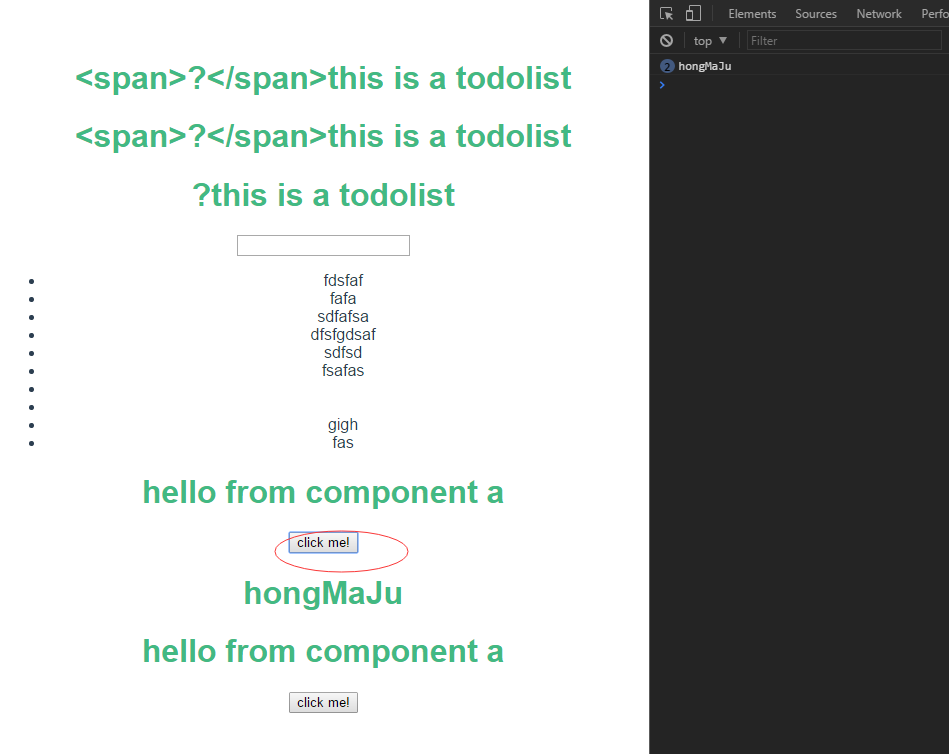
2、子组件向父组件传值
a、app.vue父组件
<template>

  <div id="app">

    <h1>{{title}}</h1>

    <h1 v-text="title"></h1>

    <h1 v-html="title"></h1>

    <input type="text" v-model="newItem" v-on:keyup.enter="addNew">

    <ul>

        <li v-for="item in items" v-bind:class="{finished:item.isFinished}" v-on:click="toggleFinish(item)">

        {{item.label}}

        </li>

    </ul>

    <p>child tells me:{{childwords}}</p>

  <componentA msgfromfather='hongMaJu' v-on:child-tell-me-something='listenToMyBoy'></componentA>

 <!--   <component-a></component-a> -->

  </div>

</template>

<script>

import Store from './Store'

import componentA from './components/componentA'

//console.log(Store)

export default {

   data () {

    return {

      title: '<span>?</span>this is a todolist',

      items:Store.fetch(),

      // items:[

      //     {

      //       label:'coding',

      //       isFinished:false

      //     },

      //     {

      //       label:'walking',

      //       isFinished:true

      //     }

      // ],

      newItem:'',

      childwords:''

    }

  },

  components:{componentA},

  watch:{

    items:{

      handler:function(items){

        // console.log(val,oldVal)

         // console.log(items);

        Store.save(items);

         // console.log(items);

      }

    },

    deep:true

  },

  methods:{

    toggleFinish:function(item){

      // console.log(item);

      item.isFinished=!item.isFinished;

      console.log(this.items);

    },

    addNew:function(){

      // this.newItem;

      // console.log(this.newItem);

      this.items.push({

        label:this.newItem,

        isFinished:false

      })

      this.newItem='';

    },

    listenToMyBoy:function(msg){

      this.childwords=msg;

    }

  }

}

</script>

<style>

.finished{

  text-decoration:underline;

}

#app {

  font-family: 'Avenir', Helvetica, Arial, sans-serif;

  -webkit-font-smoothing: antialiased;

  -moz-osx-font-smoothing: grayscale;

  text-align: center;

  color: #2c3e50;

  margin-top: 60px;

}

</style>
b、componentA.vue子组件
 <<template>

<div class="hello">

    <h1>{{msg}}</h1>

    <button v-on:click="onClickMe">click me!</button>

    <h1>{{msgfromfather}}</h1>

</div>

 </template>

 <script>

     export    default{

         data:function(){

             return{

                 msg:'hello from component a'

             }

         },

         props:['msgfromfather'],

         methods:{

             onClickMe:function(){

            // console.log(this.msgfromfather);

            this.$emit('child-tell-me-something',this.msg)

             }

         }

     }

 </script>

 <style>

h1{

    color: #42b983;

}

 </style>
c、效果


vue子父组件的通信的更多相关文章
- vue子父组件通信
之前在用vue写子父组件通信的时候,老是遇到问题!!! 子组件传值给父组件: 子组件:通过emit方法给父组件传值,这里的upparent是父组件要定义的方法 模板: <div v-on:cli ...
- Vue子父组件方法互调
讲干货,不啰嗦,大家在做vue开发过程中经常遇到父组件需要调用子组件方法或者子组件需要调用父组件的方法的情况,现做一下总结,希望对大家有所帮助. 父组件调用子组件方法: 1.设置子组件的ref,父组件 ...
- Day10-微信小程序实战-交友小程序-实现删除好友信息与子父组件间通信
回顾:上一次已经把消息的布局以及样式做好了 效果图: 在removeList.js文件中,messageId就是发起这个消息的用户了 先查看一下自定义组件的生命周期 https://developer ...
- vue --子父组件传值
1.父组件可以使用 props 把数据传给子组件. 2.子组件可以使用 $emit 触发父组件的自定义事件. vm.$emit( event, arg ) //触发当前实例上的事件 vm.$on( e ...
- vue子父组件传值
https://blog.csdn.net/weixin_38888773/article/details/81902789 https://blog.csdn.net/jsxiaoshu/artic ...
- Vue子->父组件传值
父组件引入: Import Test from'' 父页面使用: <Test ref="test" @m1="m2"><Test/> 子 ...
- Vue.js组件的通信之父组件向子父组件的通信
<!DOCTYPE html> <html lang="en"> <head> <meta charset="UTF-8&quo ...
- vue 子父组件之间的通信,及在调用组件的地方
这里是用了 element ui 你们也可以看一下管方的文档 http://element.eleme.io/#/zh-CN/component/installation 组件html <div ...
- vue之子父组件通信
一. 子-父组件间通信: let children = { # 定义子组件 template: `<div> <button @click="send"&g ...
随机推荐
- redis分布式锁小试
一.场景 项目A监听mq中的其他项目的部署消息(包括push_seq, status, environment,timestamp等),然后将部署消息同步到数据库中(项目X在对应环境[environm ...
- ACM差分约束笔记
https://www.cnblogs.com/31415926535x/p/10463112.html 很早之前学最短路的时候就看了一眼差分约束,,当时以为这种问题不怎么会出现,,而且当时为了只为了 ...
- MySQL数据库基本用法
远程连接数据库 mysql -u root -p #-u 用户名 -h后面写要连接的主机ip地址 -u后面写连接的用户名 -p回车后写密码 回车后输入密码,当前设置的密码为toor 数据库操作 创建数 ...
- 深度学习中 batchnorm 层是咋回事?
作者:Double_V_ 来源:CSDN 原文:https://blog.csdn.net/qq_25737169/article/details/79048516 版权声明:本文为博主原创文章,转载 ...
- BZOJ.3329.Xorequ(数位DP)
题目链接 x^3x=2x -> x^2x=3x 因为a^b+((a&b)<<1)=a+b,x^2x=x+2x,所以x和2x的二进制表示中不存在相邻的1. (或者,因为x+2x ...
- JVM调优总结 -Xms -Xmx -Xmn -Xss(转)
堆大小设置JVM 中最大堆大小有三方面限制:相关操作系统的数据模型(32-bt还是64-bit)限制:系统的可用虚拟内存限制:系统的可用物理内存限制.32位系统下,一般限制在1.5G~2G:64为操作 ...
- BZOJ4122 : [Baltic2015]File paths
对于在$o$点的某个询问,有两种情况: 情况1:走到任意一个点$x$然后超链接跳到$o$的某个祖先$y$再走到$o$. 枚举所有$y$看看是否存在$x$即可. 时间复杂度$O(nm)$. 情况2:走到 ...
- restful开发API
http://blog.csdn.net/kkkloveyou/article/details/21391033 小示例http://blog.csdn.net/u011645059/article/ ...
- 利用dockerfile定制镜像
利用dockerfile定制镜像 镜像的定制就是定制每一层所添加的配置.文件.如果可以吧每一层修改.安装.构建.操作的命令都写入到一个脚本,用脚本来构建.定制镜像,这个脚本就是dockerfile. ...
- iOS开发-UIView扩展CGRect
关于UIView的位置都会遇到,一般需要改变UIView的位置,需要先获取原有的frame位置,然后在frame上面修改,有的时候如果只是改变了一下垂直方向的位置,宽度和高度的一种,这种写法很麻烦.下 ...