
Vue.js学习TodoMVC小Demo
实现效果如下:
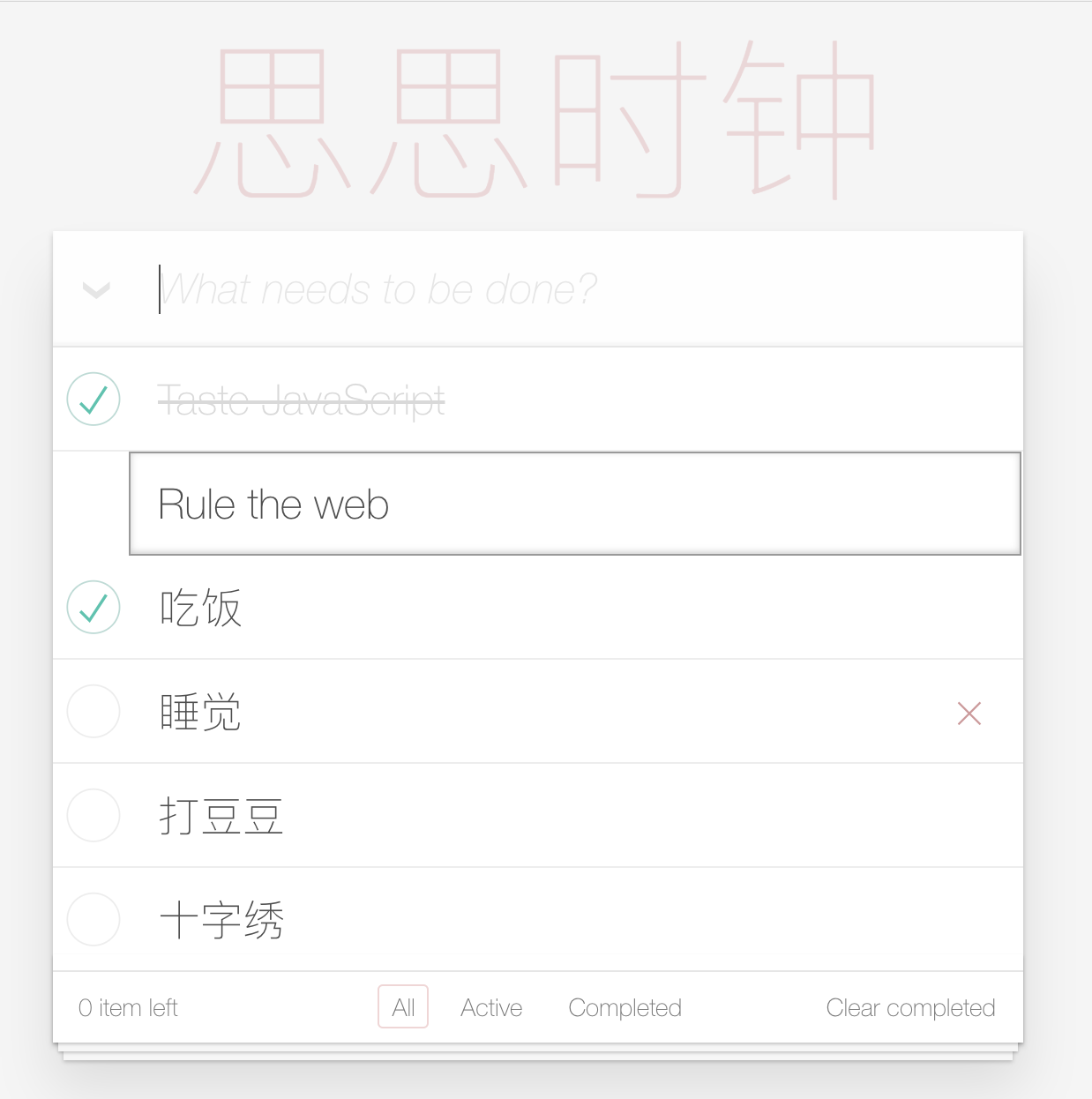
把玩了添加和删除功能,代码如下:
index.html:
<!doctype html>

<html lang="en">

    <head>

        <meta charset="utf-8">

        <meta name="viewport" content="width=device-width, initial-scale=1">

        <title>Template • TodoMVC</title>

        <link rel="stylesheet" href="node_modules/todomvc-common/base.css">

        <link rel="stylesheet" href="node_modules/todomvc-app-css/index.css">

        <!-- CSS overrides - remove if you don't need it -->

        <link rel="stylesheet" href="css/app.css">

    </head>

    <body>

        <section class="todoapp" id="app">

            <header class="header">

                <h1 v-on:click="f">{{ title }}</h1>

                <form>

                    <input @keyup.enter="add" v-model="text" class="new-todo" placeholder="What needs to be done?" autofocus>

                </form>

            </header>

            <!-- This section should be hidden by default and shown when there are todos -->

            <section class="main">

                <input id="toggle-all" class="toggle-all" type="checkbox">

                <label for="toggle-all">Mark all as complete</label>

                <ul class="todo-list">

                    <!-- These are here just to show the structure of the list items -->

                    <!-- List items should get the class `editing` when editing and `completed` when marked as completed -->

                    <li class="completed">

                        <div class="view">

                            <input class="toggle" type="checkbox" checked>

                            <label>Taste JavaScript</label>

                            <button class="destroy" ></button>

                        </div>

                        <input class="edit" value="Create a TodoMVC template">

                    </li>

                    <li class="editing">

                        <div class="view">

                            <input class="toggle" type="checkbox">

                            <label>Buy a unicorn</label>

                            <button class="destroy"></button>

                        </div>

                        <input class="edit" value="Rule the web">

                    </li>

                    <li v-for="todo in todos">

                        <div class="view">

                            <input class="toggle" type="checkbox" v-model="todo.completed">

                            <label>{{ todo.text }}</label>

                            <button class="destroy" v-on:click="destory(todo.text)"></button>

                        </div>

                        <input class="edit" value="Rule the web">

                    </li>

                </ul>

            </section>

            <!-- This footer should hidden by default and shown when there are todos -->

            <footer class="footer">

                <!-- This should be ` items left` by default -->

                <span class="todo-count"><strong></strong> item left</span>

                <!-- Remove this if you don't implement routing -->

                <ul class="filters">

                    <li>

                        <a class="selected" href="#/">All</a>

                    </li>

                    <li>

                        <a href="#/active">Active</a>

                    </li>

                    <li>

                        <a href="#/completed">Completed</a>

                    </li>

                </ul>

                <!-- Hidden if no completed items are left ↓ -->

                <button class="clear-completed">Clear completed</button>

            </footer>

        </section>

        <footer class="info">

            <p>Double-click to edit a todo</p>

            <!-- Remove the below line ↓ -->

            <p>Template by <a href="http://sindresorhus.com">Sindre Sorhus</a></p>

            <!-- Change this out with your name and url ↓ -->

            <p>Created by <a href="http://todomvc.com">you</a></p>

            <p>Part of <a href="http://todomvc.com">TodoMVC</a></p>

        </footer>

        <!-- Scripts here. Don't remove ↓ -->

        <!-- <script src="node_modules/todomvc-common/base.js"></script> -->

        <script src="node_modules/vue/dist/vue.js"></script>

        <script src="js/app.js"></script>

    </body>

</html>
app.js:
(function (window) {

    'use strict';

    // Your starting point. Enjoy the ride!

    var todos = [

        {text: '吃饭', completed: true},

        {text: '睡觉', completed: false},

        {text: '相亲', completed: true},

    ]

    new Vue({

        el: '#app',

        data: {

            title: '思思时钟',

            todos: todos,

            text: ''

        },

        methods: {

            f: function() {

                window.alert('思思,你好');

            },

            // 添加

            add: function() {

                //  在vue应用程序中的方法内部可以通过this来访问当前应用程序的上的data中的成员

                // window.alert(this.text);

                // 由于改变了数据成员,使用v-for指定的地方就会重新渲染,修改模型,就会修改视图界面

                // 修改了视图界面就会修改模型数据

                if (this.text.trim().length === ) {

                    return;

                }

                this.todos.push({

                    text: this.text,

                    completed: false

                });

                this.text = '';

            },

            // 删除

            destory: function(text) {

                // console.log(text);

                var that = this;

                this.todos.find(function(todo, index) {

                    if (todo.text === text) {

                        that.todos.splice(index, );

                    }

                });

            }

        }

    });

})(window);
对Vue突然开始产生了很大的兴趣,思思打算把玩Vue了哟,哈哈
Vue.js学习TodoMVC小Demo的更多相关文章
- 用Vue.js开发微信小程序:开源框架mpvue解析
前言 mpvue 是一款使用 Vue.js 开发微信小程序的前端框架.使用此框架,开发者将得到完整的 Vue.js 开发体验,同时为 H5 和小程序提供了代码复用的能力.如果想将 H5 项目改造为小程 ...
- vue.js学习系列-第一篇
VUE系列一 简介 vue是一个兴起的前端js库,是一个精简的MVVM.从技术角度讲,Vue.js专注于 MVVM 模型的 ViewModel 层.它通过双向数据绑定把 View 层和 Mode ...
- MPVUE - 使用vue.js开发微信小程序
MPVUE - 使用vue.js开发微信小程序 什么是mpvue? mpvue 是美团点评前端团队开源的一款使用 Vue.js 开发微信小程序的前端框架.框架提供了完整的 Vue.js 开发体验,开发 ...
- vue.js学习笔记
有了孩子之后,元旦就哪也去不了了(孩子太小),刚好利用一些时间,来公司充充电补补课,学习学习新技术,在这里做一个整理和总结.(选择的东西,既然热爱就把他做好吧!). 下来进入咱们的学习环节: 一.从H ...
- Vue.js学习笔记(2)vue-router
vue中vue-router的使用:
- vue.js 学习笔记3——TypeScript
目录 vue.js 学习笔记3--TypeScript 工具 基础类型 数组 元组 枚举 字面量 接口 类类型 类类型要素 函数 函数参数 this对象和类型 重载 迭代器 Symbol.iterat ...
- vue.js学习资料
vue.js学习VuejsAPI教程 https://vuejs.org.cn/guide/Vuejs自己的构建工具 http://www.jianshu.com/p/f8e21d87a572如何用v ...
- Vue.js学习笔记:在元素 和 template 中使用 v-if 指令
f 指令 语法比较简单,直接上代码: <!DOCTYPE HTML PUBLIC "-//W3C//DTD HTML 4.01 Transitional//EN" " ...
- vue.js学习之better-scroll封装的轮播图初始化失败
vue.js学习之better-scroll封装的轮播图初始化失败 问题一:slider组件初始化失败 原因:页面异步获取数据很慢,导致slider初始化之后,数据还未获取到,导致图片还未加载 解决方 ...
随机推荐
- vscode源码启动时需要的electron缓存位置
C:\Users\Administrator\AppData\Local\Temp\gulp-electron-cache 可以把下好的electron release直接放到这个目录,就不用重新下了 ...
- 杭电2019多校第八场 Acesrc and Good Numbers——思维打表&&oeis
题意 给定 $d,x$,$f(d,k)$ 表示 $1 \sim k$ 中 $d$ 出现的次数, $k$ 满足 $f(d,k) = k$,求小于 $x$ 的最大的 $k$. 分析 正解不会...,学习了 ...
- 013_Python3 条件控制
1.if #!/usr/bin/python3 var1 = 100 if var1: print ("1 - if 表达式条件为 true") print ( ...
- 006_Python3 数字(Number)
1. Python 数字数据类型用于存储数值. 数据类型是不允许改变的,这就意味着如果改变数字数据类型的值,将重新分配内存空间. 以下实例在变量赋值时 Number 对象将被创建: var1 = ...
- CF707D Persistent Bookcase 可持久化线段树
维护一个二维零一矩阵(n,m<=1000),支持四种操作(不超过10^5次): 将(i,j)置一 将(i,j)置零 将第i行零一反转yu 回到第K次操作前的状态 每次操作后输出全局一共有多少个一 ...
- 如何自定义 GNOME 3 桌面?
作者: Magesh Maruthamuthu 译者: LCTT 郑 | 2019-08-22 00:02 评论: 2 收藏: 1 我们收到很多来自用户的电子邮件,要我们写一篇关于 GNOME 3 ...
- List集合类
1.1: List.add方法——向集合列表中添加对象 public static void main(String[] args) { List<String> list=new Ar ...
- PHP sha1()函数
<!DOCTYPE html> <html> <body> <?php $str = "dashu"; echo sha1($str); ...
- 如何利用shell或者awk二维数组实现9x9乘法表?
第一种:利用shell for循环来实现. for i in `seq 1 9`do for j in `seq 1 9` do if [ $i -ge $j ] then echo -en &quo ...
- Python 学习随笔 - 1 - 基础数据类型、变量 及 基本运算
仅有的C语言的基础都是大学时学的: 准备赶潮流,开始学习Python. 随笔记录学习过程中,靠一点点C语言基础难以去理解的地方,以及区别于C语言的地方,做些笔记作为以后参考. Python 解释器直接 ...