
.net core 自制错误日志
前言
之前.net framework用的ErrorLog帮助类,对于监控错误形成日志,内容非常清晰,想在.net core2.2中继续用,但是有很多不一样的地方,所以想总结一下.
首先需要HttpContext,而.net core 与之前的.net framework有所不同,封装一下便于使用
建两个静态类 HttpContext
using Microsoft.AspNetCore.Http;

namespace logs

{

    public static class HttpContext

    {

        private static IHttpContextAccessor _accessor;

        public static Microsoft.AspNetCore.Http.HttpContext Current => _accessor.HttpContext;

        internal static void Configure(IHttpContextAccessor accessor)

        {

            _accessor = accessor;

        }

    }

}
using Microsoft.AspNetCore.Builder;

using Microsoft.AspNetCore.Http;

using Microsoft.Extensions.DependencyInjection;

namespace logs

{

    public static class StaticHttpContextExtensions

    {

        public static void AddHttpContextAccessor(this IServiceCollection services)

        {

            services.AddSingleton<IHttpContextAccessor, HttpContextAccessor>();

        }

        public static IApplicationBuilder UseStaticHttpContext(this IApplicationBuilder app)

        {

            var httpContextAccessor = app.ApplicationServices.GetRequiredService<IHttpContextAccessor>();

            HttpContext.Configure(httpContextAccessor);

            return app;

        }

    }

}
在Startup.cs中注入
 public void ConfigureServices(IServiceCollection services)

        {

            services.Configure<CookiePolicyOptions>(options =>

            {

                // This lambda determines whether user consent for non-essential cookies is needed for a given request.

                options.CheckConsentNeeded = context => true;

                options.MinimumSameSitePolicy = SameSiteMode.None;

            });

            services.AddMvc().SetCompatibilityVersion(CompatibilityVersion.Version_2_2);

            //DI 注入

            services.AddHttpContextAccessor();

        }
新建一个ErrorLog类
using System;

using System.IO;

namespace logs

{

    public class ErrorLog

    {

        public static void WriteLog(Exception ex)

        {

            //读取二级

            var logsPath=AppConfigurtaionServices.Configuration["Path:LogsPath"];

            string errorTime = "异常时间:" + DateTime.Now.ToString();

            string errorAddress = "异常地址:" + HttpContext.Current.Request.Scheme.ToString()+"://"+ HttpContext.Current.Request.Host.ToString()+ HttpContext.Current.Request.Path.ToString();

            string errorInfo = "异常信息:" + ex.Message;

            string errorSource = "错误源:" + ex.Source;

            string errorType = "运行类型:" + ex.GetType();

            string errorFunction = "异常函数:" + ex.TargetSite;

            string errorTrace = "堆栈信息:" + ex.StackTrace;

            //HttpContext.Current.Server.ClearError();

            System.IO.StreamWriter writer = null;

            try

            {

                //写入日志

                string path = string.Empty;

               path= System.AppDomain.CurrentDomain.BaseDirectory.ToString()+ logsPath;

                //path = HttpContext.Current.Server.MapPath("~/ErrorLogs/");

                //不存在则创建错误日志文件夹

                if (!Directory.Exists(path))

                {

                    Directory.CreateDirectory(path);

                }

                path += string.Format(@"\{0}.txt", DateTime.Now.ToString("yyyy-MM-dd"));

                writer = !System.IO.File.Exists(path) ? System.IO.File.CreateText(path) : System.IO.File.AppendText(path); //判断文件是否存在,如果不存在则创建,存在则添加

                writer.WriteLine("用户IP:" + HttpContext.Current.Connection.RemoteIpAddress.ToString());

                writer.WriteLine(errorTime);

                writer.WriteLine(errorAddress);

                writer.WriteLine(errorInfo);

                writer.WriteLine(errorSource);

                writer.WriteLine(errorType);

                writer.WriteLine(errorFunction);

                writer.WriteLine(errorTrace);

                writer.WriteLine("********************************************************************************************");

            }

            finally

            {

                if (writer != null)

                {

                    writer.Close();

                }

            }

        }

    }

}
新建控制器测试
        public IActionResult Index()

        {

            try

            {

                var b = 0;

                int a = 10 / b;

            }

            catch (Exception ex)

            {

              ErrorLog.WriteLog(ex);

            }

            return View();

        }
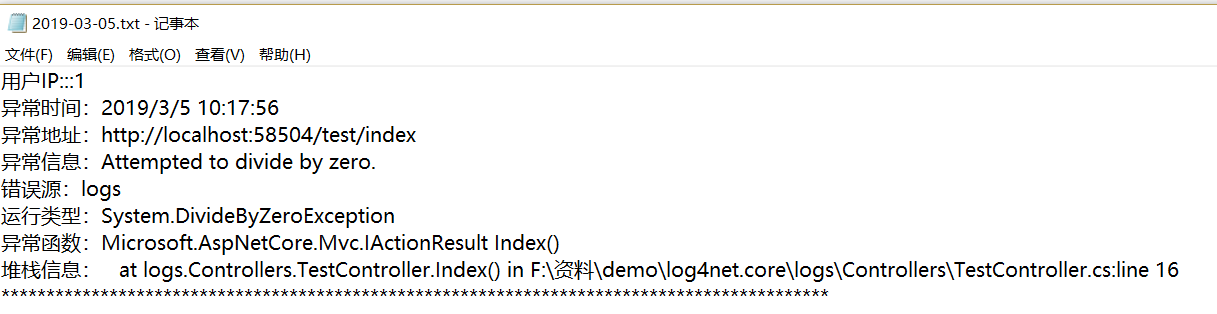
新建视图运行,在\bin\Debug\netcoreapp2.2\下创建logs文件夹与日期命名的txt文件 结果如下
最后 安利一个特别棒的appsetting读取类
using System;

using System.Collections.Generic;

using System.Linq;

using System.Threading.Tasks;

namespace logs

{

    using Microsoft.Extensions.Configuration;

    using Microsoft.Extensions.Configuration.Json;

    /// <summary>

    /// 读取appsetting.json

    /// </summary>

    public class AppConfigurtaionServices

    {

        public static IConfiguration Configuration { get; set; }

        static AppConfigurtaionServices()

        {

            //ReloadOnChange = true 当appsettings.json被修改时重新加载

            Configuration = new ConfigurationBuilder()

            .Add(new JsonConfigurationSource { Path = "appsettings.json", ReloadOnChange = true })

            .Build();

        }

    }

}
         //调用

        // AppConfigurtaionServices.Configuration.GetConnectionString("conn");

        //读取一级

        // AppConfigurtaionServices.Configuration["str"];

        //读取二级

        // AppConfigurtaionServices.Configuration["Path:LogsPath"];

        //注意,如果AppConfigurtaionServices类中抛出FileNotFoundException异常,说明目录下未找到appsettings.json文件,这时请在项目appsettings.json文件上右键——属性——将“复制到输出目录”项的值改为“如果较新则复制”即可。
.net core 自制错误日志的更多相关文章
- .Net Core中间件和过滤器实现错误日志记录
1.中间件的概念 ASP.NET Core的处理流程是一个管道,中间件是组装到应用程序管道中用来处理请求和响应的组件. 每个中间件可以: 选择是否将请求传递给管道中的下一个组件. 可以在调用管道中的下 ...
- 解决Apache的错误日志巨大的问题以及关闭Apache web日志记录
调整错误日志的级别 这几天 apache错误日志巨大 莫名其妙的30G 而且 很多都是那种页面不存在的 网站太多了 死链接相应的也很多于是把错误警告调低了 因为写日志会给系统带来很大的损耗.关闭 ...
- centos7下,解决Apache错误日志文件过大问题
1,日志文件太大问题 第一步:停止Apache服务的所有进程,删除 /var/log/httpd目录下的 error.log.access.log文件 第二步:打开 /etc/httpd/conf ...
- ASP.NET Core 异常处理与日志记录
1. ASP.NET Core 异常处理与日志记录 1.1. 异常处理 1.1.1. 异常产生的原因及处理 1.1.2. ASP.NET Core中启动开发人员异常页面 1.2. 日志记录 1.2.1 ...
- 玩转ASP.NET Core中的日志组件
简介 日志组件,作为程序员使用频率最高的组件,给程序员开发调试程序提供了必要的信息.ASP.NET Core中内置了一个通用日志接口ILogger,并实现了多种内置的日志提供器,例如 Console ...
- asp.net core 系列 13 日志
一.概述 ASP.NET Core 支持适用于各种内置和第三方日志记录, 供程序的日志记录 API,本文介绍了如何将日志记录 API 与内置提供程序一起使用.对于第三方日志记录提供程序使用,文章最后有 ...
- WebForm应用log4net记录错误日志——使用线程列队写入
我的项目结构如下图: 日志帮助类库需要log4net包:工具—NuGet包管理器—管理解决方案NuGet程序包 线程日志帮助类 FlashLogger.cs 代码 using System; usin ...
- Nginx错误日志与优化专题
一.Nginx配置和内核优化 实现突破十万并发 二.一次Nignx的502页面的错误记录 (1)错误页面显示 错误日志: // :: [error] #: * recv() failed (: Con ...
- php源码建博客5--建库建表-配置文件-错误日志
主要: 整理框架 建库建表 配置文件类 错误日志记录 --------------本篇后文件结构:-------------------------------------- blog ├─App │ ...
随机推荐
- 「小程序JAVA实战」小程序视频组件与api介绍(51)
转自:https://idig8.com/2018/09/22/xiaochengxujavashizhanxiaochengxushipinzujianyuapijieshao50/ 这次说下,小程 ...
- Lazy JSF Primefaces Datatable Pagination
http://www.javacodegeeks.com/2012/04/lazy-jsf-primefaces-datatable.html
- How do I list subversion repository's ignore settings
If it is Windows and you are using TortoiseSVN, then right-click on a folder of the working copy, go ...
- Java调用SQL Server的存储过程详解
转载自Microsoft的官方文档 http://msdn2.microsoft.com/zh-cn/library/ms378995.aspx收录于 www.enjoyjava.net/f25 本文 ...
- 基于jquery-ui及bootstrap的可拖拽模态框
可直接使用代码 <!DOCTYPE html> <html> <head> <meta charset="UTF-8"> <t ...
- JSP中系统Date的几点不符合中国时间观的地方
正常调用系统时间的显示格式是Date date = new Date 显示出来的当前时间为Sun Nov 22 18:39:51 CST 2015 星期天的英文单词是Sun, 这个大家都是熟悉的, 这 ...
- sqlconnection dispose()与close()的区别
区别: IDispose接口可以通过Using关键字实现使用后立刻销毁,因此,Dispose适合只在方法中调用一次SqlConnection对象,而Close更适合SqlConnection在关闭后可 ...
- 基于Dcoker的ZooKeeper集群的搭建
背景 原来学习 ZK 时, 我是在本地搭建的伪集群, 虽然说使用起来没有什么问题, 但是总感觉部署起来有点麻烦. 刚好我发现了 ZK 已经有了 Docker 的镜像了, 于是就尝试了一下, 发现真是爽 ...
- 11-基于dev的bug(还没想通)
十六进制转八进制 http://lx.lanqiao.cn/problem.page?gpid=T51 问题描述 给定n个十六进制正整数,输出它们对应的八进制数. 输入格式 输入的第一行为一个正整数n ...
- Visual Studio2017 设置了vcpkg之后,编译其他程序出问题
博客参考:https://github.com/nodejs/node/issues/23909 错误如下 LNK2005 _SSL_CTX_check_private_key already def ...