
C# 模拟浏览器并自动操作
本文主要讲解通过WebBrowser控件打开浏览页面,并操作页面元素实现自动搜索功能,仅供学习分享使用,如有不足之处,还请指正。
涉及知识点
- WebBrowser:用于在WinForm窗体中,模拟浏览器,打开并导航网页。
- HtmlDocument:表示一个Html文档的页面。每次加载都会是一个全新的页面。
- GetElementById(string id):通过ID或Name获取一个Html中的元素。
- HtmlElement:表示一个Html标签元素。
- BackgroundWorker 后台执行独立操作的进程。
设计思路
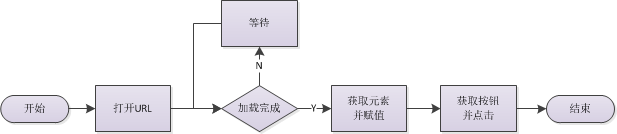
主要采用异步等待的方式,等待页面加载完成,流程如下所示:
示例效果图
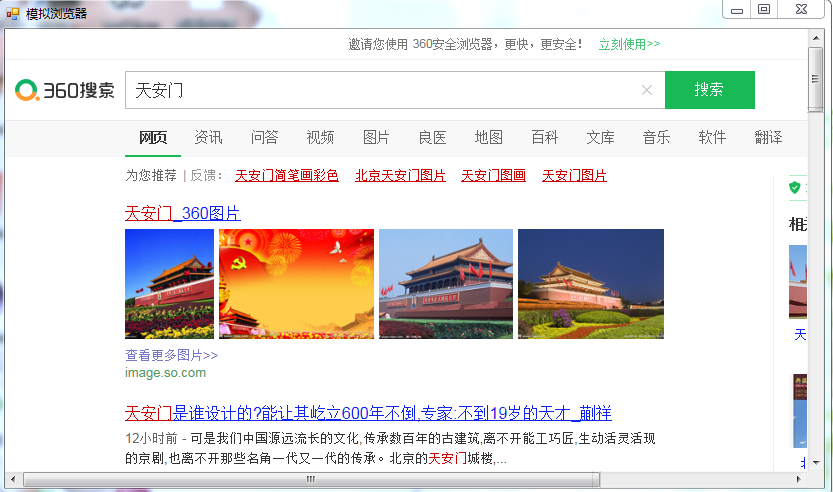
如下所示:加载完成后,自动输入【天安门】并点击搜索。
核心代码
加载新的页面,如下所示:
 string url = "https://www.so.com/";

 this.wb01.ScriptErrorsSuppressed = true;

 this.wb01.Navigate(url);
注意:this.wb01.ScriptErrorsSuppressed = true;用于是否弹出异常脚本代码错误框
获取元素并赋值,如下所示:
 string search_id = "input";

 string search_value = "天安门";

 string btn_id = "search-button";

 HtmlDocument doc = this.wb01.Document;

 HtmlElement search = doc.GetElementById(search_id);

 search.SetAttribute("value", search_value);

 HtmlElement btn = doc.GetElementById(btn_id);

 btn.InvokeMember("click");
示例整体代码,如下所示:
 using System;

 using System.Collections.Generic;

 using System.ComponentModel;

 using System.Data;

 using System.Drawing;

 using System.Linq;

 using System.Text;

 using System.Threading;

 using System.Threading.Tasks;

 using System.Windows.Forms;

 namespace DemoExplorer

 {

     public partial class FrmExplorer : Form

     {

         private bool isLoadOk = false;

         private BackgroundWorker bgWork;

         public FrmExplorer()

         {

             InitializeComponent();

         }

         private void FrmExplorer_Load(object sender, EventArgs e)

         {

             bgWork = new BackgroundWorker();

             bgWork.DoWork += bgWork_DoWork;

             bgWork.RunWorkerCompleted += bgWork_RunWorkerCompleted;

             string url = "https://www.so.com/";

             this.wb01.ScriptErrorsSuppressed = true;

             this.wb01.Navigate(url);

             bgWork.RunWorkerAsync();

         }

         private void bgWork_RunWorkerCompleted(object sender, RunWorkerCompletedEventArgs e)

         {

             string search_id = "input";

             string search_value = "天安门";

             string btn_id = "search-button";

             HtmlDocument doc = this.wb01.Document;

             HtmlElement search = doc.GetElementById(search_id);

             search.SetAttribute("value", search_value);

             HtmlElement btn = doc.GetElementById(btn_id);

             btn.InvokeMember("click");

         }

         private void bgWork_DoWork(object sender, DoWorkEventArgs e)

         {

             compWait();

         }

         private void compWait()

         {

             while (!isLoadOk)

             {

                 Thread.Sleep();

             }

         }

         private void wb01_DocumentCompleted(object sender, WebBrowserDocumentCompletedEventArgs e)

         {

             this.wb01.Document.Window.Error += new HtmlElementErrorEventHandler(Window_Error);

             if (this.wb01.ReadyState == WebBrowserReadyState.Complete)

             {

                 isLoadOk = true;

             }

             else

             {

                 isLoadOk = false;

             }

         }

         private void Window_Error(object sender, HtmlElementErrorEventArgs e)

         {

             e.Handled = true;

         }

     }

 }
另外一种实现方式(MSHTML)
什么是MSHTML?
MSHTML是windows提供的用于操作IE浏览器的一个COM组件,该组件封装了HTML语言中的所有元素及其属性,通过其提供的标准接口,可以访问指定网页的所有元素。
涉及知识点
InternetExplorer 浏览器对象接口,其中DocumentComplete是文档加载完成事件。
HTMLDocumentClass Html文档对象类,用于获取页面元素。
IHTMLElement 获取页面元素,通过setAttribute设置属性值,和click()触发事件。
示例核心代码
如下所示:
 1 namespace AutoGas

 2 {

 3     public class Program

 4     {

 5         private static bool isLoad = false;

 6

 7         public static void Main(string[] args)

 8         {

 9             string logUrl = ConfigurationManager.AppSettings["logUrl"]; //登录Url

10             string uid = ConfigurationManager.AppSettings["uid"];//用户名ID

11             string pid = ConfigurationManager.AppSettings["pid"];//密码ID

12             string btnid = ConfigurationManager.AppSettings["btnid"];//按钮ID

13             string uvalue = ConfigurationManager.AppSettings["uvalue"];//用户名

14             string pvalue = ConfigurationManager.AppSettings["pvalue"];//密码

15             InternetExplorer ie = new InternetExplorerClass();

16             ie.DocumentComplete += Ie_DocumentComplete;

17             object c = null;

18             ie.Visible = true;

19             ie.Navigate(logUrl, ref c, ref c, ref c, ref c);

20             ie.FullScreen = true;

21

22             compWait();

23             try

24             {

25                 HTMLDocumentClass doc = (HTMLDocumentClass)ie.Document;

26                 IHTMLElement username = doc.getElementById(uid);

27                 IHTMLElement password = doc.getElementById(pid);

28                 IHTMLElement btn = doc.getElementById(btnid);

29                 //如果有session,则自动登录,不需要输入账号密码

30                 if (username != null && password != null && btn != null)

31                 {

32                     username.setAttribute("value", uvalue);

33                     password.setAttribute("value", pvalue);

34                     btn.click();

35                 }

36             }

37             catch (Exception ex) {

38

39             }

40         }

41

42         public static void compWait() {

43             while (!isLoad)

44             {

45                 Thread.Sleep(200);

46             }

47         }

48

49         /// <summary>

50         ///

51         /// </summary>

52         /// <param name="pDisp"></param>

53         /// <param name="URL"></param>

54         private static void Ie_DocumentComplete(object pDisp, ref object URL)

55         {

56             isLoad = true;

57         }

58     }

59 }
备注
所谓的坚持,不过是每天努力一点点!!!
C# 模拟浏览器并自动操作的更多相关文章
- Python模拟浏览器前进后退操作
# 模拟浏览器前进后退操作 # 代码中引入selenium版本为:3.4.3 # 通过Chrom浏览器访问发起请求 # Chrom版本:59 ,chromdriver:2.3 # 需要对应版本的Chr ...
- splinter python浏览器自动化操作,模拟浏览器的行为
Splinter可以非常棒的模拟浏览器的行为,Splinter提供了丰富的API,可以获取页面的信息判断当前的行为所产生的结果 最近在研究网站自动登录的问题,涉及到需要实现浏览器自动化操作,网上有 ...
- 浏览器与服务器交互原理以及用java模拟浏览器操作v
浏览器应用服务器JavaPHPApache * 1,在HTTP的WEB应用中, 应用客户端和服务器之间的状态是通过Session来维持的, 而Session的本质就是Cookie, * 简单的讲,当浏 ...
- 孤荷凌寒自学python第八十五天配置selenium并进行模拟浏览器操作1
孤荷凌寒自学python第八十五天配置selenium并进行模拟浏览器操作1 (完整学习过程屏幕记录视频地址在文末) 要模拟进行浏览器操作,只用requests是不行的,因此今天了解到有专门的解决方案 ...
- python下selenium模拟浏览器基础操作
1.安装及下载 selenium安装: pip install selenium 即可自动安装selenium geckodriver下载:https://github.com/mozilla/ge ...
- casperjs配合phantomjs实现自动登录百度,模拟点击等等操作 - 怕虎在线www.ipahoo.com图文教程 - 怕虎在线
微信支付取消2万元保证金门槛,这是全民电商来袭!-观点-虎嗅网 微信支付取消2万元保证金门槛,这是全民电商来袭! casperjs配合phantomjs实现自动登录百度,模拟点击等等操作 - 怕虎在线 ...
- python3 scrapy 使用selenium 模拟浏览器操作
零. 在用scrapy爬取数据中,有写是通过js返回的数据,如果我们每个都要获取,那就会相当麻烦,而且查看源码也看不到数据的,所以能不能像浏览器一样去操作他呢? 所以有了-> Selenium ...
- php中curl模拟浏览器来传输数据
cURL可以使用URL的语法模拟浏览器来传输数据, 因为它是模拟浏览器,因此它同样支持多种协议,FTP, FTPS, HTTP, HTTPS, GOPHER, TELNET, DICT, FILE 以 ...
- 【Python】 Selenium 模拟浏览器 寻路
selenium 最开始我碰到SE,是上学期期末,我们那个商务小组做田野调查时发的问卷的事情.当时在问卷星上发了个问卷,但是当时我对另外几个组员的做法颇有微词,又恰好开始学一些软件知识了,就想恶作剧( ...
随机推荐
- Flex调用JavaScript获取文件路径
Flex的Web中有FileReference的类可以对文件操作,实现上传.下载的功能,但是没有办法获取到文件的路径. 普遍的方法是Flex调用JavaScript的文件浏览功能来获取文件路径. 1. ...
- Linux安装redis数据库
这几天在搞redis数据库,花了好大功夫,才成功安装在Linux上,这里将自己的安装步骤分享出来,同时也做个记录,备忘. 新人一枚,不对之处,请多指教! 首先登陆Linux服务器 Linux里,我习惯 ...
- <<代码大全>>阅读笔记之一 使用变量的一般事项
一.使用变量的一般事项 1.把变量引用局部化 变量应用局部化就是把变量的引用点尽可能集中在一起,这样做的目的是增加代码的可读性 衡量不同引用点靠近程度的一种方法是计算该变量的跨度(span) 示例 a ...
- 解析深度学习 语音识别实践 pdf下载
链接:https://pan.baidu.com/s/1jd8_2nbz6M9e20lI3JdVGA 密码:1ikc 我从别人那里买的!可以友情赞助资瓷!
- MySql 表索引设计原则
索引的优点 1.加快数据的检索速度,这是创建索引的最主要的原因; 2.通过创建唯一性索引,可以保证数据库表中每一行数据的唯一性; 3.加速表和表之间的连接; 4.在使用分组和排序子句进行数据检索时,可 ...
- 实战webpack系列04
04. 一切皆模块 Webpack有一个不可不说的优点,它把所有的文件都都当做模块处理,JavaScript代码,CSS和fonts以及图片等等通过合适的loader都可以被处理. 一.CSS 继续上 ...
- 【Android - 自定义View】之MeasureSpec简介
MeasureSpec是View测量过程中的一个重要的类,它被用来将View的尺寸规格(SpecSize)和尺寸模式(SpecMode)封装在一起,并提供打包和解包的方法. MeasureSpec虽然 ...
- tp5判断多模块下访问PC端和手机端
现在很多网站的手机端和PC端都是分开的模块,这是问题就来了,有些手机端的用户输入了PC端的网址,直接访问了PC端.下面我教大家如何实现手机端用户访问PC时,跳转回手机端. 解决方法:把下面的代码放到公 ...
- 基于webpack实现多html页面开发框架四 自动写入多入口,自动插入多个htmlWebpackPlugin插件
一.解决什么问题 1.手写页面多入口,一个一个输入太麻烦,通过代码实现 2.手写多个htmlWebpackPlugin插件太麻烦,通过代码实现 二.多入口代码实现 //读取所有.j ...
- luogu P2345 奶牛集会 |排序+树状数组
题目描述 约翰的N 头奶牛每年都会参加"哞哞大会".哞哞大会是奶牛界的盛事.集会上的活动很多,比如堆干草,跨栅栏,摸牛仔的屁股等等.它们参加活动时会聚在一起,第i 头奶牛的坐标为X ...