
Call to undefined function imagecreatefromjpeg() 让GD支持JPEG格式的图片扩展
安装扩展支持jpeg格式:
第一步:首先下载文件:

版本v8:

wget http://www.ijg.org/files/jpegsrc.v8b.tar.gz

版本v9:

wget http://www.ijg.org/files/jpegsrc.v9c.tar.gz

把jpeg安装到home目录:

./configure --prefix=/home/jpeg --enable-shared --enable-static

make && make install

第二步:安装到配置文件中

、找到php 源码目录

cd /home/ubuntu/downphp/php-7.0.

、进入 ext/gd 目录

cd /home/ubuntu/downphp/php-7.0./ext/gd

、执行命令:/home/php/bin/phpize

[root@daokr gd]#/home/php/bin/phpize

Configuring for:

PHP Api Version:

Zend Module Api No:

Zend Extension Api No:

、注意 with-freetype-dir 路径必须加载否则报错

./configure --with-php-config=/home/php/bin/php-config --with-jpeg-dir=/home/jpeg --with-freetype-dir=/usr/local/include/freetype2

、make && make install

、重启 httpd

如果上面的步骤解决不了那就重新安装php吧:

记得把
--with-jpeg-dir=/home/jpeg 加上
重新安装phpconfig
./configure --prefix=/home/php --with-config-file-path=/home/php/etc --with-fpm-user=ubuntu --with-fpm-group=ubuntu --with-pdo-mysql --with-openssl --with-pear --with-mhash --with-xmlrpc --with-zlib --with-mcrypt --with-curl --with-jpeg-dir=/home/jpeg --with-gd --with-freetype-dir=/usr/local/include/freetype2 --without-sqlite3 --without-pdo-sqlite --disable-rpath --without-pear --enable-fpm --enable-maintainer-zts --enable-pcntl --with-tsrm-pthreads --enable-mbstring --enable-mbregex --enable-bcmath --enable-zip --enable-sockets --enable-soap --enable-gd-native-ttf --enable-xml --enable-inline-optimization --enable-mysqlnd --with-mysqli=mysqlnd --with-pdo-mysql=mysqlnd
liconv close 错误解决:vim MakeFile
EXTRA_LIBS = -lcrypt -lz -lresolv -lcrypt -lmcrypt -lltdl -lpng -lz -ljpeg -lcurl -lz -lrt -lm -ldl -lnsl -lxml2 -lssl -lcrypto -lcurl -lxml2 -lssl -lcrypto -lfreetype -lxml2 -lxml2 -lcrypt -lxml2 -lxml2 -lxml2 -lxml2 -lssl -lcrypto -lcrypt -liconv

这个版本不能用imagecreatefromjpeg:
Warning: imagecreatefromjpeg(): gd-jpeg: JPEG library reports unrecoverable
为啥呢;百度了半天没解决最后还是重新编译php安装了。
最终还是重新编译了PHP配置
./configure --prefix=/home/php --with-config-file-path=/home/php/etc --with-fpm-user=ubuntu --with-fpm-group=ubuntu --with-pdo-mysql --with-openssl --with-pear --with-mhash --with-xmlrpc --with-zlib --with-mcrypt --with-curl --with-jpeg-dir --with-png-dir --with-gd --with-freetype-dir=/usr/local/include/freetype2 --without-sqlite3 --without-pdo-sqlite --disable-rpath --without-pear --enable-fpm --enable-maintainer-zts --enable-pcntl --with-tsrm-pthreads --enable-mbstring --enable-mbregex --enable-bcmath --enable-zip --enable-sockets --enable-soap --enable-gd-native-ttf --enable-xml --enable-inline-optimization --enable-mysqlnd --with-mysqli=mysqlnd --with-pdo-mysql=mysqlnd --enable-ftp --with-gettext --enable-opcache
$f = 'uploads/face/010/00/00/2296f8b53a3324e528ff37cba61cb14f_240_240.jpg';

var_dump(getImageSize($f));

$a = imagecreatefromjpeg($f);

var_dump($a);die;
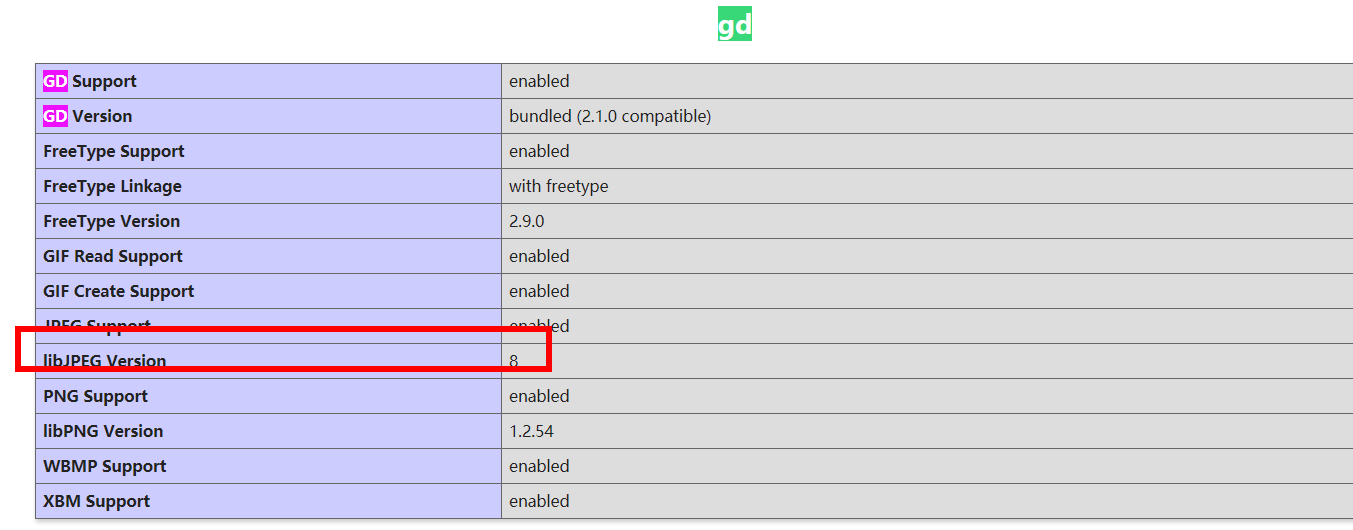
成功输出:

Call to undefined function imagecreatefromjpeg() 让GD支持JPEG格式的图片扩展的更多相关文章
- 一般源码安装添加的GD库 是不支持 jpeg 格式的图片的
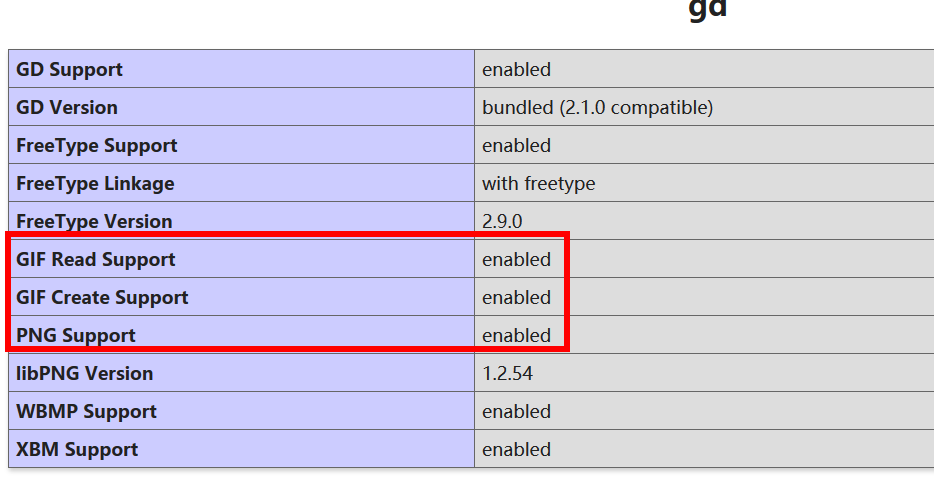
一般源码安装添加的GD库 是不支持 jpeg 格式的图片的,只支持如下格式 GD Support enabled GD Version bundled (2.0.34 compatible) GIF ...
- 火狐不支持webp格式的图片
<!DOCTYPE html> <html lang="en"> <style> ul{list-style: none;} li{float: ...
- 超图不支持JPEG格式的WMTS服务
就目前面而言,超图不支持JPEG格式的WMTS服务,只支持PNG格式的. <本篇完>
- Linux下php+imagemagick支持webp格式的图片
摘要 ImageMagick是一款功能强大的图片处理工具包,很多互联网应用中都会涉及到图片处理工作,比如切割.缩放.水印.格式转换等.ImageMagick就是一个理想的工具包. 安装基础依赖 先检查 ...
- gd库不支持jpeg的解决方法
杜工就不在这里啰嗦怎么遇到这个问题的了,如果你确实安装了的gd库,却发现无法支持jpeg格式的图片,可从下面找到答案. 原因是在编译gd库前,配置时未声明jpeg库路径.解决方法如下: 32位系统: ...
- 在已经编译安装好php7场景下,install gd库 with free-type (解决Call to undefined function imagettftext())
在已经编译安装好php7场景下,install gd库 with free-type (解决Call to undefined function imagettftext()) install g ...
- php重新编译,gd扩展支持jpeg文件
晚上写东西的时候,报了一个错误: Call to undefined function imagecreatefromjpeg() 没有开启 jpeg 支持?原来是默认安装的 gd 扩展默认不支持 j ...
- php命令行运行出现错误Call to undefined function curl_init()
在windows命令行窗口下运行php命令,需要将php.exe所在的路径添加到Path环境变量,例如C:\wamp\bin\php\php5.4.3 启动Apache服务 在命令行中输入php te ...
- Call to undefined function think\finfo_open() 报错 解决方法
Call to undefined function think\finfo_open() 经过各方面排查,是fileinfo扩展没有安装 安装即可
随机推荐
- Partition5:Partiton Scheme是否指定Next Used?
在SQL Server中,为Partition Scheme多次指定Next Used,不会出错,最后一次指定的FileGroup是Partition Scheme的Next Used,建议,在执行P ...
- 线程池及Executor框架
1.为什么要使用线程池? 诸如 Web 服务器.数据库服务器.文件服务器或邮件服务器之类的许多服务器应用程序都面向处理来自某些远程来源的大量短小的任务.请求以某种方式到达服务器,这种方式可能是通过 ...
- .Net Core WepApi-JWT认证
JWT 介绍 JWT(Json Web Token)是一种开放标准,已Json对象的方式在各方之间安全地传输信息 JWT登陆状态不在服务器端进行存储,而是通过秘钥生成一个具有有效时间的Token返回给 ...
- Centos复制的系统无法获取IP地址
本文主要是解决自己玩虚拟机时遇到的问题,网上查询了很多资料,最好综合多方的资料进行如下总结,如果无法解决您得问题,不要着急慢慢梳理总会解决的,加油~~~ 1.添加一块新的虚拟机的网卡2.删除rm -r ...
- js中console.info的使用
语法:console.info(obj1 [, obj2, ..., objN]);console.info(msg [, subst1, ..., substN]); 参数obj1 ... objN ...
- 珠宝juelrye宝石
juelrye n.珠宝 late 14c., juelrye "precious ornaments, jewel juelrye (uncountable) Adornment with ...
- SpringCloud之服务注册与发现Eureka+客户端Feign
前言 SpringCloud 是微服务中的翘楚,最佳的落地方案. Eureka 作为注册中心,是 SpringCloud 体系中最重要最核心的组件之一. Feign 使用接口加注解的方式调用服务,配合 ...
- Python学习日记(三十一) 黏包问题
import subprocess res = subprocess.Popen('dir',shell=True,stdout=subprocess.PIPE,stderr=subprocess.P ...
- Java Excel报表导出Demo
/** * 一级权限数据导出 * @return */ @RequestMapping(value = "/getExportData", method = RequestMeth ...
- USB之设备插入波形变化2
============= 本系列参考 ============= <圈圈教你玩USB>.<Linux那些事儿之我是USB> 协议文档:https://www.usb.or ...