
Redis入门教程:特性及数据类型的操作
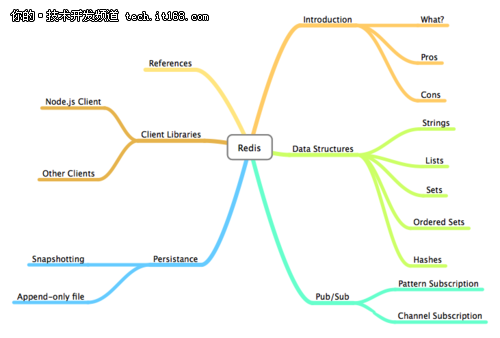
虽然Redis已经很火了,相信还是有很多同学对Redis只是有所听闻或者了解并不全面,下面是一个比较系统的Redis介绍,对Redis的特性及各种数据类型及操作进行了介绍。是一个很不错的Redis入门教程。
一、介绍
1、Redis是什么
REmote DIctionary Server(Redis) 是一个由Salvatore Sanfilippo写的key-value存储系统。Redis提供了一些丰富的数据结构,包括 lists, sets, ordered sets 以及 hashes ,当然还有和Memcached一样的 strings结构.Redis当然还包括了对这些数据结构的丰富操作。
2、Redis的优点
性能极高 – Redis能支持超过 100K+ 每秒的读写频率。
丰富的数据类型 – Redis支持二进制案例的 Strings, Lists, Hashes, Sets 及 Ordered Sets 数据类型操作。
原子 – Redis的所有操作都是原子性的,同时Redis还支持对几个操作全并后的原子性执行。
丰富的特性 – Redis还支持 publish/subscribe, 通知, key 过期等等特性。
二、数据类型
1、String类型
Redis能存储二进制安全的字符串,最大长度为1GB
OK
redis 127.0.0.1:6379> GET name
"John Doe"
String类型还支持批量的读写操作
OK
redis 127.0.0.1:6379> MGET age sex
1) "30"
2) "male"
String类型其实也可以用来存储数字,并支持对数字的加减操作。
(integer) 31
redis 127.0.0.1:6379> INCRBY age 4
(integer) 35
redis 127.0.0.1:6379> GET age
"35"
redis 127.0.0.1:6379> DECR age
(integer) 34
redis 127.0.0.1:6379> DECRBY age 4
(integer) 30
redis 127.0.0.1:6379> GET age
"30"
String类型还支持对其部分的修改和获取操作
(integer) 12
redis 127.0.0.1:6379> GET name
"John Doe Mr."
redis 127.0.0.1:6379> STRLEN name
(integer) 12
redis 127.0.0.1:6379> SUBSTR name 0 3
"John"
2、List类型
Redis能够将数据存储成一个链表,并能对这个链表进行丰富的操作:
(integer) 1
redis 127.0.0.1:6379> LPUSH students "Captain Kirk"
(integer) 2
redis 127.0.0.1:6379> LPUSH students "Sheldon Cooper"
(integer) 3
redis 127.0.0.1:6379> LLEN students
(integer) 3
redis 127.0.0.1:6379> LRANGE students 0 2
1) "Sheldon Cooper"
2) "Captain Kirk"
3) "John Doe"
redis 127.0.0.1:6379> LPOP students
"Sheldon Cooper"
redis 127.0.0.1:6379> LLEN students
(integer) 2
redis 127.0.0.1:6379> LRANGE students 0 1
1) "Captain Kirk"
2) "John Doe"
redis 127.0.0.1:6379> LREM students 1 "John Doe"
(integer) 1
redis 127.0.0.1:6379> LLEN students
(integer) 1
redis 127.0.0.1:6379> LRANGE students 0 0
1) "Captain Kirk"
Redis也支持很多修改操作:
(integer) 3
redis 127.0.0.1:6379> LRANGE students 0 2
1) "Dexter Morgan"
2) "Captain Kirk"
3) "John Doe"
redis 127.0.0.1:6379> LPUSH students "Peter Parker"
(integer) 4
redis 127.0.0.1:6379> LRANGE students 0 3
1) "Peter Parker"
2) "Dexter Morgan"
3) "Captain Kirk"
4) "John Doe"
redis 127.0.0.1:6379> LTRIM students 1 3
OK
redis 127.0.0.1:6379> LLEN students
(integer) 3
redis 127.0.0.1:6379> LRANGE students 0 2
1) "Dexter Morgan"
2) "Captain Kirk"
3) "John Doe"
redis 127.0.0.1:6379> LREM students 1 "John Doe"
(integer) 1
redis 127.0.0.1:6379> LLEN students
(integer) 1
redis 127.0.0.1:6379> LRANGE students 0 1
1) "Captain Kirk"
、集合(Sets)类型
Redis能够将一系列不重复的值存储成一个集合:
(integer) 1
redis 127.0.0.1:6379> SADD birds pigeon
(integer) 1
redis 127.0.0.1:6379> SADD birds bat
(integer) 1
redis 127.0.0.1:6379> SADD mammals dog
(integer) 1
redis 127.0.0.1:6379> SADD mammals cat
(integer) 1
redis 127.0.0.1:6379> SADD mammals bat
(integer) 1
redis 127.0.0.1:6379> SMEMBERS birds
1) "bat"
2) "crow"
3) "pigeon"
redis 127.0.0.1:6379> SMEMBERS mammals
1) "bat"
2) "cat"
3) "dog"
Sets结构也支持相应的修改操作:
(integer) 1
redis 127.0.0.1:6379> SMEMBERS mammals
1) "bat"
2) "dog"
redis 127.0.0.1:6379> SADD mammals human
(integer) 1
redis 127.0.0.1:6379> SMEMBERS mammals
1) "bat"
2) "human"
3) "dog"
Redis还支持对集合的子交并补等操作:
1) "bat"
redis 127.0.0.1:6379> SUNION birds mammals
1) "crow"
2) "bat"
3) "human"
4) "pigeon"
5) "dog"
redis 127.0.0.1:6379> SDIFF birds mammals
1) "crow"
2) "pigeon"
4、有序集合(Sorted Sets)类型
Sorted Sets和Sets结构相似,不同的是存在Sorted Sets中的数据会有一个score属性,并会在写入时就按这个score排好序。
(integer) 1
redis 127.0.0.1:6379> ZADD days 1 tue
(integer) 1
redis 127.0.0.1:6379> ZADD days 2 wed
(integer) 1
redis 127.0.0.1:6379> ZADD days 3 thu
(integer) 1
redis 127.0.0.1:6379> ZADD days 4 fri
(integer) 1
redis 127.0.0.1:6379> ZADD days 5 sat
(integer) 1
redis 127.0.0.1:6379> ZADD days 6 sun
(integer) 1
redis 127.0.0.1:6379> ZCARD days
(integer) 7
redis 127.0.0.1:6379> ZRANGE days 0 6
1) "mon"
2) "tue"
3) "wed"
4) "thu"
5) "fri"
6) "sat"
7) "sun"
redis 127.0.0.1:6379> ZSCORE days sat
"5"
redis 127.0.0.1:6379> ZCOUNT days 3 6
(integer) 4
redis 127.0.0.1:6379> ZRANGEBYSCORE days 3 6
1) "thu"
2) "fri"
3) "sat"
4) "sun"
5、Hash类型
Redis能够存储key对多个属性的数据(比如user1.uname user1.passwd)
1) "name"
2) "age"
3) "sex"
redis 127.0.0.1:6379> HVALS student
1) "Ganesh"
2) "30"
3) "Male"
redis 127.0.0.1:6379> HGETALL student
1) "name"
2) "Ganesh"
3) "age"
4) "30"
5) "sex"
6) "Male"
redis 127.0.0.1:6379> HDEL student sex
(integer) 1
redis 127.0.0.1:6379> HGETALL student
1) "name"
2) "Ganesh"
3) "age"
4) "30"
Hash数据结构能够批量修改和获取
OK
redis 127.0.0.1:6379> HMGET kid name age sex
1) "Akshi"
2) "2"
3) "Female"
3.Publish/Subscribe
Redis支持这样一种特性,你可以将数据推到某个信息管道中,然后其它人可以通过订阅这些管道来获取推送过来的信息。
三、订阅信息管道
用一个客户端订阅管道
Reading messages... (press Ctrl-C to quit)
1) "subscribe"
2) "channelone"
3) (integer) 1
另一个客户端往这个管道推送信息
(integer) 1
redis 127.0.0.1:6379> PUBLISH channelone world
(integer) 1
然后第一个客户端就能获取到推送的信息
Reading messages... (press Ctrl-C to quit)
1) "subscribe"
2) "channelone"
3) (integer) 1
1) "message"
2) "channelone"
3) "hello"
1) "message"
2) "channelone"
3) "world"
2、按一定模式批量订阅
用下面的命令订阅所有channel开头的信息通道
Reading messages... (press Ctrl-C to quit)
1) "psubscribe"
2) "channel*"
3) (integer) 1
在另一个客户端对两个推送信息
(integer) 1
redis 127.0.0.1:6379> PUBLISH channeltwo world
(integer) 1
然后在第一个客户端就能收到推送的信息
Reading messages... (press Ctrl-C to quit)
1) "psubscribe"
2) "channel*"
3) (integer) 1
1) "pmessage"
2) "channel*"
3) "channelone"
4) "hello"
1) "pmessage"
2) "channel*"
3) "channeltwo"
4) "world"
四、数据过期设置
Redis支持按key设置过期时间,过期后值将被删除(在客户端看来是补删除了的)
用TTL命令可以获取某个key值的过期时间(-1表示永不过期)
OK
redis 127.0.0.1:6379> TTL name
(integer) -1
下面命令先用EXISTS命令查看key值是否存在,然后设置了5秒的过期时间
OK
redis 127.0.0.1:6379> EXISTS name
(integer) 1
redis 127.0.0.1:6379> EXPIRE name 5
(integer) 1
5秒后再查看
(integer) 0
redis 127.0.0.1:6379> GET name
(nil)
这个值已经没有了。
上在是直接设置多少秒后过期,你也可以设置在某个时间点过期,下面例子是设置2011-09-24 00:40:00过期。
OK
redis 127.0.0.1:6379> EXPIREAT name 1316805000
(integer) 1
redis 127.0.0.1:6379> EXISTS name
(integer) 0
五、事务性
Redis本身支持一些简单的组合型的命令,比如以NX结尾命令都是判断在这个值没有时才进行某个命令。
OK
redis 127.0.0.1:6379> SETNX name "Dexter Morgan"
(integer) 0
redis 127.0.0.1:6379> GET name
"John Doe"
redis 127.0.0.1:6379> GETSET name "Dexter Morgan"
"John Doe"
redis 127.0.0.1:6379> GET name
"Dexter Morgan"
当然,Redis还支持自定义的命令组合,通过MULTI和EXEC,将几个命令组合起来执行
OK
redis 127.0.0.1:6379> MULTI
OK
redis 127.0.0.1:6379> INCR counter
QUEUED
redis 127.0.0.1:6379> INCR counter
QUEUED
redis 127.0.0.1:6379> INCR counter
QUEUED
redis 127.0.0.1:6379> EXEC
1) (integer) 1
2) (integer) 2
3) (integer) 3
redis 127.0.0.1:6379> GET counter
"3"
你还可以用DICARD命令来中断执行中的命令序列
OK
redis 127.0.0.1:6379> MULTI
OK
redis 127.0.0.1:6379> INCR newcounter
QUEUED
redis 127.0.0.1:6379> INCR newcounter
QUEUED
redis 127.0.0.1:6379> INCR newcounter
QUEUED
redis 127.0.0.1:6379> DISCARD
OK
redis 127.0.0.1:6379> GET newcounter
"0"
六、持久化
Redis的所有数据都存储在内存中,但是他也提供对这些数据的持久化。
1、数据快照
数据快照的原理是将整个Redis中存的所有数据遍历一遍存到一个扩展名为rdb的数据文件中。通过SAVE命令可以调用这个过程。
OK
redis 127.0.0.1:6379> SAVE
OK
redis 127.0.0.1:6379> SET name "Sheldon Cooper"
OK
redis 127.0.0.1:6379> BGSAVE
Background saving started
如果你是使用的brew在Mac OSX上安全的Redis,那么rdb文件会存在如下路径
/usr/local/var/db/redis/dump.rdb
6.2 Append-Only File(追加式的操作日志记录)
Redis还支持一种追加式的操作日志记录,叫append only file,其日志文件以aof结局,我们一般各为aof文件。要开启aof日志的记录,你需要在配置文件中进行如下设置:
appendonly yes
这时候你所有的操作都会记录在aof日志文件中
(nil)
redis 127.0.0.1:6379> SET name "Ganesh Gunasegaran"
OK
redis 127.0.0.1:6379> EXIT
→ cat /usr/local/var/db/redis/appendonly.aof
*2
$6
SELECT
$1
0
*3
$3
SET
$4
name
$18
Ganesh Gunasegaran
七、管理命令
Redis支持多个DB,默认是16个,你可以设置将数据存在哪一个DB中,不同DB间的数据具有隔离性。也可以在多个DB间移动数据。
OK
redis 127.0.0.1:6379> SET name "John Doe"
OK
redis 127.0.0.1:6379> SELECT 1
OK
redis 127.0.0.1:6379[1]> GET name
(nil)
redis 127.0.0.1:6379[1]> SELECT 0
OK
redis 127.0.0.1:6379> MOVE name 1
(integer) 1
redis 127.0.0.1:6379> SELECT 1
OK
redis 127.0.0.1:6379[1]> GET name
"John Doe"
Redis还能进行一些如下操作,获取一些运行信息
(integer) 1
redis 127.0.0.1:6379[1]> INFO
redis_version:2.2.13
redis_git_sha1:00000000
redis_git_dirty:0
arch_bits:64
multiplexing_api:kqueue
......
Redis还支持对某个DB数据进行清除(当然清空所有数据的操作也是支持的)
OK
redis 127.0.0.1:6379> DBSIZE
(integer) 1
redis 127.0.0.1:6379> SELECT 1
OK
redis 127.0.0.1:6379[1]> SET name "Sheldon Cooper"
OK
redis 127.0.0.1:6379[1]> DBSIZE
(integer) 1
redis 127.0.0.1:6379[1]> SELECT 0
OK
redis 127.0.0.1:6379> FLUSHDB
OK
redis 127.0.0.1:6379> DBSIZE
(integer) 0
redis 127.0.0.1:6379> SELECT 1
OK
redis 127.0.0.1:6379[1]> DBSIZE
(integer) 1
redis 127.0.0.1:6379[1]> FLUSHALL
OK
redis 127.0.0.1:6379[1]> DBSIZE
(integer) 0
八、客户端
Redis的客户端很丰富,几乎所有流行的语言都有其客户端,这里就不再赘述,有兴趣的同学可以上Redis的Clients页面去查找。
九、资料引用
Redis documentation:http://redis.io/documentation
Simon Willison – Redis tutorial:http://simonwillison.net/static/2010/redis-tutorial/
Michael J. Russo – Redis from ground up:http://blog.mjrusso.com/2010/10/17/redis-from-the-ground-up.html
10.总结
Redis入门教程:特性及数据类型的操作的更多相关文章
- <Redis> 入门二 五种数据类型的操作、通用key的操作、发布订阅
文档参考:http://www.redis.net.cn/ string - > key value 简单的keyvalue,常规计数:例如微博数,粉丝数 set -> key v ...
- Redis入门教程(三)— Java中操作Redis
在Redis的官网上,我们可以看到Redis的Java客户端众多 其中,Jedis是Redis官方推荐,也是使用用户最多的Java客户端. 开始前的准备 使用jedis使用到的jedis-2.1.0. ...
- Redis入门教程(二)
推荐阅读: Redis入门教程(一)https://www.cnblogs.com/jichi/p/10285346.html 5. Redis 的数据结构 5.1 Redis 数据结构介绍 redi ...
- 超强、超详细Redis入门教程【转】
这篇文章主要介绍了超强.超详细Redis入门教程,本文详细介绍了Redis数据库各个方面的知识,需要的朋友可以参考下 [本教程目录] 1.redis是什么2.redis的作者何许人也3.谁在使用red ...
- 超详细Redis入门教程【转】
这篇文章主要介绍了超强.超详细Redis入门教程,本文详细介绍了Redis数据库各个方面的知识,需要的朋友可以参考下 [本教程目录] 1.redis是什么 2.redis的作者何许人也 3.谁在使 ...
- 【原】Redis入门教程
最近在学习Redis,写几篇文章记录一下学习过程:Redis入门教程. 1.Redis基本概念 Redis Redis Keys Redis 基本数据类型 Redis基本操作 遍历操作 Pub-Sub ...
- Redis入门教程(二)— 基本数据类型
阅读以下内容时,手边打开一个redis-cli一起输入,输入命令敲击回车键前在心中想好你的答案,如果结果不合你的预期,请分析原因,使极大地提高学习效率.如果没有条件,每个数据类型后有代码运行结果,供你 ...
- 超强、超详细Redis入门教程
(1)什么是redis? Redis 是一个基于内存的高性能key-value数据库. (有空再补充,有理解错误或不足欢迎指正) (2)Reids的特点 Redis本质上是一个Key-Value类型的 ...
- 缓存系列-Redis入门教程
Redis是什么? Redis (REmote DIctionary Server)是一个开源(BSD许可),内存存储的数据结构服务器,可用作数据库,高速缓存和消息队列,是一个高性能的key-valu ...
随机推荐
- nohup 程序名 & (使程序推到后台运行,即使终端关闭,该程序依然运行)
IshallbeThatIshallbe:~ iamthat$ ps -ef |grep ping 502 450 1 0 9:30PM ?? 0:00.05 ping www.baidu.com 5 ...
- spring autoWire注解
1.autowire注解,可以用来获得applicationContext,ResourceLoader,BeanFactory的注入 autoWire会获得相应资源 2.autoWire注解还可以用 ...
- Android:界面设计工具DroidDraw
DroidDraw是款强大的安卓界面设计软件,基于Java Swing开发,可以通过它拖动控件.设置层属性.设置颜色等步骤轻松地生成复杂的安卓XML布局文件. >>>>> ...
- ADO.NET基础02(语句参数化,配置文件,DataSet与DataTable)
ADO.NET连接池 ado.net默认启用了连接池 *如何清空连接池?Connection的静态方法ClearAllPools(). ClearPool() Ado.net连接池使用总结: 1.第一 ...
- apache&nginx资料汇总
http://liudaoru.iteye.com/blog/336338 aquid:http://os.51cto.com/art/201009/225813.htm 数据库各种讲座:http:/ ...
- PHP工程师面临成长瓶颈
作为开发中应用最广泛的语言之一,PHP有着大量的粉丝,那么你是一名优秀的程序员吗?在进行自我修炼的同时,你是否想过面对各种各样的问题,我该如何突破自身的瓶颈,以便更好的发展呢?PHP工程师面临成长瓶颈 ...
- IOS基础框架
GameKit 为游戏提供网络功能:点对点互联和游戏中的语音交流 AddressBook 提供访问用户联系人信息的功能 AddressBookUI 提供一个用户界面,用于显示存储在地址簿中的联系人信息 ...
- BZOJ 2004 Bus 公交线路(矩阵)
题目链接:http://61.187.179.132/JudgeOnline/problem.php?id=2004 题意:小Z所在的城市有N个公交车站,排列在一条长(N-1)km的直线上,从左到右依 ...
- css link和@import区别用法
这里link与@import介绍的是html引入css的语法单词.两者均是引入css到html的单词. 1.link语法结构<link rel="stylesheet" ty ...
- Hadoop1.x与Hadoop2的区别
转自:http://blog.csdn.net/fenglibing/article/details/32916445 六.Hadoop1.x与Hadoop2的区别 1.变更介绍 Hadoop2相比较 ...