
android 开发 碎片Fragment布局例子(用按键切换碎片布局)
实现思路
1.写一个父类布局,里面写一个按键和一个帧布局(用于给Fragment布局后续替代)
2.写3个子布局,并且在写3个class继承Fragment布局
3.在MainActivity的class中写替换碎片布局的方法
(包含:FragmentManger(碎片管理器)、getSupportFragmentManager(得到支持碎片管理器)、FragmenTransaction(碎片交换器)、beginTransaction(开始碎片交换)、replace(替换)、commit(交付))
写一个父类布局,里面写一个按键和一个帧布局
<?xml version="1.0" encoding="utf-8"?>

<LinearLayout xmlns:android="http://schemas.android.com/apk/res/android"

    android:orientation="vertical"

    android:layout_width="match_parent"

    android:layout_height="match_parent"

    >

   <Button

       android:id="@+id/Button1"

       android:layout_width="match_parent"

       android:layout_height="0dp"

       android:layout_weight="1"

       android:text="改变下面的碎片"/>

    <FrameLayout

        android:id="@+id/FrameLayout1"

        android:layout_width="match_parent"

        android:layout_height="0dp"

        android:layout_weight="8">

    </FrameLayout>

</LinearLayout>
写3个子布局,并且在写3个class继承Fragment布局
<?xml version="1.0" encoding="utf-8"?>

<LinearLayout xmlns:android="http://schemas.android.com/apk/res/android"

    android:orientation="vertical"

    android:layout_width="match_parent"

    android:layout_height="match_parent"

    android:padding="10dp">

    <ImageView

        android:id="@+id/fragment_1_ImageView"

        android:layout_width="wrap_content"

        android:layout_height="wrap_content"

        android:layout_gravity="center"

        android:src="@drawable/ace"/>

    <TextView

        android:id="@+id/fragment_1_TextView"

        android:layout_width="match_parent"

        android:layout_height="match_parent"

        android:text="@string/ace"

        android:textColor="@color/colorBlack"

        android:layout_marginTop="20dp"/>

</LinearLayout>
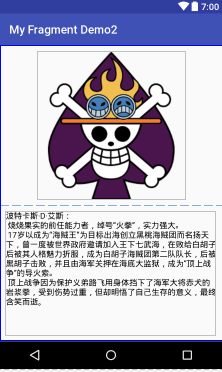
相同布局在写2个
写一个class继承fragment实现碎片布局实例化
package com.example.lenovo.myfragmentdemo2.fragment;

// 注意Fragment的依赖库建议统一使用support-v4库中的

import android.support.v4.app.Fragment;

import android.os.Bundle;

import android.support.annotation.Nullable;

import android.view.LayoutInflater;

import android.view.View;

import android.view.ViewGroup;

import com.example.lenovo.myfragmentdemo2.R;

/**

 * Created by lenovo on 2018/5/7.

 */

public class Fragment1 extends Fragment {

    @Nullable

    @Override

    public View onCreateView(LayoutInflater inflater, @Nullable ViewGroup container, Bundle savedInstanceState) {

        View view = inflater.inflate(R.layout.fragment_1,container,false);

        return view;

    }

}
在MainActivity的class中写替换碎片布局的方法
package com.example.lenovo.myfragmentdemo2;

// 注意Fragment的依赖库

import android.support.v4.app.Fragment;

import android.support.v4.app.FragmentManager;

import android.support.v4.app.FragmentTransaction;

import android.support.v7.app.AppCompatActivity;

import android.os.Bundle;

import android.view.View;

import android.widget.Button;

import com.example.lenovo.myfragmentdemo2.fragment.Fragment1;

import com.example.lenovo.myfragmentdemo2.fragment.Fragment2;

import com.example.lenovo.myfragmentdemo2.fragment.Fragment3;

public class MainActivity extends AppCompatActivity {

    private Button button;

    private int i = 1;

    @Override

    protected void onCreate(Bundle savedInstanceState) {

        super.onCreate(savedInstanceState);

        setContentView(R.layout.activity_main);

        button = (Button)findViewById(R.id.Button1);

        button.setOnClickListener(new View.OnClickListener() {

            @Override

            public void onClick(View v) {

                switch (i){

                    case 1:

                        replaceFragment(new Fragment1());

                        i++;

                        break;

                    case 2:

                        replaceFragment(new Fragment2());

                        i++;

                        break;

                    case 3:

                        replaceFragment(new Fragment3());

                        i++;

                        break;

                    default:

                        replaceFragment(new Fragment1());

                        i=1;

                        break;

                }

            }

        });

    }

    public void  replaceFragment(Fragment fragment){

        FragmentManager fragmentManager = getSupportFragmentManager();

        FragmentTransaction transaction = fragmentManager.beginTransaction();//注意!每次要执行commit()方法的时候都需要重新获取一次FragmentTransaction,否则用已经commit过的FragmentTransaction再次commit会报错!

        transaction.replace(R.id.FrameLayout1,fragment);

        transaction.commit();

    }

}
运行效果:
 点击后:
点击后: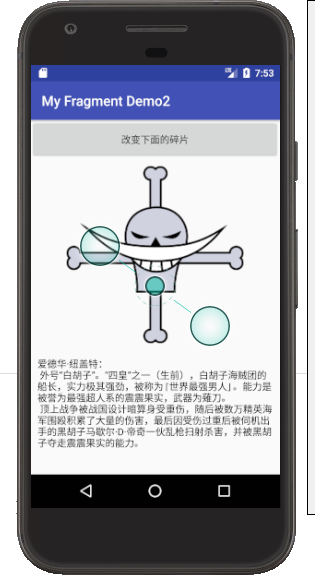
android 开发 碎片Fragment布局例子(用按键切换碎片布局)的更多相关文章
- android开发中fragment获取context
在用到fragment时无法使用.this来指定当前context内容,android开发中fragment获取context,可以使用getActivity().getApplicationCont ...
- Android 开发 之 Fragment 详解
本文转载于 : http://blog.csdn.net/shulianghan/article/details/38064191 本博客代码地址 : -- 单一 Fragment 示例 : http ...
- Android开发笔记(4)——MainActivity.java文件修改&布局嵌套
笔记链接:http://www.cnblogs.com/igoslly/p/6805020.html 笔记以开发名为CoffeeOrder的app活动为线索,介绍app如何从功能设计→ ...
- android开发 写一个自定义形状的按键
步骤: 1.在drawable 文件夹中创建一个xml布局文件. 2.修改布局文件 3.在需要使用背景的按键中导入布局. 创建布局文件: 修改布局文件: <?xml version=" ...
- Android开发笔记(一百三十四)协调布局CoordinatorLayout
协调布局CoordinatorLayout Android自5.0之后对UI做了较大的提升.一个重大的改进是推出了MaterialDesign库,而该库的基础即为协调布局CoordinatorLayo ...
- Android开发实战之拥有Material Design风格的侧滑布局
在实现开发要求中,有需要会使用抽屉式布局,类似于QQ5.0的侧滑菜单,实现的方式有很多种,可以自定义控件,也可以使用第三方开源库. 同样的谷歌也推出了自己的侧滑组件——DrawLayout,使用方式也 ...
- 【Android开发日记】妙用 RelativeLayout 实现3
段布局
在设计过程中,我们经常会遇到这样的需求: 把一条线3控制,左对齐左控制,右侧控制右对齐,中间控制,以填补剩余空间. 或者一列内放3个控件,上面的与顶部对齐,以下的沉在最底部,中间控件是弹性的.充满剩余 ...
- Android开发之利用ViewPager实现页面的切换(仿微信、QQ)
这里利用ViewPager实现页面的滑动,下面直接上代码: 1.首先写一个Activity,然后将要滑动的Fragment镶嵌到写好的Activity中. Activity的布局文件:activity ...
- Android中通过Fragment进行简单的页面切换
首先是activity中的布局 <?xml version="1.0" encoding="utf-8"?> <androidx.constr ...
随机推荐
- C# 生成指定N位随机码
/// <summary> /// 获取随机码 /// </summary> /// <param name="length">长度</p ...
- hadoop 2.7.1安装和配置
一.安装环境 硬件:虚拟机 操作系统:Centos 6.4 64位 IP:192.168.241.128主机名:admin安装用户:root 二.安装JDK 安装JDK1.7或者以上版本.这里安装jd ...
- 【java】构造函数
什么时候自定义构造函数:当分析事物时,事物一存在就具备一些特征或者行为,那么就把这么内容定义在构造函数中 作用:对对象进行初始化,对象一建立,就会自动调用与之对应的构造函数 特点: 1.函数名和类名相 ...
- centos下redis的导出和导入(限set命令)
#!/bin/bash REDIS_HOST=127.0.0.1 REDIS_PORT=6379 REDIS_DB=10 KEYNAME="*" KEYFILE=redis_key ...
- 记一次揪心的MySQL数据恢复过程
https://blog.csdn.net/poxiaonie/article/details/78304699 === 先说下背景,公司其中一个项目所有服务都部署在客户的机房内,机房较小,没有UPS ...
- 实现类QQ的编辑框
第一步,平面效果.Windows系统有几个消息专门用来处理Windows组件的边框部位,那就是WM_NCCALCSIZE和WM_NCPAINT这两个消息,从消息名字看来NC这个就代表着No Clien ...
- c#程序退出
Environment.Exit(0); Process.GetCurrentProcess().Kill();
- C++11--智能指针shared_ptr,weak_ptr,unique_ptr <memory>
共享指针 shared_ptr /*********** Shared_ptr ***********/ // 为什么要使用智能指针,直接使用裸指针经常会出现以下情况 // 1. 当指针的生命长于所指 ...
- Python利用Plotly实现对MySQL中的数据可视化
Mysql表数据: demo.sql内容 create table demo( id int ,product varchar(50) ,price decimal(18,2) ,quantity i ...
- Mongodb条件查询Query的用法
Query.All("name", "a", "b");//通过多个元素来匹配数组Query.And(Query.EQ("name ...