
NotificationSetUtilDemo【判断APP通知栏权限是否开启,以及如何跳转到应用程序设置界面】
前言
当APP有推送功能时,需要判断当前app在手机中是否开启了允许消息推送,否则即使添加了推送代码仍然收不到通知。
效果图
oppo上的效果:

使用步骤
一、项目组织结构图
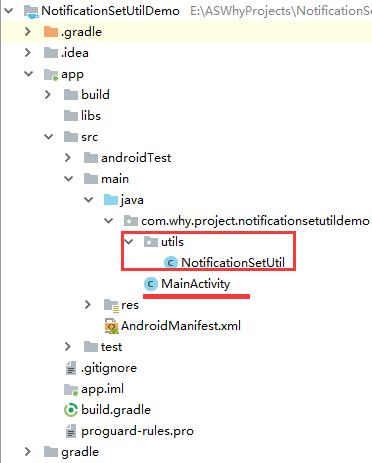
注意事项:
1、 导入类文件后需要change包名以及重新import R文件路径
2、 Values目录下的文件(strings.xml、dimens.xml、colors.xml等),如果项目中存在,则复制里面的内容,不要整个覆盖
二、导入步骤
1、将NotificationSetUtil.java类复制到项目中
package com.why.project.notificationsetutildemo.utils;

import android.app.AppOpsManager;

import android.content.Context;

import android.content.Intent;

import android.content.pm.ApplicationInfo;

import android.net.Uri;

import android.os.Build;

import android.support.annotation.RequiresApi;

import android.support.v4.app.NotificationManagerCompat;

import java.lang.reflect.Field;

import java.lang.reflect.Method;

/**

 * Created by HaiyuKing

 * Used 判断是否开启消息通知,没有开启的话跳转到手机系统设置界面

 * 参考:https://blog.csdn.net/lidayingyy/article/details/81778894

 * https://www.jianshu.com/p/205bc87cac29

 * https://blog.csdn.net/yrmao9893/article/details/74607402/

 * https://www.meiwen.com.cn/subject/qcklpftx.html

 */

public class NotificationSetUtil {

    //判断是否需要打开设置界面

    @RequiresApi(api = Build.VERSION_CODES.KITKAT)

    public static void OpenNotificationSetting(Context context, OnNextLitener mOnNextLitener) {

        if (!isNotificationEnabled(context)) {

            gotoSet(context);

        } else {

            if (mOnNextLitener != null) {

                mOnNextLitener.onNext();

            }

        }

    }

    //判断该app是否打开了通知

    /**

     * 可以通过NotificationManagerCompat 中的 areNotificationsEnabled()来判断是否开启通知权限。NotificationManagerCompat 在 android.support.v4.app包中,是API 22.1.0 中加入的。而 areNotificationsEnabled()则是在 API 24.1.0之后加入的。

     * areNotificationsEnabled 只对 API 19 及以上版本有效,低于API 19 会一直返回true

     * */

    @RequiresApi(api = Build.VERSION_CODES.KITKAT)

    public static boolean isNotificationEnabled(Context context) {

        if(Build.VERSION.SDK_INT >= Build.VERSION_CODES.KITKAT){

            NotificationManagerCompat notificationManagerCompat = NotificationManagerCompat.from(context);

            boolean areNotificationsEnabled = notificationManagerCompat.areNotificationsEnabled();

            return areNotificationsEnabled;

        }

        String CHECK_OP_NO_THROW = "checkOpNoThrow";

        String OP_POST_NOTIFICATION = "OP_POST_NOTIFICATION";

        AppOpsManager mAppOps = (AppOpsManager) context.getSystemService(Context.APP_OPS_SERVICE);

        ApplicationInfo appInfo = context.getApplicationInfo();

        String pkg = context.getApplicationContext().getPackageName();

        int uid = appInfo.uid;

        Class appOpsClass = null;

        /* Context.APP_OPS_MANAGER */

        try {

            appOpsClass = Class.forName(AppOpsManager.class.getName());

            Method checkOpNoThrowMethod = appOpsClass.getMethod(CHECK_OP_NO_THROW, Integer.TYPE, Integer.TYPE,

                    String.class);

            Field opPostNotificationValue = appOpsClass.getDeclaredField(OP_POST_NOTIFICATION);

            int value = (Integer) opPostNotificationValue.get(Integer.class);

            return ((Integer) checkOpNoThrowMethod.invoke(mAppOps, value, uid, pkg) == AppOpsManager.MODE_ALLOWED);

        } catch (Exception e) {

            e.printStackTrace();

        }

        return false;

    }

    //打开手机设置页面

    /**

     * 假设没有开启通知权限,点击之后就需要跳转到 APP的通知设置界面,对应的Action是:Settings.ACTION_APP_NOTIFICATION_SETTINGS, 这个Action是 API 26 后增加的

     * 如果在部分手机中无法精确的跳转到 APP对应的通知设置界面,那么我们就考虑直接跳转到 APP信息界面,对应的Action是:Settings.ACTION_APPLICATION_DETAILS_SETTINGS*/

    private static void gotoSet(Context context) {

        Intent intent = new Intent();

        if (Build.VERSION.SDK_INT >= 26) {

            // android 8.0引导

            intent.setAction("android.settings.APP_NOTIFICATION_SETTINGS");

            intent.putExtra("android.provider.extra.APP_PACKAGE", context.getPackageName());

        } else if (Build.VERSION.SDK_INT >= 21) {

            // android 5.0-7.0

            intent.setAction("android.settings.APP_NOTIFICATION_SETTINGS");

            intent.putExtra("app_package", context.getPackageName());

            intent.putExtra("app_uid", context.getApplicationInfo().uid);

        } else {

            // 其他

            intent.setAction("android.settings.APPLICATION_DETAILS_SETTINGS");

            intent.setData(Uri.fromParts("package", context.getPackageName(), null));

        }

        intent.setFlags(Intent.FLAG_ACTIVITY_NEW_TASK);

        context.startActivity(intent);

    }

    /*=====================添加Listener回调================================*/

    public interface OnNextLitener {

        /**

         * 不需要设置通知的下一步

         */

        void onNext();

    }

    private OnNextLitener mOnNextLitener;

    public void setOnNextLitener(OnNextLitener mOnNextLitener) {

        this.mOnNextLitener = mOnNextLitener;

    }

}
NotificationSetUtil.java
三、使用方法
package com.why.project.notificationsetutildemo;

import android.content.Context;

import android.os.Build;

import android.os.Bundle;

import android.support.v7.app.AppCompatActivity;

import android.widget.Toast;

import com.why.project.notificationsetutildemo.utils.NotificationSetUtil;

public class MainActivity extends AppCompatActivity {

    private Context mContext;

    @Override

    protected void onCreate(Bundle savedInstanceState) {

        super.onCreate(savedInstanceState);

        setContentView(R.layout.activity_main);

        mContext = this;

        if (Build.VERSION.SDK_INT >= Build.VERSION_CODES.KITKAT) {

            //判断是否需要开启通知栏功能

            NotificationSetUtil.OpenNotificationSetting(mContext, new NotificationSetUtil.OnNextLitener() {

                @Override

                public void onNext() {

                    Toast.makeText(mContext,"已开启通知权限",Toast.LENGTH_SHORT).show();

                }

            });

        }

    }

}
混淆配置
无
参考资料
Android 判断应用程序获取通知栏权限是否开启,以及如何跳转到应用程序设置界面
项目demo下载地址
暂不需要
NotificationSetUtilDemo【判断APP通知栏权限是否开启,以及如何跳转到应用程序设置界面】的更多相关文章
- iOS用户是否打开APP通知开关跳转到系统的设置界面
1.检测用户是否打开推送通知 /** 系统通知是否打开 @return 是否打开 */ //检测通知是否打开iOS8以后有所变化 所以需要适配iOS7 + (BOOL)openThePushNoti ...
- (转载)安卓6.0之前的系统 判断app是否有录音权限
卓6.0之前的系统 判断app是否有录音权限 1 2 3 4 5 6 7 8 9 10 11 12 13 14 15 16 17 18 19 20 21 22 23 24 25 26 27 28 ...
- iOS 权限判断 跳转对应设置界面
相机权限 1.1 使用说明 在合适的地方导入#import <AVFoundation/AVFoundation.h> 使用AVAuthorizationStatus类获取当前权限状态 在 ...
- Android ROM开发(三)——精简官方ROM并且内置ROOT权限,开启Romer之路
Android ROM开发(三)--精简官方ROM并且内置ROOT权限,开启Romer之路 相信ROM的相关信息大家通过前几篇的学习都是有所了解了,这里就不在一一提示了,这里我们下载一个官方包,我们还 ...
- 4.功能三:实现URL地址栏控制(15分) (1)获取到当前访问的控制器和方法(5分) (2)对当前访问的控制器和方法进行判断,有权限继续访问(5分) (3)无权限给出提示(5分)
<?php namespace app\admin\controller; use think\Controller; use think\Request; class Base extends ...
- java中 用telnet 判断服务器远程端口是否开启
package net.jweb.common.util; import java.io.BufferedReader; import java.io.BufferedWriter; import j ...
- 判断App运行是否在前台
转自:http://notes.stay4it.com/2016/02/26/check-if-app-is-running-forground/ 在一些场景中,经常会需要判断App是否在后台运行,比 ...
- 判断App是否在后台运行
在一些场景中,经常会需要判断App是否在后台运行,比如是否显示解锁界面,收到新消息是否显示Notification等.需求可能是多样化的,但所依仗的原理是相通的,今天Stay打算说说这些需求的最优解. ...
- Android判断App是否在前台运行(转)
原文地址: http://blog.csdn.net/zuolongsnail/article/details/8168689 Android开发中,有时候需要判断App是否在前台运行. 代码实现如下 ...
随机推荐
- 用ASP.NET Core 2.0 建立规范的 REST API -- GET 和 POST
本文所需的一些预备知识可以看这里: http://www.cnblogs.com/cgzl/p/9010978.html 和 http://www.cnblogs.com/cgzl/p/9019314 ...
- BZOJ_2238_Mst_树剖+线段树
BZOJ_2238_Mst_树剖+线段树 Description 给出一个N个点M条边的无向带权图,以及Q个询问,每次询问在图中删掉一条边后图的最小生成树.(各询问间独立,每次询问不对之后的询问产生影 ...
- 车牌定位与畸变校正(python3.7,opencv4.0)
一.前言及思路简析 目前车牌识别系统在各小区门口随处可见,识别效果貌似都还可以.查阅资料后,发现整个过程又可以细化为车牌定位.畸变校正.车牌分割和内容识别四部分.本篇随笔主要介绍车牌定位及畸变校正两部 ...
- 安卓开发笔记(二十六):Splash实现首页快速开屏功能
我们在进行安卓开发的时候,首页开有两种方式,一种是利用handler将一个活动进行延时,时间到达之后软件则会跳转到第二个活动当中.而另一种方法则是更加常用的方法,利用splash实现首页的快速开屏,这 ...
- MySQL安装及环境搭建
一.Windows 上安装 MySQL Windows 上安装 MySQL 相对简单,最新版本下载地址: 官网:https://dev.mysql.com/downloads/mysql/ 下载步骤: ...
- ES 11 - 配置Elasticsearch的映射 (mapping)
目录 1 映射的相关概念 1.1 什么是映射 1.2 映射的组成 1.3 元字段 1.4 字段的类型 2 如何配置mapping 2.1 创建mapping 2.2 更新mapping 2.3 查看m ...
- ES6之Promise学习与实践
1.前言 在平时的业务开发中,前端通常需要请求后台获取数据,或者NodeJs读取文件等等一系列的异步操作,我们通常需要利用异步操作的结果或者对异步操作的结果进行处理.通常我们的解决方案是:在异步操作成 ...
- 游戏AI之模糊逻辑(4)
目录 人类的逻辑 模糊变量 模糊集合 模糊规则 模糊推理 去模糊化 库博方法 结语 if(condition) then dosomething... 这次主要围绕的是游戏AI该如何模仿人类地判断条件 ...
- asp.net core 系列之webapi集成EFCore的简单操作教程
因为官网asp.net core webapi教程部分,给出的是使用内存中的数据即 UseInMemoryDatabase 的方式, 这里记录一下,使用SQL Server数据库的方式即 UseSql ...
- DateTime Tips
DateTime Tips(System.Runtime Version=4.2.1.0) 抛砖引玉,如有错误或是更好的方式还望不吝赐教 1. 根据某个DateTime对象取其当天的起始时间例如:输入 ...