
ROS机器人程序设计(原书第2版)补充资料 (玖) 第九章 导航功能包集进阶 navigation
ROS机器人程序设计(原书第2版)补充资料 (玖) 第九章 导航功能包集进阶 navigation
书中,大部分出现hydro的地方,直接替换为indigo或jade或kinetic,即可在对应版本中使用。
第8-9章,主要介绍仿真,仿真机器人与实际原理上其实差别不大,细节配置上有些不同,除了书中的示例,
这里主要还推荐turtlebot_gazebo仿真,源码非常详细具体。
第241-243页:
介绍机器人配置情况,参数配置多以.yaml文件格式。
第244-246页:
配置全局和局部代价地图,基本参数等,非常重要。
第247页:
配置对应的launch文件,进行参数加载。
第248-256页:
主要是配置和使用可视化工具rviz。
第257页:
简单解释自适应蒙特卡罗定位AMCL,有时机器人会原地转圈,可能就是依据地图在自定位。
第258页:
修改参数。
第259页:
机器人避障。
第260-262页:
机器人依据目标,自主导航运动。
第263页:
本章小节。
巩固与思考:
如何编写算法,实现机器人依据激光定位并进行室内导航巡逻或清扫算法。
补充学习:
Make a map and navigate with it
Description: Use the navigation stack to create a map of the Gazebo world and start navigation based on it.
Keywords: simulation, gazebo, map building, navigation
Tutorial Level: INTERMEDIATE
|
Make a map and Navigation in Gazebo simulation . |
Overview
In this tutorial we will create a map of a virtual world and then use it to navigate around. Basically we will reproduce build a map and navigate a map TurtleBot tutorials in a simulated world. So if you have doubts about using the navigation stack with TurtleBot those tutorials will probably help you.
Make a map
First, bring up the TurtleBot simulation as described in the Gazebo Bringup Guide, but this time we will load a slightly funnier world:
$ source /opt/ros/indigo/setup.bash

$ roslaunch turtlebot_gazebo turtlebot_world.launch
The playground world with a TurtleBot2 looks like this:
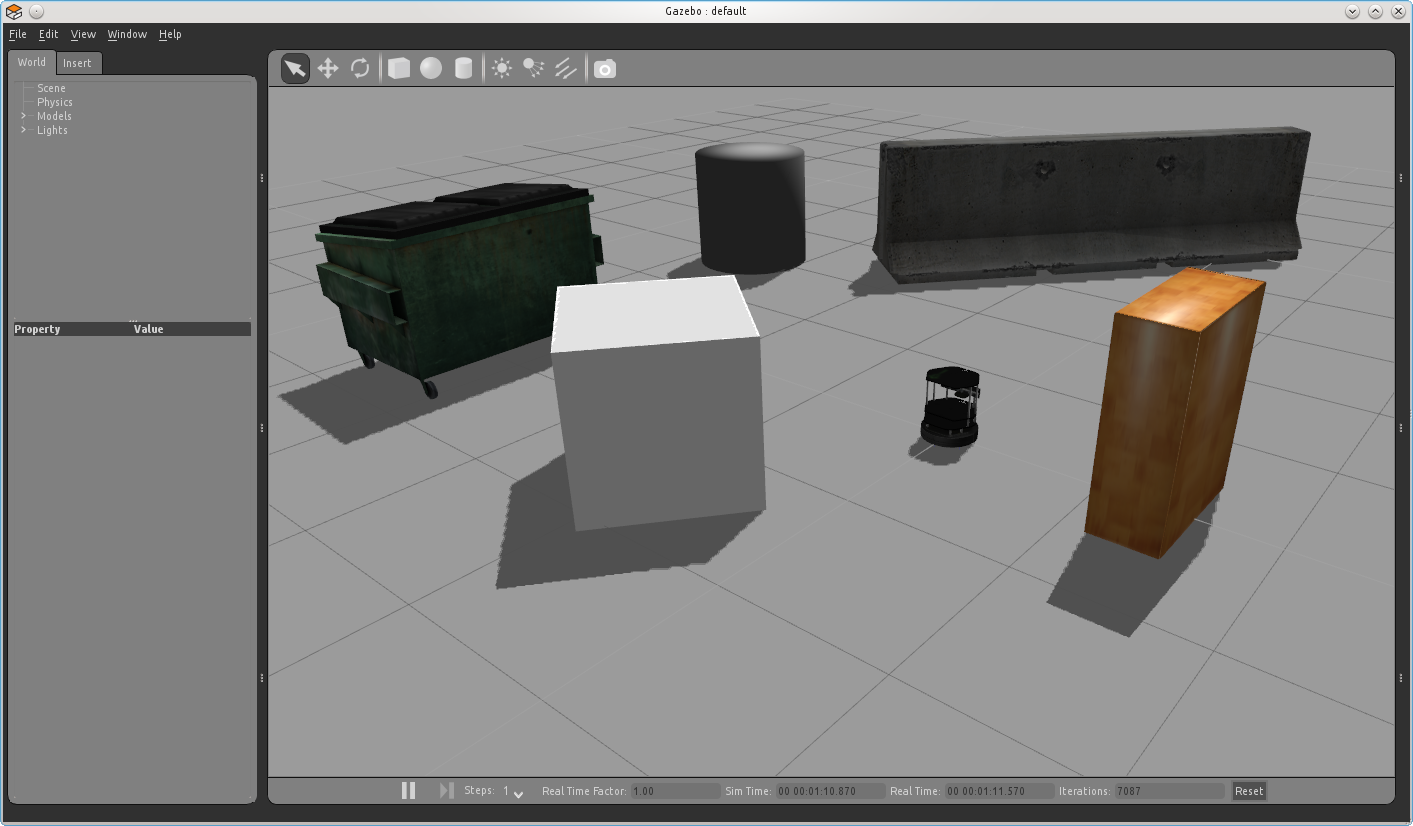
Alternatively you can use another existing world file like this:
$ roslaunch turtlebot_gazebo turtlebot_world.launch world_file:=worlds/willowgarage.world
Tip: of course you can also make your own world! With Gazebo it's not difficult, but is beyond the scope of this tutorial.
You can customize your simulated TurtleBot by setting TURTLEBOT_XXX environment variables; for example:
$ export TURTLEBOT_BASE=create

$ export TURTLEBOT_STACKS=circles

$ export TURTLEBOT_3D_SENSOR=asus_xtion_pro

$ roslaunch turtlebot_gazebo turtlebot_playground.launch
will simulate a TurtleBot 1 with an Asus Xtion Pro camera.
To start map building, type:
roslaunch turtlebot_gazebo gmapping_demo.launch
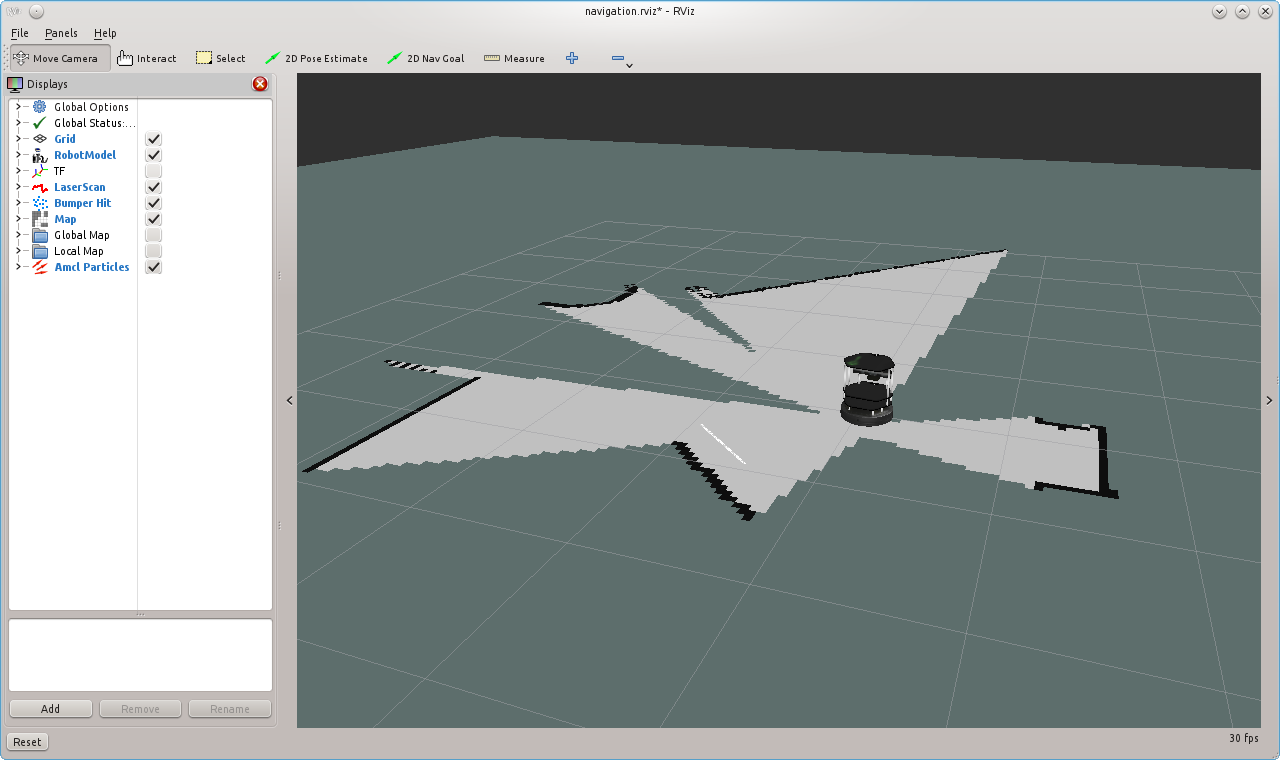
Use RViz to visualize the map building process:
$ roslaunch turtlebot_rviz_launchers view_navigation.launch
Then, as explained in the previous tutorial, use your favorite teleoperation tool to drive the TurtleBot around the world, until you get satisfied with your map. This capture shows the mapping process after turning 360 degrees.
Finally, save the map to disk:
$ rosrun map_server map_saver -f <your map name>
Navigate the playground
To be sure that all will run as expected, kill all you launched in the previous section and repeat all steps except the map building. Instead, type:
roslaunch turtlebot_gazebo amcl_demo.launch map_file:=<full path to your map YAML file>
Or if you prefer to use an already created map, just omit the map_file argument.
Now you can send the robot anywhere in the playground with RViz, same way as explained on navigate a map tutorial.
ROS机器人程序设计(原书第2版)补充资料 (玖) 第九章 导航功能包集进阶 navigation的更多相关文章
- ROS机器人程序设计(原书第2版)补充资料 (捌) 第八章 导航功能包集入门 navigation
ROS机器人程序设计(原书第2版)补充资料 (捌) 第八章 导航功能包集入门 navigation 书中,大部分出现hydro的地方,直接替换为indigo或jade或kinetic,即可在对应版本中 ...
- ROS机器人程序设计(原书第2版)补充资料 教学大纲
ROS机器人程序设计(原书第2版) 补充资料 教学大纲 针对该书稍后会补充教学大纲.教案.多媒体课件以及练习题等. <ROS机器人程序设计>课程简介 课程编号:XXXXXX 课程名称:RO ...
- ROS机器人程序设计(原书第2版)补充资料 (拾) 第十章 使用MoveIt!
ROS机器人程序设计(原书第2版)补充资料 (拾) 第十章 使用MoveIt! 书中,大部分出现hydro的地方,直接替换为indigo或jade或kinetic,即可在对应版本中使用. MoveIt ...
- ROS机器人程序设计(原书第2版)补充资料 (零) 源代码、资料和印刷错误修订等 2017年01月01日更新
ROS机器人程序设计(原书第2版)补充资料 (零) 源代码等 ROS官网 版)部分内容修订 页:第1行,删去$ 页:第6行,float64 y 前面加一个空格 页:中间创建主题:下面程序不用换行,(& ...
- ROS机器人程序设计(原书第2版)学习镜像分享及使用说明
ROS机器人程序设计(原书第2版)学习镜像分享及使用说明 系统用于ROS爱好者学习交流,也可用于其他用途,并不局限于ROS. 这款镜像文件是基于一年前的Ubuntu ROS Arduino Gazeb ...
- ROS机器人程序设计(原书第2版)补充资料 (柒) 第七章 3D建模与仿真 urdf Gazebo V-Rep Webots Morse
ROS机器人程序设计(原书第2版)补充资料 (柒) 第七章 3D建模与仿真 urdf Gazebo V-Rep Webots Morse 书中,大部分出现hydro的地方,直接替换为indigo或ja ...
- ROS机器人程序设计(原书第2版)补充资料 (陆) 第六章 点云 PCL
ROS机器人程序设计(原书第2版)补充资料 (陆) 第六章 点云 PCL 书中,大部分出现hydro的地方,直接替换为indigo或jade或kinetic,即可在对应版本中使用. RGBD深度摄像头 ...
- ROS机器人程序设计(原书第2版)补充资料 (伍) 第五章 计算机视觉
ROS机器人程序设计(原书第2版)补充资料 (伍) 第五章 计算机视觉 书中,大部分出现hydro的地方,直接替换为indigo或jade或kinetic,即可在对应版本中使用. 计算机视觉这章分为两 ...
- ROS机器人程序设计(原书第2版)补充资料 (肆) 第四章 在ROS下使用传感器和执行器
ROS机器人程序设计(原书第2版)补充资料 (肆) 第四章 在ROS使用传感器和执行器 书中,大部分出现hydro的地方,直接替换为indigo或jade或kinetic,即可在对应版本中使用. 第四 ...
随机推荐
- 理解error和exception之间的区别
很多程序员不清楚error和exception之间的区别,这区别对于如何正确的处理问题而言非常重要(见附1,"简要的叙述error和exception").就像Mary Campi ...
- 将python代码打印成pdf
将python代码打印成pdf,打印出来很丑,完全不能看. mac下:pycharm 编辑器有print的功能,但是会提示: Error: No print service found. 所以需要一个 ...
- 树莓派控制HC-SR04超声波模块测距(新手向+C语言向)
因为作业要求使用c语言代码,这里先附上一段摘自网上的代码 感谢KalaerSun的c语言代码,摘自https://blog.csdn.net/qq_25247589/article/details/6 ...
- EntityFramework Core 学习系列(一)Creating Model
EntityFramework Core 学习系列(一)Creating Model Getting Started 使用Command Line 来添加 Package dotnet add pa ...
- [Codeforces]856C - Eleventh Birthday
题目大意:给出n个数,问有多少种排列把数字接起来是11的倍数.(n<=2000) 做法:一个数后面接一个数等同于乘上10的若干次幂然后加上这个数,10模11等于-1,所以10的若干次幂是-1或1 ...
- bzoj 2339: [HNOI2011]卡农
Description Solution 比较难想.... 我们先考虑去掉无序的这个条件,改为有序,最后除 \(m!\) 即可 设 \(f[i]\) 表示前\(i\)个合法集合的方案数 明确一点: 如 ...
- ●线段树题之wows
●模拟考试的一道似乎是学长出的题,还不错,挺考代码能力的.以此记录. ●题目以被上传(改了改说法),6128 Lence的方块们 ● (像手纸一样长的贴图……) ●题目大意: 有横向排布的n个点,每个 ...
- ●BZOJ 2560 串珠子
题链: http://www.lydsy.com/JudgeOnline/problem.php?id=2560 题解: 容斥,状压计数dp 首先求出一个数组 g[s] 表示集合内的点的连边方案数(两 ...
- C++变量和基本类型——2.3.1引用
引用:为对象起了另外一个名字,通常将申明符写成&d的形式来定义引用类型,其中d是申明的变量名: int ival =1024; int &refVal=ival 一般在初始化变量时,初 ...
- 深入分析synchronized的实现原理
基础概念 synchronized可以保证方法或者代码块在运行时,同一时刻只有一个方法可以进入到临界区,同时可以保证共享变量对内存可见性. Java中每一个对象都可以作为锁,这是synchronize ...