
cocos2dx 实现flappybird
前两天在博客园看到网友实现的一个网页版的flappy bird,挂在360游戏平台,玩了一会儿得分超低,就很想自己做一个。刚好这两天炫舞的活都清了,就弄一下玩玩。
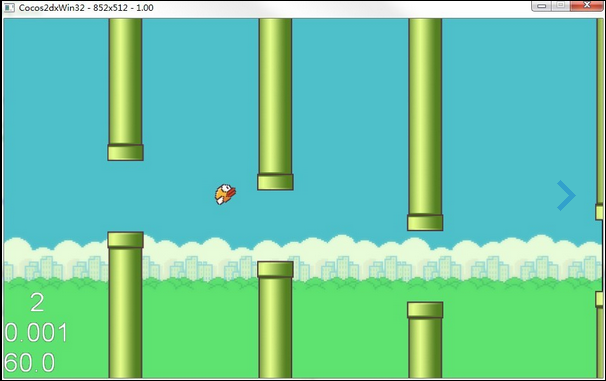
效果图
布局类GameScene.h
#ifndef GAMESCENE_BIRD

#define  GAMESCENE_BIRD

#include "cocos2d.h"

#include "Box2D/Box2D.h"

#include "SimpleAudioEngine.h"

USING_NS_CC;

class Cbird;

class CPipe;

class CGameScene :public cocos2d::CCLayer

{

public:

     CCSprite * _background;

    /* CPipe * _pipe;*/

     CCSpriteBatchNode * _gameBatchNode;

     Cbird * m_bird;

    /* CCArray *m_pipes;*/

     CPipe *_pipes;

    // Here's a difference. Method 'init' in cocos2d-x returns bool, instead of returning 'id' in cocos2d-iphone

    virtual bool init();

    // there's no 'id' in cpp, so we recommand to return the exactly class pointer

    static cocos2d::CCScene* scene();

    // a selector callback

    void menuCloseCallback(CCObject* pSender);

    // implement the "static node()" method manually

    CREATE_FUNC(CGameScene);

    virtual void ccTouchesBegan(CCSet* pTouches, CCEvent* event);

    virtual void ccTouchesEnded(CCSet* pTouches, CCEvent* event);

    void update(float dt);

    void startGame (CCObject* pSender);

private:

    enum{

        GAMEREAD=,

        GAMEOVER,

        BIRDFLY,

        BIRDDIE,

    };

    enum{

        TAG_LOGO,

        TAG_OVER,

        TAG_BUTTON,

        TAG_BESTSCORE,

        TAG_CURRSCORE,

    };

    int m_gamestate;

};

#endif
GameScene.cpp
#include "GameScene.h"

#include "Bird.h"

#include "Pipe.h"

using namespace cocos2d;

cocos2d::CCScene* CGameScene::scene()

{

    CCScene * scene = NULL;

    do

    {

        // 'scene' is an autorelease object

        scene = CCScene::create();

        CC_BREAK_IF(! scene);

        // 'layer' is an autorelease object

        CGameScene *layer = CGameScene::create();

        CC_BREAK_IF(! layer);

        // add layer as a child to scene

        scene->addChild(layer);

    } while ();

    // return the scene

    return scene;

}

bool CGameScene::init()

{

    bool bRet = false;

    do

    {

        this->setTouchEnabled(true);

        //设置游戏背景

        CCSprite * bg = CCSprite::create("bird_bg.png");

        bg->setPosition(ccp(CCDirector::sharedDirector()->getWinSize().width * 0.5f, CCDirector::sharedDirector()->getWinSize().height * 0.5f));

        this->addChild(bg, );

        //CCSpriteFrameCache(精灵帧缓存)主要用来存放CCSpriteFrame,它没有提供特别的属性,而是提供一系列用于管理CCSpriteFrame的方法

        CCSpriteFrameCache::sharedSpriteFrameCache()->addSpriteFramesWithFile("bird.plist","bird.png");

        _gameBatchNode = CCSpriteBatchNode::create("bird.png", );

        this->addChild(_gameBatchNode, );

        CCSprite * repeat;

        _background = CCSprite::createWithSpriteFrameName("bird_bg.png");

        _background->setAnchorPoint(ccp(,));

        _gameBatchNode->addChild(_background, );

        repeat = CCSprite::createWithSpriteFrameName("bird_bg.png");

        repeat->setAnchorPoint(ccp(,));

        repeat->setPosition(ccp(repeat->getContentSize().width - , ));

        _background->addChild(repeat, );

        repeat = CCSprite::createWithSpriteFrameName("bird_bg.png");

        repeat->setAnchorPoint(ccp(,));

        repeat->setPosition(ccp( * (repeat->getContentSize().width - ), ));

        _background->addChild(repeat, );

        //设置水管

    /*    _pipe =new CPipe;

        _pipe->SetLayer(_gameBatchNode);

        m_pipes = CCArray::arrayWithCapacity(4);*/

        _pipes = new CPipe[];

        for(int i = ;i < ;i ++){

            _pipes[i].init();

            _pipes[i].SetLayer(_gameBatchNode);

        }

        //加入logo

        CCSprite* _intro = CCSprite::createWithSpriteFrameName("bird_logo.png");

        _intro->setPosition(ccp(CCDirector::sharedDirector()->getWinSize().width * 0.5f, CCDirector::sharedDirector()->getWinSize().height * 0.7f));

        _intro->setTag(TAG_LOGO);

        _gameBatchNode->addChild(_intro, );

        //加入gamgover logo

        CCSprite* _over = CCSprite::createWithSpriteFrameName("bird_gameover.png");

        _over->setPosition(ccp(CCDirector::sharedDirector()->getWinSize().width * 0.5f, CCDirector::sharedDirector()->getWinSize().height * 0.7f));

        _over->setTag(TAG_OVER);

        _over->setVisible(false);

        _gameBatchNode->addChild(_over, );

        //add menu

        CCSprite * menuItemOn;

        CCSprite * menuItemOff;

        //菜单有两个状态,平时展示的样子和点击的样子

        menuItemOn = CCSprite::createWithSpriteFrameName("bird_start_btn.png");

        menuItemOff = CCSprite::createWithSpriteFrameName("brid_start_btn_pressed.png");

        //New Game 菜单

        CCMenuItemSprite * starGametItem = CCMenuItemSprite::create(

            menuItemOff,

            menuItemOn,

            this,

            //这个最重要,点击菜单调用系统哪个方法

            menu_selector(CGameScene::startGame));

        CCMenu*_mainMenu = CCMenu::create( starGametItem, NULL);//创建菜单

        _mainMenu->setPosition(ccp(CCDirector::sharedDirector()->getWinSize().width * 0.5f, CCDirector::sharedDirector()->getWinSize().height * 0.5f));

        _mainMenu->setTag(TAG_BUTTON);

        this->addChild(_mainMenu,);

        CCLabelBMFont* bestscore = CCLabelBMFont::create("", "font.fnt");

        bestscore->setPosition(CCPoint(CCDirector::sharedDirector()->getWinSize().width / , CCDirector::sharedDirector()->getWinSize().height /  * ));

        bestscore->setVisible(false);

        bestscore->setTag(TAG_BESTSCORE);

        this->addChild(bestscore,);

        CCLabelBMFont* currscore = CCLabelBMFont::create("", "font.fnt");

        currscore->setPosition(CCPoint(CCDirector::sharedDirector()->getWinSize().width / , CCDirector::sharedDirector()->getWinSize().height /  * ));

        currscore->setVisible(false);

        currscore->setTag(TAG_CURRSCORE);

        this->addChild(currscore,);

        m_bird = Cbird::create();

        CC_BREAK_IF(! m_bird);

        // Place the sprite on the center of the screen

        //pSprite->setPosition(ccp(size.width/2, size.height/2));

        // Add the sprite to HelloWorld layer as a child layer.

        _gameBatchNode->addChild(m_bird, );

        bRet = true;

        this->schedule(schedule_selector(CGameScene::update));

        m_gamestate = GAMEREAD;

    } while ();

    return bRet;

}

void CGameScene::menuCloseCallback( CCObject* pSender )

{

   CCDirector::sharedDirector()->end();

}

void CGameScene::ccTouchesBegan( CCSet* pTouches, CCEvent* event )

{

}

void CGameScene::ccTouchesEnded( CCSet* pTouches, CCEvent* event )

{

    if (m_gamestate == BIRDFLY)

    {

        m_bird->SetFlyUp();

    }

}

void CGameScene::update(float dt)

{

    //if (_pipe)

    //{

    //    _pipe->update(dt);

    //}

    //CPipe * pipe = (CPipe *)(m_pipes->objectAtIndex(0));

    //if (pipe)

    //{

    _pipes[].StartGame();

    for(int i = ;i <;i ++){

        //CPipe * _pipe = (CPipe *)(m_pipes->objectAtIndex(i));

        //CPipe * _pipe2 = (CPipe *)(m_pipes->objectAtIndex(i+1));

        if (_pipes[i].isStart())

        {

            if (_pipes[i].getPositionX()+<=_pipes[i+].getPositionX())

            {

                _pipes[i+].StartGame();

            }

        }

    }

    if (m_bird->getPositionY()<=)

    {

        m_gamestate = BIRDDIE;

    }

    if (m_gamestate == BIRDFLY)

    {

        for(int i = ;i <;i ++){

            _pipes[i].update(dt);

        }

    }

    for(int i = ;i <;i ++){

        if(_pipes[i].CheckCollision(m_bird->getPositionX(), m_bird->getPositionY()))

        {

            m_gamestate = BIRDDIE;

            _gameBatchNode->getChildByTag(TAG_LOGO)->setVisible(false);

            _gameBatchNode->getChildByTag(TAG_OVER)->setVisible(true);

            this->getChildByTag(TAG_BUTTON)->setVisible(true);

            break;

        }

    }

    CCLabelBMFont* scoreSprite = (CCLabelBMFont*)this->getChildByTag(TAG_BESTSCORE);

    CCString* s = CCString::createWithFormat("%d", CPipe::GetScore());

    scoreSprite->setString(s->getCString());

    //}

}

void CGameScene::startGame (CCObject* pSender) {

    m_gamestate = BIRDFLY;

    _gameBatchNode->getChildByTag(TAG_LOGO)->setVisible(false);

    _gameBatchNode->getChildByTag(TAG_OVER)->setVisible(false);

    this->getChildByTag(TAG_BUTTON)->setVisible(false);

    m_bird->ResetBird();

    m_bird->GameStart();

    for(int i = ;i <;i ++){

        _pipes[i].ReSetPositionX();

        _pipes[i].GameOver();

    }

    CCLabelBMFont* scoreSprite = (CCLabelBMFont*)this->getChildByTag(TAG_BESTSCORE);

    scoreSprite->setVisible(true);

}
水管Pipe类
#ifndef _PIPE_

#define  _PIPE_

#include "cocos2d.h"

#include "GameScene.h"

USING_NS_CC;

class CPipe:public CCObject{

private:

    CCSprite* m_upipe;

    CCSprite* m_dpipe;

    int relativeHight;

    enum{

        PLYAYING=,

        OVER,

    };

    int m_gamestate;

    float updatetime;

    bool canaddscore;

public:

    CPipe();

    ~CPipe();

    void ReSetPositionX();

    void update(float times);

    bool CheckCollision(int x, int y);

    void StartGame();

    void GameOver();

    void SetLayer(CCSpriteBatchNode* layer);

    float getPositionX();

    bool isStart();

    void init();

    static int GetScore();

};

#endif

#include "Pipe.h"

static int m_score = ;

CPipe::CPipe()

:m_gamestate(OVER),

updatetime(0.0),

canaddscore(false)

{

    //生成随机数

    float rheight = CCRANDOM_MINUS1_1();

    //设置上水管

    m_upipe = CCSprite::createWithSpriteFrameName("obstacle_up.png");

    m_upipe->setAnchorPoint(ccp(,));

    m_upipe->setPosition(ccp(,+rheight*));

    m_upipe->retain();

    //设置下水管

    m_dpipe = CCSprite::createWithSpriteFrameName("obstacle_down.png");

    m_dpipe->setAnchorPoint(ccp(,));

    m_dpipe->setPosition(ccp(,+rheight*));

    m_dpipe->retain();

    //this->schedule(schedule_selector(CPipe::update));

}

CPipe::~CPipe()

{

}

void CPipe::ReSetPositionX()

{

    //生成随机数

    float rheight = CCRANDOM_MINUS1_1();

    m_upipe->setPosition(ccp(,+rheight*));

    m_dpipe->setPosition(ccp(,+rheight*));

    canaddscore = true;

}

void CPipe::update( float times )

{

    //updatetime +=dt;

    //if (updatetime >= 0.4)

    //{

    //    updatetime = 0.0;

    //}

    if (m_gamestate == PLYAYING)

    {

        int pox = m_upipe->getPositionX()-;

        if (pox <=-)

        {

            pox = ;

            ReSetPositionX();

        }

        m_upipe->setPositionX(pox);

        m_dpipe->setPositionX(pox);

        if ( m_upipe->getPositionX()<CCDirector::sharedDirector()->getWinSize().width*0.36f-&&canaddscore)

        {

            m_score++;

            canaddscore = false;

        }

    }

}

bool CPipe::CheckCollision( int x, int y )

{

    if (x<m_upipe->getPositionX()+&&x>m_upipe->getPositionX())

    {

        if (y>m_upipe->getPositionY()||y<m_dpipe->getPositionY())

        {

            return true;

        }

    }

    return false;

}

void CPipe::StartGame()

{

    m_gamestate = PLYAYING;

}

void CPipe::GameOver()

{

    m_gamestate = OVER;

    m_score = ;

}

void CPipe::SetLayer( CCSpriteBatchNode* layer )

{

    layer->addChild(m_upipe, );

    layer->addChild(m_dpipe, );

}

float CPipe::getPositionX()

{

    return m_dpipe->getPositionX();

}

bool CPipe::isStart()

{

    return m_gamestate==PLYAYING;

}

void CPipe::init()

{

    m_gamestate = OVER;

    //生成随机数

    float rheight = CCRANDOM_MINUS1_1();

    //设置上水管

    m_upipe = CCSprite::createWithSpriteFrameName("obstacle_up.png");

    m_upipe->setAnchorPoint(ccp(,));

    m_upipe->setPosition(ccp(,+rheight*));

    m_upipe->retain();

    //设置下水管

    m_dpipe = CCSprite::createWithSpriteFrameName("obstacle_down.png");

    m_dpipe->setAnchorPoint(ccp(,));

    m_dpipe->setPosition(ccp(,+rheight*));

    m_dpipe->retain();

}

int CPipe::GetScore()

{

    return m_score;

}
小鸟类CBird
#ifndef _BIRD_

#define _BIRD_

#define BIRDFALLSPEED 4

#define BIRDGRAVITY 1

#include "cocos2d.h"

#include "GameScene.h"

USING_NS_CC;

typedef enum

{

    playerRead,//等待游戏开始

    PlayerFlying,//主角在往上飞

    PlayerFalling,//主角在降落

    PlayerDying//主角死亡

} PlayerState;

class Cbird:public CCSprite{

    CCAction * m_flyAnimation;

    CCAction * m_fallAnimation;

    CCAction * m_NormalAnimation;

    bool m_isfalling;

    PlayerState m_state;

    CCSize _screenSize;

public:

    //定义变量,并且直接定义默认的get/set方法

    CC_SYNTHESIZE(CCPoint, _nextPosition, NextPosition);

    CC_SYNTHESIZE(float, _width, Width);

    CC_SYNTHESIZE(float, _height, Height);

    CC_SYNTHESIZE(CCPoint, _vector, Vector);

public:

    Cbird();

    ~Cbird();

    static Cbird * create (void);

    static Cbird * ShareBird(void);

    bool InintBird();

    bool ResetBird();

    bool SetFlyUp();

    bool SetFall();

    void GameStart();

    void GameOver();

    inline void setSize() {

        _width = this->boundingBox().size.width;

        _height = this->boundingBox().size.height;

    }

private:

        void update(float dt);

        void flyactioncallback();

        float gravity;

};

#endif

#include "Bird.h"

static Cbird *instance = NULL;

Cbird::Cbird()

:_vector(ccp(,))

,_screenSize(CCDirector::sharedDirector()->getWinSize())

,gravity()

{

    m_isfalling = false;

    m_state = playerRead;

}

Cbird::~Cbird()

{

    CC_SAFE_RELEASE(m_flyAnimation);

    CC_SAFE_RELEASE(m_fallAnimation);

    CC_SAFE_RELEASE(m_NormalAnimation);

}

Cbird * Cbird::create( void )

{

    Cbird * bird = new Cbird();

    if (bird && bird->initWithSpriteFrameName("bird_hero1.png")) {

        bird->autorelease();

        bird->setSize();

        bird->InintBird();

        instance = bird;

        return bird;

    }

    CC_SAFE_DELETE(bird);

    return NULL;

}

bool Cbird::InintBird()

{

    //设置锚点

    this->setAnchorPoint(ccp(0.5f, 1.0f));

    this->setPosition(ccp(_screenSize.width * 0.36f,/* _nextPosition.y*/));

    //_height = 228;

    //_width = 180;

    _height = ;

    _width = ;

    CCAnimation* animation;

    //创建一个空白的序列帧动画信息

    animation = CCAnimation::create();

    //CCSpriteFrame对应的就是帧,将CCSpriteFrame添加到CCAnimation生成动画数据,

    //用CCAnimation生成CCAnimate(就是最终的动画动作),最后可以用CCSprite执行这个动作。

    CCSpriteFrame * frame;

    int i;

    //共有3帧,这里用for循环将对应的序列图加入到动画中

    for(i = ; i <= ; i++) {

        char szName[] = {};

        sprintf(szName, "bird_hero%i.png", i);

        frame = CCSpriteFrameCache::sharedSpriteFrameCache()->spriteFrameByName(szName);

        animation->addSpriteFrame(frame);

    }

    //设置每两帧间时间间隔

    animation->setDelayPerUnit(0.2f / 3.0f);

    //设置动画结束后是否保留动画帧信息

    animation->setRestoreOriginalFrame(false);

    //设置循环播放次数 (-1:无限循环)

    animation->setLoops(-);

    //由这个动画信息创建一个序列帧动画

    m_NormalAnimation = CCAnimate::create(animation);

    //保存这个动画

    m_NormalAnimation->retain();

    this->runAction(m_NormalAnimation);

    m_fallAnimation = CCEaseOut::create(CCRotateTo::create(0.4f, ), 0.4);

    m_fallAnimation->retain();

    this->runAction(m_fallAnimation);

    // update

    //scheduleUpdate();

    this->schedule(schedule_selector(Cbird::update));

    return ;

}

bool Cbird::SetFlyUp()

{

    if (m_state == PlayerFlying)

    {

        this->stopAction(m_flyAnimation);

    }

    else if(m_fallAnimation)

        this->stopAction(m_fallAnimation);

    //CCAction *action1 = CCSpawn::create(

    //    CCMoveTo::create(0.25f,CCPointMake(this->getPositionX(),this->getPositionY()+30)),

    //    CCRotateTo::create(0.25f,-45),

    //    );

    //CCAction *action = CCSpawn::create(

    //    CCMoveTo::create(0.25f,CCPointMake(this->getPositionX(),this->getPositionY()+20)),

    //    CCRotateTo::create(0.25f,-45),

    //    NULL

    //    );

    //CCFiniteTimeAction *action = CCJumpTo::create(0.4f, CCPointMake(this->getPositionX(),this->getPositionY()),50,1);

    //CCAction *actions = CCSpawn::create(

    //    action,

    //    //CCRotateTo::create(0.25f,-45),

    //    CCSequence::create(

    //    CCEaseInOut::create(CCRotateTo::create(0.2f, 0), 2),

    //    CCEaseInOut::create(CCRotateTo::create(0.2f, 90), 2),

    //    NULL),

    //    NULL

    //    );

    //飞的动作

    if (m_state == playerRead||m_state == PlayerDying)

    {

        return ;

    }

    gravity = ;

    CCFiniteTimeAction *action = CCJumpTo::create(0.5f, CCPointMake(this->getPositionX(),this->getPositionY()+),,);

    CCFiniteTimeAction *actionss = CCSpawn::create(

        action,

        //CCRotateTo::create(0.25f,-45),

        //CCSequence::create(

        CCSequence::actions(CCEaseIn::create(CCRotateTo::create(0.25f, -), 0.4),CCEaseOut::create(CCRotateTo::create(0.25f, ), 0.4),NULL),

    /*    CCCallFunc::create(this,callfunc_selector(Cbird::flyactioncallback)),  */

        //CCEaseInOut::create(CCRotateTo::create(0.2f, 90), 2),

        //NULL),

        NULL

        );

    CCFiniteTimeAction *actionin = CCEaseIn::create((CCActionInterval*)(actionss->copy()->autorelease()),0.5f);

    m_flyAnimation = CCSequence::create(

        actionin,

        CCCallFunc::create(this,callfunc_selector(Cbird::flyactioncallback)),

        NULL

        );

    m_flyAnimation->retain();

    this->runAction(m_flyAnimation);

    m_state = PlayerFlying;

    return ;

}

void Cbird::update(float dt)

{

    CCSize winSize = CCDirector::sharedDirector()->getWinSize();

    switch (m_state)

    {

    case PlayerFalling:

        // update bird positionY

        if (this->getPositionY() >  && this->getPositionY() < winSize.height)

        {

            //velocity -= gravity;

            this->setPositionY(this->getPositionY() -gravity);

            gravity += 0.3;

        }

        break;

    case PlayerDying:

        // update bird positionY

        if (this->getPositionY() >  && this->getPositionY() < winSize.height)

        {

            //velocity -= gravity;

            this->setPositionY(this->getPositionY() -gravity);

            gravity += 0.3;

        }

        break;

    case PlayerFlying:break;

    default:break;

    }

}

void Cbird::flyactioncallback()

{

    /*Cbird::ShareBird()->*/m_state = PlayerFalling;

    this->stopAction(m_flyAnimation);

    //m_fallAnimation = CCEaseIn::create(CCRotateTo::create(0.4f, 90), 2);

    //m_fallAnimation->retain();

    this->runAction(m_fallAnimation);

}

Cbird * Cbird::ShareBird( void )

{

    return instance;

}

void Cbird::GameStart()

{

    m_state = PlayerFalling;

}

void Cbird::GameOver()

{

    m_state = PlayerDying;

}

bool Cbird::ResetBird()

{

    this->setPosition(ccp(_screenSize.width * 0.36f,/* _nextPosition.y*/));

    gravity = ;

    return ;

}
源码地址:Download
cocos2dx 实现flappybird的更多相关文章
- cocos2dx实例开发之flappybird(入门版)
cocos2dx社区里有个系列博客完整地复制原版flappybird的全部特性.只是那个代码写得比較复杂,新手学习起来有点捉摸不透,这里我写了个简单的版本号.演演示样例如以下: watermark/2 ...
- Cocos2d-x 2.3.3版本 FlappyBird
Cocos2d-x 2.3.3版本 FlappyBird 本篇博客基于Cocos2d-x 2.3.3, 介绍怎样开发一款之前非常火的一款游戏FlappyBird.本篇博客内容大纲例如以下: 1 ...
- Cocos2d-x FlappyBird
HelloWorldScene.cpp #include "HelloWorldScene.h" USING_NS_CC; CCScene* HelloWorld::scene() ...
- cocos2d-x v3.2 FlappyBird 各个类对象详细代码分析(7)
今天我们介绍最后两个类 GameOverLayer类 GameLayer类 GameLayer类是整个游戏中最重要的类,由于是整个游戏的中央系统,控制着各个类(层)之间的交互,这个类中实现了猪脚小鸟和 ...
- 用cocos2d-x 3.2 实现的FlappyBird
近期才開始学cocos2dx,买了几本书还有看大神(主要是 笨木头)的博客.然后就自己尝试用cocos2d-x实现了一下... (新手,勿喷...) 先看执行效果 http://pan.baidu.c ...
- cocos2d-x v3.2 FlappyBird 各个类对象详细代码分析(6)
今天我们要讲三个类,这三个类应该算比較简单的 HelpLayer类 NumberLayer类 GetLocalScore类 HelpLayer类,主要放了两个图形精灵上去,一个是游戏的名字,一个是提示 ...
- OS X下开发!ios系统贪食蛇!——from cocos2d-x 3.0
前几天用cocos2d-x写了个贪食蛇!这次是全然在osx下开发的.基本的思路是这种我建立了一个Snake类,当中有两个构造函数一个是用于存放蛇身体sprite的图片和Snake的X坐标和Y坐标.另外 ...
- 一 手游开发工具cocos2d-x editor初识
可学习的demo: 7个实战项目 flappybird(飞扬小鸟).popstar(消灭星星).fruitninja(水果忍者).2048(数度消除). moonwarriors(月亮战神).frui ...
- Cocos2d-x 3.x plist+png 做动画
***************************************转载请注明出处:http://blog.csdn.net/lttree************************** ...
随机推荐
- 12. UITextField
1. UITextField 的认识 UItextField通常用于外部数据输入,以实现人机交互.比如我们QQ.微信的登录界面中让你输入账号和密码的地方 2. UITextField 控件的属性设置 ...
- cout 格式化输出
一直习惯于C语言的printf函数来打印,突然有一天要用cout来打印,发现有点不适应. 原来cout也是有格式化输出的. 首先要引入头文件 #include<iostream> // 在 ...
- python之路:Day01 --- Python基础1
本节内容 1.Python介绍 2.发展史 3.变量 4.用户输入 5.表达式 if...else语句 6.表达式 for 循环 7.表达式 while 循环 8.模块初识 9.数据类型初识 10.数 ...
- CRC循环冗余校验码总结(转)
转自 http://blog.csdn.net/u012993936/article/details/45337069 一.CRC简介 先在此说明下什么是CRC:循环冗余码校验 英文名称为Cyclic ...
- Web Js 按键事件……Enter提交事件 Enter Js事件
$(document).ready(function(){ document.onkeydown = function (event){ if (event.keyCode==13) //回车键的键值 ...
- 蓝桥杯算法提高 P1001(大数乘法)
算法提高 P1001 时间限制:1.0s 内存限制:256.0MB 当两个比较大的整数相乘时,可能会出现数据溢出的情形.为避免溢出,可以采用字符串的方法来实现两个大数之间的乘法. 具体 ...
- Fiddler问题 - creation of the root certificate was not successful
打开cmd执行命令. d: cd D:\soft\Fiddler2 makecert.exe -r -ss my -n "CN=DO_NOT_TRUST_FiddlerRoot, O=DO_ ...
- mysql优化
一.优化事项 1. 数据库(表)设计合理 (不合理设计导致内伤) 我们的表设计要符合3NF 3范式(规范的模式) , 有时我们需要适当的逆范式.2. sql语句的优化(索引,常用小技巧 ...
- Map的性能
HashMap Map基于散列表的实现(它取代了Hashtable).插入和查询"键值对"的开销是固定的.可以通过构造器设置容量和负载因子,以调整容器的性能 LinkedHashM ...
- 4.4 多线程进阶篇<下>(NSOperation)
本文并非最终版本,如有更新或更正会第一时间置顶,联系方式详见文末 如果觉得本文内容过长,请前往本人"简书" 本文源码 Demo 详见 Github https://github.c ...