
Mac OS X L2TP Client Setup
原文链接:http://www.softether.org/4-docs/2-howto/9.L2TPIPsec_Setup_Guide_for_SoftEther_VPN_Server/5.Mac_OS_X_L2TP_Client_Setup
Mac OS X L2TP Client Setup
Here is an instruction how to connect to a VPN Gate Public VPN Relay Server by using L2TP/IPsec VPN Client which is built-in on Mac OS X.
On this instruction, every screen-shots are taken on Mac OS X Mountain Lion. Other versions of Mac OS X are similar to be configured, however there might be minor different on UIs.
These screen-shots are in English version of Mac OS X. If you use other language, you can still configure it easily by referring the following instructions.
1. Initial configurations (only once at the first time)
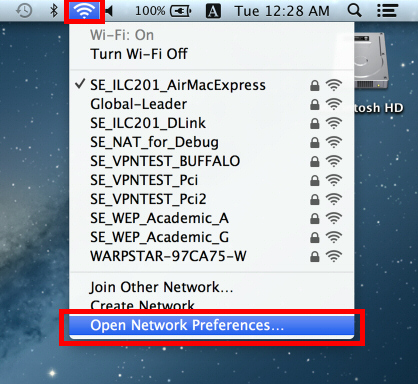
Click the network icon on the top-right side on the Mac screen. Click "Open Network Preferences..." in the menu.
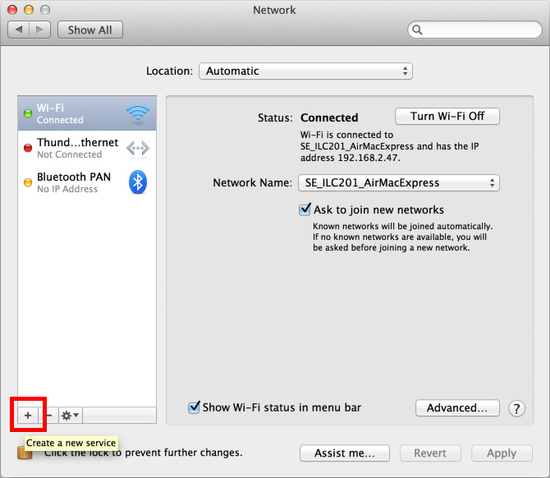
Click the "+" button on the network configuration screen.
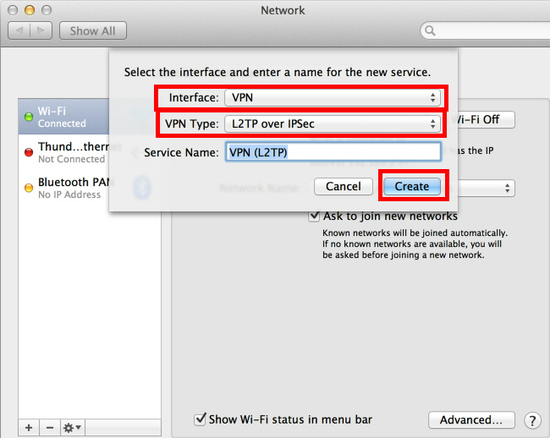
Select "VPN" as "Interface" , "L2TP over IPsec" as "VPN Type" and click the "Create" button.
A new L2TP VPN configuration will be created, and the configuration screen will appear.
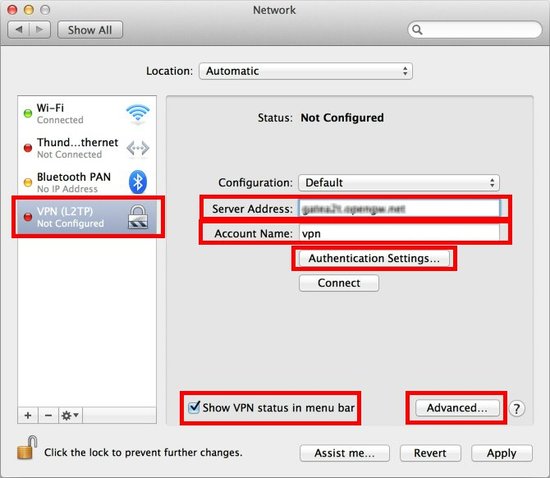
On this screen, you have to specify either hostname or IP address of the destination SoftEther VPN Server.
After you specified the "Server Address" , input the user-name on the "Account Name" field, which is the next to the "Server Address" field.
Next, click the "Authentication Settings..." button.
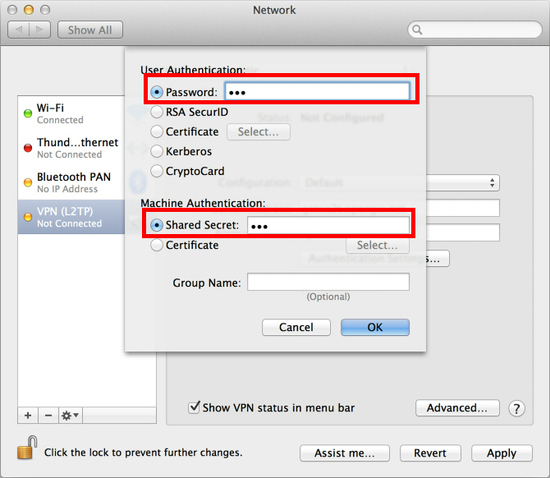
The authentication screen will appear. Input your password in the "Password" field. Specify the pre-shared key also on the "Shared Secret" field. After you input them, click the "OK" button.
After return to the previous screen, check the "Show VPN status in menu bar" and click the "Advanced..." button.
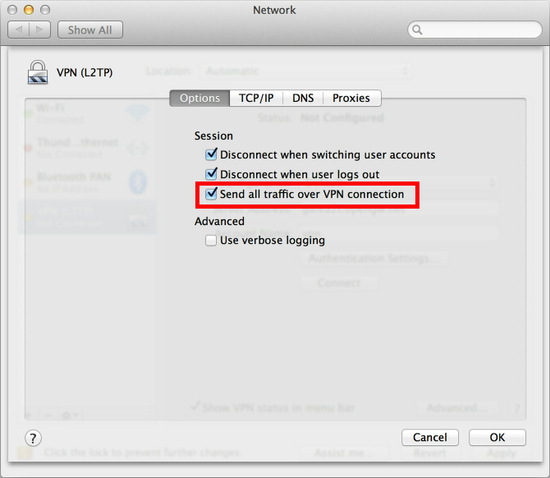
The advanced settings will be appeared. Check the "Send all traffic over VPN connection" and click the "OK" button.
On the VPN connection settings screen, click the "Connect" button to start the VPN connection.
2. Start a VPN connection
You can start a new VPN connection by clicking the "Connect" button at any time. You can also initiate a VPN connection by clicking the VPN icon on the menu bar.
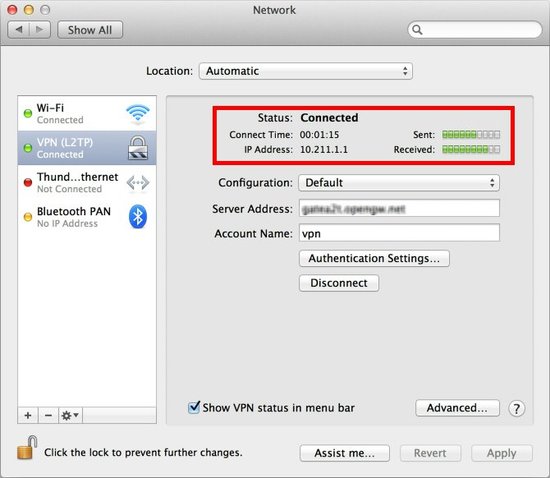
After the VPN connection will be established, the VPN connection setting screen will become as below as the "Status" will be "Connected" . Your private IP address on the VPN, and connect duration time will be displayed on the screen.
3. Enjoy VPN communication
While VPN is established, all communications will be relayed via the VPN Server. You can access to any local servers and workstation on the destination network.
Mac OS X L2TP Client Setup的更多相关文章
- Windows L2TP Client Setup
原文链接:http://www.softether.org/4-docs/2-howto/9.L2TPIPsec_Setup_Guide_for_SoftEther_VPN_Server/4.Wind ...
- Android L2TP Client Setup
原文链接:http://www.softether.org/4-docs/2-howto/9.L2TPIPsec_Setup_Guide_for_SoftEther_VPN_Server/3.Andr ...
- iPhone / iPad L2TP Client Setup
原文链接:http://www.softether.org/4-docs/2-howto/9.L2TPIPsec_Setup_Guide_for_SoftEther_VPN_Server/2.iPho ...
- Install Docker on Mac OS X(转)
Install Docker on Mac OS X You can install Docker using Boot2Docker to run docker commands at your c ...
- [转]Debugging the Mac OS X kernel with VMware and GDB
Source: http://ho.ax/posts/2012/02/debugging-the-mac-os-x-kernel-with-vmware-and-gdb/ Source: http:/ ...
- Mac 操作系统安装 SVN server教程(Subversion With Mac OS X Tutorial)
Find recent articles on my github page: rubyrobot.github.io © 2006-2014 Imagine Ecommerce Subversion ...
- Mac OS、Ubuntu 安装及使用 Consul
Consul 概念(摘录): Consul 是 HashiCorp 公司推出的开源工具,用于实现分布式系统的服务发现与配置.与其他分布式服务注册与发现的方案,比如 Airbnb 的 SmartStac ...
- Mac OS平台下应用程序安装包制作工具Packages的使用介绍
一.介绍 Windows下面开发好的应用程序要进行分发时有很多打包工具可供选择,如Inno Setup, InstallShield, NSIS, Advanced Installer, Qt Ins ...
- Enable rsh on MAC OS with command line
1. Enable rsh on macos. 1). os version (10.0) Enabling the "Allow remote login" option tur ...
随机推荐
- ykit入门
init lint pack server watch 1.创建现有工程的ykit项目 在项目文件夹下 ykit init 2.lint 检查当前项目的代码质量 手动执行代码 可验证代码正误 yk ...
- NFS、FTP介绍
第二十五课 NFS.FTP介绍 目录 一. NFS介绍 二.NFS服务端安装配置 三.NFS配置选项 四.exportfs命令 五.NFS客户端问题 六.FTP介绍 七.使用vsftpd搭建ftp 八 ...
- firefox 屏蔽Backspace按键的后退功能
直接上图
- if else 和if elif else的区别
def fuck(a): if a ==1: print(a) if a ==2: print("not good") else: print("tamade" ...
- unity3d 数据加/解密
[/font]using System.Collections; using System.Text; using System.Security.Cryptography; using System ...
- python+appium 自动化2--元素定位uiautomatorviewer
出处:https://www.cnblogs.com/yoyoketang/p/6128741.html 前言: 可以打开手机上的app了,下一步元素定位uiautomatorviewer,通过定位到 ...
- zookeeper分布式服务中选主的应用
通常zookeeper在分布式服务中作为注册中心,实际上它还可以办到很多事.比如分布式队列.分布式锁 由于公司服务中有很多定时任务,而这些定时任务由于一些历史原因暂时不能改造成框架调用 于是想到用zo ...
- JVM逃逸分析
开启逃逸分析: -server -XX:+DoEscapeAnalysis -XX:+PrintGCDetail -Xmx10m -Xms10m 关闭逃逸分析: -server -XX:-DoEsca ...
- maven 常用备忘录
1.maven 国内的常用中央仓库地址配置: <mirror> <id>alimaven</id> <name>aliyun maven</nam ...
- python学习笔记3-函数
一.函数高级特性 1)列表生成式,列表生成式即List Comprehensions,是Python内置的非常简单却强大的可以用来创建list的生成式. eg: >>> list(r ...