
Python菜鸟快乐游戏编程_pygame(4)
Python菜鸟快乐游戏编程_pygame(博主录制,2K分辨率,超高清)
https://study.163.com/course/courseMain.htm?courseId=1006188025&share=2&shareId=400000000398149
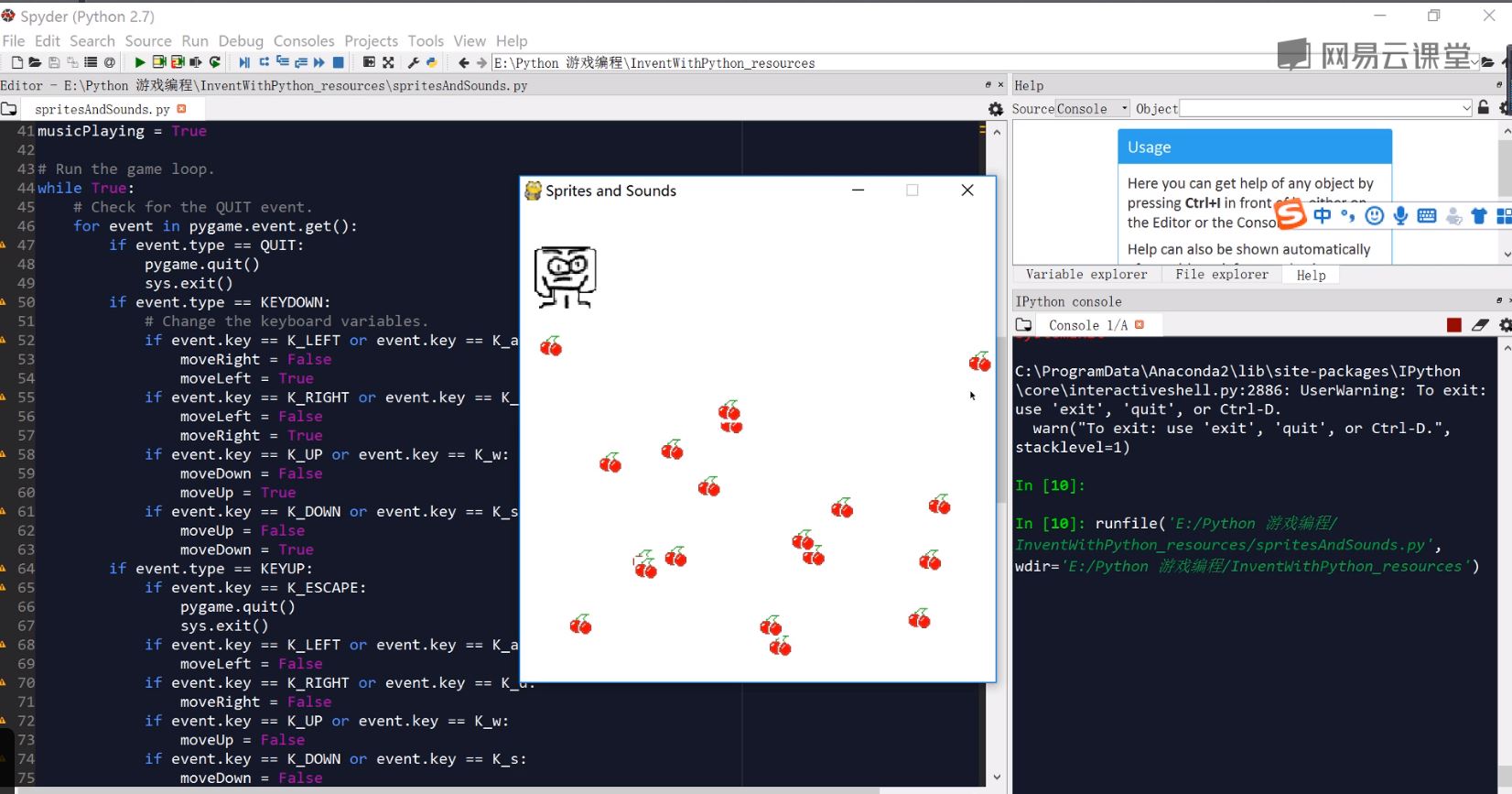
为了熟悉键盘,鼠标,颜色参数,屏幕参数,我为大家准备了一个最简单的游戏sprite and sounds
import pygame, sys, time, random

from pygame.locals import *

# Set up pygame.

pygame.init()

mainClock = pygame.time.Clock()

# Set up the window.

WINDOWWIDTH = 400

WINDOWHEIGHT = 400

windowSurface = pygame.display.set_mode((WINDOWWIDTH, WINDOWHEIGHT), 0, 32)

pygame.display.set_caption('Sprites and Sounds')

# Set up the colors.

WHITE = (255, 255, 255)

# Set up the block data structure.

player = pygame.Rect(300, 100, 40, 40)

playerImage = pygame.image.load('player.png')

playerStretchedImage = pygame.transform.scale(playerImage, (40, 40))

foodImage = pygame.image.load('cherry.png')

foods = []

for i in range(20):

    foods.append(pygame.Rect(random.randint(0, WINDOWWIDTH - 20), random.randint(0, WINDOWHEIGHT - 20), 20, 20))

foodCounter = 0

NEWFOOD = 40

# Set up keyboard variables.

moveLeft = False

moveRight = False

moveUp = False

moveDown = False

MOVESPEED = 6

# Set up the music.

pickUpSound = pygame.mixer.Sound('pickup.wav')

pygame.mixer.music.load('background.mid')

pygame.mixer.music.play(-1, 0.0)

musicPlaying = True

# Run the game loop.

while True:

    # Check for the QUIT event.

    for event in pygame.event.get():

        if event.type == QUIT:

            pygame.quit()

            sys.exit()

        if event.type == KEYDOWN:

            # Change the keyboard variables.

            if event.key == K_LEFT or event.key == K_a:

                moveRight = False

                moveLeft = True

            if event.key == K_RIGHT or event.key == K_d:

                moveLeft = False

                moveRight = True

            if event.key == K_UP or event.key == K_w:

                moveDown = False

                moveUp = True

            if event.key == K_DOWN or event.key == K_s:

                moveUp = False

                moveDown = True

        if event.type == KEYUP:

            if event.key == K_ESCAPE:

                pygame.quit()

                sys.exit()

            if event.key == K_LEFT or event.key == K_a:

                moveLeft = False

            if event.key == K_RIGHT or event.key == K_d:

                moveRight = False

            if event.key == K_UP or event.key == K_w:

                moveUp = False

            if event.key == K_DOWN or event.key == K_s:

                moveDown = False

            if event.key == K_x:

                player.top = random.randint(0, WINDOWHEIGHT - player.height)

                player.left = random.randint(0, WINDOWWIDTH - player.width)

            if event.key == K_m:

                if musicPlaying:

                    pygame.mixer.music.stop()

                else:

                    pygame.mixer.music.play(-1, 0.0)

                musicPlaying = not musicPlaying

        if event.type == MOUSEBUTTONUP:

            foods.append(pygame.Rect(event.pos[0] - 10, event.pos[1] - 10, 20, 20))

    foodCounter += 1

    if foodCounter >= NEWFOOD:

        # Add new food.

        foodCounter = 0

        foods.append(pygame.Rect(random.randint(0, WINDOWWIDTH - 20), random.randint(0, WINDOWHEIGHT - 20), 20, 20))

    # Draw the white background onto the surface.

    windowSurface.fill(WHITE)

    # Move the player.

    if moveDown and player.bottom < WINDOWHEIGHT:

        player.top += MOVESPEED

    if moveUp and player.top > 0:

        player.top -= MOVESPEED

    if moveLeft and player.left > 0:

        player.left -= MOVESPEED

    if moveRight and player.right < WINDOWWIDTH:

        player.right += MOVESPEED

    # Draw the block onto the surface.

    windowSurface.blit(playerStretchedImage, player)

    # Check whether the block has intersected with any food squares.

    for food in foods[:]:

        if player.colliderect(food):

            foods.remove(food)

            player = pygame.Rect(player.left, player.top, player.width + 2, player.height + 2)

            playerStretchedImage = pygame.transform.scale(playerImage, (player.width, player.height))

            if musicPlaying:

                pickUpSound.play()

    # Draw the food.

    for food in foods:

        windowSurface.blit(foodImage, food)

    # Draw the window onto the screen.

    pygame.display.update()

    mainClock.tick(40 )
如下图,生成一个游戏,小怪物吃樱桃。游戏随机生成若干樱桃,玩家通过操作键盘移动小怪物,吃的樱桃越多,小怪物就会越大。
https://study.163.com/provider/400000000398149/index.htm?share=2&shareId=400000000398149(博主视频教学主页)
Python菜鸟快乐游戏编程_pygame(4)的更多相关文章
- Python菜鸟快乐游戏编程_pygame(6)
Python菜鸟快乐游戏编程_pygame(博主录制,2K分辨率,超高清) https://study.163.com/course/courseMain.htm?courseId=100618802 ...
- Python菜鸟快乐游戏编程_pygame(5)
Python菜鸟快乐游戏编程_pygame(博主录制,2K分辨率,超高清) https://study.163.com/course/courseMain.htm?courseId=100618802 ...
- Python菜鸟快乐游戏编程_pygame(3)
Python菜鸟快乐游戏编程_pygame(博主录制,2K分辨率,超高清) https://study.163.com/course/courseMain.htm?courseId=100618802 ...
- Python菜鸟快乐游戏编程_pygame(2)
Python菜鸟快乐游戏编程_pygame(博主录制,2K分辨率,超高清) https://study.163.com/course/courseMain.htm?courseId=100618802 ...
- Python菜鸟快乐游戏编程_pygame(1)
Python菜鸟快乐游戏编程_pygame(博主录制,2K分辨率,超高清) https://study.163.com/course/courseMain.htm?courseId=100618802 ...
- python游戏编程——跟13岁儿童学编程
python爬虫基本告一段落,琢磨搞点其他的,正好在网上看到一个帖子,一个外国13岁小朋友用python写的下棋程序,内容详细,也有意思,拿来练手. 13岁啊.. 我这年纪还在敲 dir啥的吧 想到原 ...
- Python游戏编程入门
<Python游戏编程入门>这些文章负责整理在这本书中的知识点.注意事项和课后习题的尝试实现.并且对每一个章节给出的最终实例进行分析和注释. 初识pygame:pie游戏pygame游戏库 ...
- 分享《Python 游戏编程快速上手(第3版)》高清中文版PDF+高清英文版PDF+源代码
通过编写一个个小巧.有趣的游戏来学习Python,通过实例来解释编程的原理的方式.14个游戏程序和示例,介绍了Python基础知识.数据类型.函数.流程控制.程序调试.流程图设计.字符串操作.列表和字 ...
- 《Python游戏编程快速上手》——1.3 如何使用本书
本节书摘来自异步社区<Python游戏编程快速上手>一书中的第1章,第1.3节,作者[美] Al Sweigart(斯维加特),李强 译,更多章节内容可以访问云栖社区"异步社区& ...
随机推荐
- 属于自己的MES(二)必备的主数据
MES在系统建设前,需要先进行一些必要的数据,这些主数据是支撑MES执行的关键. 1.BOM BOM通常称为“物料清单”,也就是产品结构,在化工.制药.食品.烟草领域也叫“配方”,它主要描述了物料的物 ...
- UE3中Object和Actor的创建与销毁
创建Object ① 在uc脚本中使用new运算符来创建 /********************************************************************** ...
- ASP.NET没有魔法——目录(完结)
ASP.NET没有魔法——开篇-用VS创建一个ASP.NET Web程序 ASP.NET没有魔法——为什么使用ASP.NET ASP.NET没有魔法——第一个ASP.NET应用<MyBlog&g ...
- python类的继承、封装和多态
摘自https://www.cnblogs.com/evablogs/p/6724477.html 继承 1 2 3 4 5 6 7 8 class Person(object): def _ ...
- js坚持不懈之12:var b = {a:1};
今天看到一篇博客,在声明一个变量的时候用了如下格式的语法: var b = {a:1}; 不明白,百度一下.作如下解释: var: 声明一个变量 b: 表示变量的名称 =: 赋值符号 {}: 表示一个 ...
- python之三行代码发送邮件
(1)首先进入cmd,输入pip install yagmail (2)思路:1 .连接服务器:yagmail.SMTP(邮箱账号,邮箱密码,邮箱服务器地址,邮箱服务器端口) 2 .准备正文内容:co ...
- C# -- 使用FileInfo获取文件信息
C# -- 使用FileInfo获取文件信息 1. 代码实现 static void Main(string[] args) { GetFileInfo(@"D:\Test.xlsx&quo ...
- UI对象库-定位元素与程序分离
1.前言 这几天有人问我,UI自动化测试中使用到的页面定位元素应该存放在哪里比较合适?我想说的是如果你使用的是PO设计模式设计测试用例的话,可以把定位元素存在每一个page页面,一个page存放对应的 ...
- nginx 的各种配置
负载均衡 以上是ip的负载均衡,主要是保证 固定ip地址访问到固定服务,如果不做ip的匹配,那么每次请求的机器都不相同,就会出现问题,sessionid 之类的问题 //修改 路由负载均衡不能写has ...
- 求导程序编写(oo-java编程)
本单元的任务为求导. 即将一个含自变量x的多项式F求导成为另外一个含自变量x的多项式f.使得 dF/dx = f 为降低我们的难度,这个任务被分解成了三个阶段: (1)对幂函数进行求导(不允许嵌套) ...