
Qt封装百度人脸识别+图像识别
AI技术的发展在最近几年如火如荼,工资待遇也是水涨船高,应用的前景也是非常广阔,去年火起来的人脸识别,今年全国遍地开花,之前封装了下face++的人脸识别等接口,今年看了下百度的AI,还免费了,效果也是越来越好,活体检测这个算法更是做的吊炸天(只需要传一张图片就能判断图片中的人是翻拍的照片非活体),牛逼的一塌糊涂,我反正是跪了。特意花了半天时间将百度人脸识别+图像识别封装了下,以便后期使用。顺便预测下,百度AI在未来的国内AI市场中,不是第一就是第二,而且会持续保持至少十年。
为了兼容qt4,特意采用了qtscript解析收到的数据。
* 1:可识别身份证正面信息+背面信息
* 2:可识别银行卡信息
* 3:可识别驾驶证+行驶证信息
* 4:可进行人脸识别,人脸比对,活体检测
* 5:可设置请求地址+用户密钥+应用密钥
* 6:直接传入图片即可,信号返回,毫秒级极速响应
* 7:通用Qt4-Qt5,windows linux 嵌入式linux
可执行文件下载:https://pan.baidu.com/s/1pzhQL_YMYZyn4hW94e0QsQ
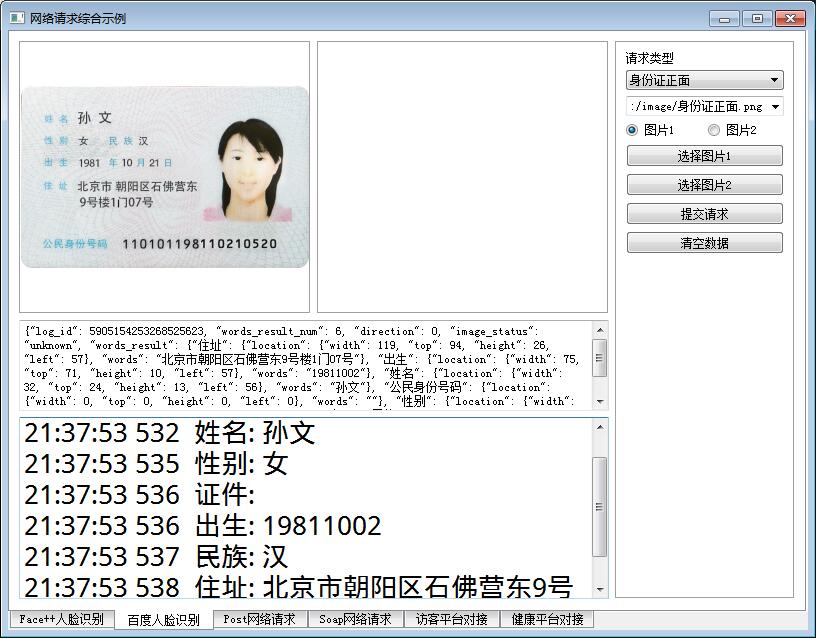
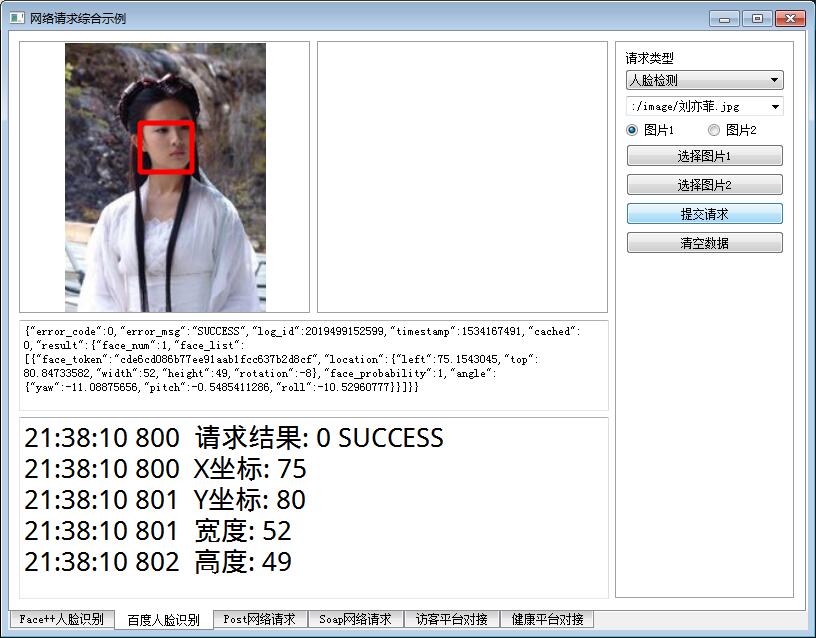
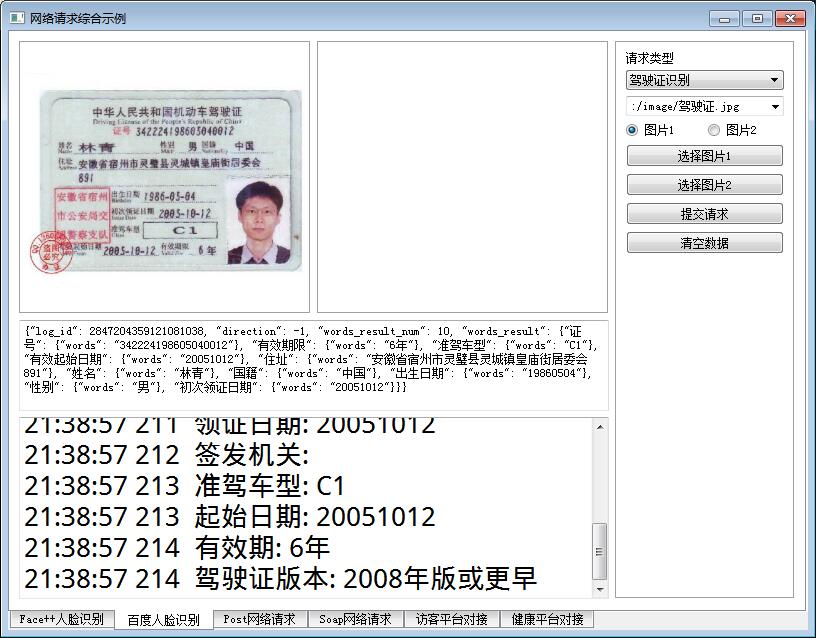
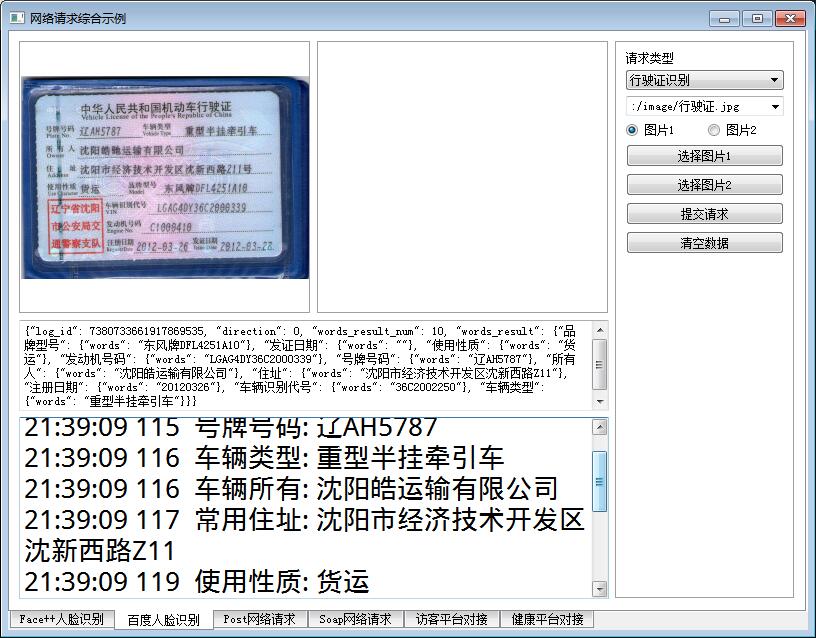
QByteArray FaceBaiDu::getImageData(const QImage &img)

{

    QImage image = img;

    QByteArray imageData;

    QBuffer buffer(&imageData);

    image.save(&buffer, "jpg");

    return imageData.toBase64();

}

QString FaceBaiDu::getImageData2(const QImage &img)

{

    return QString(getImageData(img));

}

QHttpPart FaceBaiDu::dataToHttpPart(const QByteArray &body, const QString &name)

{

    QHttpPart httpPart;

    httpPart.setHeader(QNetworkRequest::ContentDispositionHeader, QVariant(QString("form-data;name=\"%1\"").arg(name)));

    httpPart.setBody(body);

    return httpPart;

}

void FaceBaiDu::sendData(const QString &url, const QList<QHttpPart> &httpParts)

{

    //初始化消息体

    QHttpMultiPart *httpMultiPart = new QHttpMultiPart(QHttpMultiPart::FormDataType);

    //逐个添加消息内容

    foreach (QHttpPart httpPart, httpParts) {

        httpMultiPart->append(httpPart);

    }

    //初始化请求对象

    QNetworkRequest request;

    request.setUrl(QUrl(url));

#ifdef ssl

    //设置openssl签名配置,否则在ARM上会报错

    QSslConfiguration conf = request.sslConfiguration();

    conf.setPeerVerifyMode(QSslSocket::VerifyNone);

#if (QT_VERSION > QT_VERSION_CHECK(5,0,0))

    conf.setProtocol(QSsl::TlsV1_0);

#else

    conf.setProtocol(QSsl::TlsV1);

#endif

    request.setSslConfiguration(conf);

#endif

    //发送请求

    QNetworkReply *reply = manager->post(request, httpMultiPart);

    httpMultiPart->setParent(reply);

}

void FaceBaiDu::finished(QNetworkReply *reply)

{

    QString error = reply->errorString();

    if (!error.isEmpty() && error != "Unknown error") {

        emit receiveError(error);

    }

    if (reply->bytesAvailable() > 0 && reply->error() == QNetworkReply::NoError) {

        QString data = reply->readAll();

        reply->deleteLater();

        //发送接收数据信号

        emit receiveData(data);

        //初始化脚本引擎

        QScriptEngine engine;

        //构建解析对象

        QScriptValue script = engine.evaluate("value=" + data);

        //获取鉴权标识符

        QString token = script.property("access_token").toString();

        if (!token.isEmpty()) {

            tokenFace = token;

            tokenOcr = token;

        }

        //通用返回结果字段

        int code = script.property("error_code").toInt32();

        QString msg = script.property("error_msg").toString();

        emit receiveResult(code, msg);

        //人脸识别部分

        QScriptValue result = script.property("result");

        if (!result.isNull()) {

            //人脸识别

            QScriptValue face_list = result.property("face_list");

            if (face_list.isObject()) {

                checkFaceList(face_list);

            }

            //人脸比对

            QScriptValue score = result.property("score");

            if (!score.isNull()) {

                double value = score.toString().toDouble();

                if (value > 0) {

                    emit receiveFaceCompare(QRect(), QRect(), value);

                } else {

                    emit receiveFaceCompareFail();

                }

            }

            //活体检测

            QScriptValue face_liveness = result.property("face_liveness");

            if (!face_liveness.isNull()) {

                double liveness = face_liveness.toString().toDouble();

                if (liveness > 0) {

                    emit receiveLive(liveness);

                }

            }

            //银行卡

            QScriptValue bank_card_number = result.property("bank_card_number");

            if (!bank_card_number.isNull()) {

                QString card_number = bank_card_number.toString();

                QString bank_name = result.property("bank_name").toString();

                if (!card_number.isEmpty()) {

                    emit receiveBankCardInfo(card_number, bank_name);

                }

            }

        }

        //文字识别部分

        QScriptValue words_result = script.property("words_result");

        if (!words_result.isNull()) {

            //身份证正面

            QScriptValue nation = words_result.property("民族");

            if (nation.isObject()) {

                checkCardFront(words_result);

            }

            //身份证反面

            QScriptValue issuedby = words_result.property("签发机关");

            if (issuedby.isObject()) {

                checkCardBack(words_result);

            }

            //驾驶证

            QScriptValue license_number = words_result.property("证号");

            if (license_number.isObject()) {

                checkDriverLicense(words_result);

            }

            //行驶证

            QScriptValue model = words_result.property("品牌型号");

            if (model.isObject()) {

                checkRVehicleLicense(words_result);

            }

        }

    }

}

void FaceBaiDu::checkFaceList(const QScriptValue &face_list)

{

    QRect face_rectangle;

    //创建迭代器逐个解析具体值

    QScriptValueIterator it(face_list);

    while (it.hasNext()) {

        it.next();

        QString face_token = it.value().property("face_token").toString();

        if (!face_token.isEmpty()) {

            QScriptValue location = it.value().property("location");

            if (location.isObject()) {

                face_rectangle.setX(location.property("left").toInt32());

                face_rectangle.setY(location.property("top").toInt32());

                face_rectangle.setWidth(location.property("width").toInt32());

                face_rectangle.setHeight(location.property("height").toInt32());

            }

        }

        it.next();

        if (face_rectangle.width() > 0) {

            emit receiveFaceRect(face_rectangle);

        } else {

            break;

        }

    }

}

void FaceBaiDu::checkCardFront(const QScriptValue &scriptValue)

{

    QScriptValue name = scriptValue.property("姓名");

    QScriptValue address = scriptValue.property("住址");

    QScriptValue birthday = scriptValue.property("出生");

    QScriptValue number = scriptValue.property("公民身份号码");

    QScriptValue sex = scriptValue.property("性别");

    QScriptValue nation = scriptValue.property("民族");

    QString strName = name.property("words").toString();

    QString strAddress = address.property("words").toString();

    QString strBirthday = birthday.property("words").toString();

    QString strNumber = number.property("words").toString();

    QString strSex = sex.property("words").toString();

    QString strNation = nation.property("words").toString();

    emit receiveIDCardInfoFront(strName, strSex, strNumber, strBirthday, strNation, strAddress);

}

void FaceBaiDu::checkCardBack(const QScriptValue &scriptValue)

{

    QScriptValue issuedby = scriptValue.property("签发机关");

    QScriptValue dateStart = scriptValue.property("签发日期");

    QScriptValue dateEnd = scriptValue.property("失效日期");

    QString strIssuedby = issuedby.property("words").toString();

    QString strDataStart = dateStart.property("words").toString();

    QString strDateEnd = dateEnd.property("words").toString();

    QString strDate = QString("%1.%2.%3-%4.%5.%6")

                      .arg(strDataStart.mid(0, 4)).arg(strDataStart.mid(4, 2)).arg(strDataStart.mid(6, 2))

                      .arg(strDateEnd.mid(0, 4)).arg(strDateEnd.mid(4, 2)).arg(strDateEnd.mid(6, 2));

    emit receiveIDCardInfoBack(strDate, strIssuedby);

}

void FaceBaiDu::checkDriverLicense(const QScriptValue &scriptValue)

{

    QScriptValue licenseNumber = scriptValue.property("证号");

    QScriptValue name = scriptValue.property("姓名");

    QScriptValue gender = scriptValue.property("性别");

    QScriptValue nationality = scriptValue.property("国籍");

    QScriptValue address = scriptValue.property("住址");

    QScriptValue birthday = scriptValue.property("出生日期");

    QScriptValue issueDate = scriptValue.property("初次领证日期");

    QScriptValue classType = scriptValue.property("准驾车型");

    QScriptValue validFrom = scriptValue.property("有效起始日期");

    QScriptValue validFor = scriptValue.property("有效期限");

    QString strLicenseNumber = licenseNumber.property("words").toString();

    QString strName = name.property("words").toString();

    QString strGender = gender.property("words").toString();

    QString strNationality = nationality.property("words").toString();

    QString strAddress = address.property("words").toString();

    QString strBirthday = birthday.property("words").toString();

    QString strIssueDate = issueDate.property("words").toString();

    QString strClassType = classType.property("words").toString();

    QString strValidFrom = validFrom.property("words").toString();

    QString strValidFor = validFor.property("words").toString();

    emit receiveDriverInfo(strValidFrom, strGender, "", strIssueDate, strClassType, strLicenseNumber,

                           strValidFor, strBirthday, "1", strAddress, strNationality, strName);

}

void FaceBaiDu::checkRVehicleLicense(const QScriptValue &scriptValue)

{

    QScriptValue plateNo = scriptValue.property("号牌号码");

    QScriptValue vehicleType = scriptValue.property("车辆类型");

    QScriptValue owner = scriptValue.property("所有人");

    QScriptValue address = scriptValue.property("住址");

    QScriptValue useCharacter = scriptValue.property("使用性质");

    QScriptValue model = scriptValue.property("品牌型号");

    QScriptValue vin = scriptValue.property("车辆识别代号");

    QScriptValue engineNo = scriptValue.property("发动机号码");

    QScriptValue registerDate = scriptValue.property("注册日期");

    QScriptValue issueDate = scriptValue.property("发证日期");

    QString strPlateNo = plateNo.property("words").toString();

    QString strCehicleType = vehicleType.property("words").toString();

    QString strOwner = owner.property("words").toString();

    QString strAddress = address.property("words").toString();

    QString strUseCharacter = useCharacter.property("words").toString();

    QString strModel = model.property("words").toString();

    QString strVin = vin.property("words").toString();

    QString strEngineNo = engineNo.property("words").toString();

    QString strRegisterDate = registerDate.property("words").toString();

    QString strIssueDate = issueDate.property("words").toString();

    emit receiveRvehicleInfo(strIssueDate, strCehicleType, "", strVin, strPlateNo, strUseCharacter,

                             strAddress, strOwner, strModel, strRegisterDate, strEngineNo);

}

void FaceBaiDu::sendData(const QString &url, const QString &data, const QString &header)

{

    QNetworkRequest request;

    request.setHeader(QNetworkRequest::ContentTypeHeader, header);

    request.setUrl(QUrl(url));

#ifdef ssl

    //设置openssl签名配置,否则在ARM上会报错

    QSslConfiguration conf = request.sslConfiguration();

    conf.setPeerVerifyMode(QSslSocket::VerifyNone);

#if (QT_VERSION > QT_VERSION_CHECK(5,0,0))

    conf.setProtocol(QSsl::TlsV1_0);

#else

    conf.setProtocol(QSsl::TlsV1);

#endif

    request.setSslConfiguration(conf);

#endif

    manager->post(request, data.toUtf8());

}

void FaceBaiDu::getToken(const QString &client_id, const QString &client_secret)

{

    QStringList list;

    list.append(QString("grant_type=%1").arg("client_credentials"));

    list.append(QString("client_id=%1").arg(client_id));

    list.append(QString("client_secret=%1").arg(client_secret));

    QString data = list.join("&");

    QString url = "https://aip.baidubce.com/oauth/2.0/token";

    sendData(url, data);

}

void FaceBaiDu::detect(const QImage &img)

{

    QStringList list;

    list.append(QString("{\"image\":\"%1\",\"image_type\":\"BASE64\"}").arg(getImageData2(img)));

    QString data = list.join("");

    QString url = QString("https://aip.baidubce.com/rest/2.0/face/v3/detect?access_token=%1").arg(tokenFace);

    sendData(url, data);

}

void FaceBaiDu::compare(const QImage &img1, const QImage &img2)

{

    QString imgData1 = getImageData2(img1);

    QString imgData2 = getImageData2(img2);

    //如果需要活体检测则NONE改为LOW NORMAL HIGH

    QStringList list;

    list.append("[");

    list.append(QString("{\"image\":\"%1\",\"image_type\":\"BASE64\",\"liveness_control\":\"NONE\"}").arg(imgData1));

    list.append(",");

    list.append(QString("{\"image\":\"%1\",\"image_type\":\"BASE64\",\"liveness_control\":\"NONE\"}").arg(imgData2));

    list.append("]");

    QString data = list.join("");

    QString url = QString("https://aip.baidubce.com/rest/2.0/face/v3/match?access_token=%1").arg(tokenFace);

    sendData(url, data);

}

void FaceBaiDu::live(const QImage &img)

{

    QList<QImage> imgs;

    if (!img.isNull()) {

        imgs << img;

    }

    live(imgs);

}

void FaceBaiDu::live(const QList<QImage> &imgs)

{

    //记住最后一次处理的时间,限制频繁的调用

    QDateTime now = QDateTime::currentDateTime();

    if (lastTime.msecsTo(now) < 500) {

        return;

    }

    lastTime = now;

    QStringList list;

    list.append("[");

    int count = imgs.count();

    for (int i = 0; i < count; i++) {

        QString imgData = getImageData2(imgs.at(i));

        list.append(QString("{\"image\":\"%1\",\"image_type\":\"BASE64\"}").arg(imgData));

        if (i < count - 1) {

            list.append(",");

        }

    }

    list.append("]");

    QString data = list.join("");

    QString url = QString("https://aip.baidubce.com/rest/2.0/face/v3/faceverify?access_token=%1").arg(tokenFace);

    sendData(url, data);

}

void FaceBaiDu::idmatch(const QString &idcard, const QString &name)

{

    QStringList list;

    list.append(QString("{\"id_card_num\":\"%1\",\"name\":\"%2\"}").arg(idcard).arg(name));

    QString data = list.join("");

    QString url = QString("https://aip.baidubce.com/rest/2.0/face/v3/person/idmatch?access_token=%1").arg(tokenFace);

    sendData(url, data);

}

void FaceBaiDu::idcard(const QImage &img, bool front)

{

    QList<QHttpPart> httpParts;

    httpParts << dataToHttpPart(front ? "front" : "back", "id_card_side");

    httpParts << dataToHttpPart(getImageData(img), "image");

    QString url = QString("https://aip.baidubce.com/rest/2.0/ocr/v1/idcard?access_token=%1").arg(tokenOcr);

    sendData(url, httpParts);

}

void FaceBaiDu::bankcard(const QImage &img)

{

    QList<QHttpPart> httpParts;

    httpParts << dataToHttpPart(getImageData(img), "image");

    QString url = QString("https://aip.baidubce.com/rest/2.0/ocr/v1/bankcard?access_token=%1").arg(tokenOcr);

    sendData(url, httpParts);

}

void FaceBaiDu::driverLicense(const QImage &img)

{

    QList<QHttpPart> httpParts;

    httpParts << dataToHttpPart(getImageData(img), "image");

    QString url = QString("https://aip.baidubce.com/rest/2.0/ocr/v1/driving_license?access_token=%1").arg(tokenOcr);

    sendData(url, httpParts);

}

void FaceBaiDu::vehicleLicense(const QImage &img)

{

    QList<QHttpPart> httpParts;

    httpParts << dataToHttpPart(getImageData(img), "image");

    QString url = QString("https://aip.baidubce.com/rest/2.0/ocr/v1/vehicle_license?access_token=%1").arg(tokenOcr);

    sendData(url, httpParts);

}
Qt封装百度人脸识别+图像识别的更多相关文章
- 基于Emgu CV+百度人脸识别,实现视频动态 人脸抓取与识别
背景 目前AI 处于风口浪尖,作为 公司的CTO,也作为自己的技术专研,开始了AI之旅,在朋友圈中也咨询 一些大牛对于AI 机器学习框架的看法,目前自己的研究方向主要开源的 AI 库,如:Emgu C ...
- 百度人脸识别api及face++人脸识别api测试(python)
一.百度人脸识别服务 1.官方网址:http://apistore.baidu.com/apiworks/servicedetail/464.html 2.提供的接口包括: 2.1 多人脸比对:请求多 ...
- C# 30分钟完成百度人脸识别——进阶篇(文末附源码)
距离上次入门篇时隔两个月才出这进阶篇,小编惭愧,对不住关注我的卡哇伊的小伙伴们,为此小编用这篇博来谢罪. 前面的准备工作我就不说了,注册百度账号api,创建web网站项目,引入动态链接库引入. 不了解 ...
- 百度人脸识别AI实践.doc
0, 前言 百度开放了很多AI能力,其中人脸识别就是其中之一. 本文对百度人脸识别AI进行实践检验,看看其使用效果如何. 鉴于是最为基础的实践,基本都是在其接口范例代码修改而来. 百度人脸识别AI网站 ...
- uniapp安卓ios百度人脸识别、活体检测、人脸采集APP原生插件
插件亮点 1 支持安卓平板(横竖屏均可),苹果的iPad.2 颜色图片均可更换. 特别提醒 此插件包含 android 端和 iOS 端,考虑到有些同学只做其中一个端的 app,特意分为 2 个插件, ...
- 日常API之C#百度人脸识别
最近看到一只我家徒儿发来的链接,原来是一堆百度AI的SDK,于是一时兴起就做了一只人脸识别,喵喵喵(●'◡'●) 一.准备工作 首先,当然是下载SDK啦:http://ai.baidu.com/sdk ...
- C# 10分钟完成百度人脸识别——入门篇
嗨咯,小编在此祝大家新年快乐财多多! 今天我们来盘一盘人脸注册.人脸识别等相关操作,这是一个简单入门教程. 话不多说,我们进入主题: 完成人脸识别所需的步骤: 注册百度账号api,创建自己的应用: 创 ...
- 转《trackingjs+websocket+百度人脸识别API,实现人脸签到》流程
先用websocket与后台建立通讯:用trackingjs在页面调用电脑摄像头,监听人脸,发现有人脸进入屏幕了,就把图片转成base64字符串,通过websocket发送到后端:后端拿到图片,调用百 ...
- trackingjs+websocket+百度人脸识别API,实现人脸签到
在公司做了个年会的签到.抽奖系统.用java web做的,用公司的办公app扫二维码码即可签到,扫完码就在大屏幕上显示这个人的照片.之后领导让我改得高大上一点,用人脸识别来签到,就把扫二维码的步骤改成 ...
随机推荐
- (转)DSound开发常用的几个结构
WAVEFORMATEX WAVEFORMATEX { WORD wFormatTag; WORD nChannels; DWORD nSamplesPerSec; DWORD nAvgBytesPe ...
- Java设计模式之七大结构型模式(附实例和详解)
博主在大三的时候有上过设计模式这一门课,但是当时很多都基本没有听懂,重点是也没有细听,因为觉得没什么卵用,硬是要搞那么复杂干嘛.因此设计模式建议工作半年以上的猿友阅读起来才会理解的比较深刻.当然,你没 ...
- 消息中间件activemq-5.13.0整合spring
首先说明这里是在qctivemq配置好并启动服务的情况下进行,请先自行配置好.也可关注我的博文(消息中间件qctivemq安全验证配置)进行配置. 1.首先看一下项目结构 2.所需jar包,这里只列出 ...
- Java基础--深克隆补充
深克隆文章很多,这里推荐Java提高篇--对象克隆(复制). 以上文章条理清晰,一目了然,但最近在项目中碰到的实际问题是,所要克隆的对象是加上子类父类共计207个,无论用上述两种方式的哪一种,都要一一 ...
- struts2危险漏洞解决方法
原创,bgy编写.2013-07-24 前文: 随着苹果开发者网站的沦陷,已经曝光一周的Apache Struts2漏洞再次成为热门话题,今天有消息称由于该漏洞被利用,淘宝的数据库已经被盗,尽管淘宝官 ...
- 详解BarTender符号体系特殊选项之“行数”
上面两篇文章小编和大家分享了BarTender符号体系特殊选项中的“行高”和“列”.此外,某些二维 (2D) 符号体系的结构为多个信息行,每一行看上去都像一个非常窄的条形码. 例如,以下图像是含 3 ...
- 在ABBYY中如何修正倾斜的PDF页面
作为一名文案工作者,每天都要跟各种PDF文件打交道,合同.报价单.协议书等等等,通常提供给客户的都是扫描之后的PDF文档,虽说都是机器扫描,但毕竟是人为放置的,难免位置放置不齐,导致扫描出来的文档出现 ...
- IT管理就这么管
随着信息系统的广泛应用,员工没有电脑就无法工作,企业离开信息系统就无法顺利开展业务.信息部作为企业的内部信息化部门,承担了包括软件开发.系统维 护.硬件维护的几乎所有IT相关任务,对保障公司业务系统的 ...
- pyCharm运行python提示“please select a valid interpreter”
报错信息“please select a valid interpreter”提示“请选择一个有效的解释器” pyCharm是编写python语言的集成IDE工具,安装pyCharm后需要自行安装py ...
- mysql中,通过json_insert函数向json字段插入键值?json_insert函数的使用?
需求描述: 通过json_insert向json字段中插入值,在此进行实验,记录下. 操作过程: 1.查看已经有的包含json数据类型的表 mysql> select * from tab_js ...