
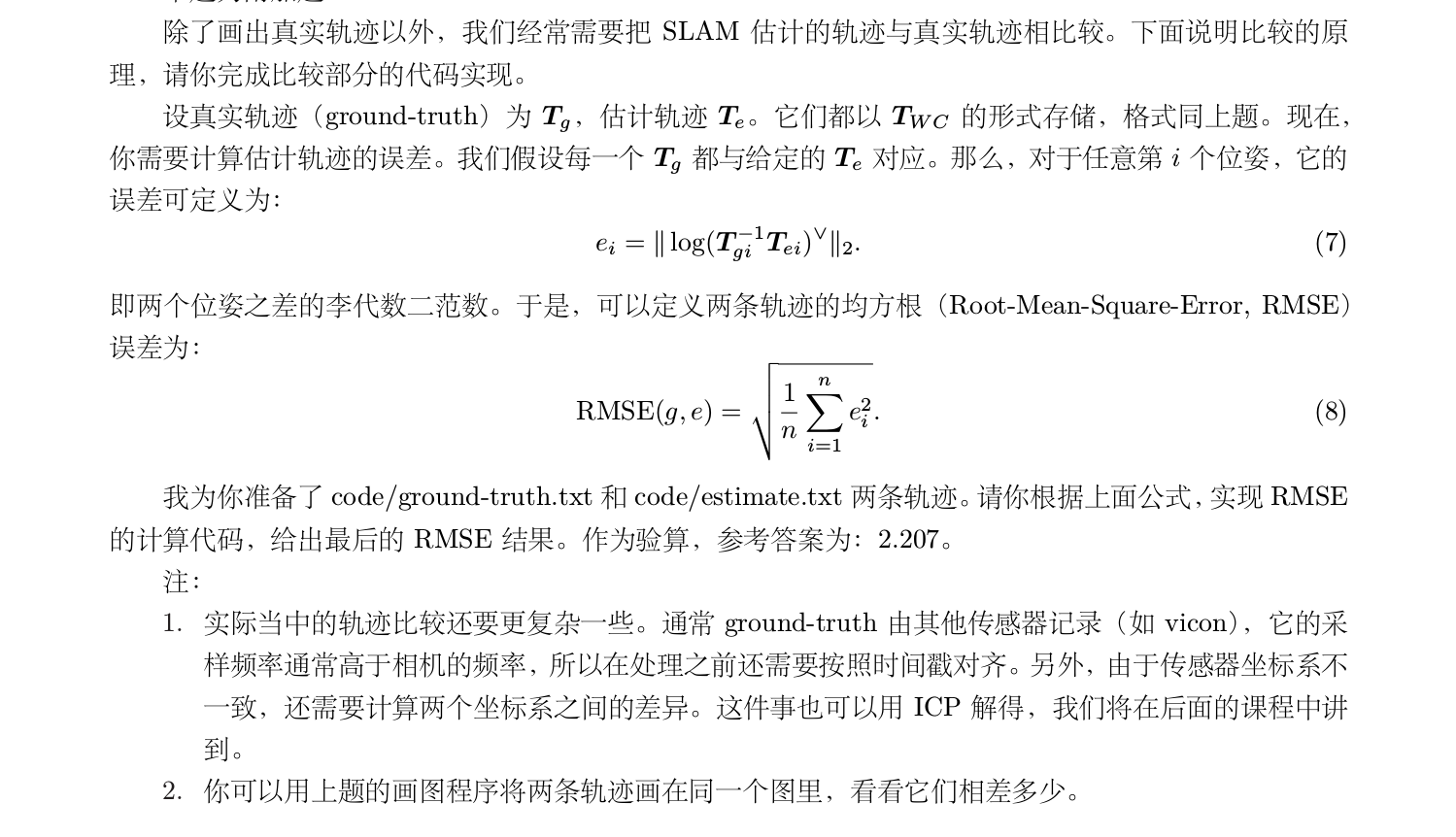
使用Pangolon在同一副图中,画出两个轨迹,比较误差
使用 code/ground-truth.txt 和 code/estimate.txt 两条轨迹。请你根据上面公式,实现 RMSE
的计算代码,给出最后的 RMSE 结果。作为验算,参考答案为:2.207。用上题的画图程序将两条轨迹画在同一个图里,看看它们相差多少。
完整题目描述
ground-truth.txt和estimate.txt放在了源文件夹下的data目录下,编写了用于画图的trajectory_compare.cpp文件
相关代码及程序可在我的github中获取,地址:https://github.com/feifanrensheng/trajectory_compare
代码如下:
 // trajectory_compare.cpp created by zhang ning 2018/3/23

 #include <sophus/se3.h>

 #include <string>

 #include <iostream>

 #include <fstream>

 // need pangolin for plotting trajectory

 #include <pangolin/pangolin.h>

 using namespace std;

 // function for plotting trajectory, don't edit this code

 // start point is red and end point is blue

 void DrawTrajectory(vector<Sophus::SE3, Eigen::aligned_allocator<Sophus::SE3>>,vector<Sophus::SE3, Eigen::aligned_allocator<Sophus::SE3>>);

 int main(int argc, char **argv) {

     vector<Sophus::SE3, Eigen::aligned_allocator<Sophus::SE3>> poses1,poses2;

     /// implement pose reading code

     // start your code here (5~10 lines)

     ifstream infile;

     infile.open("../data/estimated.txt");

     if(!infile) cout<<"error"<<endl;

     cout<<"存入数组"<<endl;   //先将文件中的数据存入到一个二维数组中

     double data;

     double a[][];

     double *p=&a[][];

     while(infile>>data)             //遇到空白符结束

     {

         *p=data;

          p++;

     }

     infile.close();

     for(int i=;i<;i++)   //分别对每一行数据生成一个变换矩阵,然后存入动态数组poses中

     {

     Eigen::Quaterniond q1 = Eigen::Quaterniond(a[i][],a[i][],a[i][],a[i][]);

         Eigen::Vector3d t1;

     t1<<a[i][],a[i][],a[i][];

         Sophus::SE3 SE3_qt1(q1,t1);

         poses1.push_back(SE3_qt1);

     }

     ifstream truth;

     truth.open("../data/groundtruth.txt");

     if(!truth) cout<<"error"<<endl;

     cout<<"存入数组"<<endl;   //先将文件中的数据存入到一个二维数组中

     double data1;

     double b[][];

     double *p1=&b[][];

     while(truth>>data1)             //遇到空白符结束

     {

         *p1=data1;

          p1++;

     }

     truth.close();

     for(int i=;i<;i++)   //分别对每一行数据生成一个变换矩阵,然后存入动态数组poses中

     {

     Eigen::Quaterniond q2 = Eigen::Quaterniond(b[i][],b[i][],b[i][],b[i][]);

         Eigen::Vector3d t2;

     t2<<b[i][],b[i][],b[i][];

         Sophus::SE3 SE3_qt2(q2,t2);

         poses2.push_back(SE3_qt2);

     }

     // end your code here

     // draw trajectory in pangolin

     DrawTrajectory(poses1,poses2);

     return ;

 }

 /*******************************************************************************************/

 void DrawTrajectory(vector<Sophus::SE3, Eigen::aligned_allocator<Sophus::SE3>> poses1,vector<Sophus::SE3, Eigen::aligned_allocator<Sophus::SE3>> poses2) {

     if (poses1.empty() || poses2.empty() ) {

         cerr << "Trajectory is empty!" << endl;

         return;

     }

     // create pangolin window and plot the trajectory

     //创建一个窗口

     pangolin::CreateWindowAndBind("Trajectory Viewer", , );

     //启动深度测试

     glEnable(GL_DEPTH_TEST);

     //启动混合

     glEnable(GL_BLEND);

     //混合函数glBlendFunc( GLenum sfactor , GLenum dfactor );sfactor 源混合因子dfactor 目标混合因子

     glBlendFunc(GL_SRC_ALPHA, GL_ONE_MINUS_SRC_ALPHA);

     // Define Projection and initial ModelView matrix

     pangolin::OpenGlRenderState s_cam(

             pangolin::ProjectionMatrix(, , , , , , 0.1, ),

       //对应的是gluLookAt,摄像机位置,参考点位置,up vector(上向量)

             pangolin::ModelViewLookAt(, -0.1, -1.8, , , , 0.0, -1.0, 0.0)

     );

     pangolin::View &d_cam = pangolin::CreateDisplay()

             .SetBounds(0.0, 1.0, pangolin::Attach::Pix(), 1.0, -1024.0f / 768.0f)

             .SetHandler(new pangolin::Handler3D(s_cam));

     while (pangolin::ShouldQuit() == false) {

         glClear(GL_COLOR_BUFFER_BIT | GL_DEPTH_BUFFER_BIT);

         d_cam.Activate(s_cam);

         glClearColor(1.0f, 1.0f, 1.0f, 1.0f);

         glLineWidth();

         for (size_t i = ; i < poses1.size() - ; i++) {

             glColor3f( - (float) i / poses1.size(), 0.0f, (float) i / poses1.size());

             glBegin(GL_LINES);

             auto p1 = poses1[i], p2 = poses1[i + ];

             glVertex3d(p1.translation()[], p1.translation()[], p1.translation()[]);

             glVertex3d(p2.translation()[], p2.translation()[], p2.translation()[]);

             glEnd();

         }

         for (size_t j = ; j < poses2.size() - ; j++) {

             glColor3f( - (float) j / poses2.size(), 0.0f, (float) j / poses2.size());

             glBegin(GL_LINES);

             auto p3 = poses2[j], p4 = poses2[j + ];

             glVertex3d(p3.translation()[], p3.translation()[], p3.translation()[]);

             glVertex3d(p4.translation()[], p4.translation()[], p4.translation()[]);

             glEnd();

         }

         pangolin::FinishFrame();

         usleep();   // sleep 5 ms

     }

 }
#CMakeLists.txt

# writed by zhang ning //

cmake_minimum_required( VERSION 2.8 )

project(trajectory_compare)

set( CMAKE_BUILD_TYPE "Debug" )

set( CMAKE_CXX_FLAGS "-std=c++11 -O3" )

find_package( Sophus REQUIRED)

find_package( Pangolin REQUIRED)

include_directories( "/usr/include/eigen3" )

include_directories( ${Sophus_INCLUDE_DIRS} )

include_directories( ${Pangolin_INCLUDE_DIRS} )

add_executable( trajectory_compare trajectory_compare.cpp)

target_link_libraries( trajectory_compare ${Sophus_LIBRARIES} ${Pangolin_LIBRARIES} )
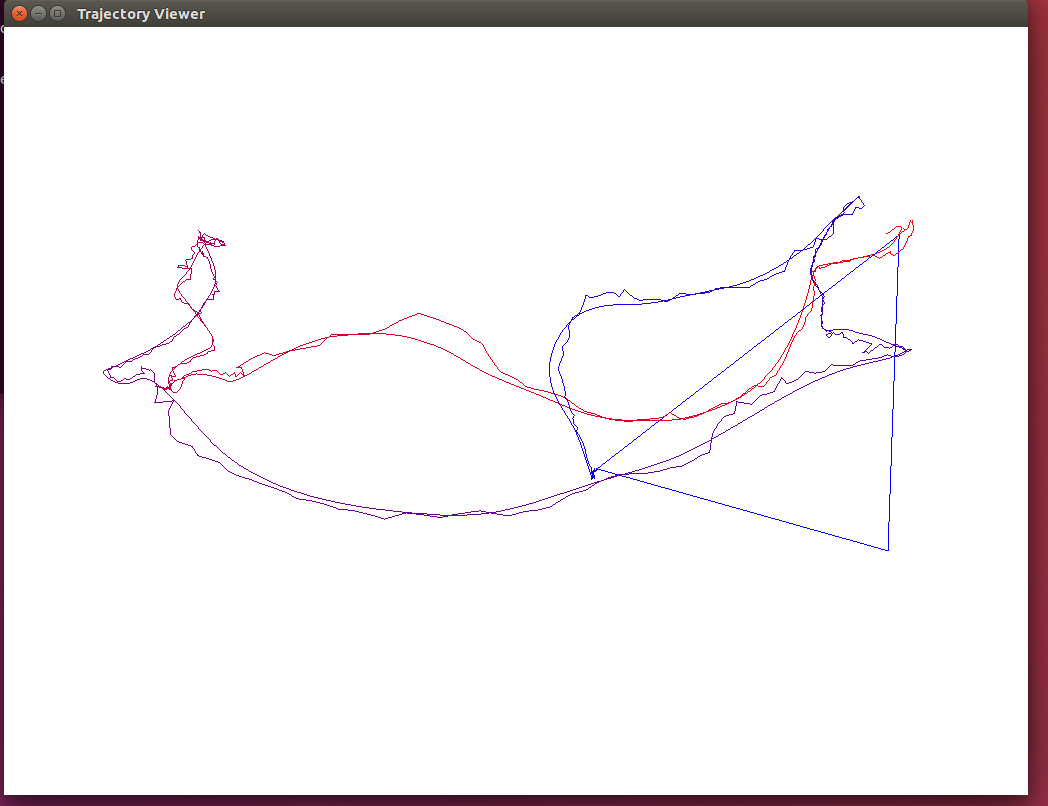
画出效果图如下所示
使用Pangolon在同一副图中,画出两个轨迹,比较误差的更多相关文章
- python—networkx:在一张图中画出多个子图
通过plt.subplot能够在一张图中画出多个子图 #coding: utf-8 #!/usr/bin/env python """ Draw a graph with ...
- 机器学习入门-随机森林温度预测-增加样本数据 1.sns.pairplot(画出两个关系的散点图) 2.MAE(平均绝对误差) 3.MAPE(准确率指标)
在上一个博客中,我们构建了随机森林温度预测的基础模型,并且研究了特征重要性. 在这个博客中,我们将从两方面来研究数据对预测结果的影响 第一方面:特征不变,只增加样本的数据 第二方面:增加特征数,增加样 ...
- wpf 在不同DPI下如何在DrawingVisual中画出清晰的图形
环境Win10 VS2017 .Net Framework4.7.1 本文仅讨论在DrawingVisual中进行的画图. WPF单位,系统DPI,显示器DPI三者的定义及关系 WPF单位:一 ...
- 如何在canvas中画出一个太极图
先放一个效果图: 代码如下 <!DOCTYPE html> <html> <head> <meta charset="utf-8" /&g ...
- matplotlib中在for中画出多张图
import matplotlib.pyplot as plt import numpy as np fig, axes = plt.subplots(2, 2) def showim(): for ...
- Latex中画出函数文件的调用关系拓扑图
流程图,思维导图,拓扑图通常能把我们遇到的一些复杂的关系结构用图形的方式展现出来.在Latex中要想画这样的拓扑图,有一个很好用的绘图工具包 pgf/tikz . 1.pgf/tikz的安装:pgf/ ...
- 百度地图API实时画出动态运行轨迹(一条行驶轨迹),车头实时指向行驶方向,设置角度偏移
参考网址:https://blog.csdn.net/skywqnan/article/details/79036262 改变车的方向:http://www.cnblogs.com/peixuanzh ...
- 使用Eclipse在Excel中找出两张表中相同证件号而姓名或工号却出现不同的的项
1:首先把Excel中的文本复制到txt中,复制如下: A表: 证件号 工号 姓名 310110xxxx220130004 101 傅家宜3101 ...
- 给定一个值S,在有序数组中找出两个元素A和B,使 A+B = S.
在网上看到过一个面试题,感觉挺有意思,看别人的代码写的逻辑不够谨慎,重写了一个,较真了又... package com.array7.algorithm; public class Algorithm ...
随机推荐
- VS2010安装包制作全过程图解
项目的第一个版本出来了,要做个安装包,很久没做过已经有些淡忘了,网上差了差资料,写了一个,总结下,可能还不是很完善,仅作参考. 1.首先在打开 VS2010 >新建>项目 2.创建一 ...
- Android 程序打包及签名(转)
为什么要签名??? 开发Android的人这么多,完全有可能大家都把类名,包名起成了一个同样的名字,这时候如何区分?签名这时候就是起区分作用的. 由于开发商可能通过使用相同的Package Name来 ...
- Android的WebView控件载入网页显示速度慢的究极解决方案
Android的WebView控件载入网页显示速度慢的究极解决方案 [转载来源自http://hi.baidu.com/goldchocobo/] 秒(甚至更多)时间才会显示出来.研究了很久,搜遍了国 ...
- Elastic-Job原理分析(version:2.1.4)
当当的Elastic-Job开源出了两种分布式Job的解决方案:1. elastic-job-lite,这是一个无中心节点的调度: Elastic-Job-Lite定位为轻量级无中心化解决方案,使用j ...
- GDAL------加载Shapefile文件
代码: using System; using System.Collections.Generic; using System.Linq; using System.Text; using Syst ...
- Java重定向输出流实现程序日志
创建一个类,在该类的main主方法中,保存System类的out成员变量为临时变量,然后创建一个新的文件输出流,并把这个输出流设置为System类新的输出流.在程序关键位置输出调试信息,这些调试信息将 ...
- NetBpm Q&A(7)
原文:NetBPM工作流的一个示例:请假审批 前言 在NetBPM的实践与应用中,大家一定会遇到各种各样的问题,笔者特建此帖, 聚集了一些典型问题,并作了初步解答.本帖将不断更新,大家有什么问题,可以 ...
- Java bean中布尔类型使用注意
JavaBean是一个标准,遵循标准的Bean是一个带有属性和getters/setters方法的Java类. JavaBean的定义很简单,但是还有有一些地方需要注意,例如Bean中含有boolea ...
- 基础知识《十二》一篇文章理解Cookie和Session
理解Cookie和Session机制 会话(Session)跟踪是Web程序中常用的技术,用来跟踪用户的整个会话.常用的会话跟踪技术是Cookie与Session.Cookie通过在客户端记录信息确定 ...
- 常见微信小程序开发工具
图标: 1.iconfont图标库:http://www.iconfont.cn/home/index?spm=a313x.7781069.1998910419.2