
python——numpy_1图像基本操作
1.图像的数组表示:
from PIL import Image

from pylab import *

from numpy import *

im = array(Image.open('E:\Python\meinv.jpg'))

print(im.shape,im.dtype)

im = array(Image.open('E:\Python\meinv.jpg').convert('L'),'f')

print(im.shape,im.dtype)
运行结果:
(272, 480, 3) uint8        #第一个元组中数据表示图像的行,列,颜色通道数 紧接着的字符

                                     #串表示元素的数据类型

(272, 480) float32
2.灰度变换
from PIL import Image

from pylab import *

from numpy import *

im = array(Image.open('E:\Python\meinv.jpg'))

print(im.shape,im.dtype)

im = array(Image.open('E:\Python\meinv.jpg').convert('L'),'f')

print(im.shape,im.dtype)

im2 = 255 - im       #对图像进行反相处理

figure()

imshow(im2)

im3 = (100.0/255)*im +100      #将图像像素值变换到100——200区间

figure()

imshow(im3)

im4 = 255.0*(im/255.0)**2         #对图像的像素值求平方后得到的图像

figure()

imshow(im4)

print(int(im4.min()),int(im4.max()))    #输出像素的最大和最小值

show()
图1:图像的反相
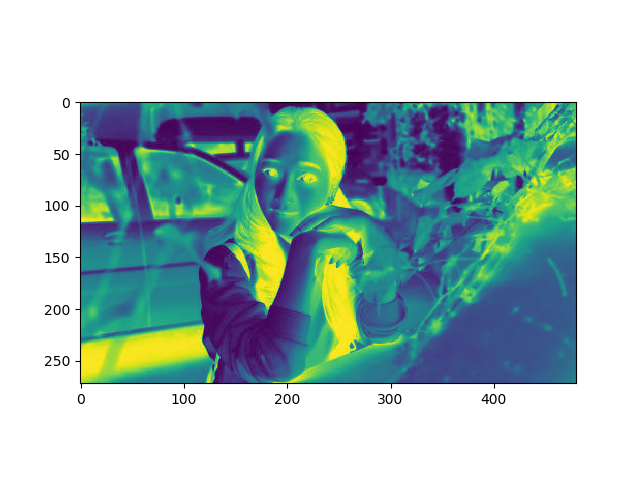
图2:像素值变到100——200
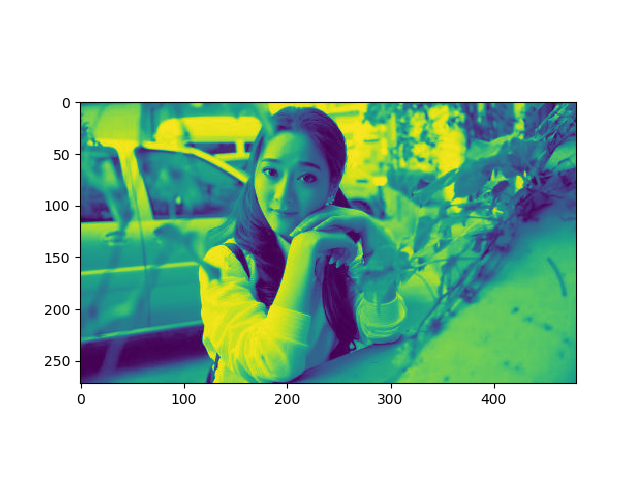
图3:像素值的平方

python——numpy_1图像基本操作的更多相关文章
- Python: scikit-image 图像的基本操作
这个用例说明Python 的图像基本运算 import numpy as np from skimage import data import matplotlib.pyplot as plt cam ...
- opencv-python教程学习系列7-opencv图像基本操作
前言 opencv-python教程学习系列记录学习python-opencv过程的点滴,本文主要介绍图像的基本操作,坚持学习,共同进步. 系列教程参照OpenCV-Python中文教程: 系统环境 ...
- opencv学习(六)——图像基本操作
图像基本操作 一.访问和修改像素值 先来理解一下,图像与一般的矩阵或张量有何不同(不考虑图像的格式,元数据等信息).首先,一张图像有自己的属性,宽,高,通道数.其中宽和高是我们肉眼可见的属性,而通道数 ...
- Python实现图像直方图均衡化算法
title: "Python实现图像直方图均衡化算法" date: 2018-06-12T17:10:48+08:00 tags: [""] categorie ...
- Python实现图像边缘检测算法
title: "Python实现图像边缘检测算法" date: 2018-06-12T17:06:53+08:00 tags: ["图形学"] categori ...
- Python 调用图像融合API
Python 调用图像融合API 本文记录使用Python,调用腾讯AI开放平台的图像融合API.官网给出的Demo用的是PHP,博主作为Python的粉丝,自然想用它来和『最好的』的语言一较高下,顺 ...
- Python中图像的缩放 resize()函数的应用
cv2.resize(src, dsize[, dst[, fx[, fy[, interpolation]]]]) -> dst 参数说明: src - 原图 dst - 目标图像.当参数ds ...
- python 在图像上写中文字体 (python write Chinese in image)
本人处理图像的时候经常使用opencv的包,但是 cv2.putText 显示不了中文,所以查找了如何在python在图像上写中文的方法,在伟大的Stack Overflow上面找到一个方法,分享给大 ...
- python 处理图像出现The lower bounary is neither an array of the same size and same type as src, nor a scalar in function inRange
在用python处理图像过程中出现如下错误 导致这个错误的原因是im是二维,而lower_green和upper_green是三维,所以无法用inRange处理. 由上图可以看出image本来是具有高 ...
随机推荐
- ubuntu & sublime字体设置
ubuntu # yahei http://pan.baidu.com/share/link?shareid=972621198&uk=1243888096&fid=333591974 ...
- 关于java@Override错误
重写的接口的方法,编译的时候一直报@override is not override a method from superclass,查了一下资料,这个@override报错是因为版本的原因. 在J ...
- .net core 操作域控 活动目录 ladp -- Support for System.DirectoryServices for Windows
原文链接:https://github.com/dotnet/corefx/issues/2089 1. @ianhays to kick start the project in CoreFX re ...
- kinectV2平面检测
最近做一个关于kinect的东西,主要是在RGB图上提取指定的平面.对于kinect也是刚刚接触不是很熟悉,捣鼓了两天做了很粗糙的东西,但是也学到了一些东西,所以记录一下. 思路大概就是: 在RGB中 ...
- 关于定义顺序和内存分配的关系--记一道不严谨的C语言题
include<stdio.h> #include<iostream> int main() { char a[] = "123"; char b[] = ...
- python IDE--pycharm安装及使用
官网 :http://www.jetbrains.com/pycharm/ 下载community版本,免费.下载之后傻瓜式安装即可. 1 启动pycharm,选择新建项目: 设置项目路径和项目名: ...
- IOS 4个容易混淆的属性(textAligment contentVerticalAlignment contentHorizontalAlignment contentMode)
四个容易混淆的属性:1. textAligment : 文字的水平方向的对齐方式1> 取值NSTextAlignmentLeft = 0, // 左对齐NSTextAlignme ...
- RPC&ORM
- python Unittest+excel+ddt数据驱动测试
#!user/bin/env python # coding=utf- # @Author : Dang # @Time : // : # @Email : @qq.com # @File : # @ ...
- CUDA Texture纹理存储器 示例程序
原文链接 /* * Copyright 徐洪志(西北农林科技大学.信息工程学院). All rights reserved. * Data: 2012-4-20 */ // // 此程序是演示了1D和 ...