
Can Microsoft’s exFAT file system bridge the gap between OSes?
转自:http://arstechnica.com/information-technology/2013/06/review-is-microsofts-new-data-sharing-system-a-cross-platform-savior/
With Apple's licensing of Microsoft's exFAT file system, it seems like we finally have a good option for OS X and Windows disk swapping. Dave Girard spent some time investigating the appeal, the limitations, and the alternatives to exFAT.
One of the more painful areas of cross-platform computing is data sharing. While networking between Mac OS X, Windows, and Linux has gotten a lot easier thanks to SAMBA, disk sharing still feels like it’s in its infancy thanks to proprietary file systems and the unique legacy needs of the respective operating systems they run on. There are options for cross-platform file sharing—plenty actually—it’s just that each one presents its own limitations and appeals. With Apple’s licensing of Microsoft’s exFAT file system, it seemed like the main problem with FAT32—the 4GB file size limit—was put to rest, and many people are probably now using it to swap video libraries between their MacBooks and HTPCs or share downloads between OS X and Boot Camped Windows. But exFAT has its own issues and limitations that few people are probably aware of—and considering how few people even know about exFAT, we thought this was a good opportunity to cover it, along with the various alternatives.
exFAT: The savior of cross-platform file sharing?
First, a brief history of exFAT for those unfamiliar with it. exFAT is a proprietary Microsoft file system that was designed to bridge the gap between the NTFS file system and the more dated FAT32 file system. Its main advantages are that it can store files over 4GB since it is a 64-bit file system. Its max file size limitation is 16 EiB (Exbibyte) and its theoretical max capacity is 64 ZiB (Zebibyte), which our people in the lab have called “stupidly huge.” You won’t have any issues with hitting file size or capacity ceilings with exFAT. Since exFAT is a closed format, Apple had to license it to integrate it into OS X 10.6.5 and later. You can format a volume as exFAT within Disk Utility. I’ve read about people having issues with exFAT disks that were formatted using Snow Leopard’s (10.6.x) Disk Utility showing up in Windows. Apparently, Apple’s block size was correct according to the standard, but different enough from Windows’ default to cause it not to be recognized on the Windows side. So Snow Leopard users were forced to use Windows to format the drive as exFAT, and then it would show up fine in OS X. This seems to be fixed in Mountain Lion (10.8) since I didn’t have any issues getting the Mountain Lion-formatted exFAT partitions to show up in Windows 7. On the Windows side, native exFAT support is built into Windows as of Vista SP1, and exFAT drivers are available for older builds like XP. Since it’s a relatively new and proprietary format, Linux exFAT support is definitely lackluster, but there is an implementation of exFAT as a FUSE user-space level file system. I haven’t personally tried it.
exFAT limitations and things to keep in mind
Before you run out and format everything as exFAT, you should understand its limitations—and they aren’t insignificant. exFAT has no file system-level encryption or compression support, and, like FAT32 before it, there is no journaling built into the exFAT file system. This means it has a much higher probability of data loss than with NTFS or HFS+. Since FAT32 and exFAT are common USB stick file systems, TFAT and TexFAT are driver-level additions to FAT32 and exFAT volumes that address the lack of journaling in much the same way that Apple has with HFS+ in OS X. But those are currently only implemented in mobile OSes. That's not it. exFAT also isn’t supported by Time Machine in OS X, which requires an HFS+ volume. Another odd limitation of exFAT support in OS X is that you can’t create a software RAID array in exFAT format, but you can do it with the FAT32 format. It also has very limited permission and ACL support for those who need to isolate different users from certain files. If you're just planning on sharing a video or music library, this isn't a problem. Still, the lack of journaling could be problematic. In the limited testing I did, bundled OS X applications launched fine from an exFAT volume. I wouldn’t recommend installing apps to a non-HFS+ volume, though, since the lack of permissions support could probably cause issues with larger applications. For content developers and designers looking to share files between Macs and PCs, you should have no issues using exFAT as a bridge format. You should be careful when copying older Mac fonts to an exFAT-formatted disk, though. Older Mac PostScript font suitcases have resource fork data that is not retained when copied to non-HFS or HFS+ volumes (HFS is the older pre-OS X file system, for those wondering). So if you’re using anything other than HFS+ disks, it’s best practice to use the Finder to zip your fonts if you’re transferring older suitcase-based PostScript fonts. The OS X Finder’s zip supports resource forks—that’s one of the reasons it creates the __MACOSX folder in zip archives. Newer font formats like OpenType don’t use resource forks, so newly purchased fonts won’t be an issue on non-HFS+ volumes.
A brief look at some exFAT alternatives
Some NTFS options
Since the NTFS file system has been around for a while, it is now well supported across all OSes with some free and commercial options. As a cross-platform file system, NTFS’s major appeal is that it supports journaling across all OSes—without any driver-level fixes or workarounds. By default, OS X reads NTFS volumes but can’t write to them. You need additional software to get write access to these NTFS disks. The FUSE-based NTFS-3G was the most appealing option since it was free, but it hasn’t been updated since 2011 so I wouldn’t recommend it. Two popular Mac options are Tuxera NTFS, which is a FUSE-based implementation, and Paragon NTFS for Mac. Both packages offer control over volume caching, NTFS-specific options, and some handy additions for full Mac OS X compatibility: ?
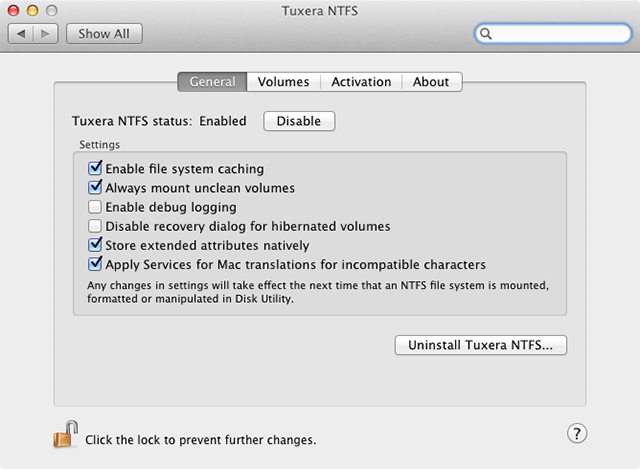
Both Paragon and Tuxera let you format NTFS right from within Disk Utility, but Paragon is the only one that supports formatting of NTFS compressed volumes and full journaling of NTFS disks. At $20, it’s also currently $10 cheaper than Tuxera. After you see the benchmark results, it should be pretty clear which is the choice to go with.
The HFS+ options
Apple’s Boot Camp drivers install read-only support of HFS+ volumes by default so you can access those Mac partitions within Windows. Early versions were very unstable and caused frequent BSODs, but the latest version seems to work fine. The lack of write support is the real drawback, so you’ll need MacDrive for that. As the best-known HFS+ driver for Windows, Mediafour’s MacDrive has been around for a while now. I’ve used MacDrive for years and have always liked its feature set. Apart from the basic read/write features, it lets you set volumes to read-only in case you don’t want Windows messing with your volumes. If you format a partition on a Mac OS X volume within Windows, MacDrive will protect the main partition info so that your other Mac volume data is unaffected. This frequently came in handy when formatting the test partition for the benchmarks in Windows 7 SP1. The Pro version of MacDrive adds support for OS X HFS+ software RAID volumes, secure delete, and auto-defragmentation, which could be a boon to multimedia users who prefer to keep large media files from being fragmented. MacDrive has partial support of journaling—if your machine lost power or the drive was removed while copying in OS X, it will read the journal entry and try to complete the copy. But if you're in Windows, MacDrive does not edit the journal, so you get no journaling support for file system operations done within Windows. At $49.99 for MacDrive Standard and $69.99 for the Pro option, that makes MacDrive a harder sell given the slight handicap when compared to Paragon in OS X. Obviously, if you have an external HFS+ software RAID you need to share, MacDrive Pro is the only option. But if you are starting with disks from scratch, NTFS is the cheaper option.
Can Microsoft’s exFAT file system bridge the gap between OSes?的更多相关文章
- Common Internet File System
CIFS (Common Internet File System) is a protocol that gained popularity around the year 2000, as ven ...
- Low-overhead enhancement of reliability of journaled file system using solid state storage and de-duplication
A mechanism is provided in a data processing system for reliable asynchronous solid-state device bas ...
- Design and Implementation of the Sun Network File System
Introduction The network file system(NFS) is a client/service application that provides shared file ...
- 解决 docker 报错: Error starting daemon: error initializing graphdriver: backing file system is unsupported for this graph driver
CentOS 7.5 x64下 sudo yum install docker -y systemctl enable docker systemctl start docker 发现启动失败 jou ...
- android-problem——remount of /system failed: Read-only file system
adb remount后仍旧不能对system进行读写.需要进行adb disable-verity 在Android6.0 (Android M)userdebug版本上(eng版本不存在该问题), ...
- File System Design Case Studies
SRC=http://www.cs.rutgers.edu/~pxk/416/notes/13-fs-studies.html Paul Krzyzanowski April 24, 2014 Int ...
- 【Azure 存储服务】如何把开启NFS 3.0协议的Azure Blob挂载在Linux VM中呢?(NFS: Network File System 网络文件系统)
问题描述 如何把开启NFS协议的Azure Blob挂载到Linux虚拟机中呢? [答案]:可以使用 NFS 3.0 协议从基于 Linux 的 Azure 虚拟机 (VM) 或在本地运行的 Linu ...
- 乌版图 read-only file system
今天在启动虚拟机的时候,运行命令svn up的时候,提示lock,并且read-only file system,这个....我是小白啊,怎么办?前辈在专心写代码,不好打扰,果断找度娘啊 于是乎,折腾 ...
- File system needs to be upgraded. You have version null and I want version 7
安装hbase时候报错: File system needs to be upgraded. You have version null and I want version 7 注: 我安装的hba ...
随机推荐
- silverlight vs2010 需要缺少的web组件才能加载
在打开一个开源的Silverlight项目是遇到如图所示的问题,点击是后没有反应. 查了资料,需要安装微软的webpi(Microsoft Web Platform Installer) webpi的 ...
- Nginx的验证、启动、停止、重启
验证 验证nginx配置文件是否正确,进入sbin目录,输入以下命令: ./nginx -t 启动 进入sbin目录,输入以下命令: ./nginx -c /home/mppay/nginx/con ...
- tcp的半连接与完全连接队列(三)源码分析
TCP 协议中的 SYN queue 和 accept queue 处理 若要理解本文意图说明的问题,可能需要以下知识背景: listen 系统调用的 backlog 参数含义,以及与 net.cor ...
- 性能测试工具LoadRunner09-LR之Virtual User Generator 日志
在录制和回放的时候,VU会分别把发生的事件记录成日志文件,这些日志有利于我们跟踪VU和服务器的交互过程 回放日志(Replay Log) 脚本回放运行时的输出都记在这个Log里 “输出”窗口的“回放日 ...
- 手机缺失sqlite3时操作数据库的多种解决方案 ----adb命令科普
在Android应用开发无处不在SQLite数据库的身影.那么在开发中怎么使用adb命令操作数据库的功能呢? 下面我们将完整的介绍与数据库操作相关的命令集及当手机缺少sqlite3的时候的多种解决方案 ...
- 用Jmeter 测试接口--需要登录怎么办?
一.试用场景---当你测试的接口 需要登录,然后 你又不知道怎么让这测这个接口前登录?这篇文章写得是 用静态的Token 值,来测试需要登录的接口 二.步骤 1 首相用Jmeter 将要测试的接 ...
- ubuntu 下安装配置LAMP
详情见: http://www.linuxeden.com/html/softuse/20130731/141934.html
- MVC execl 导入导出
MVC execl 导入导出 <input id="xls" name="xls" type="file" style="w ...
- JS匿名函数递归实现阶乘
var rs = (function (value) { if (value > 1) return value * arguments.callee(value - 1); return va ...
- #CSS的盒子模型、元素类型
CSS的盒子模型.元素类型 本文首先介绍了CSS元素的统一内部结构模型,盒子模型:然后介绍了CSS元素基于不同分类标准定义的元素类型,包括基于不同内容设置方式定义的replaced元素和non-r ...