
iOS学习之UITableView中Cell的操作
接着iOS学习之Table View的简单使用 这篇,这里主要讲UITableView 中的Cell的操作,包括标记、移动、删除、插入。
要进行数据的操作了,把代码里的不可变数组改成可变的:
NSArray *list -》NSMutableArray *list
1、标记Cell。
效果如下:
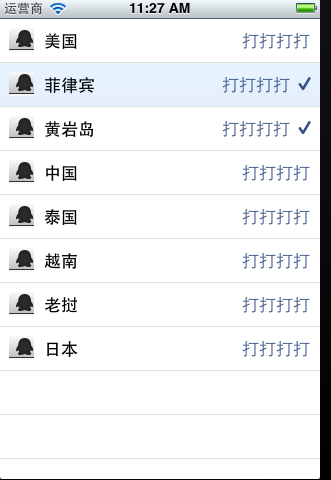
打开项目,
-(void)tableView:(UITableView *)tableView didSelectRowAtIndexPath:(NSIndexPath *)indexPath。
添加代码
- -(void)tableView:(UITableView *)tableView didSelectRowAtIndexPath:(NSIndexPath *)indexPath{
- // NSString *rowString = [self.list objectAtIndex:[indexPath row]];
- // UIAlertView * alter = [[UIAlertView alloc] initWithTitle:@"选中的行信息" message:rowString delegate:self cancelButtonTitle:@"确定" otherButtonTitles:nil, nil];
- // [alter show];
- UITableViewCell *cell = [tableView cellForRowAtIndexPath:indexPath];
- if (cell.accessoryType == UITableViewCellAccessoryNone) {
- cell.accessoryType = UITableViewCellAccessoryCheckmark;
- }else {
- cell.accessoryType = UITableViewCellAccessoryNone;
- }
- [tableView deselectRowAtIndexPath:indexPath animated:YES];
- }
标记分别有四种效果:
UITableViewCellAccessoryCheckmark
UITableViewCellAccessoryDetailDisclosureButton
UITableViewCellAccessoryDisclosureIndicator
UITableViewCellAccessoryNone
可以自己试试。
2、删除Cell
想要实现移动或者删除行这样的操作,需要启动表格的编辑模式。使用的是setEditing:animated:方法。
打开xib,生成Table的IBoutlet映射 tableView;
在viewDidload里添加
[self.tableViewsetEditing:YES];
这是启动运行程序,

打开可编辑模式,默认情况显示删除的图标的。
实现删除的代码:
- - (void)tableView:(UITableView *)tableView commitEditingStyle:
- (UITableViewCellEditingStyle)editingStyle forRowAtIndexPath:(NSIndexPath *)indexPath {
- NSUInteger row = [indexPath row];
- if (editingStyle == UITableViewCellEditingStyleDelete) {
- [self.list removeObjectAtIndex:row];
- [tableView deleteRowsAtIndexPaths:[NSArray arrayWithObject:indexPath]
- withRowAnimation:UITableViewRowAnimationAutomatic];
- }
- }
这个方法根据参数editingStyle是UITableViewCellEditingStyleDelete
在这删除行的方法又出现了一个常量:UITableViewRowAnimationAutomatic,它表示删除时的效果,类似的常量还有:
UITableViewRowAnimationAutomatic
UITableViewRowAnimationTop
UITableViewRowAnimationBottom
UITableViewRowAnimationLeft
UITableViewRowAnimationRight
UITableViewRowAnimationMiddle
UITableViewRowAnimationFade
UITableViewRowAnimationNone
从常量名称打开可以看出效果来。
这是运行,就可以删除其中的一个Cell行了。
3、移动Cell
添加代码如下:
3.1先把默认的删除的图标去掉
- - (UITableViewCellEditingStyle)tableView:(UITableView *)tableView
- editingStyleForRowAtIndexPath:(NSIndexPath *)indexPath {
- return UITableViewCellEditingStyleInsert;
- }
3.2返回当前Cell是否可以移动
- - (BOOL)tableView:(UITableView *)tableView canMoveRowAtIndexPath:(NSIndexPath *)indexPath {
- return YES;
- }
3.3执行移动操作
- - (void)tableView:(UITableView *)tableView moveRowAtIndexPath:(NSIndexPath *)
- sourceIndexPath toIndexPath:(NSIndexPath *)destinationIndexPath {
- NSUInteger fromRow = [sourceIndexPath row];
- NSUInteger toRow = [destinationIndexPath row];
- id object = [self.list objectAtIndex:fromRow];
- [self.list removeObjectAtIndex:fromRow];
- [self.list insertObject:object atIndex:toRow];
- }
运行程序:
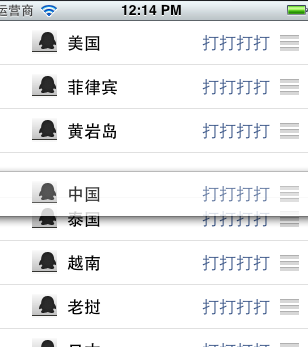
怎么移动呢?不要以为按住行的任何地方都能移动,要按住最左边的三道杠的图标才能拖动移动
4、插入cell:
4.1插入和删除差不多,在
- (void)tableView:(UITableView *)tableView commitEditingStyle:
(UITableViewCellEditingStyle)editingStyle forRowAtIndexPath:(NSIndexPath *)indexPath
添加UITableViewCellEditingStyleInsert判断
- - (void)tableView:(UITableView *)tableView commitEditingStyle:
- (UITableViewCellEditingStyle)editingStyle forRowAtIndexPath:(NSIndexPath *)indexPath {
- NSUInteger row = [indexPath row];
- if (editingStyle == UITableViewCellEditingStyleDelete) {
- [self.list removeObjectAtIndex:row];
- [tableView deleteRowsAtIndexPaths:[NSArray arrayWithObject:indexPath]
- withRowAnimation:UITableViewRowAnimationAutomatic];
- }else if(editingStyle == UITableViewCellEditingStyleInsert ){
- NSArray *insertIndexPaths = [NSArray arrayWithObjects:indexPath,nil];
- [self.list insertObject:@"inset new Cell" atIndex:row];
- [tableView insertRowsAtIndexPaths:insertIndexPaths withRowAnimation:UITableViewRowAnimationMiddle];
- }
- }
4.2 修改图标为插入样式。
- - (UITableViewCellEditingStyle)tableView:(UITableView *)tableView
- editingStyleForRowAtIndexPath:(NSIndexPath *)indexPath {
- return UITableViewCellEditingStyleInsert;
- }
运行,点加号图标,
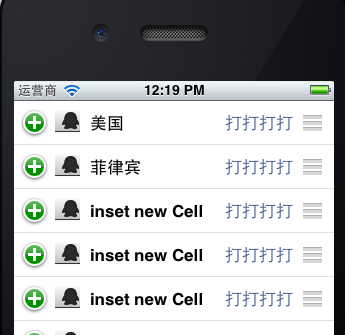
完成!
例子代码:http://download.csdn.net/detail/totogo2010/4398669
著作权声明:本文由http://blog.csdn.net/totogo2010/原创,欢迎转载分享。请尊重作者劳动,转载时保留该声明和作者博客链接,谢谢
iOS学习之UITableView中Cell的操作的更多相关文章
- UITableView中cell里的UITextField不被弹出键盘挡住
UITableView中cell里的UITextField不被弹出键盘挡住 本人视频教程系类 iOS中CALayer的使用 效果如下: 源码: EditCell.h 与 EditCell.m // ...
- UITableView中cell点击的绚丽动画效果
UITableView中cell点击的绚丽动画效果 本人视频教程系类 iOS中CALayer的使用 效果图: 源码: YouXianMingCell.h 与 YouXianMingCell.m / ...
- 如何获取UITableView中cell的frame值
如何获取UITableView中cell的frame值 这个可以用来处理UITableView弹出键盘的问题 本人视频教程系类 iOS中CALayer的使用 效果: 源码: // // ViewC ...
- 用适配器模式处理复杂的UITableView中cell的业务逻辑
用适配器模式处理复杂的UITableView中cell的业务逻辑 适配器是用来隔离数据源对cell布局影响而使用的,cell只接受适配器的数据,而不会与外部数据源进行交互. 源码: ModelCell ...
- iOS - UITableView中Cell重用机制导致Cell内容出错的解决办法
"UITableView" iOS开发中重量级的控件之一;在日常开发中我们大多数会选择自定Cell来满足自己开发中的需求, 但是有些时候Cell也是可以不自定义的(比如某一个简单的 ...
- ios UITableView中Cell重用机制导致内容重复解决方法
UITableView继承自UIScrollview,是苹果为我们封装好的一个基于scroll的控件.上面主要是一个个的 UITableViewCell,可以让UITableViewCell响应一些点 ...
- iOS学习之UITableView
一.UITableView的概念 UITabelView继承于UIScrollView,可以滚动. @interface UITableView : UIScrollView <NSCoding ...
- iOS开发之UITableView中计时器的几种实现方式(NSTimer、DispatchSource、CADisplayLink)
最近工作比较忙,但是还是出来更新博客了.今天博客中所涉及的内容并不复杂,都是一些平时常见的一些问题,通过这篇博客算是对UITableView中使用定时器的几种方式进行总结.本篇博客会给出在TableV ...
- iOS开发总结-UITableView 自定义cell和动态计算cell的高度
UITableView cell自定义头文件:shopCell.h#import <UIKit/UIKit.h>@interface shopCell : UITableViewCell@ ...
随机推荐
- Codeforces 1027E Inverse Coloring 【DP】
Codeforces 1027E Inverse Coloring 题目链接 #include<bits/stdc++.h> using namespace std; #define N ...
- 自动化测试时Ios设备无法调出键盘问题
- MySQL 字段基本操作
MySQL添加字段的方法并不复杂,下面将为您详细介绍MySQL添加字段和修改字段等操作的实现方法,希望对您学习MySQL添加字段方面会有所帮助. .登录数据库 >mysql -u root -p ...
- 《DSP using MATLAB》示例Example 6.28
代码: % The following 3 lines produce filter coefficients shown in Table 6.1 wp = [0.35, 0.65]; ws = [ ...
- 【DUBBO】 Dubbo原理解析-Dubbo内核实现之基于SPI思想Dubbo内核实现
转载:http://blog.csdn.net/quhongwei_zhanqiu/article/details/41577235 SPI接口定义 定义了@SPI注解 public @interfa ...
- CSU1632Repeated Substrings(后缀数组/最长公共前缀)
题意就是求一个字符串的重复出现(出现次数>=2)的不同子串的个数. 标准解法是后缀数组.最长公共前缀的应用,对于样例aabaab,先将所有后缀排序: aab 3 aabaab 1 a ...
- jekyll 安装使用
1. 安装 条件: ruby gem 注意版本,同时建议使用国内的镜像 gem install jekyll bundler 2. 创建网站 jekyll new my-awesome ...
- Ubuntu 破解密码及用户管理
Ubuntu 破解密码及用户管理 ubuntu 16.04 破解密码 useradd 实现以下要求 1.ubuntu16.04破解密码 2.创建下面的用户.组和组成员关系 名字为xipudata 的组 ...
- bzoj1588[HNOI2002]营业额统计——双向链表
题目:https://www.lydsy.com/JudgeOnline/problem.php?id=1588 简单Splay.但用双向链表做.很好的思路. 1.(离线)按值排序,记下pre和nxt ...
- (转)Tomcat迁移JBoss杂症—不识别及不能解析web.xml
本文介绍了在将tomcat下的web工程迁移到jboss下面时遇到的问题 背景: Tomcat 7.0 JBoss AS 4.2.2 IED: Eclipse Java EE IDE for Web ...