
在Eclipse上实现简单的JDBC增删查改操作
在Javaweb的学习里,学到了如何完成简单的增删查改操作,在这里撰写一篇文章以便自己整理回忆。
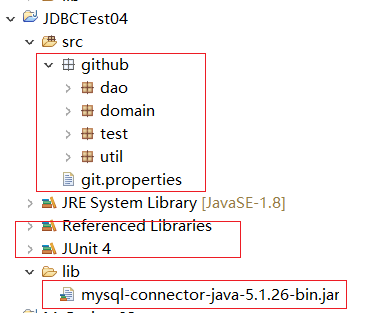
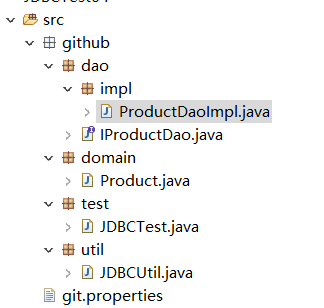
- 首先要建立一些包和导入一些文件、建一些类。具体框架如图
- 编写Product类
 public class Product {

     private long id;

     private String productName;

     private long dir_id;

     private double salePrice;

     private String supplier;

     private String brand;

     private double cutoff;

     private double costPrice;

     public long getId() {

         return id;

     }

     public void setId(long id) {

         this.id = id;

     }

     public String getProductName() {

         return productName;

     }

     public void setProductName(String productName) {

         this.productName = productName;

     }

     public long getDir_id() {

         return dir_id;

     }

     public void setDir_id(long dir_id) {

         this.dir_id = dir_id;

     }

     public double getSalePrice() {

         return salePrice;

     }

     public void setSalePrice(double salePrice) {

         this.salePrice = salePrice;

     }

     public String getSupplier() {

         return supplier;

     }

     public void setSupplier(String supplier) {

         this.supplier = supplier;

     }

     public String getBrand() {

         return brand;

     }

     public void setBrand(String brand) {

         this.brand = brand;

     }

     public double getCutoff() {

         return cutoff;

     }

     public void setCutoff(double cutoff) {

         this.cutoff = cutoff;

     }

     public double getCostPrice() {

         return costPrice;

     }

     public void setCostPrice(double costPrice) {

         this.costPrice = costPrice;

     }

     @Override

     public String toString() {

         return "Product [id=" + id + ", productName=" + productName + ", dir_id=" + dir_id + ", salePrice=" + salePrice

                 + ", supplier=" + supplier + ", brand=" + brand + ", cutoff=" + cutoff + ", costPrice=" + costPrice

                 + "]";

     }

     public Product(long id, String productName, long dir_id, double salePrice, String supplier, String brand,

             double cutoff, double costPrice) {

         super();

         this.id = id;

         this.productName = productName;

         this.dir_id = dir_id;

         this.salePrice = salePrice;

         this.supplier = supplier;

         this.brand = brand;

         this.cutoff = cutoff;

         this.costPrice = costPrice;

     }

     public Product() {

         super();

     }

 }
- 编写IProductDao类
 import java.util.List;

 import github.domain.Product;

 public interface IProductDao {

     /*

      * 根据id删除产品

      */

     public void deleteProductById(long id);

     /*

      * 更新数据的操作

      */

     public void updateProduct(Product product);

     /*

      * 查询数据的操作,根据id

      */

     public Product queryProductById(long id);

     /*

      * 查询所有的产品

      */

     public List<Product> queryAllProduct();

     /*

      * 新增数据

      */

     public void addProduct(Product product);

 }
- 编写ProductDaoImpl类
 import java.sql.Connection;

 import java.sql.PreparedStatement;

 import java.sql.ResultSet;

 import java.sql.SQLException;

 import java.util.ArrayList;

 import java.util.List;

 import github.dao.IProductDao;

 import github.domain.Product;

 import github.util.JDBCUtil;

 public class ProductDaoImpl implements IProductDao {

 JDBCUtil jdbc = JDBCUtil.getInstance();

     @Override

     public void deleteProductById(long id) {

         Connection connection = null;

         PreparedStatement pst = null;

         try {

             connection = jdbc.getConnection();

             pst = connection.prepareStatement("delete from product where id = ?");

             pst.setLong(1, id);

             pst.executeUpdate();

         } catch (SQLException e) {

             e.printStackTrace();

         }finally{

             jdbc.close(null, pst, connection);

         }

     }

     @Override

     public void updateProduct(Product product) {

         Connection connection = null;

         PreparedStatement pst = null;

         try {

             connection = jdbc.getConnection();

             pst = connection.prepareStatement("update product set productName = ? where id = ?");

             pst.setString(1, product.getProductName());

             pst.setLong(2, product.getId());

             pst.executeUpdate();

         } catch (SQLException e) {

             e.printStackTrace();

         }finally{

             jdbc.close(null, pst, connection);

         }

     }

     @Override

     public Product queryProductById(long id) {

         Product p1 = new Product();

         Connection connection = null;

         PreparedStatement pst = null;

         ResultSet rs = null;

         try {

             connection = jdbc.getConnection();

             pst = connection.prepareStatement("select * from product where id = ?");

             pst.setLong(1, id);

             rs = pst.executeQuery();

             while(rs.next()){

                 String productName = rs.getString("productName");

                 p1.setProductName(productName);

             }

         } catch (SQLException e) {

             e.printStackTrace();

         }finally{

             jdbc.close(rs, pst, connection);

         }

         return p1;

     }

     @Override

     public List<Product> queryAllProduct() {

         List<Product> list = new ArrayList<Product>();

         try {

             Connection connection = jdbc.getConnection();

             PreparedStatement pst = connection.prepareStatement("select * from product");

             ResultSet rs = pst.executeQuery();

             while(rs.next()){

                 long id = rs.getLong("id");

                 String productName = rs.getString("productName");

                 long dir_id = rs.getLong("dir_id");

                 double salePrice = rs.getDouble("salePrice");

                 String supplier = rs.getString("supplier");

                 String brand = rs.getString("brand");

                 double cutoff = rs.getDouble("cutoff");

                 double costPrice = rs.getDouble("costPrice");

                 Product p = new Product(id, productName, dir_id, salePrice, supplier, brand, cutoff, costPrice);

                 list.add(p);

             }

         } catch (SQLException e) {

             e.printStackTrace();

         }

         return list;

     }

     @Override

     public void addProduct(Product product) {

         String sql="insert into product (id,productName,dir_id,salePrice,supplier,brand,cutoff,costPrice) values(?,?,?,?,?,?,?,?)";

         Connection connection = null;

         PreparedStatement pst = null;

         try {

             connection = jdbc.getConnection();

             pst = connection.prepareStatement(sql);

             pst.setLong(1, product.getId());

             pst.setString(2, product.getProductName());

             pst.setLong(3, product.getDir_id());

             pst.setDouble(4, product.getSalePrice());

             pst.setString(5,product.getSupplier());

             pst.setString(6, product.getBrand());

             pst.setDouble(7, product.getCutoff());

             pst.setDouble(8, product.getCostPrice());

             pst.executeUpdate();

         }  catch (SQLException e) {

             e.printStackTrace();

         }finally{

             jdbc.close(null, pst, connection);

         }

     }

 }
- 封装工具JDBCUtil类
 /*

  * 操作JDBC的工具类

  */

 import java.io.IOException;

 import java.sql.Connection;

 import java.sql.DriverManager;

 import java.sql.ResultSet;

 import java.sql.SQLException;

 import java.sql.Statement;

 import java.util.Properties;

 public class JDBCUtil {

     private static JDBCUtil instace = null;

     private static Properties pro = null;

     static{

         try {

             pro = new Properties();

             //读取配置文件

             pro.load(Thread.currentThread().getContextClassLoader().getResourceAsStream("git.properties"));

             Class.forName(pro.getProperty("jdbc.driver"));

             instace = new JDBCUtil();//创建对象

         } catch (ClassNotFoundException e) {

             e.printStackTrace();

         } catch (IOException e) {

             e.printStackTrace();

         }

     }

     /*

      * 获取jdbcutil的对象

      */

     public static JDBCUtil getInstance(){

         return instace;

     }

     //2.获取连接

     public Connection getConnection() throws SQLException{

         return DriverManager.getConnection(pro.getProperty("jdbc.url"),pro.getProperty("jdbc.username"),pro.getProperty("jdbc.password"));

     }

     //3.关闭

     public void close(ResultSet rs,Statement st,Connection connection){

         try {

             if(rs!=null){

                 rs.close();

             }

         } catch (SQLException e) {

             e.printStackTrace();

         }finally{

             try {

                 if(st!=null){

                     st.close();

                 }

             } catch (SQLException e) {

                 e.printStackTrace();

             }finally{

                 try {

                     if(connection!=null){

                         connection.close();

                     }

                 } catch (SQLException e) {

                     e.printStackTrace();

                 }

             }

         }

     }

 }
- 编写git.properties
 jdbc.driver = com.mysql.jdbc.Driver

 jdbc.url = jdbc:mysql:///test

 jdbc.username = root

 jdbc.password = root
- 编写JDBCTest类
 import java.util.List;

 import org.junit.Test;

 import github.dao.IProductDao;

 import github.dao.impl.ProductDaoImpl;

 import github.domain.Product;

 public class JDBCTest {

     /*

      * 删除数据

      */

     IProductDao productDao = new ProductDaoImpl();

     @Test

     public void test() {

         productDao.deleteProductById(2);

     }

     /*

      * 更改数据

      */

     @Test

     public void testUpdate() {

         Product p1 = new Product();

         p1.setProductName("荧光闪烁");

         p1.setId(14);

         productDao.updateProduct(p1);

     }

     /*

      * 单查询

      */

     @Test

     public void testQuery() {

         Product p = productDao.queryProductById(22L);

         System.out.println(p);

     }

     /*

      * 多查询

      */

     @Test

     public void testAllQuery() {

         List<Product> queryAllProduct = productDao.queryAllProduct();

         for(Product p : queryAllProduct){

             System.out.println(p);

         }

     }

     /*

      * 增加数据

      */

     @Test

     public void addProductTest() {

         Product p1 = new Product();

         p1.setId(5);

         p1.setProductName("荧光闪烁");

         p1.setDir_id(5);

         p1.setSalePrice(186.32);

         p1.setSupplier("可乐");

         p1.setBrand("可乐");

         p1.setCutoff(0.72);

         p1.setCostPrice(143.52);

         productDao.addProduct(p1);

     }

 }
- 运行程序

在Eclipse上实现简单的JDBC增删查改操作的更多相关文章
- Java连接MySQL数据库及简单的增删查改操作
主要摘自 https://www.cnblogs.com/town123/p/8336244.html https://www.runoob.com/java/java-mysql-connect.h ...
- 利用dbutils工具实现数据的增删查改操作(dbutis入门)
一.前期准备 1.安装数据库(如:mysql5.5) 2.安装Eclipse(如:3.4) 3.下载数据库驱动包 4.下载dbutis工具包 5.在Eclipse创建名为 dbutils 的工程并在工 ...
- PHP与MYSQL结合操作——文章发布系统小项目(实现基本增删查改操作)
php和mysql在一起几十年了,也是一对老夫老妻了,最近正在对他们的爱情故事进行探讨,并做了一个很简单的小东西——文章发布系统,目的是为了实现mysql对文章的基本增删查改操作 前台展示系统有:文章 ...
- Mybatis基础配置及增删查改操作
一.简介 平时我们都用JDBC访问数据库,除了需要自己写SQL之外,还必须操作Connection, Statement, ResultSet 这些其实只是手段的辅助类. 不仅如此,访问不同的表,还会 ...
- JDBC增删查改(使用配置文件)
JDBCDemo2.java package com.zhangbz.jdbc; import java.sql.Connection; import java.sql.ResultSet; impo ...
- JDBC 增删查改
public class MemberDaoImpl implements MemberDao { private Connection conn = null; public MemberDaoIm ...
- myBatis 实现用户表增删查改操作<方法2 加入接口>(最终版)
这2种方法的区别:1.添加接口 2.运用接口来实现 其他的都一样 添加接口 //接口的名字和xml的名字一样,这样xml中的namespace就不用改 public interface UserMap ...
- myBatis 实现用户表增删查改操作<方法1 没有使用接口的>(最终版)
在UserMapper.xml中添加增删改查 <?xml version="1.0" encoding="UTF-8" ?> <!DOCTYP ...
- java操作ElasticSearch(es)进行增删查改操作
有时间是要了解一下ES这个东西的~ ---------------------------------------------------------------------------------- ...
随机推荐
- ArcGIS Desktop的安装
1.双击ArcGIS Desktop安装目录下的Setup.exe. 2.点击“下一步”. 3.选择“我接受许可协议(A)”,点击“下一步”. 4.选择“完全安装”,点击“下一步”. 5.点击“更改” ...
- coding++:thymelef 模板报错 the entity name must immediately follow the '&' in the entity reference
thymelef模板里面是不能实用&符号的 要用&转义符代替,官网也有文档说明可以用官方的通配符代替, 官方文档 http://www.thymeleaf.org/doc/tutori ...
- CentOS76 安装k8s1.18的简单步骤
1. 前提条件就不再详细描写了: 关闭防火墙 升级内核到至少4. 关闭swap 关闭selinux 等 2. 本次安装采用酸酸乳和privoxy的方式进行, 不过发现部分rpm 包还是特别慢,没办法用 ...
- Linux环境下部署项目时的步骤和一些要注意的点
SQL的导出和导入 sql的导出 首先选中要导出的数据库 然后点击左下角的administration选项,进入导出界面. 点击Data Export 然后勾选图中的几个选项即可导出一个sql,如果需 ...
- Javascript判断图片是否存在
<!DOCTYPE html PUBLIC "-//W3C//DTD HTML 4.01//EN" "http://www.w3.org/TR/html4/stri ...
- 结合异步模型,再次总结Netty多线程编码最佳实践
更多技术分享可关注我 前言 本文重点总结Netty多线程的一些编码最佳实践和注意事项,并且顺便对Netty的线程调度模型,和异步模型做了一个汇总.原文:结合异步模型,再次总结Netty多线程编码最 ...
- 2019NYIST计科第七次周赛总结
2019NYIST计科第七次周赛总结 文章目录 2019NYIST计科第七次周赛总结 [秤取物体重量( 二进制枚举法)](https://blog.csdn.net/qq_34261446/artic ...
- PTA | 1019 数字黑洞 (20分)
给定任一个各位数字不完全相同的 4 位正整数,如果我们先把 4 个数字按非递增排序,再按非递减排序,然后用第 1 个数字减第 2 个数字,将得到一个新的数字.一直重复这样做,我们很快会停在有" ...
- layui经典模块化前端UI框架初识
layui产生背景 layui相对于vue来说确实稍有逊色,但是官网提供的入门文档以及完善的框架结构,使的很多人开始用layui来开发前端页面,那么什么人会去使用layui呢? 针对后端开发人员,在对 ...
- Vulnhub DC-1靶机渗透
简介 DC-1靶机是为了入门渗透测试的人准备的入门级的靶机,该靶机共有5个flag,其中最后一个finalflag是真的flag,其他都是提示性flag.这个靶机虽然简单,但是还是能学到一些基本的思路 ...