
Winform 中tabcontrol 美化
需要对tabcontrol按照美工出的图进行美化
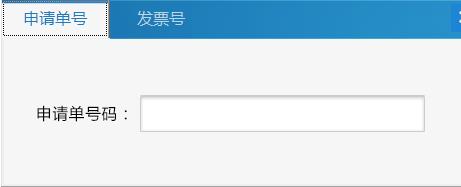
对tabpage页进行标题设置,首先对整个tabcontrol的DrawMode设置为OwnerDrawFixed,由于需要对标题宽度有要求,设置sizemode为fixed,可以对itemsize调整,设置标题的宽和高,然后进行写事件就能实现
 private void tb_DrawItem(object sender, DrawItemEventArgs e)

        {

            StringFormat sf = new StringFormat();

            #region 头背景

            sf.LineAlignment = StringAlignment.Center;

            sf.Alignment = StringAlignment.Center;

            Rectangle rec = tb.ClientRectangle;

            //获取背景图片,我的背景图片在项目资源文件中。

            Image backImage = Properties.Resources.pop_tab1_2;

            e.Graphics.DrawImage(backImage, , , tb.Width, tb.ItemSize.Height + );

            #endregion

            #region  设置选择的标签的背景

            if (e.Index == tb.SelectedIndex)

                e.Graphics.DrawImage(Properties.Resources.pop_tab1_1, e.Bounds.X, e.Bounds.Y, e.Bounds.Width, e.Bounds.Height);

            else

                e.Graphics.DrawImage(Properties.Resources.pop_tab1_2, e.Bounds.X, e.Bounds.Y, e.Bounds.Width, e.Bounds.Height);

            e.Graphics.DrawString(((TabControl)sender).TabPages[e.Index].Text,

            System.Windows.Forms.SystemInformation.MenuFont, new SolidBrush(Color.Black), e.Bounds, sf);

            #endregion

            #region 重写标签名

            ColorConverter colorConverter = new ColorConverter();

            Color cwhite = (Color)colorConverter.ConvertFromString("#2178ba");

            SolidBrush white = new SolidBrush(cwhite);

            Rectangle rect0 = tb.GetTabRect();

            StringFormat stringFormat = new StringFormat();

            stringFormat.Alignment = StringAlignment.Center;

            stringFormat.LineAlignment = StringAlignment.Center;
e.Graphics.DrawString("申请单号", new Font("微软雅黑", 12), white, rect0, stringFormat);
           #endregion

        }
Winform 中tabcontrol 美化的更多相关文章
- C# winform 中 TabControl 动态显示 TabPage
在winform应用中,tabcontrol是一个很好的控件,可以根据需求提供多个选项卡(TabPages),但是有一个问题是当某个项目需要多个选项卡,但是不同的功能要求显示不同的选项卡,其他的非该功 ...
- c# winform中TabControl中给每个选项卡添加不同的图标(图片)
在一个TabControl控件中,有几个选项卡,现在在每个选项卡上显示不同的图标. 1:你要现在form窗体中通过工具箱加入一个imagelist,名字为imagelist1,如下图: 2:然后在里面 ...
- WinForm中TabControl的使用
TabControl和TabPage之间有一个默认颜色的边框,很难去除,需要重写TabControl控件重绘区域 public class FullTabControl : TabControl { ...
- winform中tabControl的标题隐藏
方法一: Apperarance 属性:Faltbuttons SizeMode属性:Fixed 各个TabPage的Text :空 ItemSize : Width=0;Height=1; //He ...
- Winform 自定义TabControl实现浏览器标签
作者:Gavin(daisong.michelangelo@gmail.com) 时间: Nov, 2015 封面图片为Gavin原创,请勿未经允许私自引 最近因为工作需要,要做一个桌面浏览器,和大多 ...
- C# Winform中窗体的美化—— 用IrisSkin轻松实现换肤功能
今天经前辈提醒才知道winform窗体还有美化工具,呵呵,不得不说,孤陋寡闻了.下面总结一下irisskin2的使用步骤和遇到的问题及解决办法. 1.网址:http://www.pc6.com/sof ...
- 控制WinForm中Tab键的跳转
一,需求 在Winform中,默认情况下,按下Tab键,光标会按照我们设定的TabIndex值从小到大进行跳转. 但如果用户要求按下Tab键跳转到特定的控件,这种要求还是很合理的,比如用户只想输入几个 ...
- 转载:WinForm中播放声音的三种方法
转载:WinForm中播放声音的三种方法 金刚 winForm 播放声音 本文是转载的文章.原文出处:http://blog.csdn.net/jijunwu/article/details/4753 ...
- C# Winform 中如何实现音乐播放和视频播放
C# Winform 中如何实现音乐播放和视频播放 namespace WindowsFormsApplication1 { public partial class Form2 : Form { ...
随机推荐
- setAttribute的浏览器兼容性
1.element要用getElementById 或者是ByTagName来得到 2.setAttribute("class", vName)中class是指改变"cl ...
- 关于laravel框架分页报错的问题
因为laravel框架有自己的分页封装,所以与其他框架相比laravel框架的分页的实现要方便的多 只要分别在php脚本与视图中使用 $data=DB::table('index_pic')-> ...
- 一个Java8模型的batch队列
有点小问题,cpu过高,但是思路不错: http://www.tuicool.com/articles/URz2i2q
- NAACL 2013 Paper Mining User Relations from Online Discussions using Sentiment Analysis and PMF
中文简单介绍:本文对怎样基于情感分析和概率矩阵分解从网络论坛讨论中挖掘用户关系进行了深入研究. 论文出处:NAACL'13. 英文摘要: Advances in sentiment analysis ...
- [ACM] POJ 1046 Color Me Less
Color Me Less Time Limit: 1000MS Memory Limit: 10000K Total Submissions: 30146 Accepted: 14634 D ...
- HDU 1166 敌兵布阵 树状数组||线段树
http://acm.hdu.edu.cn/showproblem.php?pid=1166 题目大意: 给定n个数的区间N<=50000,还有Q个询问(Q<=40000)求区间和. 每个 ...
- Docker使用Dockerfile创建Centos(tomcat+jdk)镜像
原文链接:https://blog.csdn.net/qq_37936542/article/details/80824389 Docker构建镜像的方法主要有两种: (1)使用docker c ...
- mysql 配置,还得多看看~
http://blog.chinaunix.net/uid-20639775-id-154429.html
- 卡塔兰数(Catalan)
卡塔兰数(Catalan) 原理: 令h(0)=1,h(1)=1. 卡塔兰数满足递推式:h(n)=h(0)*h(n-1)+h(1)*h(n-2) + ... + h(n-1)h(0)(n>=2) ...
- 装饰模式和python装饰器
装饰器和装饰模式 先给出两者的定义: - 装饰器:装饰器是一个非常著名的设计模式,常常被用于有切面需求的场景.较为经典的有插入日志.性能測试.事务处理等. 装饰器是解决这类问题的绝佳设计.有了装饰器, ...