
格式化输出(%用法和fomat用法)
一:%用法
1、整数输出
%o —— oct 八进制
%d —— dec 十进制
%x —— hex 十六进制
print('%o' % 20)  #

print('%d' % 20)  #

print('%x' % 20)  #
2、浮点数输出
%f ——保留小数点后面六位有效数字
%.3f,保留3位小数位
%e ——保留小数点后面六位有效数字,指数形式输出
%.3e,保留3位小数位,使用科学计数法
%g ——在保证六位有效数字的前提下,使用小数方式,否则使用科学计数法
%.3g,保留3位有效数字,使用小数或科学计数法
print('%f' % 1.11)  # 默认保留6位小数 1.110000

print('%.1f' % 1.11)  # 取1位小数 1.1

print('%e' % 1.11)  # 默认6位小数,用科学计数法 1.110000e+00

print('%.3e' % 1.11)  # 取3位小数,用科学计数法 1.110e+00

print('%g' % 1111.1111)  # 默认6位有效数字 1111.11

print('%.7g' % 1111.1111)  # 取7位有效数字 1111.111

print('%.2g' % 1111.1111)  # 取2位有效数字,自动转换为科学计数法 1.1e+03
3、字符串输出
%s
%10s——右对齐,占位符10位
%-10s——左对齐,占位符10位
%.2s——截取2位字符串
%10.2s——10位占位符,截取两位字符串
print('%s' % 'hello world')  # 字符串输出  hello world

print('%20s' % 'hello world')  # 右对齐,取20位,不够则补位           hello world

print('%-20s' % 'hello world')  # 左对齐,取20位,不够则补位 hello world

print('%.2s' % 'hello world')  # 取2位 he

print('%10.2s' % 'hello world')  # 右对齐,取2位         he

print('%-10.2s' % 'hello world')  # 左对齐,取2位 he
4、其他
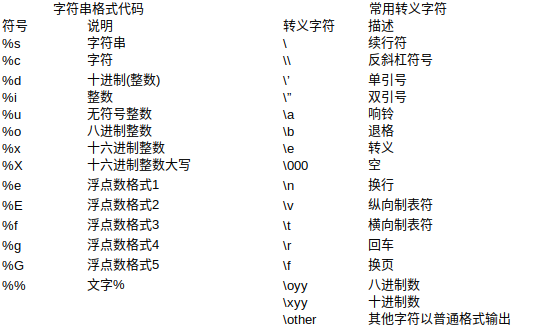
二:format用法
相对基本格式化输出采用‘%’的方法,format()功能更强大,该函数把字符串当成一个模板,通过传入的参数进行格式化,并且使用大括号‘{}’作为特殊字符代替‘%’
1、位置匹配
(1)不带编号,即“{}”
(2)带数字编号,可调换顺序,即“{1}”、“{2}”
(3)带关键字,即“{a}”、“{tom}”
print('{} {}'.format('hello','world'))  # 不带字段 hello world

print('{0} {1}'.format('hello','world'))  # 带数字编号 hello world

print('{0} {1} {0}'.format('hello','world'))  # 打乱顺序 hello world hello

print('{1} {1} {0}'.format('hello','world'))  # world world hello

print('{a} {tom} {a}'.format(tom='hello',a='world'))  # 带关键字 world hello world

# 通过位置匹配

print('{0}, {1}, {2}'.format('a', 'b', 'c')) # a, b, c

print('{}, {}, {}'.format('a', 'b', 'c'))  # 3.1+版本支持 a, b, c

print('{2}, {1}, {0}'.format('a', 'b', 'c')) # c, b, a

print('{2}, {1}, {0}'.format(*'abc'))  # 可打乱顺序 c, b, a

print('{0}{1}{0}'.format('abra', 'cad'))  # 可重复 abracadabra

# 通过类的属性匹配

class Point:

    def __init__(self, x, y):

        self.x, self.y = x, y

    def __str__(self):

        return 'Point({self.x}, {self.y})'.format(self=self)

print(str(Point(4, 2)))  # Point(4, 2)

# 通过下标或者key匹配参数

coord = (3, 5)

print('X: {0[0]};  Y: {0[1]}'.format(coord))  # X: 3;  Y: 5

a = {'a': 'test_a', 'b': 'test_b'}

print('X: {0[a]};  Y: {0[b]}'.format(a))  # X: test_a;  Y: test_b
2、格式转换
'b' - 二进制。将数字以2为基数进行输出。
'c' - 字符。在打印之前将整数转换成对应的Unicode字符串。
'd' - 十进制整数。将数字以10为基数进行输出。
'o' - 八进制。将数字以8为基数进行输出。
'x' - 十六进制。将数字以16为基数进行输出,9以上的位数用小写字母。
'e' - 幂符号。用科学计数法打印数字。用'e'表示幂。
'g' - 一般格式。将数值以fixed-point格式输出。当数值特别大的时候,用幂形式打印。
'n' - 数字。当值为整数时和'd'相同,值为浮点数时和'g'相同。不同的是它会根据区域设置插入数字分隔符。
'%' - 百分数。将数值乘以100然后以fixed-point('f')格式打印,值后面会有一个百分号。
print('{0:b}'.format(3)) #

print('{:c}'.format(20)) #

print('{:d}'.format(20)) #

print('{:o}'.format(20)) #

print('{:x}'.format(20)) #

print('{:e}'.format(20)) # 2.000000e+01

print('{:g}'.format(20.1)) # 20.1

print('{:f}'.format(20)) # 20.000000

print('{:n}'.format(20)) #

print('{:%}'.format(20)) # 2000.000000%
3、format变形用法
# f"xxxx"

# 可在字符串前加f以达到格式化的目的,在{}里加入对象,此为format的另一种形式:

a = "hello"

b = "world"

print(f"{a} {b}")

name = 'jack'

age = 18

sex = 'man'

job = "IT"

salary = 9999.99

print(f'my name is {name.capitalize()}.')  # my name is Jack.

print(f'I am {age:*^10} years old.')  # I am ****18**** years old.

print(f'I am a {sex}')  # I am a man

print(f'My salary is {salary:10.3f}')  # My salary is   9999.990
格式化输出(%用法和fomat用法)的更多相关文章
- python基础_格式化输出(%用法和format用法)(转载)
python基础_格式化输出(%用法和format用法) 目录 %用法 format用法 %用法 1.整数的输出 %o -- oct 八进制%d -- dec 十进制%x -- hex 十六进制 &g ...
- python基础_格式化输出(%用法和format用法)
目录 %用法 format用法 %用法 1.整数的输出 %o —— oct 八进制%d —— dec 十进制%x —— hex 十六进制 1 >>> print('%o' % 2 ...
- 【Python笔记】1、格式化输出(%用法和format用法)
转自:https://www.cnblogs.com/fat39/p/7159881.html 一.格式化输出1.整数的输出%o —— oct 八进制%d —— dec 十进制%x —— hex 十六 ...
- 自学Python1.8-python input/print用法 格式化输出
自学Python之路 自学Python1.8-python input/print用法 格式化输出 1.input函数 Python3.x 中 input() 函数接受一个标准输入数据,返回为 str ...
- golang格式化输出-fmt包用法详解
golang格式化输出-fmt包用法详解 注意:我在这里给出golang查询关于包的使用的地址:https://godoc.org 声明: 此片文章并非原创,大多数内容都是来自:https:// ...
- Python格式化输出——format用法示例
format OR % 提到Python中的格式化输出方法,一般来说有以下两种方式: print('hello %s' % 'world') # hello world print('hello {} ...
- python格式化输出之format用法
format用法 相对基本格式化输出采用‘%’的方法,format()功能更强大,该函数把字符串当成一个模板,通过传入的参数进行格式化,并且使用大括号‘{}’作为特殊字符代替‘%’ 使用方法由两种:b ...
- python格式化输出(% format用法)
%基本用法: 十进制输出:print('%d' % 6) 6也可以换成其它的数字变量 八进制输出:print('%o' % 6) 6也可以换成其它的数字变量 字符串输出:print('%s' ...
- Python print函数用法,print 格式化输出
原文地址:http://blog.csdn.net/zanfeng/article/details/52164124 使用print输出各型的 字符串 整数 浮点数 出度及精度控制 strHello ...
随机推荐
- .NET Core解析DNS域名或主机名的方法
在.NET Core中我们可以用System.Net.Dns类来解析域名或主机名的IP地址,我们新建一个.NET Core控制台项目,写入下面代码: using System; using Syste ...
- .Net Core 指定编码格式的问题
我们在读取txt文件时,如果文件格式不是utf8,则获取的中文会乱码,所以要么另存文件为utf8格式,要么使用和文件相同的编码来读取. 如果文件为utf8,则: //一种 StreamReader s ...
- XAML加载的四种方式
XAML加载与编译可以分为四种: 仅使用代码进行WPF程序的生成 使用代码和未编译的标记 使用代码和编译过的BAML 1.只是用代码进行窗体的生成:优点是可以随意定制应用程序,缺点是没有可视化编辑窗口 ...
- SQL语句--删除掉重复项只保留一条
用SQL语句,删除掉重复项只保留一条 在几千条记录里,存在着些相同的记录,如何能用SQL语句,删除掉重复的呢1.查找表中多余的重复记录,重复记录是根据单个字段(peopleId)来判断 select ...
- Apache Tomcat 9.0 Tomcat9 服务无法启动。发生服务特定错误: 4.
在Tomcat的安装目录下,bin文件夹里面 找到tomcat9w.exe 双击进去,将第四页java里面第一个复选框Use default 选中 保存即可启动tomcat9服务
- Maven中 jar包冲突原理与解决办法
Maven中jar包冲突是开发过程中比较常见而又令人头疼的问题,我们需要知道 jar包冲突的原理,才能更好的去解决jar包冲突的问题.本文将从jar包冲突的原理和解决两个方面阐述Maven中jar包冲 ...
- 【开发笔记】-Ubuntu环境命令初始化
更新apt-get命令 apt-get update 安装yum命令 首先检测是否安装 build-essential 包 sudo apt-get install build-essential 安 ...
- 如何显示IntelliJ IDEA工具的Run Dashboard功能(转)
从 JetBrains released IntelliJ IDEA 2017.2.1 版本之后,新出的功能‘Run Dashboard,它能非常方便的提供开发人员查看本地springboot服务运行 ...
- FreePascal - CodeTyphon 和 Lazarus, 如何像Delphi一样有代码之间的连线?
CodeTyphon 6.9 默认CodeTyphon没有开启代码之间连线功能,一直不知道如何调出来,在使用CodeTyphon 和 Lazarus 很渴望也能像Delphi那样有这种功能,实际上它们 ...
- PHP在线批量下载文件
在项目开发中需要给客户提供在线下载文件的功能. 解决方案:使用PHP自带的ZipArchive类,将多个文件打包成zip文件,供客户下载! 使用ZipArchive类时,需要先开启php_zip扩展, ...