
Android五大布局详解——RelativeLayout(相对布局)
RelativeLayout
接着上一篇,本篇我将介绍RelativeLayout(相对布局)的一些知识点。
RelativeLayout
这是一个非常常用的布局,相比于上节所学到的LinearLayout布局,它更加的随意,可以通过相对定位的方式让控件出现在布局的任何位置。新建UILayoutTestTwo工程,修改activity_main.xml中的代码:
<?xml version="1.0" encoding="utf-8"?>

<RelativeLayout xmlns:android="http://schemas.android.com/apk/res/android"

    android:layout_width="match_parent"

    android:layout_height="match_parent">

    <Button

        android:id="@+id/button_one"

        android:layout_width="wrap_content"

        android:layout_height="wrap_content"

        android:layout_alignParentLeft="true"

        android:layout_alignParentTop="true"

        android:text="button 1"/>

    <Button

        android:id="@+id/button_two"

        android:layout_width="wrap_content"

        android:layout_height="wrap_content"

        android:layout_alignParentRight="true"

        android:layout_alignParentTop="true"

        android:text="button 2"/>

    <Button

        android:id="@+id/button_three"

        android:layout_width="wrap_content"

        android:layout_height="wrap_content"

        android:layout_centerInParent="true"

        android:text="button 3"/>

    <Button

        android:id="@+id/button_four"

        android:layout_width="wrap_content"

        android:layout_height="wrap_content"

        android:layout_alignParentLeft="true"

        android:layout_alignParentBottom="true"

        android:text="button 4"/>

    <Button

        android:id="@+id/button_five"

        android:layout_width="wrap_content"

        android:layout_height="wrap_content"

        android:layout_alignParentRight="true"

        android:layout_alignParentBottom="true"

        android:text="button 5"/>

</RelativeLayout>
运行程序,效果如下图:
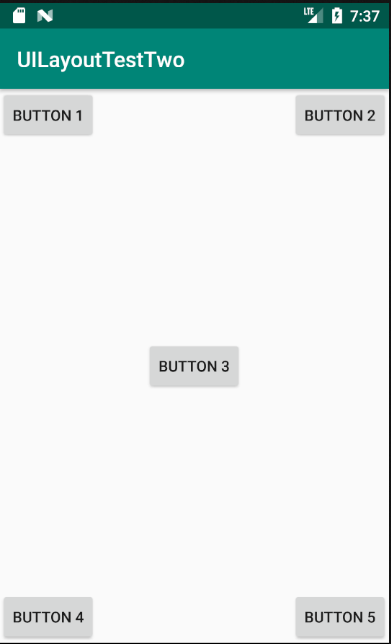
以上代码不做过多解释。上面的控件定位是依靠父布局的,其实RelativeLayout中还可以依靠控件进行定位。修改activity_main.xml中的代码:
<?xml version="1.0" encoding="utf-8"?>

<RelativeLayout xmlns:android="http://schemas.android.com/apk/res/android"

    android:layout_width="match_parent"

    android:layout_height="match_parent">

    <Button

        android:id="@+id/button_three"

        android:layout_width="wrap_content"

        android:layout_height="wrap_content"

        android:layout_centerInParent="true"

        android:text="button 3"/>

    <Button

        android:id="@+id/button_one"

        android:layout_width="wrap_content"

        android:layout_height="wrap_content"

        android:layout_above="@+id/button_three"

        android:layout_toLeftOf="@+id/button_three"

        android:text="button 1"/>

    <Button

        android:id="@+id/button_two"

        android:layout_width="wrap_content"

        android:layout_height="wrap_content"

        android:layout_above="@+id/button_three"

        android:layout_toRightOf="@+id/button_three"

        android:text="button 2"/>

    <Button

        android:id="@+id/button_four"

        android:layout_width="wrap_content"

        android:layout_height="wrap_content"

        android:layout_below="@+id/button_three"

        android:layout_toLeftOf="@+id/button_three"

        android:text="button 4"/>

    <Button

        android:id="@+id/button_five"

        android:layout_width="wrap_content"

        android:layout_height="wrap_content"

        android:layout_below="@+id/button_three"

        android:layout_toRightOf="@+id/button_three"

        android:text="button 5"/>

</RelativeLayout>
运行程序,效果如图所示:

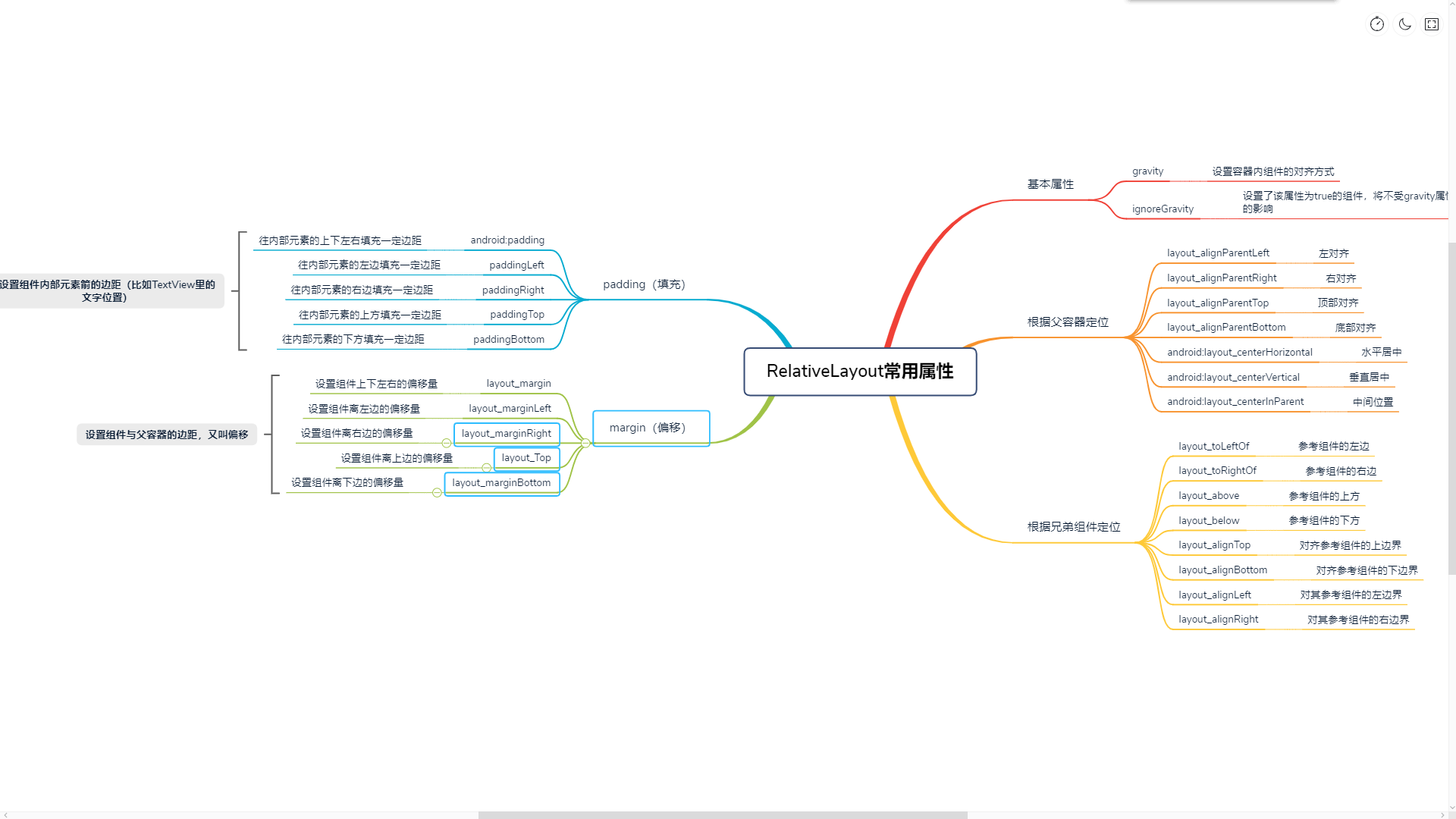
RelativeLayout的属性除了上面提到的,还有很多其他的,以后的学习中遇到了,可以多积累。下面是一些属性的简要说明:
Android五大布局详解——RelativeLayout(相对布局)的更多相关文章
- Android 布局详解 -三表格布局(TableLayout)以及重要属性
TableLayout跟TableRow 是一组搭配应用的布局,TableLayout置底,TableRow在TableLayout的上方,而Button.TextView等控件就 ...
- Html5移动端页面自适应布局详解(阿里rem布局)
在移动设备上进行网页的重构或开发,首先得搞明白的就是移动设备上的viewport,通读网上的各种对于viewport的解释之后 大概viewport可以理解为三种 1.layout viewport ...
- Android 布局详解
Android 布局详解 1.重用布局 当一个布局文件被多处使用时,最好<include>标签来重用布局. 例如:workspace_screen.xml的布局文件,在另一个布局文件中被重 ...
- Grid 网格布局详解
Grid网格布局详解: Grid布局与Flex布局有着一定的相似性,Grid布局是将容器划分成行和列,产生单元格,可以看做是二维布局. 基本概念: 采用网格布局的区域,称为"容器" ...
- Android开发重点难点1:RelativeLayout(相对布局)详解
前言 啦啦啦~博主又推出了一个新的系列啦~ 之前的Android开发系列主要以完成实验的过程为主,经常会综合许多知识来写,所以难免会有知识点的交杂,给人一种混乱的感觉. 所以博主推出“重点难点”系列, ...
- Android 布局学习之——Layout(布局)详解二(常见布局和布局参数)
[Android布局学习系列] 1.Android 布局学习之——Layout(布局)详解一 2.Android 布局学习之——Layout(布局)详解二(常见布局和布局参数) 3.And ...
- Android布局详解之一:FrameLayout
原创文章,如有转载,请注明出处:http://blog.csdn.net/yihui823/article/details/6702273 FrameLayout是最简单的布局了.所有放在布局里的 ...
- 【翻译】Anatomy of a Program in Memory—剖析内存中的一个程序(进程的虚拟存储器映像布局详解)
[翻译]Anatomy of a Program in Memory—剖析内存中的一个程序(进程的虚拟存储器映像布局详解) . . .
- DevExpress控件GridControl中的布局详解 【转】
DevExpress控件GridControl中的布局详解 [转] 2012-10-24 13:27:28| 分类: devexpress | 标签:devexpress |举报|字号 订阅 ...
随机推荐
- 开发中遇到的一些bug及解决方案
一.在使用UIStackView时报“UIStackView before iOS 9.0”.
- 使用 Zookeeper 的 Api 实现服务注册
创建常量接口 com.bjsxt.constant.Constants package com.bjsxt.constant; public interface Constants { //访问Zoo ...
- [TimLinux] MySQL 导入sql文件数据慢的问题解决办法
慢的时候执行的命令: mysql -uusername -p -hip_address -Ddb_name < ./db.sql 快的时候执行的命令: mysql -uusername -p - ...
- python金融应用(二)基本数据类型和结构
一.基本数据类型 1.整形 a=10 type(a) Out[75]: int a.bit_length() #字节长度Out[76]: 4 整形相除会返回整形,想要返回浮点数,需要用浮点数相除1./ ...
- 转-友晶Sdram_Control_4Port的全页操作Bug?
http://www.cnblogs.com/edaplayer/p/3678897.html 以前在学校初学fpga的时候碰到sdram就搞不定了,现在突然发现网上有好多现成的代码,友晶的,alte ...
- 【CSS】378- [译]44个 CSS 精选知识点
写在前面 一个周五的晚上,闲来无事整理下自己的 github(经常做收藏党),今天打算都过一遍,发现一个 star很高的项目,里面有大量的 CSS 片段,而且标题很诱人,然后又花了将近1个小时从头到尾 ...
- 【算法】342- JavaScript常用基础算法
一个算法只是一个把确定的数据结构的输入转化为一个确定的数据结构的输出的function.算法内在的逻辑决定了如何转换. 基础算法 一.排序 1.冒泡排序 //冒泡排序function bubbleSo ...
- Windows安装MSYS2_切换zsh_整合cmder
MSYS2是什么 MSYS2 (Minimal SYStem 2) 是一个MSYS的独立改写版本,主要用于 shell 命令行开发环境.同时它也是一个在Cygwin (POSIX 兼容性层) 和 Mi ...
- JS-常考算法题解析
常考算法题解析 这一章节依托于上一章节的内容,毕竟了解了数据结构我们才能写出更好的算法. 对于大部分公司的面试来说,排序的内容已经足以应付了,由此为了更好的符合大众需求,排序的内容是最多的.当然如果你 ...
- CSS动态表达式
样式:style:expression(脚本) 如: 1 _top: expression(this.offsetHeight); _top: expression(eval(document.doc ...