
r-cnn学习(五):SmoothL1LossLayer论文与代码的结合理解
A Loss Function for Learning Region Proposals
训练RPN时,只对两种anchor给予正标签:和gt_box有着最高的IoU && IoU超过0.7。如果对于
所有的gt_box,其IoU都小于0.3,则标记为负。损失函数定义如下:

其中i为一个mini-batch中某anchor的索引,pi表示其为目标的预测概率,pi*表示gt_box(正为1,否则为0)。
ti和ti*分别表示预测框的位置和gt_box框的位置。Lreg如下:
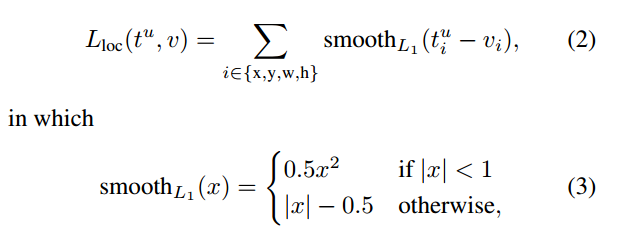
bound-box regression中各参数的计算方式为:
 (4)
(4)
其对应的SmoothL1LossLayer代码如下,整个过程分为两部分:前向计算以及后向计算(1)式的后半部分:
// ------------------------------------------------------------------

// Fast R-CNN

// Copyright (c) 2015 Microsoft

// Licensed under The MIT License [see fast-rcnn/LICENSE for details]

// Written by Ross Girshick

// ------------------------------------------------------------------

#include "caffe/fast_rcnn_layers.hpp"

namespace caffe {

//SmoothL1前向计算(3)式

template <typename Dtype>

__global__ void SmoothL1Forward(const int n, const Dtype* in, Dtype* out,

    Dtype sigma2) {

  // f(x) = 0.5 * (sigma * x)^2          if |x| < 1 / sigma / sigma

  //        |x| - 0.5 / sigma / sigma    otherwise

  CUDA_KERNEL_LOOP(index, n) {

    Dtype val = in[index];

    Dtype abs_val = abs(val);

    if (abs_val < 1.0 / sigma2) {

      out[index] = 0.5 * val * val * sigma2;

    } else {

      out[index] = abs_val - 0.5 / sigma2;

    }

  }

}

//

template <typename Dtype>

void SmoothL1LossLayer<Dtype>::Forward_gpu(const vector<Blob<Dtype>*>& bottom,

    const vector<Blob<Dtype>*>& top) {

  int count = bottom[0]->count();

  caffe_gpu_sub(

      count,

      bottom[0]->gpu_data(),  //ti

      bottom[1]->gpu_data(),  //ti*

      diff_.mutable_gpu_data());    // d := ti-ti*

  if (has_weights_) {  //乘上相关的权重,对应于(1)式中的pi*,有目标时为1

    // apply "inside" weights

    caffe_gpu_mul(

        count,

        bottom[2]->gpu_data(), //pi*

        diff_.gpu_data(),

        diff_.mutable_gpu_data());  // d := w_in * (b0 - b1)

  }
  //代入计算SmoothL1

  SmoothL1Forward<Dtype><<<CAFFE_GET_BLOCKS(count), CAFFE_CUDA_NUM_THREADS>>>(

      count, diff_.gpu_data(), errors_.mutable_gpu_data(), sigma2_);

  CUDA_POST_KERNEL_CHECK;

  if (has_weights_) {  //乘上相关的权重

    // apply "outside" weights

    caffe_gpu_mul(

        count,

        bottom[3]->gpu_data(), // 1/Nreg

        errors_.gpu_data(),

        errors_.mutable_gpu_data());  // d := w_out * SmoothL1(w_in * (b0 - b1))

  }

  Dtype loss;

  caffe_gpu_dot(count, ones_.gpu_data(), errors_.gpu_data(), &loss);

  top[0]->mutable_cpu_data()[0] = loss / bottom[0]->num();

}

//反向计算,对smoothLoss求导

template <typename Dtype>

__global__ void SmoothL1Backward(const int n, const Dtype* in, Dtype* out,

    Dtype sigma2) {

  // f'(x) = sigma * sigma * x         if |x| < 1 / sigma / sigma

  //       = sign(x)                   otherwise

  CUDA_KERNEL_LOOP(index, n) {

    Dtype val = in[index];

    Dtype abs_val = abs(val);

    if (abs_val < 1.0 / sigma2) {

      out[index] = sigma2 * val;

    } else {

      out[index] = (Dtype(0) < val) - (val < Dtype(0));

    }

  }

}

//

template <typename Dtype>

void SmoothL1LossLayer<Dtype>::Backward_gpu(const vector<Blob<Dtype>*>& top,

    const vector<bool>& propagate_down, const vector<Blob<Dtype>*>& bottom) {

  // after forwards, diff_ holds w_in * (b0 - b1)

  int count = diff_.count();
  //调用反向smoothloss,diff_.gpu_data()表示x,diff_.mutable_gpu_data()表示smoothloss的导数

  SmoothL1Backward<Dtype><<<CAFFE_GET_BLOCKS(count), CAFFE_CUDA_NUM_THREADS>>>(

      count, diff_.gpu_data(), diff_.mutable_gpu_data(), sigma2_);

  //类似于前向

  CUDA_POST_KERNEL_CHECK;

  for (int i = 0; i < 2; ++i) {

    if (propagate_down[i]) {

      const Dtype sign = (i == 0) ? 1 : -1;

      const Dtype alpha = sign * top[0]->cpu_diff()[0] / bottom[i]->num();

      caffe_gpu_axpby(

          count,                           // count

          alpha,                           // alpha

          diff_.gpu_data(),                // x

          Dtype(0),                        // beta

          bottom[i]->mutable_gpu_diff());  // y

      if (has_weights_) {

        // Scale by "inside" weight

        caffe_gpu_mul(

            count,

            bottom[2]->gpu_data(),

            bottom[i]->gpu_diff(),

            bottom[i]->mutable_gpu_diff());

        // Scale by "outside" weight

        caffe_gpu_mul(

            count,

            bottom[3]->gpu_data(),

            bottom[i]->gpu_diff(),

            bottom[i]->mutable_gpu_diff());

      }

    }

  }

}

INSTANTIATE_LAYER_GPU_FUNCS(SmoothL1LossLayer);

}  // namespace caffe
r-cnn学习(五):SmoothL1LossLayer论文与代码的结合理解的更多相关文章
- 10K+,深度学习论文、代码最全汇总!
我们大部分人是如何查询和搜集深度学习相关论文的?绝大多数情况是根据关键字在谷歌.百度搜索.想寻找相关论文的复现代码又会去 GitHub 上搜索关键词.浪费了很多时间不说,论文.代码通常也不够完整.怎么 ...
- R语言学习笔记(五)绘图(1)
R是一个惊艳的图形构建平台,这也是R语言的强大之处.本文将分享R语言简单的绘图命令. 本文所使用的数据或者来自R语言自带的数据(mtcars)或者自行创建. 首先,让我们来看一个简单例子: ...
- [ZZ]计算机视觉、机器学习相关领域论文和源代码大集合
原文地址:[ZZ]计算机视觉.机器学习相关领域论文和源代码大集合作者:计算机视觉与模式 注:下面有project网站的大部分都有paper和相应的code.Code一般是C/C++或者Matlab代码 ...
- Context Encoder论文及代码解读
经过秋招和毕业论文的折磨,提交完论文終稿的那一刻总算觉得有多余的时间来搞自己的事情. 研究论文做的是图像修复相关,这里对基于深度学习的图像修复方面的论文和代码进行整理,也算是研究生方向有一个比较好的结 ...
- Android JNI学习(五)——Demo演示
本系列文章如下: Android JNI(一)——NDK与JNI基础 Android JNI学习(二)——实战JNI之“hello world” Android JNI学习(三)——Java与Nati ...
- TweenMax动画库学习(五)
目录 TweenMax动画库学习(一) TweenMax动画库学习(二) TweenMax动画库学习(三) Tw ...
- R基础学习
R基础学习 The Art of R Programming 1.seq 产生等差数列:seq(from,to,by) seq(from,to,length) for(i in 1:length(x) ...
- SVG 学习<五> SVG动画
目录 SVG 学习<一>基础图形及线段 SVG 学习<二>进阶 SVG世界,视野,视窗 stroke属性 svg分组 SVG 学习<三>渐变 SVG 学习<四 ...
- R语言学习 第四篇:函数和流程控制
变量用于临时存储数据,而函数用于操作数据,实现代码的重复使用.在R中,函数只是另一种数据类型的变量,可以被分配,操作,甚至把函数作为参数传递给其他函数.分支控制和循环控制,和通用编程语言的风格很相似, ...
随机推荐
- OrchardNoCMS模块生成工具命令简化
OrchardNoCMS模块生成工具命令行简化列表: 目前只有codegen feature和cultures三个命令. 对应的都进行了参数简化. 例如:codegen module 简化为cod ...
- 查看struct或class的内存布局
适用于VC编译器(Visual Studio) 附加选项: /d1 reportSingleClassLayout[foo] 例如CItem(注意后面没有空格) /d1 reportSingleCla ...
- 如何查看SQL Server的版本、补丁包信息?以及如何鉴别是否需要升级自己的SQL Server?
作为一个SQL Server的数据库管理人员,经常需要碰到的一个问题就是查看自己SQL Server属于哪个版本,是否安装了最新的修复补丁包,是否安装了最近的安全补丁.在此之前,我们可以通过以下SQL ...
- .dwg(sw)-exb
尺寸风格:除了标准外合并,合并好后删除. 文本风格:除了标准外合并,合并好后删除.
- UISearchBar控件-让我们来搞定!(转)
转载自:http://blog.sina.com.cn/s/blog_7b9d64af0101dfg8.html 最近用到搜索功能.于是,经过不断的研究,终于,有点懂了. 那就来总结一下吧,好 ...
- 【PHP】月末・月初の出力方法
文章出处 : Qiita - http://qiita.com/shoridevel/items/0a2f4a64e55d84919a1c 今月の月初 echo date("Y-m-01&q ...
- windows2003安装证书服务:csp配置不正确、您没有此密钥容器的写访问权限
1.填写CA名称后在生成密钥时提示:csp配置不正确或安装不完整. 原因:可能的原因为CS服务(Crysptographic Service)没有启动 . ps:该服务依赖RPC服务,但RP ...
- Pycharm 输出中文或打印中文乱码现象的解决办法
1. 确保文件开头加上以下代码: # -*- coding:utf-8 -*- 还可以加上 import sys reload(sys) sys.setdefaultencoding('utf-8') ...
- mysql-data-dumper
mysql-data-dumper mysql-data-dumper最近几天写的项目. 一开始仅仅想实现一个简单的数据导出工具,方便大家使用,提升团队成员的效率.后来结果想法天马行空,所以进度有点慢 ...
- HTML3
1. HTML5新增的标签 主体结构标签, 用来做布局.比div更具语义 <header> 定义文档的页眉 <nav> 定义导航链接的部分 <article> 规定 ...