
Liferay7 BPM门户开发之38: OSGi模块化Bndtools、Maven、Gradle开发构建入门
前言
OSGi是目前动态模块系统的事实上的工业标准,它适用于任何需要模块化、面向服务、面向组件的应用程序。Eclipse如此庞大和复杂的插件体系,就是基于OSGi。Liferay也是基于OSGi。
OSGi是模块化设计的一种标准,适用于大中型项目。在一些小型项目中,开发者也可以自己设计私有的classLoader机制来实现插件开发环境,比如openfire
OSGi是在Java平台上开发模块化应用程序的一种方式。它允许你构建模块(称之为bundle),它们彼此之间是隔离的,具备明确的和可管理的依赖。
我们的关注点在于依赖,比如说特定的bundle能不能安装到我们的环境之中,是不是还要添加额外的依赖,它对其他模块的影响是什么等等。
OSGi长期以来的工具支持比较糟糕,OSGi本来是轻量级的技术,但因为难以使用而广受诟病,Bndtools是快速开发OSGi bundle和应用的IDE,用于快速的编码/运行/测试。它貌似只支持Eclipse,还不支持其他IDE,IntelliJ有Osmorc 项目,NetBeans会使用Maven Bundle Plugin
Bndtools是由Peter Kriens (OSGi联盟的技术总监)开发的,由Neil Bartlett维护。BndTools希望你可以使用OSGi声明式服务以POJO样式编写组件,而不依赖于OSGi。这样,这些组件就可以在OSGi之外进行单元测试,并在非OSGi的生产环境——像Sprint或JavaEE——中使用。
BndTools的“本地”构建系统是bnd本身,它支持Apache Ant同时构建多个项目,这也是OSGi联盟构建他们的1300多个bundle的方式。Bnd拥有插件化的库系统(pluggable repository system),这让我们可以使用任何一种后端的库技术,包括Ivy。
不贴代码了,直接看下面:
Bndtools OSGi对企业开发带来的好处:
http://www.infoq.com/cn/articles/agile-and-structural-modularity-part3?utm_source=tuicool&utm_medium=referral
案例:西门子公司通过OSGi实现结构性的模块化,由此达到敏捷的目标,与此同时也实现了社交和流程方面的敏捷开发。Bndtools是促成这一解决方案的关键。同时,西门子公司的业务需求也反过来促进和形成了Bndtools的关键功能。
Bndtools安装
http://bndtools.org/installation.html
Bndtools开发入门
http://bndtools.org/tutorial.html
有人说liferay v7像个玩具?那么先来看看它和v6.2的架构区别:
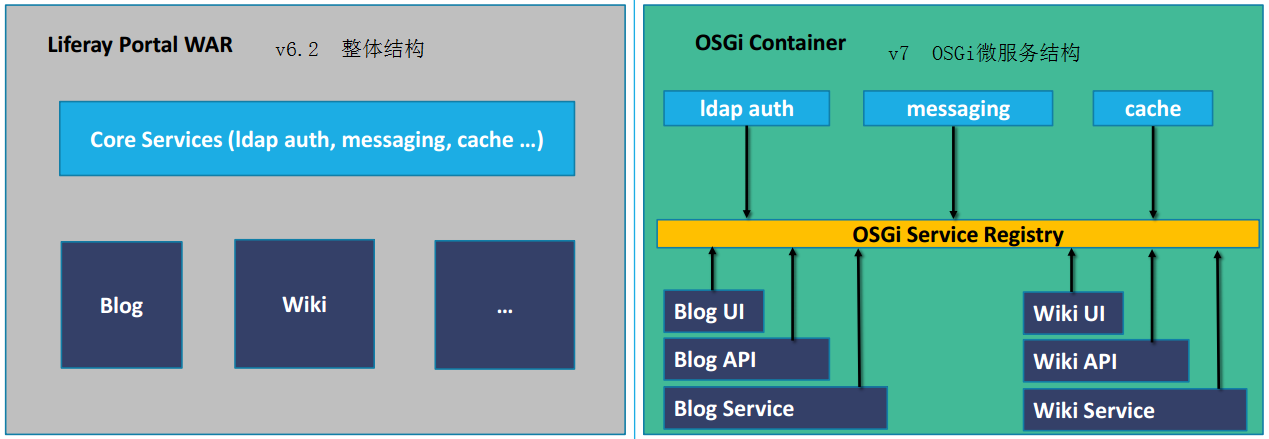
- liferay v7.0通过微服务改造提取的bundles超过300个;
- liferay v7.0的扩展集成点超过200,这个在v6.2是不可想象的;
所以继续做v6.2是没有任何意义了。
目前我在不断整理集成点的开发,见:
http://www.cnblogs.com/starcrm/p/6062914.html
如何在Liferay开发中自动把插件构建到osgi容器
这里简单举例说明,先写一个portlet:
注意,@Component是osgi的注解,用于注册组件,组件可以理解为最后颗粒度的类元素。
- immediate元素控制是否立即激活Component configuration;
- service元素描述了Component实现的接口,这些接口一定是对外提供服务接口;
- property元素定义了配置参数
- 当有依赖项时,还需要有reference元素
package 你的包名;

import java.io.IOException;

import java.io.PrintWriter;

import javax.portlet.GenericPortlet;

import javax.portlet.Portlet;

import javax.portlet.PortletException;

import javax.portlet.RenderRequest;

import javax.portlet.RenderResponse;

import org.osgi.service.component.annotations.Component;

@Component(

    immediate = true,

    property = {

        "com.liferay.portlet.display-category=category.sample",

        "com.liferay.portlet.instanceable=true",

        "javax.portlet.display-name=YourPortlet",

        "javax.portlet.security-role-ref=power-user,user"

    },

    service = Portlet.class

)

public class YourPortlet extends GenericPortlet {

    @Override

    protected void doView(RenderRequest request, RenderResponse response)

        throws IOException, PortletException {

        PrintWriter printWriter = response.getWriter();

        printWriter.print("Hello World!");

    }

}
Bndtools方式
自动化构建:
只需要运行XXXX.run文件:
-runremote: liferay;shell=-1

-runbundles: \

  你的Porject目录;version=latest,\

-runpath: \

  ../cnf/local/biz.aQute.remote.launcher/biz.aQute.remote.launcher-3.0.0.jar;version=file
注意:biz.aQute.remote.agent-X.X.X.jar这个必须要先存在。
在“你的Porject目录”里必须有这个文件:bnd.bnd
内容:
Bundle-Version: 1.0.0

-sources: true

Private-Package: 你的包名.YourPortlet

-buildpath:\

javax.portlet;version='2.0.0',\

org.osgi.service.component.annotations;version='1.3.0'
OSGi原来复杂的构建过程,现在已自动化了。
Maven方式
也可以通过Maven 构建
<build>

<plugins>

<plugin>

<groupId>org.apache.maven.plugins</groupId>

<artifactId>maven-compiler-plugin</artifactId>

<version>3.1</version>

<configuration>

<source>1.7</source>

<target>1.7</target>

</configuration>

</plugin>

<plugin>

<groupId>org.apache.maven.plugins</groupId>

<artifactId>maven-jar-plugin</artifactId>

<version>2.6</version>

<configuration>

<archive>

<manifestFile>${project.build.outputDirectory}/META-INF/MANIFEST.MF</manifestFile>

</archive>

</configuration>

</plugin>

<plugin>

<groupId>biz.aQute.bnd</groupId>

<artifactId>bnd-maven-plugin</artifactId>

<version>3.2.0</version>

<executions>

<execution>

<id>default-bnd-process</id>

<goals>

<goal>bnd-process</goal>

</goals>

</execution>

</executions>

<dependencies>

<dependency>

<groupId>biz.aQute.bnd</groupId>

<artifactId>biz.aQute.bndlib</artifactId>

<version>3.2.0</version>

</dependency>

<dependency>

<groupId>com.liferay</groupId>

<artifactId>com.liferay.ant.bnd</artifactId>

<version>2.0.28</version>

</dependency>

</dependencies>

</plugin>

</plugins>

</build>
gradle方式
貌似更简单
build.gradle:
dependencies {
compile 'com.liferay.portal:com.liferay.portal.kernel:2.0.0'
compile 'javax.portlet:portlet-api:2.0'
compile 'org.osgi:org.osgi.service.component.annotations:1.3.0'
}
version = '1.0.0'
bnd.bnd 可以大大简略:
Bundle-Version: 1.0.

-sources: true
运行:
../../gradlew deploy
更多其他osgi参考资料
osgi大纲(v6.0 2015年版)
https://osgi.org/download/r6/osgi.cmpn-6.0.0.pdf
osgi学习资源:
https://www.osgi.org/developer/resources/learning-resources-tutorials/
http://enroute.osgi.org/book/150-tutorials.html
一个非常好的例子:
http://www.vogella.com/tutorials/OSGi/article.html
Apache Felix OSGi Tutorial:
http://felix.apache.org/documentation/tutorials-examples-and-presentations/apache-felix-osgi-tutorial.html
Neil Bartlett:
http://njbartlett.name/osgibook.html
http://njbartlett.name/files/osgibook_preview_20091217.pdf
Bndtools Tutorial:
http://bndtools.org/tutorial.html
Eclipse Equinox教程
http://www.eclipse.org/equinox/documents/quickstart-framework.php
Beginer Tutorial
http://www.javaworld.com/article/2077837/java-se/java-se-hello-osgi-part-1-bundles-for-beginners.html
Liferay7 BPM门户开发之38: OSGi模块化Bndtools、Maven、Gradle开发构建入门的更多相关文章
- Liferay7 BPM门户开发之37: Liferay7下的OSGi Hook集成开发
hook开发是Liferay客制扩展的一种方式,比插件灵活,即可以扩展liferay门户,也能对原有特性进行更改,Liferay有许多内置的服务,比如用hook甚至可以覆盖Liferay服务. 可作为 ...
- Liferay7 BPM门户开发之17: Portlet 生命周期
Portlet 生命周期 init() =〉 render() =〉 processAction() =〉 processEvent() =〉 serveResource() =〉destroy() ...
- Liferay7 BPM门户开发之10: 通用流程实现从Servlet到Portlet(Part1)
开发目的: 实现通用流程自动化处理(即实现不需要hardcode代码的bpm统一处理后台,仅需要写少量前端html form代码和拖拽设计BPM定义) 既可独立运行或可依托于Liferay或依托其它门 ...
- Liferay7 BPM门户开发之12:acitiviti和liferay用户权限体系集成
写到第12章才出现Liferay的内容,希望可以厚积薄发. 我们的目标是不使用不维护Activiti的用户组织架构,只维护Liferay的体系,这样的好处是非常明显的,即不用做组织架构的同步工作. 原 ...
- Liferay7 BPM门户开发之32: 实现自定义认证登陆(定制Authentication Hook)
第一步:修改liferay-hook.xml <?xml version="1.0"?> <!DOCTYPE hook PUBLIC "-//Lifer ...
- Liferay7 BPM门户开发之46: 集成Activiti用户、用户组、成员关系同步
在实际的BPM集成开发过程中,Liferay和Activiti这两个异构的系统之间,用户.组的同步需求非常重要,用来实现签收组的概念,比如指定签收组.会签.抢签都需要用到. Activiti可以通过自 ...
- Liferay7 BPM门户开发之44: 集成Activiti展示流程列表
处理依赖关系 集成Activiti之前,必须搞清楚其中的依赖关系,才能在Gradle里进行配置. 依赖关系: 例如,其中activiti-engine依赖于activiti-bpmn-converte ...
- Liferay7 BPM门户开发之34: liferay7对外服务类生成(RestService Get Url)
在liferay7中开发不依赖Service Builder的对外服务类,非常简洁,只需要2点注解: 在类的前部定义: @ApplicationPath("/PathXXX") 方 ...
- Liferay7 BPM门户开发之27: MVC Portlet插件工程开发
官网上的教材说实话实在精简不清晰. https://dev.liferay.com/develop/tutorials/-/knowledge_base/7-0/creating-an-mvc-por ...
随机推荐
- 大神的Blog挂了,从Bing快照里复制过来的备份
UWidget封装SWidget到UMG 2015年8月30日0 为了使用UMG中的一些高级或便利特性,需要将制作好的Slate控件封装到UWidget中去. 当前UE4版本4.8.3. 将Slate ...
- python基础05 if选择
摘要:if语句是用来检查一个条件,如果条件为真(true),我们运行一个语句块(称为IF块),否则(else)运行另一个语句块(else块).else语句是可选的 程序1(将文件保存为if.py): ...
- swift 上手
学习swift的笔记,偶尔会更新一下 变量与常量 变量定义使用var,常量使用let,类型安全,有自动类型推导,注意赋值的=号两边必须有空格. 变量和常量名是可以几乎所有字符,这些都非常像javasc ...
- 我听说 C...
我听说在 c 语言的世界里,goto 和异常处理都是声名狼藉的东西,而我认为它们在一起就能化解各自的问题.
- SQL Server 里的递归查询
http://www.360doc.com/content/13/0607/11/8463843_291221684.shtml
- C++构造函数/析构函数 设置成private的原因
C++构造函数/析构函数 设置成private的原因 标签(空格分隔): c/c++ 将构造函数,析构函数声明为私有和保护的,那么对象如何创建? 已经不能从外部调用构造函数了,但是对象必须被构造,应该 ...
- [LintCode] Climbing Stairs 爬梯子问题
You are climbing a stair case. It takes n steps to reach to the top. Each time you can either climb ...
- python安装完毕后,提示找不到ssl模块的解决步骤
转载自 醇酒醉影 python安装完毕后,提示找不到ssl模块: [root@localhost ~]# python2.7.5 Python 2.7.5 (default, Jun 3 2013, ...
- centos上安装php运行环境
可以参考,但我安装的过程不完全一样http://www.cnblogs.com/liulun/p/3535346.html 我先安装的apache,直接执行的yum -y install httpd ...
- 数据分析之Numpy基础:数组和适量计算
Numpy(Numerical Python)是高性能科学计算和数据分析的基础包. 1.Numpy的ndarray:一种多维数组对象 对于每个数组而言,都有shape和dtype这两个属性来获取数组的 ...