
android开发 静态碎片布局实现
实现思维:
1.需要写2个或者多个子布局
2.写一个Java的class去实现将子布局与父类布局铺满。(一个子布局对应一个class)
3.在父类布局中导入fragment布局,并且添加android:name=“”属性;
1.写2个布局:
<?xml version="1.0" encoding="utf-8"?>

<LinearLayout xmlns:android="http://schemas.android.com/apk/res/android"

    android:orientation="vertical"

    android:layout_width="match_parent"

    android:layout_height="match_parent"

    android:background="@color/colorAccent">

    <TextView

        android:layout_marginTop="20dp"

        android:layout_width="wrap_content"

        android:layout_height="wrap_content"

        android:text="下面的布局"

        android:textSize="30sp"

        android:textColor="@color/colorBlack"

        android:maxEms="1"

        android:maxLines="5"

        android:layout_gravity="center"

        />

</LinearLayout>
<?xml version="1.0" encoding="utf-8"?>

<LinearLayout xmlns:android="http://schemas.android.com/apk/res/android"

    android:orientation="vertical"

    android:layout_width="match_parent"

    android:layout_height="match_parent">

    <TextView

        android:layout_marginTop="20dp"

        android:layout_width="wrap_content"

        android:layout_height="wrap_content"

        android:layout_gravity="center"

        android:text="上面的布局"

        android:textSize="30sp"

        android:textColor="@color/colorBlack"

        android:maxEms="1"

        android:maxLines="5"/>

</LinearLayout>
2.Java的class去实现将子布局与父类布局铺满
package com.example.lenovo.mydebrisdemo;

import android.app.Fragment;

import android.os.Bundle;

import android.support.annotation.Nullable;

import android.view.LayoutInflater;

import android.view.View;

import android.view.ViewGroup;

/**

 * Created by lenovo on 2018/5/5.

 */

public class Top extends Fragment {

    @Nullable

    @Override

    public View onCreateView(LayoutInflater inflater, @Nullable ViewGroup container, Bundle savedInstanceState) {

        View view = inflater.inflate(R.layout.top_fragment,container,false);

        return view;

    }

}
package com.example.lenovo.mydebrisdemo;

import android.app.Fragment;

import android.os.Bundle;

import android.support.annotation.Nullable;

import android.view.LayoutInflater;

import android.view.View;

import android.view.ViewGroup;

/**

 * Created by lenovo on 2018/5/5.

 */

public class Button extends Fragment {

    @Nullable

    @Override

    public View onCreateView(LayoutInflater inflater, @Nullable ViewGroup container, Bundle savedInstanceState) {

        View view = inflater.inflate(R.layout.botton_fragment,container,false);

        return view;

    }

}
3.父类布局中导入fragment布局,并且添加android:name=“”属性;
<?xml version="1.0" encoding="utf-8"?>

<LinearLayout xmlns:android="http://schemas.android.com/apk/res/android"

    android:orientation="vertical"

    android:layout_width="match_parent"

    android:layout_height="match_parent">

    <!--id一定要加否则会报错-->

    <fragment

        android:id="@+id/top"

        android:name="com.example.lenovo.mydebrisdemo.Top"

        android:layout_width="match_parent"

        android:layout_height="0dp"

        android:layout_weight="1"/>

    <fragment

        android:id="@+id/button"

        android:name="com.example.lenovo.mydebrisdemo.Button"

        android:layout_width="match_parent"

        android:layout_height="0dp"

        android:layout_weight="1"/>

</LinearLayout>
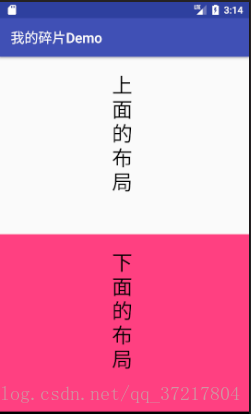
运行效果:
android开发 静态碎片布局实现的更多相关文章
- Android开发-之五大布局
在html中大家都知道布局是什么意思了,简单来说就是将页面划分模块,比如html中的div.table等.那么Android中也是这样的.Android五大布局让界面更加美化,开发起来也更加方便.当然 ...
- Android开发5大布局方式详解
Android中常用的5大布局方式有以下几种: 线性布局(LinearLayout):按照垂直或者水平方向布局的组件. 帧布局(FrameLayout):组件从屏幕左上方布局组件. 表格布局(Tabl ...
- Android开发 静态static类与static方法持有Context是否导致内存泄露的疑问
简述 在Android开发的过程中,难免会使用单例模式或者静态方法工具类.我们会让它们持有一些外部的Context或者View一般有以下几种情况: 单例模式,类的全局变量持有Context 或 Vie ...
- .Net程序猿玩转Android开发---(6)线性布局LinearLayout
LinearLayout控件是Android中重要的布局控件,是一个线性控件,所谓线性控件的意思是指该控件里面的内容仅仅能水平或垂直排列.也就 ...
- Android开发 ---Fragment片段布局
前言 Fragment想必大家不陌生吧,在日常开发中,对于Fragment的使用也很频繁,现在主流的APP中,基本的架构也都是一个主页,然后每个Tab项用Fragment做布局,不同选项做切换,使用起 ...
- android 开发 使用自定义布局实现标题栏复用(标题栏内容自定义:使用代码实现和xml布局自定义属性2种办法实现)
在个人学习的情况下可能很少使用自定义布局去实现大量复用的情况下,但是在一个开发工作的环境下就会使用到大量复用的自定义控件. 实现思维: 1.写一个xml的布局,用于标题栏的样式,并且添加在标题栏中你想 ...
- android开发学习---layout布局、显示单位和如何进行单元测试
一.五大布局(layout) android中的用五大布局:LinearLayout (线性布局).AbsoluteLayout(绝对布局).RelativeLayout(相对布局).TableLay ...
- android开发中常见布局的注意点
常见布局的注意点 线性布局: 必须有一个布局方向 水平或者垂直 在垂直布局中 只有左对齐 右对齐 水平居中生效 在水平布局中 只有顶部对齐 底部对齐 垂直居中生效 权重:组件按比例分配屏幕的剩余部分( ...
- Android开发中XML布局的常用属性说明
<!-- 常用属性说明: android:id="@+id/button" 为控件指定Id android:text="NNNNNNNNNN" 指定控件的 ...
随机推荐
- python调用hanlp分词包手记
python调用hanlp分词包手记 Hanlp作为一款重要的分词工具,本月初的时候看到大快搜索发布了hanlp的1.7版本,新增了文本聚类.流水线分词等功能.关于hanlp1.7版本的新功能,后 ...
- pyhanlp用户自定义词典添加实例说明
pyhanlp用户自定义词典添加实例说明 pyhanlp是python版封装的的HanLP,项目地址:https://github.com/hankcs/pyhanlp 经过测试,HanLP比nltk ...
- Uedit编辑器编辑Velocity
1.切换到源代码模式 UM.getEditor('editor').execCommand("source"); 2.给编辑器插入Velocity源码 $(".edui- ...
- ionic platform add ios, Error:spawn EACCES
RT: cordova ionic 环境搭建好之后,需要添加平台才能打包,添加平台如果出错:Error:spawn EACCES, 原因是因为没添加hooks, 请使用 ionic add hooks ...
- 浅析Hyperledger Fabric共识算法 摘自http://www.cocoachina.com/blockchain/20180829/24728.html
Hyperledger Fabric共识算法 区块链系统是一个分布式架构,交易账本信息由各个节点管理,组成一个庞大的分布式账本.在分布式系统中,各个节点收到的交易信息的顺序可能存在差异(例如,网络延迟 ...
- 转:Oracle 执行计划(Explain Plan) 说明
Oracle 执行计划(Explain Plan) 说明 原贴地址:http://blog.csdn.net/tianlesoftware/article/details/5827245 如果要分 ...
- regasm 无法定位输入程序集
c# 写的DLL是32位的,在64位机器上注册时提示 无法定位输入程序集 方法1: 使用绝对路径: "%windir%\Microsoft.NET\Framework\v2.0.50727\ ...
- linux 简单笔记
Linux查看端口使用状态.关闭端口方法 http://blog.csdn.net/wudiyi815/article/details/7473097
- php中的this,self,parent
this就是指向当前对象实例的指针,不指向任何其他对象或类 如$this->fun1(); self:指向类本身,也就是self是不指向任何已经实例化的对象 ,self使用来指向类中的静态属性或 ...
- 黄聪:HBuilder复制PHP项目后,【转到定位】功能失效
1.[工具]--[插件安装]--[Aptana php插件]--[选择]--[安装] 2.随便开几个文件,操作一下[编辑]--[整理代码格式]就可以了