
循环&信息添加&颜色修改
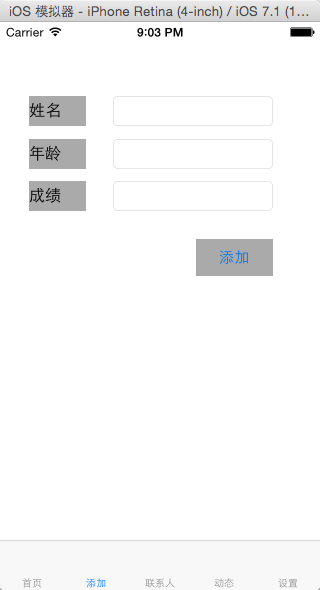
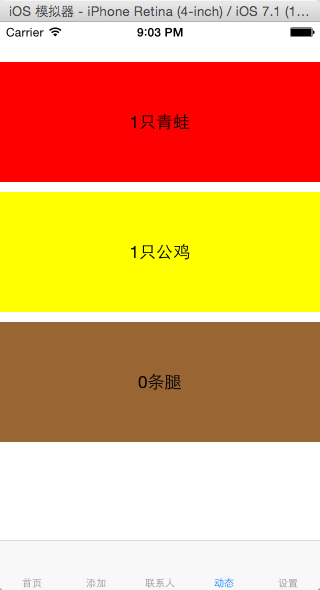
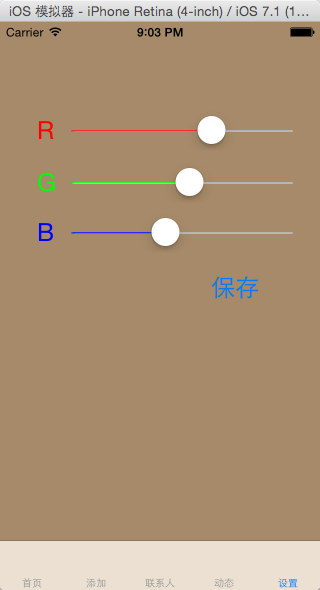
#import "AViewController.h"
@interface AViewController () <UIActionSheetDelegate>
@end
@implementation AViewController
- (id)initWithNibName:(NSString *)nibNameOrNil bundle:(NSBundle *)nibBundleOrNil
{
self = [super initWithNibName:nibNameOrNil bundle:nibBundleOrNil];
if (self) {
}
return self;
}
- (void)viewDidLoad
{
[super viewDidLoad];
// Do any additional setup after loading the view.
self.navigationItem.rightBarButtonItem = [[UIBarButtonItem alloc]initWithTitle:@"下一页" style:UIBarButtonItemStyleDone target:self action:@selector(nextClick)];
}
- (void)nextClick
{
int num = self.navigationController.viewControllers.count+1;
int r = arc4random_uniform(256);
int g = arc4random_uniform(256);
int b = arc4random_uniform(256);
AViewController *av = [[AViewController alloc]init];
av.navigationItem.title = [NSString stringWithFormat:@"第%d页",num];
av.view.backgroundColor = [UIColor colorWithRed:r/255.0f green:g/255.0f blue:b/255.0f alpha:1];
av.hidesBottomBarWhenPushed = YES;
av.navigationItem.leftBarButtonItem = [[UIBarButtonItem alloc]initWithTitle:@"返回" style:UIBarButtonItemStyleDone target:av action:@selector(backClick)];
[self.navigationController pushViewController:av animated:YES];
}
- (void)backClick
{
UIActionSheet *as = [[UIActionSheet alloc]initWithTitle:@"返回到" delegate:self cancelButtonTitle:@"取消" destructiveButtonTitle:@"首页" otherButtonTitles:@"上一页",@"第三页",@"第五页", nil];
[as showInView:self.tabBarController.view];
}
- (void)actionSheet:(UIActionSheet *)actionSheet clickedButtonAtIndex:(NSInteger)buttonIndex
{
NSArray *arr = self.navigationController.viewControllers;
switch (buttonIndex) {
case 0:
{
[self.navigationController popToRootViewControllerAnimated:YES];
}
break;
case 1:
{
[self.navigationController popViewControllerAnimated:YES];
}
break;
case 2:
{
if (arr.count > 2) {
[self.navigationController popToViewController:[arr objectAtIndex:2] animated:YES];
}
}
break;
case 3:
{
if (arr.count > 4) {
[self.navigationController popToViewController:[arr objectAtIndex:4] animated:YES];
}
}
break;
default:
break;
}
}
- (void)didReceiveMemoryWarning
{
[super didReceiveMemoryWarning];
// Dispose of any resources that can be recreated.
}
@end
#import "BViewController.h"
#import "CViewController.h"
@interface BViewController ()
@end
@implementation BViewController
- (id)initWithNibName:(NSString *)nibNameOrNil bundle:(NSBundle *)nibBundleOrNil
{
self = [super initWithNibName:nibNameOrNil bundle:nibBundleOrNil];
if (self) {
// Custom initialization
}
return self;
}
- (void)viewDidLoad
{
[super viewDidLoad];
// Do any additional setup after loading the view from its nib.
}
//保存按钮点击事件
- (IBAction)saveClick:(UIButton *)sender
{
[self.view endEditing:YES];
UITextField *name = (UITextField *)[self.view viewWithTag:1];
UITextField *age = (UITextField *)[self.view viewWithTag:2];
UITextField *num = (UITextField *)[self.view viewWithTag:3];
NSString *str = [NSString stringWithFormat:@"姓名:%@\n年龄:%@\n成绩:%@",name.text,age.text,num.text];
CViewController *cv = [self.tabBarController.viewControllers objectAtIndex:2];
[cv.dataArr addObject:str];
}
- (void)touchesBegan:(NSSet *)touches withEvent:(UIEvent *)event
{
[self.view endEditing:YES];
}
- (void)didReceiveMemoryWarning
{
[super didReceiveMemoryWarning];
// Dispose of any resources that can be recreated.
}
#import <UIKit/UIKit.h>
@interface CViewController : UIViewController
@property (nonatomic,retain)NSMutableArray *dataArr;
@end
#import "CViewController.h"
#import "AppDelegate.h"
@interface CViewController () <UITableViewDataSource,UITableViewDelegate>
{
UITableView *_myTableView;
}
@end
@implementation CViewController
- (id)initWithNibName:(NSString *)nibNameOrNil bundle:(NSBundle *)nibBundleOrNil
{
self = [super initWithNibName:nibNameOrNil bundle:nibBundleOrNil];
if (self) {
// Custom initialization
_dataArr = [[NSMutableArray alloc]init];
}
return self;
}
- (void)viewWillAppear:(BOOL)animated
{
[_myTableView reloadData];
}
- (void)viewDidLoad
{
[super viewDidLoad];
// Do any additional setup after loading the view.
_myTableView = [[UITableView alloc]initWithFrame:CGRectMake(0, 40, 320, [UIScreen mainScreen].bounds.size.height-49-40)];
_myTableView.delegate = self;
_myTableView.dataSource = self;
[self.view addSubview:_myTableView];
}
- (NSInteger)tableView:(UITableView *)tableView numberOfRowsInSection:(NSInteger)section
{
return _dataArr.count;
}
- (CGFloat)tableView:(UITableView *)tableView heightForRowAtIndexPath:(NSIndexPath *)indexPath
{
return 80;
}
- (UITableViewCell *)tableView:(UITableView *)tableView cellForRowAtIndexPath:(NSIndexPath *)indexPath
{
UITableViewCell *cell = [tableView dequeueReusableCellWithIdentifier:@"qqq"];
if (!cell) {
cell = [[UITableViewCell alloc]initWithStyle:UITableViewCellStyleDefault reuseIdentifier:@"qqq"];
UILabel *label = [[UILabel alloc]initWithFrame:CGRectMake(0, 0, 320, 80)];
label.numberOfLines = 0;
label.backgroundColor = [UIColor yellowColor];
label.tag = 1;
[cell.contentView addSubview:label];
}
UILabel *la = (UILabel *)[cell.contentView viewWithTag:1];
la.text = [_dataArr objectAtIndex:indexPath.row];
return cell;
}
- (void)tableView:(UITableView *)tableView commitEditingStyle:(UITableViewCellEditingStyle)editingStyle forRowAtIndexPath:(NSIndexPath *)indexPath
{
[_dataArr removeObjectAtIndex:indexPath.row];
[_myTableView deleteRowsAtIndexPaths:[NSArray arrayWithObject:indexPath] withRowAnimation:UITableViewRowAnimationAutomatic];
}
- (void)didReceiveMemoryWarning
{
[super didReceiveMemoryWarning];
// Dispose of any resources that can be recreated.
}
#import "DViewController.h"
@interface DViewController () <UIScrollViewDelegate>
{
UIScrollView *_sview1;
UIScrollView *_sview2;
UIScrollView *_sview3;
}
@end
@implementation DViewController
- (id)initWithNibName:(NSString *)nibNameOrNil bundle:(NSBundle *)nibBundleOrNil
{
self = [super initWithNibName:nibNameOrNil bundle:nibBundleOrNil];
if (self) {
// Custom initialization
}
return self;
}
- (void)viewDidLoad
{
[super viewDidLoad];
// Do any additional setup after loading the view.
_sview1 = [[UIScrollView alloc]initWithFrame:CGRectMake(0, 40, 320, 120)];
_sview1.pagingEnabled = YES;
_sview1.delegate = self;
_sview1.backgroundColor = [UIColor redColor];
_sview1.contentSize = CGSizeMake(320*10, 120);
for (int i = 0; i<10; i++) {
UILabel *label = [[UILabel alloc]initWithFrame:CGRectMake(i*320, 0, 320, 120)];
label.text = [NSString stringWithFormat:@"%i只青蛙",i+1];
label.textAlignment = NSTextAlignmentCenter;
[_sview1 addSubview:label];
}
[self.view addSubview:_sview1];
_sview2 = [[UIScrollView alloc]initWithFrame:CGRectMake(0, 170, 320, 120)];
_sview2.backgroundColor = [UIColor yellowColor];
_sview2.delegate = self;
_sview2.pagingEnabled = YES;
_sview2.contentSize = CGSizeMake(320*20, 120);
for (int i = 0; i<20; i++) {
UILabel *label = [[UILabel alloc]initWithFrame:CGRectMake(i*320, 0, 320, 120)];
label.text = [NSString stringWithFormat:@"%i只公鸡",i+1];
label.textAlignment = NSTextAlignmentCenter;
[_sview2 addSubview:label];
}
[self.view addSubview:_sview2];
_sview3 = [[UIScrollView alloc]initWithFrame:CGRectMake(0, 300, 320, 120)];
_sview3.backgroundColor = [UIColor brownColor];
_sview3.pagingEnabled = YES;
_sview3.delegate = self;
_sview3.scrollEnabled = NO;
_sview3.contentSize = CGSizeMake(320*40, 120);
for (int i=0; i<41;i++) {
UILabel *label = [[UILabel alloc]initWithFrame:CGRectMake(i*320, 0, 320, 120)];
label.text = [NSString stringWithFormat:@"%i条腿",i];
label.textAlignment = NSTextAlignmentCenter;
[_sview3 addSubview:label];
}
[self.view addSubview:_sview3];
}
- (void)scrollViewDidEndDecelerating:(UIScrollView *)scrollView
{
int a = scrollView.contentOffset.x/320 + 1;
if (scrollView==_sview1) {
[_sview3 setContentOffset:CGPointMake(a*320*4, 0)animated:YES];
} else {
[_sview3 setContentOffset:CGPointMake(a*320*2, 0) animated:YES];
}
}
- (void)didReceiveMemoryWarning
{
[super didReceiveMemoryWarning];
// Dispose of any resources that can be recreated.
}
#import "EViewController.h"
@interface EViewController ()
@end
@implementation EViewController
- (id)initWithNibName:(NSString *)nibNameOrNil bundle:(NSBundle *)nibBundleOrNil
{
self = [super initWithNibName:nibNameOrNil bundle:nibBundleOrNil];
if (self) {
// Custom initialization
}
return self;
}
- (void)viewDidLoad
{
[super viewDidLoad];
// Do any additional setup after loading the view from its nib.
}
//slider滑动事件
- (IBAction)colorChange:(UISlider *)sender
{
UISlider *s1 = (UISlider *)[self.view viewWithTag:11];
UISlider *s2 = (UISlider *)[self.view viewWithTag:12];
UISlider *s3 = (UISlider *)[self.view viewWithTag:13];
self.view.backgroundColor = [UIColor colorWithRed:s1.value green:s2.value blue:s3.value alpha:1];
}
//保存按钮点击事件
- (IBAction)saveClick:(UIButton *)sender
{
for (UIViewController *vc in self.tabBarController.viewControllers) {
vc.view.backgroundColor = self.view.backgroundColor;
}
}
- (void)didReceiveMemoryWarning
{
[super didReceiveMemoryWarning];
// Dispose of any resources that can be recreated.
}
@end
#import "MyTabBar.h"
#import "AViewController.h"
#import "BViewController.h"
#import "CViewController.h"
#import "DViewController.h"
#import "EViewController.h"
@interface MyTabBar ()
@end
@implementation MyTabBar
- (id)initWithNibName:(NSString *)nibNameOrNil bundle:(NSBundle *)nibBundleOrNil
{
self = [super initWithNibName:nibNameOrNil bundle:nibBundleOrNil];
if (self) {
// Custom initialization
}
return self;
}
- (void)viewDidLoad
{
[super viewDidLoad];
// Do any additional setup after loading the view.
AViewController *av = [[AViewController alloc]init];
BViewController *bv = [[BViewController alloc]init];
CViewController *cv = [[CViewController alloc]init];
DViewController *dv = [[DViewController alloc]init];
EViewController *ev = [[EViewController alloc]init];
av.title = @"首页";
bv.title = @"添加";
cv.title = @"联系人";
dv.title = @"动态";
ev.title = @"设置";
UINavigationController *an = [[UINavigationController alloc]initWithRootViewController:av];
NSArray *controllers = [NSArray arrayWithObjects:an,bv,cv,dv,ev, nil];
self.viewControllers = controllers;
}
- (void)didReceiveMemoryWarning
{
[super didReceiveMemoryWarning];
// Dispose of any resources that can be recreated.
}
循环&信息添加&颜色修改的更多相关文章
- 使用ADO对象添加、修改、删除数据
使用ADO对象对数据库中的数据进行添加.修改和删除等操作.首先创建一个ADO类,通过ADO类连接数据库,并打开记录集.例如,使用ADO对象添加.修改.删除数据,程序设计步骤如下:(1)创建一个基于对话 ...
- datagrid 添加、修改、删除(转载)
原链接:JQueryEasyUI学习笔记(十)datagrid 添加.修改.删除 基于datagrid框架的删除.添加与修改: 主要是批量删除,双击表单修改.选中行修改,增加行修改,再有就是扩展edi ...
- Quartz动态添加,修改,删除任务(暂停,任务状态,恢复,最近触发时间)
首页 博客 学院 下载 图文课 论坛 APP 问答 商城 VIP会员 活动 招聘 ITeye GitChat 写博客 小程序 消息 登录注册 关闭 quartz_Cron表达式一分钟教程 09-05 ...
- 给手绘图着色(添加颜色或色彩):CVPR2020论文点评
给手绘图着色(添加颜色或色彩):CVPR2020论文点评 Learning to Shade Hand-drawn Sketches 论文链接:https://arxiv.org/pdf/2002.1 ...
- ExtJS 4.2 业务开发(三)数据添加和修改
接上面的船舶管理业务,这里介绍添加和修改操作. 目录 1. 添加操作 2. 修改操作 3. 在线演示 1. 添加操作 1.1 创建AddShipWindow.js 在业务中的view目录下创建一个Ad ...
- MVC5 网站开发之八 栏目功能 添加、修改和删除
本次实现栏目的浏览.添加.修改和删除. 栏目一共有三种类型. 常规栏目-可以添加子栏目,也可以添加内容模型.当不选择内容模型时,不能添加内容. 单页栏目-栏目只有一个页面,可以设置视图. 链接栏目-栏 ...
- ASP.NET MVC搭建项目后台UI框架—6、客户管理(添加、修改、查询、分页)
目录 ASP.NET MVC搭建项目后台UI框架—1.后台主框架 ASP.NET MVC搭建项目后台UI框架—2.菜单特效 ASP.NET MVC搭建项目后台UI框架—3.面板折叠和展开 ASP.NE ...
- Jquery EasyUI的添加,修改,删除,查询等基本操作介绍
http://www.jb51.net/article/42016.htm 初识Jquery EasyUI看了一些博主用其开发出来的项目,页面很炫,感觉功能挺强大,效果也挺不错,最近一直想系统学习一套 ...
- IIS环境下如何批量添加、修改、删除绑定的域名
IIS环境下如何批量添加和修改所绑定域名 1.关闭IISADMIN服务和W3SVC服务,可以从服务里面关闭,也可以直接执行命令:net stop iisadmin /y: 2.打开“C:\WINDOW ...
随机推荐
- Ros系列_学习一
刚入门ROS,不,没入门,还在门口,这是今天的总结: (一)创建一个工作空间 1.创建一个初始工作空间: mkdir -p ~/catkin_ws/src cd ~/catkin_ws/src cat ...
- R语言-直方图
1.直方图 直方图和柱形图的区别:直方图表示频数,柱形图表示数量. 一般直方图的X轴表示取值范围,Y轴表示频数 hist() 函数 > hist(rnorm(1000)) #1000个正态随机数 ...
- 重新装kafka
Linux搭建kafka 一.安装Java 1.查看linux 的系统版本 root@aliyun:~# uname --m x86_64 2.安装java mkdir -p /usr/local ...
- float double
float : 单精度浮点数 double : 双精度浮点数 两者的主要区别如下: 01.在内存中占有的字节数不同 单精度浮点数在机内存占4个字节 双精度浮点数在机内存占8个字节 02.有效数字位数不 ...
- Mybatis返回List<Map<K,V>>
最终映射的字段名 会被作为 hashMap 的 key , <!-- TODO 测试返回 HashMap--> <resultMap id="testResultMap&q ...
- 算法之LOWB三人组之插入排序
插入排序 思想:类似于抽扑克牌,共有8张扑克牌,手里默认有一张,桌面上有7张,我们每次从桌面上抽一张和手里的牌进行比较,如果比手里的牌大,则直接放到手里的牌的后面,如果比手里的牌小,则放到手里的牌的前 ...
- 用PLSQL Developer 查看连接因子 tnsnames.ora
1 2
- centos如何查看磁盘剩余空间
linux系统的Df命令是以磁盘分区为单位查看文件系统,可以加上参数查看磁盘剩余空间信息,命令格式: df -hl 显示格式为: 文件系统 容量 已用 可用 已用% 挂载点 /dev/hda5 487 ...
- 每月IT摘录201811
技术 1.打牢基础,从会使用-了解原理-了解思想一步一步来,最怕基础很弱但却以什么都用过为荣的人,这样的人我招进来也只是初级而已,工作年限再多也没有用.少林里面,有功和拳之分,如蛇拳猴拳是拳,马步功石 ...
- 第十章 优先级队列 (b1)完全二叉堆:结构