
Booting LPC-Link2, Updating LPCXpresso firmware
Booting LPC-Link2
The recommended way to use LPC-Link2 with the LPCXpresso IDE is to boot and soft load a debug firmware image at the start of a debug session.
Normally, LPC-Link 2 is booted automatically, however under certain circumstances - such as when using the command line flash utility, you may need to boot it manually.
Note: Both the LPCXpresso V2/V3 boards and RDB4078 incorporate a built in LPC-Link2 debug probe, so this FAQ equally applies to these boards.
Note: This FAQ only applies to LPC-Link2 hardware when configured to operate in DFU mode, it does not apply if the LPC-Link2 hardware is configured to boot from a debug firmware image held in flash such as CMSIS-DAP.
Background
When powered on, LPC-Link 2 hardware makes use of the DFU mechanism (Device Firmware Update)
to allow the LPCXpresso IDE to download debug firmware into the on-board RAM.
This scheme offers great flexibility and ensures that the latest compatible firmware will be used for a given version of the IDE.
Before boot, LPC-Link 2 appears as a USB device with details:
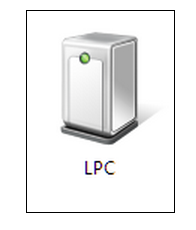
For LPCXpresso IDE prior to v7.8: After boot, LPC-Link2 will by default appear as a USB device with details:
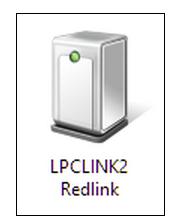
From LPCXpresso IDE v7.8 onwards: After boot, LPC-Link2 will by default appear as a USB device with details:

For information on setting the LPCXpresso IDE default debug firmware see: Configuring which LPC-Link2 firmware image to soft-load
Note: the standard utilities to explore USB devices on our supported host platforms are:
- Windows - Device Manager
- LPCXpressoIDE also provides a listusb utility in:
- <install_dir>\lpcxpresso\bin\Scripts
- LPCXpressoIDE also provides a listusb utility in:
- Linux - terminal command: lsusb
- Mac OSX - terminal command: system_profiler SPUSBDataType
The procedure to manually boot the probe is shown below.
Using the Command Line
From LPCXpresso IDE version 7.3x and later, we now supply a boot script for all supported platforms. To make use of this script:
- cd <install_dir>\lpcxpresso\bin and run
- boot_link2
For version of LPCXpresso IDE earlier than version 7.3 - you will need to locate the dfu-util utility and pass the parameters for the device and code etc. as below:
cd <install_dir>\lpcxpresso\bin and run
- dfu-util -d 1FC9:000C -c 0 -t 2048 -R -D LPC432x_Redlink_V4_30.bin.hdr
- LPC432x_Redlink_V4_30.bin.hdr is the file name for the firmware supplied in LPCXpresso IDE V 7.2.0
- Note: The exact name of the .hdr file may change between different tools releases, please ensure you use the name of the correct name!
- LPC432x_Redlink_V4_30.bin.hdr is the file name for the firmware supplied in LPCXpresso IDE V 7.2.0
Using the GUI
It is also possible to manually boot LPC-Link 2 from the GUI, on occasion this may be a more convenient solution than using the command line.
To do this, locate the red Boot icon on the Toolbar:

Troubleshooting
If you have been able to use LPC-Link 2 in a debug session but now see issues such as "No compatible emulator available"
or "Priority 0 connection to this core already taken" when trying to perform a debug operation ...
- ensure you have shut down any previous debug session
- You must close a debug session (press the Red 'terminate' button) before starting another debug session
- It is possible that the debug driver is still running in the background. Use the task manager or equivalent to kill any tasks called:
- redlinkserv
- arm-none-eabi_gdb*
- crt_emu_*
If your host has never worked with LPC-Link 2, first perform some basic checks with reference to the background information at the beginning of this FAQ.
- Try a different USB cable!
- Try a different USB port. If your host has USB3 and USB2, then try a USB2 port
- there are know issues with motherboard USB3 firmware, ensure your host is using the latest driver from the manufacturer
- Note: this is not referencing the host OS driver but the motherboard firmware of the USB port
- there are know issues with motherboard USB3 firmware, ensure your host is using the latest driver from the manufacturer
- If using a USB hub, first try a direct connection to the host computer
- Try completely removing and re-installing the host device driver. See also LPC-Link2 fails to enumerate with CMSIS-DAP
- If using Windows 8.1, then sometimes the Windows USB power settings can cause problems.
For more details use your favourite search engine to search for "windows 8 usb power settings" or similar. For example:
Updating LPCXpresso firmware
LPCXpresso range of development boards from NXP which include the LPC-Link 2 interface can be firmware updated to include mbed USB disk programming capabilities.
Below is a quick guide to how to carry out this update.
Requirements
- A Windows computer
- Download and install the latest DFU Boot drivers
- Download and install the latest NXP DFU Download utility
Instructions
1. Fit jumper JP3
2. Connect the "link" micro-B connector to the PC

3. Run dfusec.exe
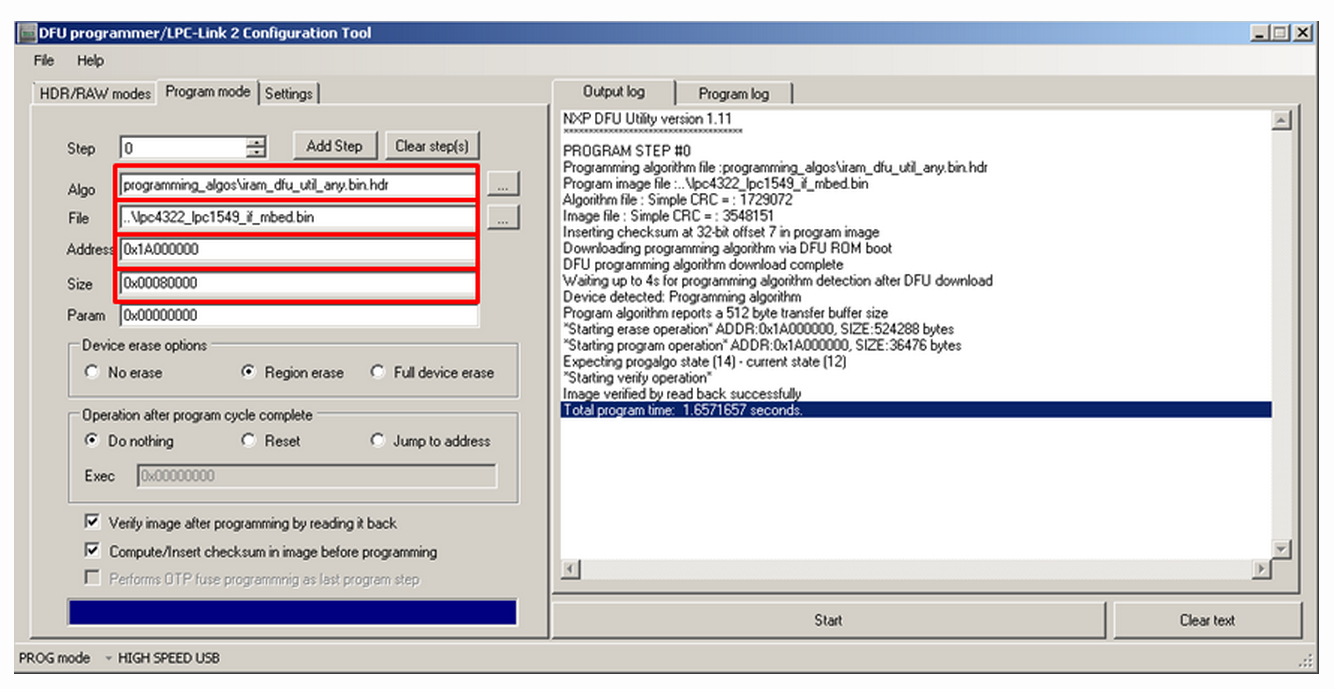
- Browse to the correct Algorithm file (the correct one should be selected by default)
- Download the binary for your board from the list below, and then :
- Browse to the binary
- Set the parameter : "Address"
- Set the parameter : "Size"
- Press the start button on the PC application... wait... done :-)
4. Remove the jumper JP3 and unplug/plug in the LPCXpresso
You should now have an mbed flash disk for drag and drop programming
Binary Downloads
- LPCXpresso1549
- LPCXpresso1549 firmware image 2015-07-14 v0221 (fixed the MBED.HTM file only)
- LPCXpresso1549 firmware image 2015-04-18 v0221
- LPCXpresso1549 firmware image 2014-04-03 v0202
- Address : 0x1A000000
- Size : 0x00080000
- LPCXpresso11U68
- LPCXpresso11U68 firmware image 2015-04-28 v0221
- LPCXpresso11U68 firmware image 2014-04-03 v0202
- Address : 0x1A000000
- Size : 0x00080000
- LPCXpresso4337
- LPCXpresso4337 firmware image 2015-04-27 v0221
- Address : 0x1A000000
- Size : 0x00080000
Booting LPC-Link2, Updating LPCXpresso firmware的更多相关文章
- LabTool : LPC LINK2, LPC4370 cheap scope: 80Ms/s 12 bit
80MHz 12 bit ADC processor LPC4370.LPCxpresso do a LPC LINK2 and LABTOOLS open source oscilloscope d ...
- LPC LINK2 IO CONNECTOR
- CyanogenMod wiki reading tips | Android tips
To Enable the Developer and Performance settings on CyanogenMod 10.1 In the Settings app, choose the ...
- UEFI boot: how does that actually work, then?
原文地址:https://www.happyassassin.net/2014/01/25/uefi-boot-how-does-that-actually-work-then/ 翻译:https:/ ...
- Booting the Linux/ppc kernel without Open Firmware
The DT block format 这一章定义了传递给内核的FDT(flattened device tree)的格式.关于它包含的内容以及内核需要的属性将在后续章节描述. 注:DT block应 ...
- Booting dircetly into Redlink FW from flash
Booting dircetly into Redlink FW from flash Hello, the usual way to use the Redlink FW is a two-step ...
- LPCScrypt, DFUSec : USB FLASH download, programming, and security tool, LPC-Link 2 Configuration tool, Firmware Programming
What does this tool do? The LPC18xx/43xx DFUSec utility is a Windows PC tool that provides support f ...
- cmsis dap interface firmware
cmsis dap interface firmware The source code of the mbed HDK (tools + libraries) is available in thi ...
- RPI学习--环境搭建_更新firmware
(用以解决USB摄像头不识别的状况) rpi-update是老外开发的一个更新树莓派firmware的工具 $ sudo apt-get update $ sudo apt-get install ...
随机推荐
- 【转】教你何时开启水果机上的HDR拍照
原址:http://news.mydrivers.com/1/175/175922.htm 苹果在iOS 4.1操作系统中为iPhone 4增加了一项有趣的新功能:HDR拍照.虽然目前市场上支持HDR ...
- 【转】如何评价 Apple 新推出的编程语言 Swift?
如何评价 Apple 新推出的编程语言 Swift? 原文地址:http://www.zhihu.com/question/24002984 评价:如果你会Objective-C,你不需要去看它. ...
- HDU 4608 I-number 2013 Multi-University Training Contest 1 1009题
题目大意:输入一个数x,求一个对应的y,这个y满足以下条件,第一,y>x,第二,y 的各位数之和能被10整除,第三,求满足前两个条件的最小的y. 解题报告:一个模拟题,比赛的时候确没过,感觉这题 ...
- C# 文件Copy
文件Copy有以下几种方法: 1.Copy string sourceFile = @"c:\temp\New Text Document.txt"; string destina ...
- Windows入侵问题排查
1.深入分析,查找入侵原因 1.1 检查帐户和弱口令 1.查看服务器已有系统或应用帐户是否存在弱口令 检查说明:主要检查系统管理员帐户.网站后台帐户.数据库帐户以及其他应用程序(FTP.Tomcao. ...
- springcloud服务安全连接
Spring Cloud可以增加HTTP Basic认证来增加服务连接的安全性. 1.加入security启动器 在maven配置文件中加入Spring Boot的security启动器. <d ...
- iOS 中 h5 页面 iframe 调用高度自扩展问题及解决
开发需求需要在 h5 中用 iframe 中调用一个其他公司开发的 html 页面. 简单的插入 <iframe /> 并设置宽高后,发现在 Android 手机浏览器上打开可以正常运行, ...
- android上使用蓝牙设备进行语音输入
主要实现步骤如下:1.确保已经和蓝牙耳机配对连接上.2.开启蓝牙信道AudioManager mAudioManager = (AudioManager)getSystemService(Contex ...
- Demo005 小学四则运算自动生成程序
目录 小学四则运算自动生成程序 0.传送门 1.题目要求 2.功能实现 2.1 总体设计 2.2 用户欢迎界面 2.3 用户功能界面 2.4 屏幕输出 2.5 文本输出 2.6 获取时间 2.7 用户 ...
- ubuntu eclipse 找不到jre文件
一. 把jdk下的jre文件copy到eclipse安装目录 二. 打开eclipse 重新设计library和工作空间