
springboot + swagger
swagger用于定义API文档。
好处:
- 前后端分离开发
- API文档非常明确
- 测试的时候不需要再使用URL输入浏览器的方式来访问Controller
- 传统的输入URL的测试方式对于post请求的传参比较麻烦(当然,可以使用postman这样的浏览器插件)
- spring-boot与swagger的集成简单的一逼
1、项目结构
和上一节一样,没有改变。
2、pom.xml
引入了两个jar。

 1         <dependency>

 2            <groupId>io.springfox</groupId>

 3            <artifactId>springfox-swagger2</artifactId>

 4            <version>2.2.2</version>

 5         </dependency>

 6         <dependency>

 7            <groupId>io.springfox</groupId>

 8            <artifactId>springfox-swagger-ui</artifactId>

 9            <version>2.2.2</version>

10         </dependency>
3、Application.java
 1 package com.xxx.firstboot;

 2

 3 import org.springframework.boot.SpringApplication;

 4 import org.springframework.boot.autoconfigure.SpringBootApplication;

 5

 6 import springfox.documentation.swagger2.annotations.EnableSwagger2;

 7

 8 @SpringBootApplication        //same as @Configuration+@EnableAutoConfiguration+@ComponentScan

 9 @EnableSwagger2             //启动swagger注解

10 public class Application {

11

12     public static void main(String[] args) {

13         SpringApplication.run(Application.class, args);

14     }

15

16 }
说明:
- 引入了一个注解@EnableSwagger2来启动swagger注解。(启动该注解使得用在controller中的swagger注解生效,覆盖的范围由@ComponentScan的配置来指定,这里默认指定为根路径"com.xxx.firstboot"下的所有controller)
4、UserController.java
 1 package com.xxx.firstboot.web;

 2

 3 import org.springframework.beans.factory.annotation.Autowired;

 4 import org.springframework.web.bind.annotation.RequestHeader;

 5 import org.springframework.web.bind.annotation.RequestMapping;

 6 import org.springframework.web.bind.annotation.RequestMethod;

 7 import org.springframework.web.bind.annotation.RequestParam;

 8 import org.springframework.web.bind.annotation.RestController;

 9

10 import com.xxx.firstboot.domain.User;

11 import com.xxx.firstboot.service.UserService;

12

13 import io.swagger.annotations.Api;

14 import io.swagger.annotations.ApiImplicitParam;

15 import io.swagger.annotations.ApiImplicitParams;

16 import io.swagger.annotations.ApiOperation;

17 import io.swagger.annotations.ApiResponse;

18 import io.swagger.annotations.ApiResponses;

19

20 @RestController

21 @RequestMapping("/user")

22 @Api("userController相关api")

23 public class UserController {

24

25     @Autowired

26     private UserService userService;

27

28 //    @Autowired

29 //    private MyRedisTemplate myRedisTemplate;

30

31     @ApiOperation("获取用户信息")

32     @ApiImplicitParams({

33         @ApiImplicitParam(paramType="header",name="username",dataType="String",required=true,value="用户的姓名",defaultValue="zhaojigang"),

34         @ApiImplicitParam(paramType="query",name="password",dataType="String",required=true,value="用户的密码",defaultValue="wangna")

35     })

36     @ApiResponses({

37         @ApiResponse(code=400,message="请求参数没填好"),

38         @ApiResponse(code=404,message="请求路径没有或页面跳转路径不对")

39     })

40     @RequestMapping(value="/getUser",method=RequestMethod.GET)

41     public User getUser(@RequestHeader("username") String username, @RequestParam("password") String password) {

42         return userService.getUser(username,password);

43     }

44

45 //    @RequestMapping("/testJedisCluster")

46 //    public User testJedisCluster(@RequestParam("username") String username){

47 //        String value =  myRedisTemplate.get(MyConstants.USER_FORWARD_CACHE_PREFIX, username);

48 //        if(StringUtils.isBlank(value)){

49 //            myRedisTemplate.set(MyConstants.USER_FORWARD_CACHE_PREFIX, username, JSON.toJSONString(getUser()));

50 //            return null;

51 //        }

52 //        return JSON.parseObject(value, User.class);

53 //    }

54

55 }
说明:
- @Api:用在类上,说明该类的作用
- @ApiOperation:用在方法上,说明方法的作用
- @ApiImplicitParams:用在方法上包含一组参数说明
- @ApiImplicitParam:用在@ApiImplicitParams注解中,指定一个请求参数的各个方面
- paramType:参数放在哪个地方
- header-->请求参数的获取:@RequestHeader
- query-->请求参数的获取:@RequestParam
- path(用于restful接口)-->请求参数的获取:@PathVariable
- body(不常用)
- form(不常用)
- name:参数名
- dataType:参数类型
- required:参数是否必须传
- value:参数的意思
- defaultValue:参数的默认值
- paramType:参数放在哪个地方
- @ApiResponses:用于表示一组响应
- @ApiResponse:用在@ApiResponses中,一般用于表达一个错误的响应信息
- code:数字,例如400
- message:信息,例如"请求参数没填好"
- response:抛出异常的类
- @ApiModel:描述一个Model的信息(这种一般用在post创建的时候,使用@RequestBody这样的场景,请求参数无法使用@ApiImplicitParam注解进行描述的时候)
- @ApiModelProperty:描述一个model的属性
以上这些就是最常用的几个注解了。
需要注意的是:
- ApiImplicitParam这个注解不只是注解,还会影响运行期的程序,例子如下:
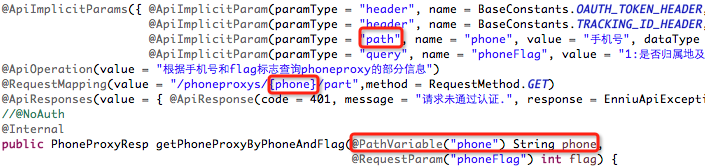
如果ApiImplicitParam中的phone的paramType是query的话,是无法注入到rest路径中的,而且如果是path的话,是不需要配置ApiImplicitParam的,即使配置了,其中的value="手机号"也不会在swagger-ui展示出来。
具体其他的注解,查看:
https://github.com/swagger-api/swagger-core/wiki/Annotations#apimodel
测试:
启动服务,浏览器输入"http://localhost:8080/swagger-ui.html"
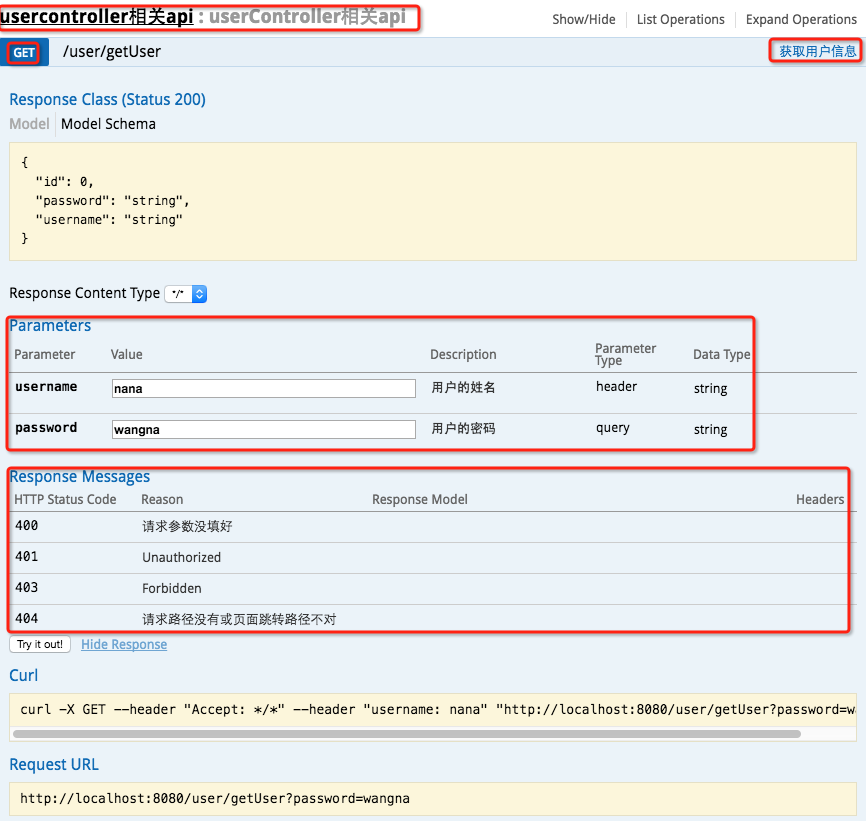
最上边一个红框:@Api
GET红框:method=RequestMethod.GET
右边红框:@ApiOperation
parameter红框:@ApiImplicitParams系列注解
response messages红框:@ApiResponses系列注解
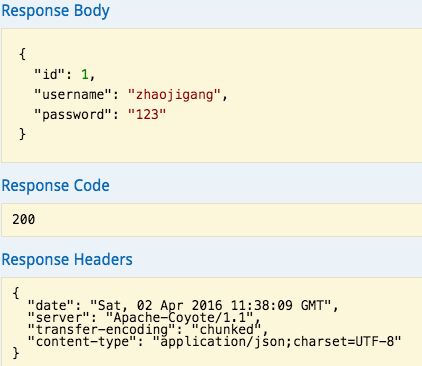
输入参数后,点击"try it out!",查看响应内容:
http://www.cnblogs.com/java-zhao/p/5348113.html
springboot + swagger的更多相关文章
- SpringBoot+Swagger整合API
SpringBoot+Swagger整合API Swagger:整合规范的api,有界面的操作,测试 1.在pom.xml加入swagger依赖 <!--整合Swagger2配置类--> ...
- springboot+swagger集成
一.swagger介绍 Swagger 是一款RESTFUL接口的文档在线自动生成+功能测试功能软件.本文简单介绍了在项目中集成swagger的方法和一些常见问题.如果想深入分析项目源码,了解更多内容 ...
- springboot+swagger接口文档企业实践(下)
目录 1.引言 2. swagger接口过滤 2.1 按包过滤(package) 2.2 按类注解过滤 2.3 按方法注解过滤 2.4 按分组过滤 2.4.1 定义注解ApiVersion 2.4.2 ...
- springboot+swagger接口文档企业实践(上)
目录 1.引言 2.swagger简介 2.1 swagger 介绍 2.2 springfox.swagger与springboot 3. 使用springboot+swagger构建接口文档 3. ...
- Swagger详解(SpringBoot+Swagger集成)(转)
版权声明:本文为博主原创文章,遵循 CC 4.0 BY-SA 版权协议,转载请附上原文出处链接和本声明.本文链接:https://blog.csdn.net/ai_miracle/article/de ...
- 【转】Swagger详解(SpringBoot+Swagger集成)
Swagger-API文档接口引擎Swagger是什么 Swagger是一个规范和完整的框架,用于生成.描述.调用和可视化 RESTful 风格的 Web 服务.总体目标是使客户端和文件系统作为服务器 ...
- 第四章 springboot + swagger(转载)
此篇博客转发自:http://www.cnblogs.com/java-zhao/p/5348113.html swagger用于定义API文档. 好处: 前后端分离开发 API文档非常明确 测试的时 ...
- 【转载】springboot + swagger
注:本文参考自 http://www.jianshu.com/p/0465a2b837d2 https://www.cnblogs.com/java-zhao/p/5348113.html swagg ...
- 【第四章】 springboot + swagger
注:本文参考自 http://www.jianshu.com/p/0465a2b837d2 swagger用于定义API文档. 好处: 前后端分离开发 API文档非常明确 测试的时候不需要再使用URL ...
随机推荐
- Linux字符设备
一.linux系统将设备分为3类:字符设备.块设备.网络设备. 字符设备:是指只能一个字节一个字节读写的设备,不能随机读取设备内存中的某一数据,读取数据需要按照先后数据.字符设备是面向流的设备,常见的 ...
- iOS开发多线程篇—GCD介绍
iOS开发多线程篇—GCD介绍 一.简单介绍 1.什么是GCD? 全称是Grand Central Dispatch,可译为“牛逼的中枢调度器” 纯C语言,提供了非常多强大的函数 2.GCD的优势 G ...
- python语法------时间函数
1.导入函数库: import time 获取格式化的时间 你可以根据需求选取各种格式,但是最简单的获取可读的时间模式的函数是asctime(): #!/usr/bin/python # -*- co ...
- ubuntu 下创建桌面快捷方式
1)新建文件eclipse.desktop,命令如下: sudo vim /usr/share/applications/eclipse.desktop 2)在新建文件中添加如下内容并保存: [Des ...
- get请求乱码
1.get请求不管用什么编码都是乱码, 2.由于http请求最先到达的是容器,所以先要检查容器的unrencodeing <Connector port="80" proto ...
- C#学习笔记----枚举、结构、方法及构造函数的总结
一.枚举 语法: [public] enum 枚举名 { 值1, 值2, 值3, ........ } public:访问修饰符.公开的公共的,哪都可以访问. enum:关键字,声明枚举的关键字 枚举 ...
- 黑马程序员——OC语言 三大特性之继承
Java培训.Android培训.iOS培训..Net培训.期待与您交流! (以下内容是对黑马苹果入学视频的个人知识点总结) 三大特性之继承 (一)继承的基本用法 先建立个Animal再用Dog继承前 ...
- matlab 非平稳变化时域分析
对于非平稳信号,由于傅立叶变换核心函数-正弦函数具有无限性,因此选用短时窗来分析局域信号: 需要注意的时,选取完滑动的时间窗一般是中心对称而且为奇数,这时被分析的时间点正好是滑动窗的中点. 因此,时域 ...
- VS2015打开工程 未能正确加载“”包的问题
启动vs2015专业版时,出现类似于这样的提示框,有好几个,点击是或否,但下次打开还是会出现.寻找了网上的一些解决办法,例如用vs命令窗口或其他,但都无疾而终,下面提供的这个办法,顺利解决此问题 1. ...
- 学习Nim语言.rar(nim语言中文教程下载)
学习Nim语言 nim 语法上类似python ,是一门静态编译型语言,nim 使用空格缩进标示语句块的开始和结束, 喜欢python风格的程序员应该也会很容易适应和喜欢nim的风格. nim语言官方 ...