
Karma和Jasmine 自动化单元测试环境搭建
最近初学AngularJS ,看到的一些教程中经常有人推荐使用Karma+Jasmine来进行单元测试。自己之前也对Jasmine有些了解,jasmine也是一个不错的测试框架。
1、 karma介绍
Karma是Testacular的新名字,在2012年google开源了Testacular,2013年Testacular改名为Karma。
Karma是一个基于Node.js的JavaScript测试执行过程管理工具(Test Runner)。该工具可用于测试所有主流Web浏览器,也可集成到CI(Continuous integration)工具,也可和其他代码编辑器一起使用。这个测试工具的一个强大特性就是,它可以监控(Watch)文件的变化,然后自行执行,通 过console.log显示测试结果。
Jasmine是单元测试框架,本单将介绍用Karma让Jasmine测试自动化完成。Jasmine的介绍,请参考文章:jasmine行为驱动,测试先行
istanbul是一个单元测试代码覆盖率检查工具,可以很直观地告诉我们,单元测试对代码的控制程度。
1 安装NodeJS 以及Npm
2。全局安装Karma npm install -g karma karma安装过程中会同时安装 karma-jasmine 。karma-requirejs等模块。测试是否安装成功 只需要 在控制台 启用
karma start 会出现

在浏览器中输入 http://localhost:9876

3 Karma + Jasmine配置
初始化karma配置文件karma.conf.js 进入要测试文件夹 在控制台中输入karma init 一直按回车即可最终会生成一个karm-conf.js的配置文件
// Karma configuration

// Generated on Wed Oct 30 2013 16:15:24 GMT+0800 (中国标准时间)

module.exports = function(config) {

  config.set({

    // base path, that will be used to resolve files and exclude

    basePath: '',

    // frameworks to use

    frameworks: ['jasmine'],

    // list of files / patterns to load in the browser

    files: [

    ],

    // list of files to exclude

    exclude: [

    ],

    // test results reporter to use

    // possible values: 'dots', 'progress', 'junit', 'growl', 'coverage'

    reporters: ['progress'],

    // web server port

    port: 9876,

    // enable / disable colors in the output (reporters and logs)

    colors: true,

    // level of logging

    // possible values: config.LOG_DISABLE || config.LOG_ERROR || config.LOG_WARN || config.LOG_INFO || config.LOG_DEBUG

    logLevel: config.LOG_INFO,

    // enable / disable watching file and executing tests whenever any file changes

    autoWatch: true,

    // Start these browsers, currently available:

    // - Chrome

    // - ChromeCanary

    // - Firefox

    // - Opera (has to be installed with `npm install karma-opera-launcher`)

    // - Safari (only Mac; has to be installed with `npm install karma-safari-launcher`)

    // - PhantomJS

    // - IE (only Windows; has to be installed with `npm install karma-ie-launcher`)

    browsers: ['Chrome'],

    // If browser does not capture in given timeout [ms], kill it

    captureTimeout: 60000,

    // Continuous Integration mode

    // if true, it capture browsers, run tests and exit

    singleRun: false

  });

};
4 自动化测试 :三部准备工作 1、编写要测试的js文件即 功能实现js 2编写测试文件 由于我们这里使用的是jasmine 来测试,所以我们按照jasmine的语法来写就行了关于jasmine 请参考上文的连接 3 修改karma.conf.js配置文件。
在D盘根目录下新建一个文件夹 karmatest 新建一个js文件在并编写功能 Caculate.js
function add(a,b){

return a+b;

}
测试文件 test.js
describe("A suite of basic functions", function() {

    it("reverse word",function(){

        expect(add(1,2)).toEqual(3);

    });

});
修改 将karma配置文件 karm.conf.js放入karmatest文件夹下,并修改如下
module.exports = function (config) {

    config.set({

        basePath: '',

        frameworks: ['jasmine'],

        files: ['*.js'],

        exclude: ['karma.conf.js'],

        reporters: ['progress'],

        port: 9876,

        colors: true,

        logLevel: config.LOG_INFO,

        autoWatch: true,

        browsers: ['Chrome'],

        captureTimeout: 60000,

        singleRun: false,

    });

};
开始运行 karma进行测试 在控制台中进入 cd karma 。运行 karma start karma.conf.js 即可开启测试。并且会自动启动 浏览器,上面配置为chrome浏览器。
如果测试通过 控制台显示如下
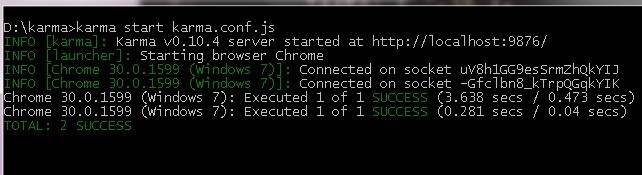
如果修改 测试的代码 将3改为4 控制台立刻给出错误的提示,看得出来
describe("A suite of basic functions", function() {

    it("reverse word",function(){

        expect(add(1,2)).toEqual(4);

    });

});
由于karma.conf.js配置文件中autoWatch: true, 所以test.js文件保存后,会自动执行单元测试。提示我们单元测试出错了。

karma在启动时 chrome 浏览器可能无法自动启动,这时候需要增加一个环境变量CHROME_BIN 值为chome.exe的目录。如
C:\Program Files (x86)\Google\Chrome\Application\chrome.exe

官方解答如下
Chrome won't start. (Issues: #202, #74) Set CHROME_BIN like this > export CHROME_BIN='C:\Program Files (x86)\Google\Chrome\Application\chrome.exe' Increase the timeout from 5000ms to 10000ms. At 5000ms, timeouts occurred and the retry logic kicks in and eventually resolves after two to three tries.
Karma和Jasmine 自动化单元测试环境搭建的更多相关文章
- Karma和Jasmine自动化单元测试
从零开始nodejs系列文章,将介绍如何利Javascript做为服务端脚本,通过Nodejs框架web开发.Nodejs框架是基于V8的引擎,是目前速度最快的Javascript引擎.chrome浏 ...
- Karma和Jasmine自动化单元测试——本质上还是在要开一个浏览器来做测试
1. Karma的介绍 Karma是Testacular的新名字,在2012年google开源了Testacular,2013年Testacular改名为Karma.Karma是一个让人感到非常神秘的 ...
- Karma:1. 集成 Karma 和 Jasmine 进行单元测试
关于 Karma 会是一个系列,讨论在各种环境下,使用 Karma 进行单元测试. 本文讨论 karma 集成 Jasmine 进行单元测试. 初始化 NPM 实现初始化 NPM 包管理,创建 pac ...
- Android自动化测试之环境搭建
Android自动化测试之环境搭建 一.Android-sdk介绍 SDK(Software development kit)软件开发工具包.被软件开发工程师用于为特定的软件包.软件框架.硬件平台. ...
- Robot Framework自动化_环境搭建以及第一个用例
Robot Framework自动化_环境搭建以及第一个脚本 培训老师:肖能尤 2016/06/07 课程目的 一.Robot framework 环境搭建以及第一个脚本 课程内容 1 安装前准 ...
- Windows版Jenkins+SVN+Maven自动化部署环境搭建【转】
前言 因今年公司新产品线较多,为了降低耦合,达到业务分离.重用,提高内部开发效率的目的,采用了基于服务组件.前后端分离的架构体系.与之前传统单应用架构相比,系统部署.配置更加复杂,为了能够频繁地将软件 ...
- Jenkins + Jmeter +Ant自动化集成环境搭建(一)
所需工具 一.jmeter 工具下载 https://jmeter.apache.org/ 配置环境JDK等及各种插件可以看小七之前的教程 二.Ant安装(http://ant.apache.org ...
- jmeter + ant + jenkins 自动化集成环境搭建
所需工具 一.jmeter 工具下载 https://jmeter.apache.org/ 配置环境JDK等及各种插件 二.Ant安装(http://ant.apache.org/) 安装Ant是为 ...
- python 3.6 + robotFramework自动化框架 环境搭建、学习笔记
################################################################# #author: 陈月白 #_blogs: http://www.c ...
随机推荐
- linux编辑器使用记录
超强大vim配置文件: wget http://files.cnblogs.com/ma6174/vimrc.zip unzip -f vimrc.zip -d ~/ 一.vim编辑器 进入 ...
- 【转】 UML各种线的含义
原文地址:http://blog.csdn.net/jianfpeng241241/article/details/49617449 内容目录: 从一个示例开始 类之间的关系 时序图 附录:<图 ...
- 29_java之JDBC|SQL注入
01JDBC概念和数据库驱动程序 * A: JDBC概念和数据库驱动程序 * a: JDBC概述 * JDBC(Java Data Base Connectivity,java数据库连接)是一种用于执 ...
- Seaborn绘图
http://seaborn.pydata.org/index.html Seaborn其实是在matplotlib的基础上进行了更高级的API封装,从而使得作图更加容易,在大多数情况下使用seabo ...
- Spring MVC起步
1.1跟踪Spring MVC的请求 每当用户在Web浏览器中点击链接或提交表单的时候,请求就开始工作了.对请求的工作描述就像是快递投送员.与邮局投递员或FedEx投送员一样,请求会将信息从一个地方带 ...
- clipboard使用总结
官方网站:https://clipboardjs.com/ 使用总结:http://blog.csdn.net/hry2015/article/details/70941912
- @RestController使用 接收jso参数 将参数转换为对象
package com.monitor.controller; import org.springframework.http.ResponseEntity; import org.springfra ...
- Mysql 中的伪列用法1
SELECT ( @rowNO := @rowNo + 1 ) AS rowno, A.*FROM ( SELECT * FROM t_user ) a, ( SELECT @rowNO := 0 ) ...
- (转)libvirt API的基本概念
本文摘自:http://blog.sina.com.cn/s/blog_da4487c40102v31i.html libvirt对象 libvirt的对象向外展现了虚拟化环境的所有资源.libvir ...
- Fresnel Reflection Shader
[Fresnel Reflection] One of the most used types of reflections is the Fresnel reflection. One of the ...