
How to install redis server on CentOS 7 / RHEL 7
在本教程中,我们将学习如何在CentOS 7 / RHEL 7上安装Redis服务器。 redis的缩写是REmote DIctionary Server。
它是最流行的开源,高级键值缓存和存储之一。
reids的官方网站地址: http://redis.io/
如果你的服务器没有安装wget下载程序的话,需要先安装wget,
Install wget command:
yum install wget
Install redis server
Now use yum command to install redis server
yum install redis
Two important redis server configuration file’s path1. /etc/redis.conf
2. /etc/redis-sentinel.conf
Now start the redis server after this.
systemctl start redis.service
Check the running status of redis server
systemctl status redis.service
To test the installation of Redis, use below given command
If the response output is PONG, it means installation is completed successfully.
[root@localhost ~]# redis-cli ping

PONG

[root@localhost ~]#
Start/Stop/Restart/Status and Enable redis server
To start redis server
systemctl start redis.service
To stop redis server
systemctl stop redis.service
To restart redis server
systemctl restart redis.service
To get running status of redis server
systemctl status redis.service
To enable redis server at system’s booting time.
systemctl enable redis.service
To disable redis server at system’s booting time.
systemctl disable redis.service
查看redis是否启动:
reids-server
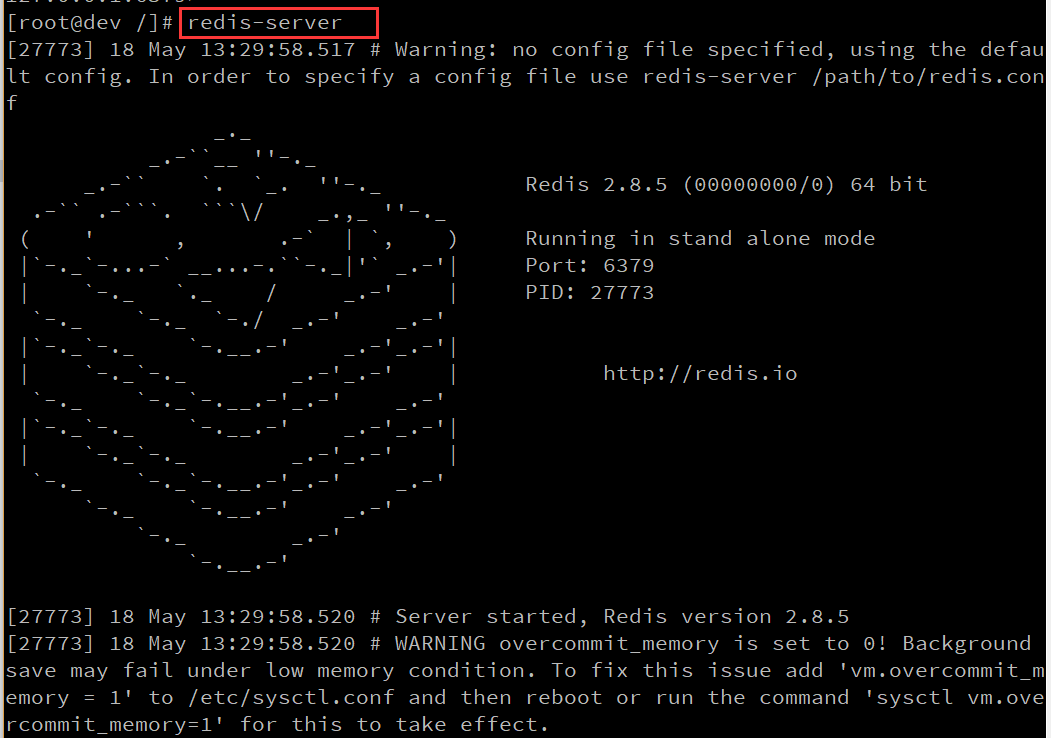
打开redis终端:
redis-cli
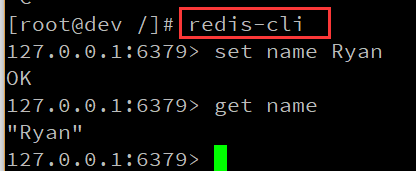
首次在php中使用redis时,我遇到了class 'Redis' not found的错误,
$redis = new Redis();
最后再网上发现需要再Redis前面加上\,
$redis = new \Redis();
访问远程Redis服务。Connect to Remote Redis Server
使用客户端远程连接redis
通常来说,生产环境下的Redis服务器只设置为仅本机访问(Redis默认也只允许本机访问)。有时候我们也许需要使Redi能被远程访问。
配置
修改Redis配置文件/etc/redis/redis.conf,找到bind那行配置:
# bind 127.0.0.1
去掉#注释并改为:
bind 0.0.0.0
指定配置文件然后重启Redis服务即可:
sudo redis-server /etc/redis/redis.conf
关于bind配置的含义,配置文件里的注释是这样说的:
# By default Redis listens for connections from all the network interfaces

# available on the server. It is possible to listen to just one or multiple

# interfaces using the "bind" configuration directive, followed by one or

# more IP addresses.

#

# Examples:

#

# bind 192.168.1.100 10.0.0.1

# bind 127.0.0.1
远程连接
配置好Redis服务并重启服务后。就可以使用客户端远程连接Redis服务了。命令格式如下:
$ redis-cli -h {redis_host} -p {redis_port}
其中{redis_host}就是远程的Redis服务所在服务器地址,{redis_port}就是Redis服务端口(Redis默认端口是6379)。例如:
$ redis-cli -h 120.120.10.10 -p

redis>ping

PONG

How to install redis server on CentOS 7 / RHEL 7的更多相关文章
- Install RabbitMQ server in CentOS 7
About RabbitMQ RabbitMQ is an open source message broker software, also sometimes known as message-o ...
- Official online document, install svn server in centOS
http://www.krizna.com/centos/install-svn-server-on-centos-6/
- Install Jetty web server on CentOS 7 / RHEL 7
http://www.eclipse.org/jetty/download.html http://www.eclipse.org/jetty/documentation/current/startu ...
- Install Tomcat 6 on CentOS or RHEL --转载
source:http://www.davidghedini.com/pg/entry/install_tomcat_6_on_centos This post will cover installa ...
- Install EPEL repo on CentOS 7 / RHEL 7
On CentOS 7, we have found without downloading the epel-release RPM package(as we used to do on prev ...
- 虚拟机centOS中安装Redis,主机Redis Destop Manager不能访问虚拟机Redis server的解决方案
今天在学些redis的时候碰到个问题,发现主机Redis Destop Manager不能访问虚拟机Redis server的解决方案,找了一些网上的资料,原因可能有两个,整理记录下来: 1. Red ...
- How to install Redis 3.2 on CentOS 6 and 7
What is Redis? Redis is a flexible open-source, key value data store, used as a database, cache and ...
- Install Redis on CentOS 6.4--转
Install Redis on CentOS 6.4 source:http://thoughts.z-dev.org/2013/05/27/install-redis-on-centos-6-4/ ...
- Install TightVNC Server in RHEL/CentOS and Fedora to Access Remote Desktops
Virtual Networking Computing (VNC) is a Kind of remote sharing system that makes it possible to take ...
随机推荐
- 造成socket.error: [Errno 99] Cannot assign requested
socket.error: [Errno 99] Cannot assign requested address 网上你去搜,基本都是说bind的时候,地址已经被用了,都是胡扯.地址被用报的错误应该是 ...
- IT部门域事件与业务分析
IT event--->system--->IT dept |--------------->IT dept |--------------->system 域事件分类: 直接 ...
- IT圈网红,抢鲜围观
即将于2017年10月23-26日,在北京举办的微软技术暨生态大会,是微软中国年度最盛大的科技峰会,是微软技术大会与合作伙伴大会的首次联袂,也是聚集众多IT大咖的技术狂欢派对. 无论你想实现现代化工作 ...
- 在Windows Server 2012中搭建SQL Server 2012故障转移集群
OK~ WSFC 2012 R2 年度盛宴开始~ 在本文中,老王将用一系列的场景,把动态仲裁,动态见证,票数调整,LowerQuorumPriorityNodeID,阻止仲裁等群集仲裁技术串起来,完成 ...
- Python+selenium之带unittest的脚本分析
from selenium import webdriver from selenium.webdriver.common.by import By from selenium.webdriver.c ...
- HDU 4283 You Are the One (区间DP,经典)
题意: 某校举行一场非诚勿扰,给定一个出场序列,表示n个人的屌丝值,如果他是第k个出场的,他的不满意度为(k-1)*diao[i].为了让所有人的屌丝值之和更小,导演设置一个栈,可以将部分人装进栈中, ...
- UVA 1619 Feel Good 感觉不错 (扫描法)
Feel Good Time Limit: 3000MS Memory Limit: Unknown 64bit IO Format: %lld & %llu Bill is deve ...
- maven,gradle本地缓存位置
gradle: 配置系统环境变量GRADLE_USER_HOME即可,值为缓存位置. maven: 修改settings文件:maven的home路径下的conf文件夹下的settings.xml 对 ...
- 解决cocos游戏安卓release版本闪退问题
在cocos中偶尔会遇到闪退的问题,特别是android和ios系统下的闪退就特别难处理了, 虽然说能使用xcode和eclipse显示log,但是也会出现一些特别的情况,直接闪退而且 没有任何预兆. ...
- Codevs3324 新斯诺克
题目描述 Description 斯诺克又称英式台球,是一种流行的台球运动.在球桌上,台面四角以及两长边中心位置各有一个球洞,使用的球分别为1 个白球,15 个红球和6 个彩球(黄.绿.棕.蓝.粉红. ...