
[Hadoop大数据]——Hive数据的导入导出
Hive作为大数据环境下的数据仓库工具,支持基于hadoop以sql的方式执行mapreduce的任务,非常适合对大量的数据进行全量的查询分析。
本文主要讲述下hive载cli中如何导入导出数据:
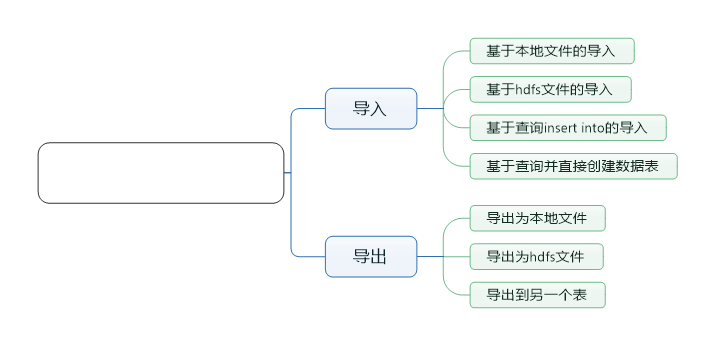
导入数据
第一种方式,直接从本地文件系统导入数据
我的本机有一个test1.txt文件,这个文件中有三列数据,并且每列都是以'\t'为分隔
[root@localhost conf]# cat /usr/tmp/test1.txt

1	a1	b1

2	a2	b2

3	a3	b3

4	a4	b
创建数据表:
>create table test1(a string,b string,c string)

>row format delimited

>fields terminated by '\t'

>stored as textfile;
导入数据:
load data local inpath '/usr/tmp/test1.txt' overwrite into table test1;
其中local inpath,表明路径为本机路径
overwrite表示加载的数据会覆盖原来的内容
第二种,从hdfs文件中导入数据
首先上传数据到hdfs中
hadoop fs -put /usr/tmp/test1.txt /test1.txt
在hive中查看test1.txt文件
hive> dfs -cat /test1.txt;

1	a1	b1

2	a2	b2

3	a3	b3

4	a4	b4
创建数据表,与前面一样。导入数据的命令有些差异:
load data inpath '/test1.txt' overwrite into table test2;
第三种,基于查询insert into导入
首先定义数据表,这里直接创建带有分区的表
hive> create table test3(a string,b string,c string) partitioned by (d string) row format delimited fields terminated by '\t' stored as textfile;

OK

Time taken: 0.109 seconds

hive> describe test3;

OK

a                   	string

b                   	string

c                   	string

d                   	string

# Partition Information

# col_name            	data_type           	comment

d                   	string

Time taken: 0.071 seconds, Fetched: 9 row(s)
通过查询直接导入数据到固定的分区表中:
hive> insert into table test3 partition(d='aaaaaa') select * from test2;

WARNING: Hive-on-MR is deprecated in Hive 2 and may not be available in the future versions. Consider using a different execution engine (i.e. spark, tez) or using Hive 1.X releases.

Query ID = root_20160823212718_9cfdbea4-42fa-4267-ac46-9ac2c357f944

Total jobs = 3

Launching Job 1 out of 3

Number of reduce tasks is set to 0 since there's no reduce operator

Job running in-process (local Hadoop)

2016-08-23 21:27:21,621 Stage-1 map = 100%,  reduce = 0%

Ended Job = job_local1550375778_0001

Stage-4 is selected by condition resolver.

Stage-3 is filtered out by condition resolver.

Stage-5 is filtered out by condition resolver.

Moving data to directory hdfs://localhost:8020/user/hive/warehouse/test.db/test3/d=aaaaaa/.hive-staging_hive_2016-08-23_21-27-18_739_4058721562930266873-1/-ext-10000

Loading data to table test.test3 partition (d=aaaaaa)

MapReduce Jobs Launched:

Stage-Stage-1:  HDFS Read: 248 HDFS Write: 175 SUCCESS

Total MapReduce CPU Time Spent: 0 msec

OK

Time taken: 3.647 seconds
通过查询观察结果
hive> select * from test3;

OK

1	a1	b1	aaaaaa

2	a2	b2	aaaaaa

3	a3	b3	aaaaaa

4	a4	b4	aaaaaa

Time taken: 0.264 seconds, Fetched: 4 row(s)
PS:也可以直接通过动态分区插入数据:
insert into table test4 partition(c) select * from test2;
分区会以文件夹命名的方式存储:
hive> dfs -ls /user/hive/warehouse/test.db/test4/;

Found 4 items

drwxr-xr-x   - root supergroup          0 2016-08-23 21:33 /user/hive/warehouse/test.db/test4/c=b1

drwxr-xr-x   - root supergroup          0 2016-08-23 21:33 /user/hive/warehouse/test.db/test4/c=b2

drwxr-xr-x   - root supergroup          0 2016-08-23 21:33 /user/hive/warehouse/test.db/test4/c=b3

drwxr-xr-x   - root supergroup          0 2016-08-23 21:33 /user/hive/warehouse/test.db/test4/c=b4
第四种,直接基于查询创建数据表
直接通过查询创建数据表:
hive> create table test5 as select * from test4;

WARNING: Hive-on-MR is deprecated in Hive 2 and may not be available in the future versions. Consider using a different execution engine (i.e. spark, tez) or using Hive 1.X releases.

Query ID = root_20160823213944_03672168-bc56-43d7-aefb-cac03a6558bf

Total jobs = 3

Launching Job 1 out of 3

Number of reduce tasks is set to 0 since there's no reduce operator

Job running in-process (local Hadoop)

2016-08-23 21:39:46,030 Stage-1 map = 100%,  reduce = 0%

Ended Job = job_local855333165_0003

Stage-4 is selected by condition resolver.

Stage-3 is filtered out by condition resolver.

Stage-5 is filtered out by condition resolver.

Moving data to directory hdfs://localhost:8020/user/hive/warehouse/test.db/.hive-staging_hive_2016-08-23_21-39-44_259_5484795730585321098-1/-ext-10002

Moving data to directory hdfs://localhost:8020/user/hive/warehouse/test.db/test5

MapReduce Jobs Launched:

Stage-Stage-1:  HDFS Read: 600 HDFS Write: 466 SUCCESS

Total MapReduce CPU Time Spent: 0 msec

OK

Time taken: 2.184 seconds
查看结果
hive> select * from test5;

OK

1	a1	b1

2	a2	b2

3	a3	b3

4	a4	b4

Time taken: 0.147 seconds, Fetched: 4 row(s)
导出数据
导出到本地文件
执行导出本地文件命令:
hive> insert overwrite local directory '/usr/tmp/export' select * from test1;

WARNING: Hive-on-MR is deprecated in Hive 2 and may not be available in the future versions. Consider using a different execution engine (i.e. spark, tez) or using Hive 1.X releases.

Query ID = root_20160823221655_05b05863-6273-4bdd-aad2-e80d4982425d

Total jobs = 1

Launching Job 1 out of 1

Number of reduce tasks is set to 0 since there's no reduce operator

Job running in-process (local Hadoop)

2016-08-23 22:16:57,028 Stage-1 map = 100%,  reduce = 0%

Ended Job = job_local8632460_0005

Moving data to local directory /usr/tmp/export

MapReduce Jobs Launched:

Stage-Stage-1:  HDFS Read: 794 HDFS Write: 498 SUCCESS

Total MapReduce CPU Time Spent: 0 msec

OK

Time taken: 1.569 seconds

hive>
在本地文件查看内容:
[root@localhost export]# ll

total 4

-rw-r--r--. 1 root root 32 Aug 23 22:16 000000_0

[root@localhost export]# cat 000000_0

1a1b1

2a2b2

3a3b3

4a4b4

[root@localhost export]# pwd

/usr/tmp/export

[root@localhost export]#
导出到hdfs
hive> insert overwrite directory '/usr/tmp/test' select * from test1;

WARNING: Hive-on-MR is deprecated in Hive 2 and may not be available in the future versions. Consider using a different execution engine (i.e. spark, tez) or using Hive 1.X releases.

Query ID = root_20160823214217_e8c71bb9-a147-4518-8353-81f9adc54183

Total jobs = 3

Launching Job 1 out of 3

Number of reduce tasks is set to 0 since there's no reduce operator

Job running in-process (local Hadoop)

2016-08-23 21:42:19,257 Stage-1 map = 100%,  reduce = 0%

Ended Job = job_local628523792_0004

Stage-3 is selected by condition resolver.

Stage-2 is filtered out by condition resolver.

Stage-4 is filtered out by condition resolver.

Moving data to directory hdfs://localhost:8020/usr/tmp/test/.hive-staging_hive_2016-08-23_21-42-17_778_6818164305996247644-1/-ext-10000

Moving data to directory /usr/tmp/test

MapReduce Jobs Launched:

Stage-Stage-1:  HDFS Read: 730 HDFS Write: 498 SUCCESS

Total MapReduce CPU Time Spent: 0 msec

OK

Time taken: 1.594 seconds
导出成功,查看导出的hdfs文件
hive> dfs -cat /usr/tmp/test;

cat: `/usr/tmp/test': Is a directory

Command failed with exit code = 1

Query returned non-zero code: 1, cause: null

hive> dfs -ls /usr/tmp/test;

Found 1 items

-rwxr-xr-x   3 root supergroup         32 2016-08-23 21:42 /usr/tmp/test/000000_0

hive> dfs -cat /usr/tmp/test/000000_0;

1a1b1

2a2b2

3a3b3

4a4b4

hive>
导出到另一个表
样例可以参考前面数据导入的部分:
insert into table test3 select * from test1;
[Hadoop大数据]——Hive数据的导入导出的更多相关文章
- 从零自学Hadoop(16):Hive数据导入导出,集群数据迁移上
阅读目录 序 导入文件到Hive 将其他表的查询结果导入表 动态分区插入 将SQL语句的值插入到表中 模拟数据文件下载 系列索引 本文版权归mephisto和博客园共有,欢迎转载,但须保留此段声明,并 ...
- 从零自学Hadoop(17):Hive数据导入导出,集群数据迁移下
阅读目录 序 将查询的结果写入文件系统 集群数据迁移一 集群数据迁移二 系列索引 本文版权归mephisto和博客园共有,欢迎转载,但须保留此段声明,并给出原文链接,谢谢合作. 文章是哥(mephis ...
- HBase数据备份及恢复(导入导出)的常用方法
一.说明 随着HBase在重要的商业系统中应用的大量增加,许多企业需要通过对它们的HBase集群建立健壮的备份和故障恢复机制来保证它们的企业(数据)资产.备份Hbase时的难点是其待备份的数据集可能非 ...
- [terry笔记]Oracle数据泵-schema导入导出
数据泵是10g推出的功能,个人倒数据比较喜欢用数据泵. 其导入的时候利用remap参数很方便转换表空间以及schema,并且可以忽略服务端与客户端字符集问题(exp/imp需要排查字符集). 数据泵也 ...
- Oracle导出表数据与导入表数据dmp,以及导入导出时候常见错误
使用DOS 操作界面导出表数据,导入表数据(需要在数据库所在的服务器上边执行) exp UserName/Password@192.168.0.141/orcl file=d:\xtables.d ...
- 入门大数据---Hive数据查询详解
一.数据准备 为了演示查询操作,这里需要预先创建三张表,并加载测试数据. 数据文件 emp.txt 和 dept.txt 可以从本仓库的resources 目录下载. 1.1 员工表 -- 建表语句 ...
- C#中缓存的使用 ajax请求基于restFul的WebApi(post、get、delete、put) 让 .NET 更方便的导入导出 Excel .net core api +swagger(一个简单的入门demo 使用codefirst+mysql) C# 位运算详解 c# 交错数组 c# 数组协变 C# 添加Excel表单控件(Form Controls) C#串口通信程序
C#中缓存的使用 缓存的概念及优缺点在这里就不多做介绍,主要介绍一下使用的方法. 1.在ASP.NET中页面缓存的使用方法简单,只需要在aspx页的顶部加上一句声明即可: <%@ Outp ...
- 让 .NET 更方便的导入导出 Excel
让 .Net 更方便的导入导出Excel Intro 因为前一段时间需要处理一些 excel 数据,主要是导入/导出操作,将 Excel 数据转化为对象再用程序进行处理和分析,没有找到比较满意的库,于 ...
- sql developer Oracle 数据库 用户对象下表及表结构的导入导出
Oracle数据库表数据及结构的导入导出 导出的主机与即将导入到的目标主机的tablespace 及用户名需一直!!!!!
随机推荐
- hibernate框架int和Integer类型区别
hibernate 框架在定义实体时,int类型最好定义为Inttger类型,因为在注入时int是值类型不允许为空.
- 恶心的content
getBaseContent getApplicationContent ...
- 多线程之信号量(By C++)
信号量在多线程中,主要是用于线程的同步或者限制线程运行的数量. 所谓同步,当流程1运行在线程1中,流程2运行在线程2中,流程2必须在流程1结束之后才能开始执行.你会怎么做,所有就需要给出一个流程1结束 ...
- RNN求解过程推导与实现
RNN求解过程推导与实现 RNN LSTM BPTT matlab code opencv code BPTT,Back Propagation Through Time. 首先来看看怎么处理RNN. ...
- NOI 题库 8471 题解
8471 切割回文 描述 阿福最近对回文串产生了非常浓厚的兴趣. 如果一个字符串从左往右看和从右往左看完全相同的话,那么就认为这个串是一个回文串.例如,“abcaacba”是一个回文串,“abca ...
- 【第二课】WEBIX 入门自学-获取WEBIX及相关资料
下载WEBIX组件库 http://webix.com/download/ WEBIX在线文档 http://docs.webix.com/ 离线的手册 下载
- jquery 的3D Carousel插件参数说明
这个插件大家都很熟悉了,但是在网上找了很久找不到相关的资料,只有自己琢磨研究了一下.有些参数一眼都可以看出意思,在此我只说一下每个图片要想带一些扩展信息怎么处理. 1:首先需要创建一个ul对象,然后里 ...
- <!DOCTYPE html>很重要
噩梦开始的源头:之前写html或者jsp页面,从来不注意doctype的声明,也不太明白doctype的作用.直到最近碰到了一个非常奇葩的 bug:某一个页面在IE7和8,Chrome,ff等下正常, ...
- Excel Sheet Column Title
Given a positive integer, return its corresponding column title as appear in an Excel sheet. For exa ...
- SSH整合,必出精品
SSH:顾名思义(spring,struts2,hirbernate) Struts(表示层)+Spring(业务层)+Hibernate(持久层) Struts是一个表示层框架,主要作用是界面展示 ...