
9.2 翻译系列:数据注解特性之---Column【EF 6 Code First系列】
EF 6 Code-First系列文章目录:
- 1 翻译系列:什么是Code First(EF 6 Code First 系列)
- 2.翻译系列:为EF Code-First设置开发环境(EF 6 Code-First系列)
- 3.翻译系列:EF Code-First 示例(EF 6 Code-First系列)
- 4.翻译系列:EF 6 Code-First默认约定(EF 6 Code-First系列)
- 5.翻译系列:EF 6中数据库的初始化(EF 6 Code-First 系列)
- 6.翻译系列:EF 6 Code-First中数据库初始化策略(EF 6 Code-First系列
- 7.翻译系列:EF 6中的继承策略(EF 6 Code-First 系列)
- 8.翻译系列: EF 6中配置领域类(EF 6 Code-First 系列)
- 9.翻译系列:EF 6以及EF Core中的数据注解特性(EF 6 Code-First系列)
- 9.1 翻译系列:数据注解特性之----Table【EF 6 Code-First 系列】
- 9.2 翻译系列:数据注解特性之---Column【EF 6 Code First系列】
- 9.3 翻译系列:数据注解特性之Key【EF 6 Code-First 系列】
- 9.4 翻译系列:EF 6以及 EF Core中的NotMapped特性(EF 6 Code-First系列)
- 9.5 翻译系列:数据注解之ForeignKey特性【EF 6 Code-First系列】
- 9.6 翻译系列:数据注解之Index特性【EF 6 Code-First系列】
- 9.7 翻译系列:EF数据注解特性之--InverseProperty【EF 6 Code-First系列】
- 9.8 翻译系列:数据注解特性之--Required 【EF 6 Code-First系列】
- 9.9 翻译系列:数据注解特性之--MaxLength 【EF 6 Code-First系列】
- 9.10 翻译系列:EF数据注解特性之StringLength【EF 6 Code-First系列】
- 9.11 翻译系列:数据注解特性之--Timestamp【EF 6 Code-First系列】
- 9.12 翻译系列:数据注解特性之ConcurrencyCheck【EF 6 Code-First系列】
- 10.翻译系列:EF 6中的Fluent API配置【EF 6 Code-First系列】
- 10.1.翻译系列:EF 6中的实体映射【EF 6 Code-First系列】
- 10.2.翻译系列:使用Fluent API进行属性映射【EF 6 Code-First】
- 11.翻译系列:在EF 6中配置一对零或者一对一的关系【EF 6 Code-First系列】
- 12.翻译系列:EF 6 中配置一对多的关系【EF 6 Code-First系列】
- 13.翻译系列:Code-First方式配置多对多关系【EF 6 Code-First系列】
- 14.翻译系列:从已经存在的数据库中生成上下文类和实体类【EF 6 Code-First系列】
- 15.翻译系列:EF 6中的级联删除【EF 6 Code-First 系列】
- 16.翻译系列:EF 6 Code -First中使用存储过程【EF 6 Code-First系列】
- 17.翻译系列:将Fluent API的配置迁移到单独的类中【EF 6 Code-First系列】
- 18.翻译系列:EF 6 Code-First 中的Seed Data(种子数据或原始测试数据)【EF 6 Code-First系列】
- 19.翻译系列:EF 6中定义自定义的约定【EF 6 Code-First约定】
- 20.翻译系列:Code-First中的数据库迁移技术【EF 6 Code-First系列】
- 20.1翻译系列:EF 6中自动数据迁移技术【EF 6 Code-First系列】
- 20.2.翻译系列:EF 6中基于代码的数据库迁移技术【EF 6 Code-First系列】
- 21.翻译系列:Entity Framework 6 Power Tools【EF 6 Code-First系列】
Column特性,可以应用于实体的一个或者多个属性上面,用来配置数据库中数据表中列的列名、列的数据类型以及列的先后顺序。Column特性重写了默认的约定。按照EF 6和EF Core中的默认约定,将会创建和属性相同的列名称,并且数据表,列的顺序和实体中属性的顺序一致。
Column Attribute: [Column (string name, Properties:[Order = int],[TypeName = string])
name:表的数据列的名称
Order:列的顺序,从索引0开始【可选的】
TypeName:列的类型名称【可选的】
下面的例子,改变了一个列的名称:
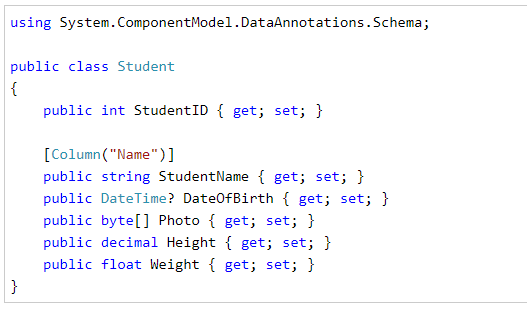
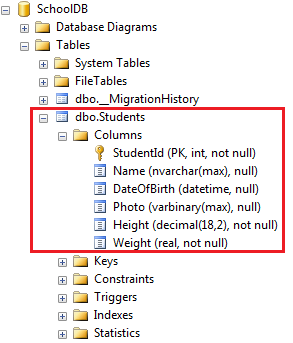
在上面的例子中,我们在StudentName属性上应用Column特性,所以EF将会重写默认约定,为我们创建一个名称为Name的数据列,而不是StudentName数据列:
列的数据类型
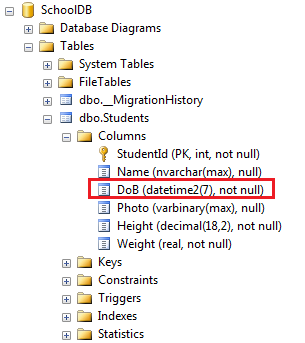
可以使用Column特性中的TypeName参数,来指定列的数据类型,如下:

在上面的例子中,我们在DataOfBirth属性上,设置了TypeName参数值为DataTime2,然后就会为我们生成类型为DataTime2的列,而不是DateTime类型的列。
列的先后顺序
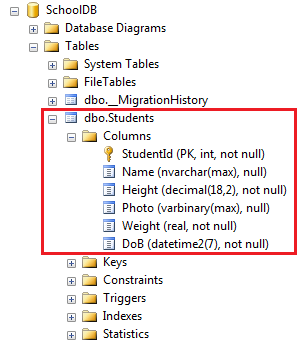
使用从索引0开始的Order参数,来设置数据库中列的顺序。按照默认约定,主键列会是第一个,然后其他的列的顺序,就是基于属性在实体中的先后顺序了。
注意:Order参数必须要应用在实体的所有属性上面,并且索引数不能有一样的,索引从0开始。

上面的例子,将会在数据库中,生成这样的顺序的列:
好了,理论介绍完了,我们何不动手实践一下?
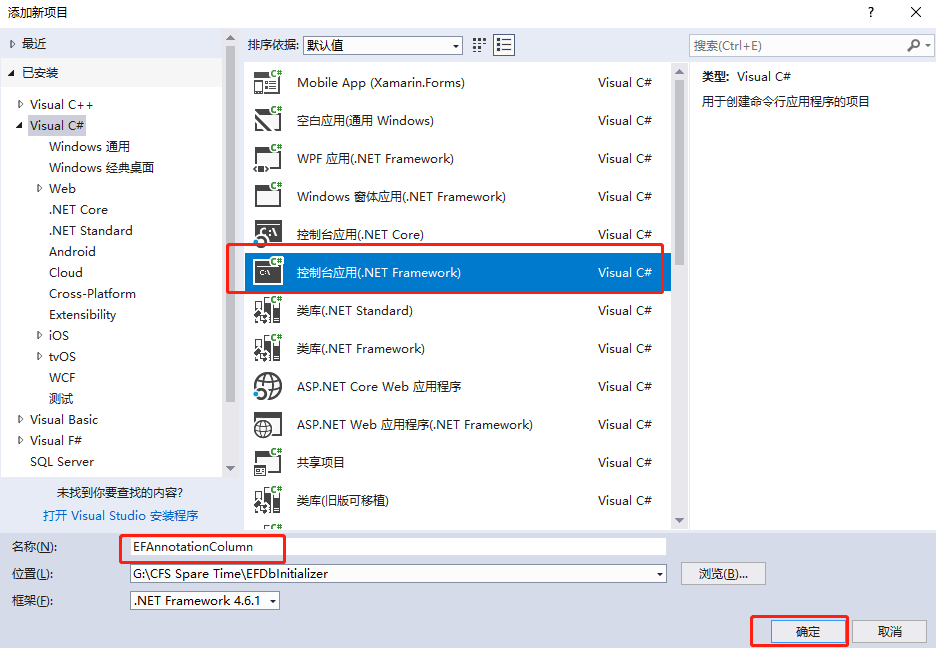
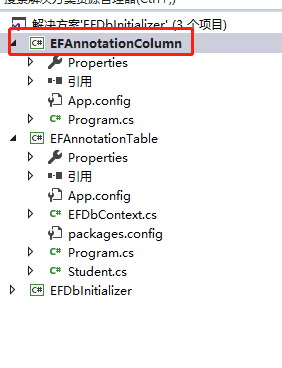
1.创建一个名称为EFAnnotationColumn的控制台应用程序。
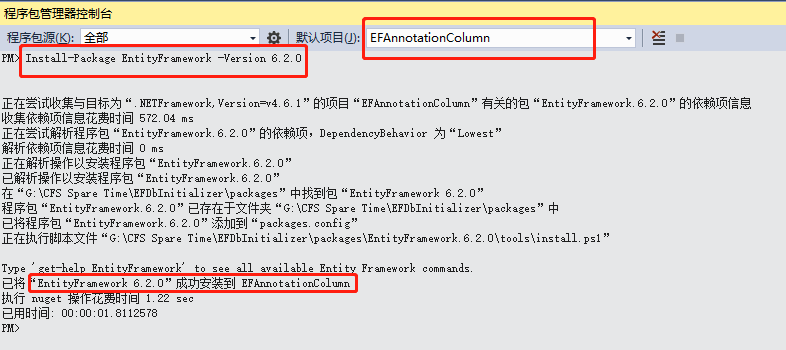
2.安装EF【Install-Package EntityFramework -Version 6.2.0】
3.创建一个Book类:
 public class Book

    {

        public int BookID { get; set; }

        public string BookName { get; set; }

        public string AuthorName { get; set; }

        public DateTime PublishedDate { get; set; }

        public decimal Price { get; set; }

    }
4.创建一个上下文类:BookContext
public class BookContext:DbContext

    {

        public BookContext():base("name=Constr")

        {

            Database.SetInitializer<BookContext>(new DropCreateDatabaseAlways<BookContext>());

        }

        public DbSet<Book> Books { get; set; }

    }
5.SQL连接字符串:
  <connectionStrings>

    <add name="Constr" connectionString="Server=.;Database=EFAnnotationColumnDB;uid=sa;pwd=Password_1" providerName="System.Data.SqlClient"/>

  </connectionStrings>
6.测试代码:
  class Program

    {

        static void Main(string[] args)

        {

            using (var db = new BookContext())

            {

                Book bookModel = new Book()

                {

                    BookName = "西游记",

                    AuthorName = "吴承恩",

                    PublishedDate = DateTime.Now.AddYears(-),

                    Price=109.99M

                };

                db.Entry(bookModel).State = System.Data.Entity.EntityState.Added;

                db.SaveChanges();

            }

            Console.WriteLine("添加数据成功");

            Console.ReadKey();

        }

    }
运行代码:

我们看看数据库:
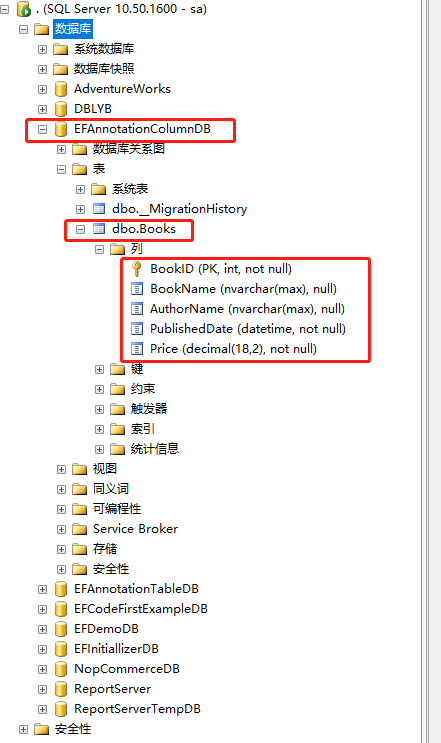
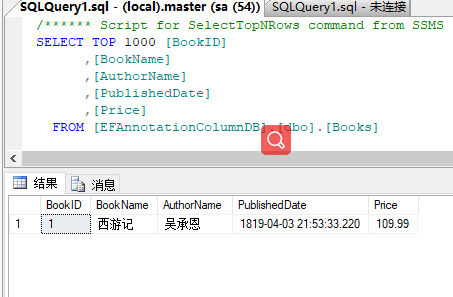
可以看到默认约定,为我们生成了数据库以及数据表Books,列的顺序就和实体中属性先后顺序一样。
我们来修改一下Book实体:
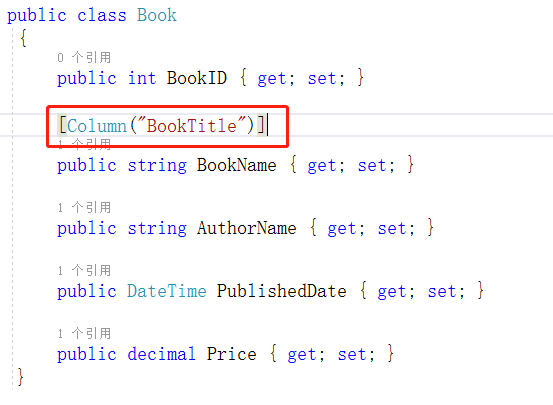
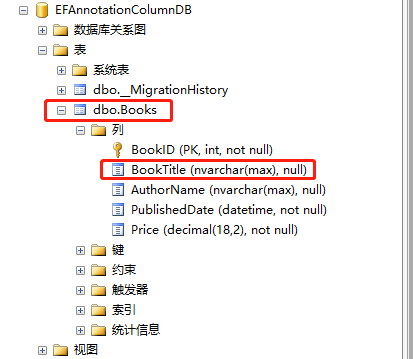
然后运行项目:可以看到BookName字段名称,经过配置,生成了名称为BookTitle列。
我们再修改一下Book实体:
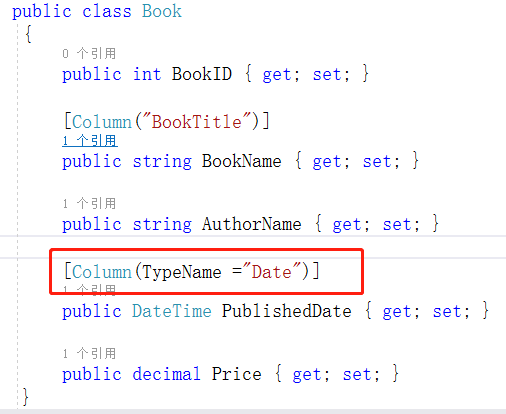
接着运行程序;看到PublishedDate列的数据类型成了我们配置的Date。
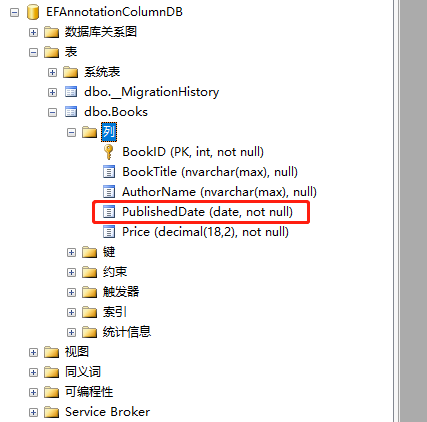
再修改一下Book实体:
 public class Book

    {

        [Column(Order =3)]

        public int BookID { get; set; }

        [Column("BookTitle",Order =4)]

        public string BookName { get; set; }

        [Column(Order =1)]

        public string AuthorName { get; set; }

        [Column(TypeName ="Date",Order =0)]

        public DateTime PublishedDate { get; set; }

        [Column(Order =2)]

        public decimal Price { get; set; }

    }
我们使用数据注解,配置列的顺序是:PublishedDate -->AuthorName-->Price-->BookID-->BookName.那么实际上是不是这样呢,我们运行项目:
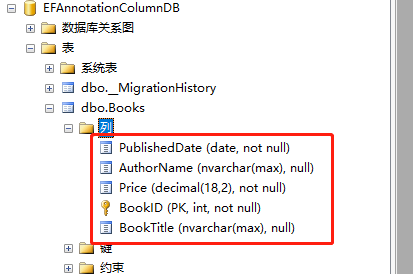
可以看到,列的顺序就是按照我们配置的这样。
有个疑问,上面说到,配置列的顺序的时候,必须对所有的列,都应用于Column的Order参数。我们来看看一个反例:
修改Book实体:
 public class Book

    {

        [Column(Order =)]

        public int BookID { get; set; }

        public string BookName { get; set; }

        [Column(Order =)]

        public string AuthorName { get; set; }

        [Column(TypeName ="Date",Order =)]

        public DateTime PublishedDate { get; set; }

        public decimal Price { get; set; }

    }
上面我们移除了BookName属性和Price属性的Column特性,没有设置Order。我们运行看看:
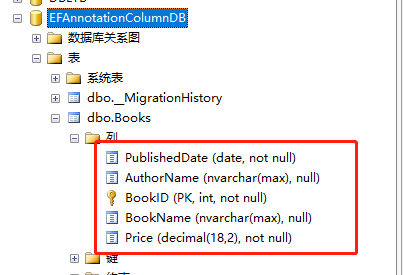
可以看到,EF是按照有设置Order参数的顺序来的,第一个是索引为0 的PublishedDate,第二个是索引为1的AuthorName,第三个就是索引为3的BookID了,然后后面两个就是按照他们在实体中的顺序来的了。
我们再改一下,只对一个属性设置Order,看看:
public int BookID { get; set; }
public string BookName { get; set; }
public string AuthorName { get; set; }
public DateTime PublishedDate { get; set; }
[Column(Order = 3)]
public decimal Price { get; set; }
上面代码,只对Price属性设置了Order,索引为3,我们运行看看:【可以看到Price成为了第一个列,排在最前面,然后后面的列的顺序,就是按照属性在实体中的先后顺序了。】
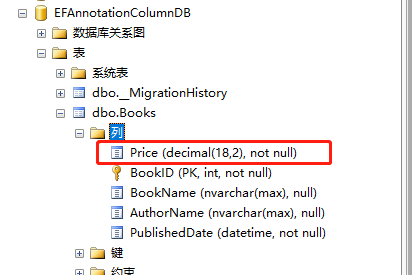
好了,这篇文章就介绍完了,主要讲解了数据注解特性之---Column,值得注意的是,当配置列的顺序的时候,必须对所有的列都应用于Column特性中的Order参数标记,索引从0开始,切记!!!
9.2 翻译系列:数据注解特性之---Column【EF 6 Code First系列】的更多相关文章
- 9.10 翻译系列:EF数据注解特性之StringLength【EF 6 Code-First系列】
原文链接:https://www.entityframeworktutorial.net/code-first/stringlength-dataannotations-attribute-in-co ...
- 9.9 翻译系列:数据注解特性之--MaxLength 【EF 6 Code-First系列】
原文链接:https://www.entityframeworktutorial.net/code-first/maxlength-minlength-dataannotations-attribut ...
- 9.7 翻译系列:EF数据注解特性之--InverseProperty【EF 6 Code-First系列】
原文链接:https://www.entityframeworktutorial.net/code-first/inverseproperty-dataannotations-attribute-in ...
- 9.3 翻译系列:数据注解特性之Key【EF 6 Code-First 系列】
原文链接:http://www.entityframeworktutorial.net/code-first/key-dataannotations-attribute-in-code-first.a ...
- 9.翻译系列:EF 6以及EF Core中的数据注解特性(EF 6 Code-First系列)
原文地址:http://www.entityframeworktutorial.net/code-first/dataannotation-in-code-first.aspx EF 6 Code-F ...
- 9.1 翻译系列:数据注解特性之----Table【EF 6 Code-First 系列】
原文地址:http://www.entityframeworktutorial.net/code-first/table-dataannotations-attribute-in-code-first ...
- 9.5 翻译系列:数据注解之ForeignKey特性【EF 6 Code-First系列】
原文链接:https://www.entityframeworktutorial.net/code-first/foreignkey-dataannotations-attribute-in-code ...
- 9.6 翻译系列:数据注解之Index特性【EF 6 Code-First系列】
原文链接:https://www.entityframeworktutorial.net/entityframework6/index-attribute-in-code-first.aspx EF ...
- 9.8 翻译系列:数据注解特性之--Required 【EF 6 Code-First系列】
原文链接:https://www.entityframeworktutorial.net/code-first/required-attribute-dataannotations-in-code-f ...
随机推荐
- java Integer类以及拆箱和装箱
package com.ilaw.boson.controller; public class Demo { public static void main(String[] args) { Inte ...
- MySQL慢查询日志相关的配置和使用。
MySQL慢查询日志提供了超过指定时间阈值的查询信息,为性能优化提供了主要的参考依据,是一个非常实用的功能,MySQL慢查询日志的开启和配置非常简单,可以指定记录的文件(或者表),超过的时间阈值等就可 ...
- 安装好ubuntu双系统启动时卡死解决办法
问题描述:在安装完ubuntu双系统后,第一次启动ubuntu系统时,卡死在启动界面(或者黑屏),这大概都是由于显卡驱动的原因,具体不在这里阐述,通过以下方法能成功解决,据我个人经验,这可能是诸多方法 ...
- Ubuntu下解决MySQL自启动,chkconfig list 全部off 情况
chkconfig命令是用于RedHat/Fedora发行版的,而对于像Ubuntu之类的Debian发行版,应该使用这个命令: sudo update-rc.d mysql defaults 验证一 ...
- Javascript的算法题目
用js实现单链表的增删,直接上代码 const linkList=new LinkList() function LinkList(){ var Node=function(element){ thi ...
- C语言变量声明内存分配
转载: C语言变量声明内存分配 一个由c/C++编译的程序占用的内存分为以下几个部分 1.栈区(stack)— 程序运行时由编译器自动分配,存放函数的参数值,局部变量的值等.其操作方式类似于数据结 ...
- time模块的使用
https://www.cnblogs.com/jimmy-share/p/10605575.html import time 一.方法汇总: time.sleep():定时函数 time.time( ...
- node.js中express的Router路由的使用
express中的Router作用就是为了方便我们更好的根据路由去分模块.避免将所有路由都写在入口文件中. 一.简单的使用Router const express = require('express ...
- Python开发——【循环】语句
while循环 while 条件: # 要执行的循环体 # 如果条件为真,那么循环体则执行 # 如果条件为假,那么循环体不执行 死循环 count = 0 while True:# 条件永远为真 pr ...
- javaweb开发.调试
一.快速调试一个类 1.类里面写public static void main(String[] args) throws Exception{}方法 2.该类上右键->Run As->J ...