
Xcode 8.X Command Line Tools
Summary
- Step 1. Upgrade Your System to macOS Sierra
- Step 2. Open the Terminal Application
- Step 3. Is XCode Already Installed?
- Step 4. Enter Commands
- Step 5. Install XCode Command Line Tools
- Step 6. Verify Installation
MacOS Sierra
To install the newest Xcode Command Line Tools, you’ll need the latest version of macOS. If you’ve owned your Mac for several years and haven’t updated macOS, be prepared to spend several hours updating the operating system.
See Apple’s instructions How to upgrade to macOS Sierra. You can install macOS 10.12 Sierra from the Mac App Store for free. Allow plenty of time for the download and installation (it may take several hours).
If You Updated to macOS Sierra
If you updated to macOS Sierra from an earlier version of macOS, and you previously installed Xcode Command Line Tools, you will need to install the new version of Xcode Command Line Tools as described here.
If you previously installed the full Xcode package, you will need to update Xcode to the newest version (Xcode 8 or newer). After updating Xcode, launch and run the Xcode application and accept the Apple license terms.
Terminal Application
The Terminal application or console gives us access to the Unix command line, or shell. We call the command line the shell because it is the outer layer of the operating system’s internal mechanisms (which we call the kernel).
Find the macOS Terminal application by using the Command-Spacebar combination and searching for “Terminal.” It’s in the Applications/Utilities/folder.
Try out the terminal application by entering a shell command:
$ whoami
Don’t type the $ character. The $ character is a cue that you should enter a shell command. This is a longtime convention that indicates you should enter a command in the terminal application. The Unix shell command whoami returns your username.
To learn more about Unix shell commands, read The Command Line Crash Course.
Is Xcode Already Installed?
You don’t need the full Xcode package to get the Xcode Command Line Tools. You only need the full Xcode package if you are doing development of applications for the Apple operating systems. However, you may have previously installed the full Xcode package.
Check if the full Xcode package is already installed:
$ xcode-select -p
If you see:
/Applications/Xcode.app/Contents/Developer
the full Xcode package is already installed.
You will need to update Xcode to the newest version (Xcode 8 or newer). Go to the App Store application and check “Updates.” After updating Xcode, be sure to launch the Xcode application and accept the Apple license terms.
If you intend to install Ruby using RVM, and you see a file location that contains spaces in the path:
/Applications/Apple Dev Tools/Xcode.app/Contents/Developer
you must delete Xcode. RVM cannot accommodate spaces in a path so RVM will fail when you attempt to install Ruby. You can either install only the Xcode Command Line Tools (instructions below) or reinstall the full Xcode package.
Install Xcode Command Line Tools
MacOS Sierra will alert you when you enter a command in the terminal that requires Xcode Command Line Tools. For example, you can enter gccor make.
Try it. Enter:
$ gcc
You’ll see an alert box:
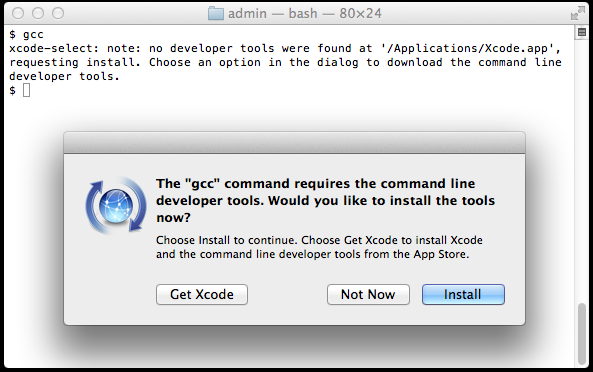
Alternatively, you can use a command to install Xcode Command Line Tools. It will produce a similar alert box. Note the double hyphen:
$ xcode-select --install
Click “Install” to download and install Xcode Command Line Tools.
The instructions in the alert box are confusing. You don’t need to "Get Xcode" from the App Store. Just click "Install" for the Xcode Command Line Tools. If you have a slow Internet connection, it may take many minutes.
If the download takes a very long time (over an hour) or fails, you can try an alternative. Go to https://developer.apple.com/downloads/more and enter your Apple ID and password. You'll be asked to agree to the terms of the Apple Developer Program. You'll see a list of software packages you can download. Look for the latest version of Command Line Tools and click to download the .dmg file. Downloading the .dmg file is much faster than waiting for the command-line-based download. Install the .dmg file by clicking on the package icon.
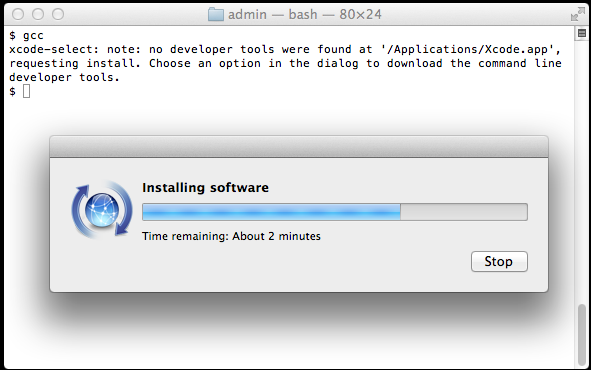
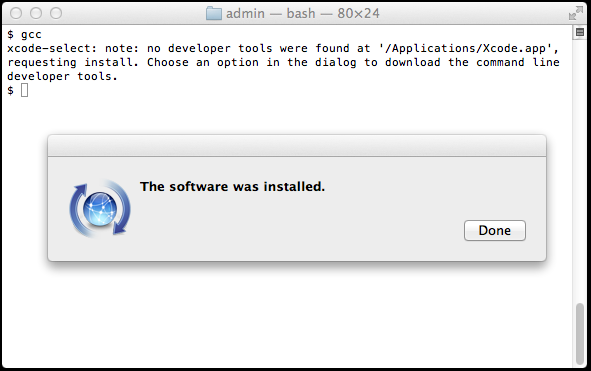
Verify that you’ve successfully installed Xcode Command Line Tools:
$ xcode-select -p

/Library/Developer/CommandLineTools
Just to be certain, verify that gcc is installed:
$ gcc --version

Configured with: --prefix=/Library/Developer/CommandLineTools/usr --with-gxx-include-dir=/usr/include/c++/4.2.1

Apple LLVM version 6.0 (clang-600.0.54) (based on LLVM 3.5svn)

Target: x86_64-apple-darwin14.0.0

Thread model: posix
On earlier versions of macOS, it was more difficult to install Xcode Command Line Tools. It required a huge download of the full Xcode package from the Mac App Store or registration as an Apple developer for a smaller Command Line Tools package. Mac OS X Mavericks made installation of Xcode Command Line Tools much simpler.
Alternatives
The OSX GCC Installer is an open source project to provide the GCC compiler and related tools. In a recent blog post, Xcode, GCC, and Homebrew, the project maintainer recommends installing the Xcode Command Line Tools because the open source project is unable to duplicate the complete Apple package (notably, the Node software project isn’t supported).
Start Coding!
With the GCC compiler installed, you can install any Unix system tools you need for software development.
To install Rails, see the article Install Ruby on Rails – macOS.
Want to learn Ruby on Rails? See What is Ruby on Rails?, the book Learn Ruby on Rails, and recommendations for a Rails tutorial.
Xcode 8.X Command Line Tools的更多相关文章
- Mac appium.dmg. Xcode Command Line Tools
You need to install the command line tools as marked in your message: ✖ Xcode Command Line Tools are ...
- appium----【已解决】【Mac】环境配置提示“Xcode Command Line Tools are NOT installed!"
报错问题提示截图如下: 报错原因 :根据给出的信息很明显可以看到是"Xcode Command Line Tools"此工具没有安装 解决措施: 打开终端直接执行:xcode-se ...
- Xcode command line tools
1.Xcode command line tools 安装 如果你不是一名 iOS 或 OS X 开发者,可以跳过安装 XCode 的过程,直接安装 Xcode command line tools. ...
- stderr: xcode-select: error: tool 'xcodebuild' requires Xcode, but active developer directory '/Library/Developer/CommandLineTools' is a command line tools instance
错误提示: (1). stderr: xcode-select: error: tool 'xcodebuild' requires Xcode, but active developer direc ...
- 怎样安装Command Line Tools in OS x Mavericks&Yosemite(Without xcode)--转载
How to Install Command Line Tools in OS X Mavericks & Yosemite (Without Xcode) Mac users who pre ...
- mac, xcode 6.1 安装command line tools 支持,autoconf,automake等
以下软件包 都去我的环境库找到 1 先安装 tcl库 2 安装macports /opt/local/bin/port 一般装到这里 安装autoconf时提示: Warning: The Xcode ...
- could not launch process: debugserver or lldb-server not found: install XCode's command line tools or lldb-server
0x00 事件 VS 调试 go 的时候,发生了这个错误,导致无法调试: could not launch process: debugserver or lldb-server not found: ...
- macOS Mojave 10.14 无法安装brew缺少Command Line Tools for Xcode的解决办法
问题描述: 首先我的版本是 Xcode 10.1 如果按照以前的方法安装brew 复制 1 /usr/bin/ruby -e "$(curl -fsSL https://raw.github ...
- xcode-select: error: tool 'xcodebuild' requires Xcode, but active developer directory '/Library/Developer/CommandLineTools' is a command line tools instance
运行xcode命令报错: sh-3.2# xcodebuild xcode-select: error: tool 'xcodebuild' requires Xcode, but active de ...
随机推荐
- [leetcode]50. Pow(x, n)求幂
Implement pow(x, n), which calculates x raised to the power n (xn). Example 1: Input: 2.00000, 10 Ou ...
- Js学习(6) 标准库-Array对象
Array是Js的原生对象,同时也是一个构造函数,可以用它生成新的数组 用不用new结果都一样 var arr = new Array(2); // 等同于 var arr = Array(2); 但 ...
- vue组件之时间组件
效果图 主要有两个注意点,前面时分,通过定时器,1秒钟取一次,只要数据变了立刻让他展示,当然也可以1分钟取一次,我看了下定时器和真正的时间 其实有一定的偏差的,大约要1分多才会改变,所以我用了1秒取一 ...
- Docker Hello World
Docker 允许你在容器内运行应用程序,使用docker run命令来在容器内运行一个个应用程序. 输出Hello World docker run ubuntu:15.10 ./bin/echo ...
- DVR NVR
1.NVR: 是(Network Video Recorder即网络硬盘录像机)的缩写.NVR最主要的功能是通过网络接收IPC(网络摄像机)设备传输的数字视频码流,并进行存储.管理,从而实现网络化带来 ...
- [SoapUI] 从测试套件,测试用例,测试步骤,测试数据各个级别控制是否执行
自动保存 # -*- coding: utf-8 -*- import java.awt.Color import org.apache.poi.ss.usermodel.Cell import or ...
- 《Linux就该这么学》第四天课程
秦时明月经典语录: 侠道:五步之内,百人不当.十年磨剑,一孤侠道——荆轲 我发了一些课堂笔记,供你们参考 原创地址:https://www.linuxprobe.com/chapter-03.htm ...
- ota升级动画修改
在网上可以搜到很多相关的文章,但是很多文章都是复制粘贴而来的,为了方便后面工作学习,本文会把其中最关键的几个步骤列出来. 首先根据ota升级界面的文字可以确认相关的图片资源的目录在哪里,可以网上搜一下 ...
- python_day1_变量
一.变量 定义: 通俗来讲可变化的量称之为变量,专业的解释为:把程序运算的中间结果临时存到内存里,以备后面的代码继续调用,这几个名字的学名就叫做“变量” 用法: name = 'zzx' 其中name ...
- docker安装redis 指定配置文件且设置了密码
---------首先,所有docker的命令,都可以用 docker help 来查询,这个挺好的,我反正记不住辣么多命令呀. 1.直接pull 官方镜像吧.没啥说的,这样方便省事.如果你非要用 ...