
TGridPanel做一个自动按比例缩放的窗体
object grdpnlAdd: TGridPanel

  Left =

  Top =

  Width =

  Height =

  Align = alClient  //重要

  BevelOuter = bvNone

  BorderWidth =

  Color = clWhite

  ColumnCollection = < //设定3列 设定比例

    item

      Value = 49.500000000000000000

    end

    item

      Value = 1.000000000000000000

    end

    item

      Value = 49.500000000000000000

    end>

  ControlCollection = <

    item

      Column =

      Control = pnlVehicleInfo //每个格子控制的容器

      Row =

    end

    item

      Column =

      Control = pnlTransportInfo

      Row =

    end

    item

      Column =

      Control = pnlCarrageUnit

      Row =

    end

    item

      Column =

      Control = pnlConsignUnit

      Row =

    end

    item

      Column =

      Control = pnl1CargoInfo

      Row =

    end

    item

      Column =

      Control = pnl1Hint

      Row =

    end>

  DoubleBuffered = True

  ExpandStyle = emFixedSize

  Locked = True

  Padding.Left =

  Padding.Top =

  Padding.Right =

  Padding.Bottom =

  ParentBackground = False

  ParentDoubleBuffered = False

  RowCollection = < //添加五行,设定比例

    item

      Value = 33.000000000000000000

    end

    item

      Value = 1.000000000000000000

    end

    item

      Value = 27.000000000000000000

    end

    item

      Value = 1.000000000000000000

    end

    item

      Value = 38.000000000000000000

    end>

  TabOrder =

  VerticalAlignment = taAlignBottom

  ExplicitTop = -

  ExplicitWidth =

  ExplicitHeight =

  object pnlVehicleInfo: TPanel

    Left =

    Top =

    Width =

    Height =

    Align = alClient

    BevelOuter = bvNone

    BevelWidth =

    BorderWidth =

    Color =

    Font.Charset = ANSI_CHARSET

    Font.Color = clWindowText

    Font.Height = -

    Font.Name = ####

    Font.Style = []

    ParentBackground = False

    ParentFont = False

    TabOrder =

    ExplicitWidth =

    ExplicitHeight =

    object grpVehicleInfo: TGroupBox

      Left =

      Top =

      Width =

      Height =

      Align = alClient

      Caption = ' '####' '

      Font.Charset = ANSI_CHARSET

      Font.Color = clWindowText

      Font.Height = -

      Font.Name = ####

      Font.Style = []

      ParentFont = False

      TabOrder =

      ExplicitWidth =

      ExplicitHeight =

    end

  end

  object pnlTransportInfo: TPanel

    Left =

    Top =

    Width =

    Height =

    Align = alClient

    BevelOuter = bvNone

    BevelWidth =

    BorderWidth =

    Color =

    Font.Charset = ANSI_CHARSET

    Font.Color = clWindowText

    Font.Height = -

    Font.Name = ####

    Font.Style = []

    ParentBackground = False

    ParentFont = False

    TabOrder =

    ExplicitTop =

    ExplicitWidth =

    ExplicitHeight =

    object grpTransportInfo: TGroupBox

      Left =

      Top =

      Width =

      Height =

      Align = alClient

      Caption = ' '####' '

      Font.Charset = ANSI_CHARSET

      Font.Color = clWindowText

      Font.Height = -

      Font.Name = ####

      Font.Style = []

      ParentFont = False

      TabOrder =

      ExplicitWidth =

      ExplicitHeight =

    end

  end

  object pnlCarrageUnit: TPanel

    Left =

    Top =

    Width =

    Height =

    Align = alClient

    BevelOuter = bvNone

    BevelWidth =

    BorderWidth =

    Color =

    Font.Charset = ANSI_CHARSET

    Font.Color = clWindowText

    Font.Height = -

    Font.Name = ####

    Font.Style = []

    ParentBackground = False

    ParentFont = False

    TabOrder =

    ExplicitLeft =

    ExplicitWidth =

    ExplicitHeight =

    object grpCarrageUnit: TGroupBox

      Left =

      Top =

      Width =

      Height =

      Align = alClient

      Caption = ####' '

      Font.Charset = ANSI_CHARSET

      Font.Color = clWindowText

      Font.Height = -

      Font.Name = ####

      Font.Style = []

      ParentFont = False

      TabOrder =

      ExplicitWidth =

      ExplicitHeight =

    end

  end

  object pnlConsignUnit: TPanel

    Left =

    Top =

    Width =

    Height =

    Align = alClient

    BevelOuter = bvNone

    BevelWidth =

    BorderWidth =

    Color =

    Font.Charset = ANSI_CHARSET

    Font.Color = clWindowText

    Font.Height = -

    Font.Name = ####

    Font.Style = []

    ParentBackground = False

    ParentFont = False

    TabOrder =

    ExplicitLeft =

    ExplicitTop =

    ExplicitWidth =

    ExplicitHeight =

    object grpConsignUnit: TGroupBox

      Left =

      Top =

      Width =

      Height =

      Align = alClient

      Caption = ' '####' '

      Font.Charset = ANSI_CHARSET

      Font.Color = clWindowText

      Font.Height = -

      Font.Name = ####

      Font.Style = []

      ParentFont = False

      TabOrder =

      ExplicitWidth =

      ExplicitHeight =

    end

  end

  object pnl1CargoInfo: TPanel

    Left =

    Top =

    Width =

    Height =

    Align = alClient

    BevelOuter = bvNone

    BevelWidth =

    BorderWidth =

    Color =

    Font.Charset = ANSI_CHARSET

    Font.Color = clWindowText

    Font.Height = -

    Font.Name = ####

    Font.Style = []

    ParentBackground = False

    ParentFont = False

    TabOrder =

    ExplicitTop =

    ExplicitWidth =

    ExplicitHeight =

    object grpCargoInfo: TGroupBox

      Left =

      Top =

      Width =

      Height =

      Align = alClient

      Caption = ' '####' '

      Font.Charset = ANSI_CHARSET

      Font.Color = clWindowText

      Font.Height = -

      Font.Name = ####

      Font.Style = []

      ParentFont = False

      TabOrder =

      ExplicitWidth =

      ExplicitHeight =

    end

  end

  object pnl1Hint: TPanel

    AlignWithMargins = True

    Left =

    Top =

    Width =

    Height =

    Align = alClient

    BevelOuter = bvNone

    BevelWidth =

    BorderWidth =

    Color =

    Font.Charset = ANSI_CHARSET

    Font.Color = clWindowText

    Font.Height = -

    Font.Name = ####

    Font.Style = []

    ParentBackground = False

    ParentFont = False

    TabOrder =

    ExplicitLeft =

    ExplicitTop =

    ExplicitWidth =

    ExplicitHeight =

  end

end
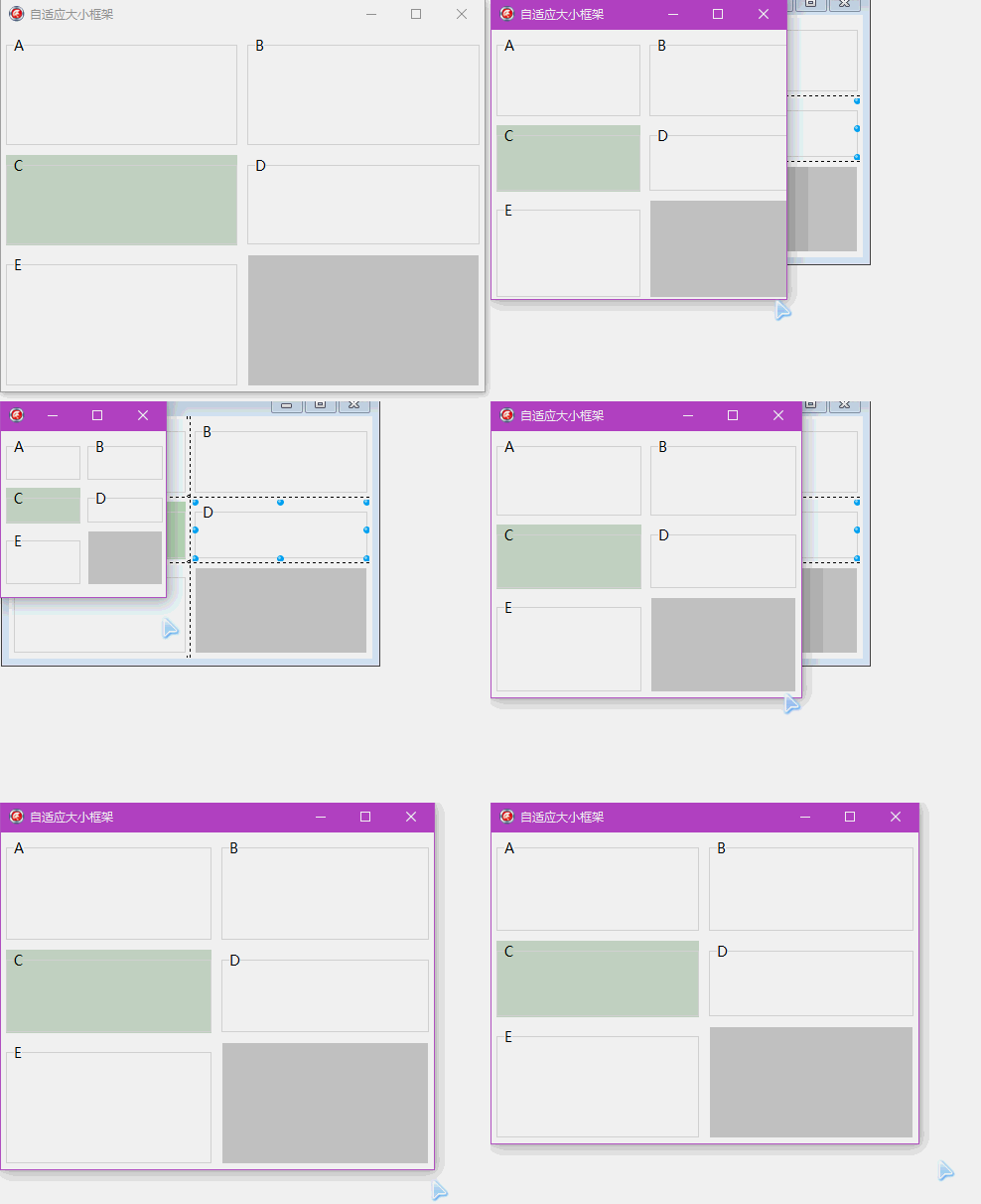
全选复制,粘贴到XE 的空窗体上即可。
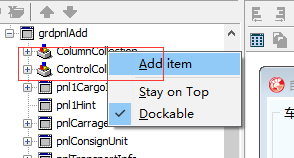
添加行 控件的ColumnCollection属性右键添加 Add item
添加列 控件的RowCollection 属性右键添加 Add item
控制的格子ControlCollection 就自动出来了,在上面放panel等容器,然后通过这个属性选择容器对应受到哪个格子控制。
或者用代码控制
{grdpnlAdd.ColumnCollection.BeginUpdate;
grdpnlAdd.ColumnCollection[0].Value := 49.5;
grdpnlAdd.ColumnCollection[1].Value := 1;
grdpnlAdd.ColumnCollection[2].Value := 49.5;
grdpnlAdd.ColumnCollection.EndUpdate;
grdpnlAdd.RowCollection.BeginUpdate;
grdpnlAdd.RowCollection[0].Value := 32;
grdpnlAdd.RowCollection[1].Value := 1;
grdpnlAdd.RowCollection[2].Value := 32;
grdpnlAdd.RowCollection[3].Value := 1;
grdpnlAdd.RowCollection[4].Value := 33;
grdpnlAdd.RowCollection.EndUpdate; }
TGridPanel做一个自动按比例缩放的窗体的更多相关文章
- 做一个自动修改本机IP和mac的bat文件
原文:做一个自动修改本机IP和mac的bat文件 1.ip bat修改理论探讨 前两天我突然萌生了一个念头:能不能做一个小程序来实现自动配置或修改IP和mac,达到一键搞定的目的,这样尤其适合那些带着 ...
- Micropython 如何用Turnipbit做一个自动浇水装置
最近在研究Turnipbit这块板子,打算是连接一个摄像头模块,正在实验练习中,(祝自己早日弄好)上篇文章我们讲了用Turnipbit连接LCD5110显示英文词句,前几天给家里花浇水的时候发现花招了 ...
- [转]用Python做一个自动生成读表代码的小脚本
写在开始(本片文章不是写给小白的,至少你应该知道一些常识!) 大家在Unity开发中,肯定会把一些数据放到配置文件中,尤其是大一点的项目,每次开发一个新功能的时候,都要重复的写那些读表代码.非常烦.来 ...
- 【按键精灵篇】如何做一个自动打开APP进入注册页面自动输入自己手机号
按键精灵,虽然很早听过,但是一直没有真正使用过,所以最近有点时间也简单试一下,通过脚本自动清理APP缓存,打开百家号并自动进入注册页面输入自己的手机号. 软件清单 1. 雷电手机模拟器:https:/ ...
- 今天做一个winform,想直接把窗体改成输出类库,其他地方直接调结果总提示不能注册组件,回来调度,可以,总结,windows还是直接用新建的类型项目,改容易出错
如题, 对于winform程序,还是新建一个类库,这样,在类库里面可以添加窗体.这样可以提供其他程序集来调用里面的窗体
- 使用java AWT做一个增加按钮的简单菜单窗体
package com.ysq.Swing; import java.awt.BorderLayout; import java.awt.Container; import java.awt.Flow ...
- 更新到PS CC 2019 缩放的时候 按住shift变成不规则缩放了 反而不按住shift是等比例缩放
更新到PS CC 2019 缩放的时候 按住shift变成不规则缩放了 反而不按住shift是等比例缩放 更新到PS CC 2019 缩放的时候 按住shift变成不规则缩放了 反而不按住shift是 ...
- 做了一个图片等比缩放的js
做了一个图片等比缩放的js 芋头 发布在view:8447 今天改了一下博客的主题,发现博客主题在ie6下变样了,后来发现是因为某篇文章里的某个图片太大了撑开了容器,导致样式错位,前几天公司需求里 ...
- delphi 一个自动控制机的硅控板检测程序,用多线程和API,没有用控件,少做改动就能用 用485开发
一个自动控制机的硅控板检测程序,用多线程和API,没有用控件,少做改动就能用Unit CommThread; Interface Uses Windows, Classes, SysUtils, G ...
随机推荐
- Mybatis传参数
1使用@Param注解传参数 mapper接口:public void updateUser(@Param("user")User user)throws Exception; m ...
- 不从SD卡启动树莓派2
本文你可以学到: berryboot使用,kali安装,开挂的MobaXterm,以及关于通过LABEL和UUID挂载的小技巧. 本文默认你有一定Linux基础,同时针对刚入门的水平,因为这是我的折腾 ...
- AE开发实现GP工具IDW
IDW——空间插值 IDW(Inverse Distance Weighted)是一种常用而简便的空间插值方法,它以插值点与样本点间的距离为权重进行加权平均,离插值点越近的样本点赋予的权重越大. 设平 ...
- 深入理解javascript原型和闭包(18)——补充:上下文环境和作用域的关系
本系列用了大量的篇幅讲解了上下文环境和作用域,有些人反映这两个是一回儿事.本文就用一个小例子来说明一下,作用域和上下文环境绝对不是一回事儿. 再说明之前,咱们先用简单的语言来概括一下这两个的区别. 0 ...
- Android通过名称找图片
开发中往往会遇到这种情况:在Drawable文件夹中有若干张相似的图片(这里的相似指的是不仅图片名称相似,用途也相似),现在要根据用户的某个操作选出其中的一张.例如,在类似微信语音功能的开发中,按住“ ...
- STM32f103之外部中断
一.背景 有个需求,IO口检测上升沿,然后做相应的动作.在此记录STM32F103的外部中断结构及配置方法, 以备下次快速上手使用. 有许多不太明白,又是老司机(:-D)帮忙,真的是站在别人的肩膀上会 ...
- 【bzoj1076】[SCOI2008]奖励关
题目描述 你正在玩你最喜欢的电子游戏,并且刚刚进入一个奖励关.在这个奖励关里,系统将依次随机抛出k次宝物,每次你都可以选择吃或者不吃(必须在抛出下一个宝物之前做出选择,且现在决定不吃的宝物以后也不能再 ...
- linux安装php & nginx
1.安装libxml2 地址:http://ftp.gnome.org/pub/GNOME/sources/libxml2/ wget http://caesar.acc.umu.se/pub/GNO ...
- C#高级编程笔记 Day 8, 2016年9月 28日 (数组)
1.数组的初始化 声明了数组后,就必须为数组分配内存,以保存数组的所有元素.数组是引用类型,所以必须给它分配堆上的内存,为此,应使用 new 运算符,指定数组中元素的类型和数量来初始化数组的变量.若使 ...
- word20161206
D-channel / D 信道 DACL, discretionary access control list / 自由访问控制列表 daily backup / 每日备份 Data Communi ...