
Maven私服:Docker安装nexus3
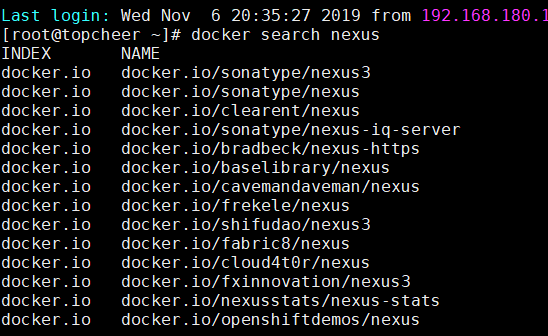
查找nexus3镜像
docker search nexus

拉取nexus3镜像
docker pull docker.io/sonatype/nexus3

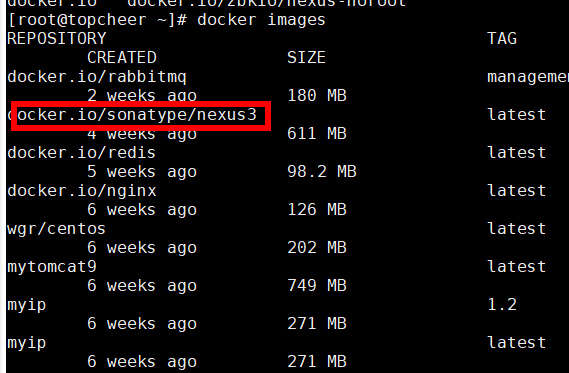
查看镜像
docker images
运行nexus容器
docker run -id --privileged=true --name=nexus3. --restart=always -p : -v /topcheer/nexus3/nexus-data:/nexus-data 8eb898be2a53(这个是容器id或名称)
[root@topcheer ~]# docker ps -l

CONTAINER ID        IMAGE               COMMAND                  CREATED             STATUS              PORTS                    NAMES

b4d0c5712512        8eb898be2a53        "sh -c ${SONATYPE_..."   8 hours ago         Up 3 hours          0.0.0.0:8081->8081/tcp   nexus3

[root@topcheer ~]#
解释:
-id 创建守护式容器
--privileged=true 授予root权限(挂载多级目录必须为true,否则容器访问宿主机权限不足)
--name=名字 给你的容器起个名字
-p 宿主机端口:容器端口映射
-v 宿主机目录:容器目录 目录挂载

注意:
运行容器后访问主机+配置的宿主机映射端口无反应时,请稍等几分钟(视配置时间长短不一),等待nexus3完成初始化才能访问成功
访问nexus3
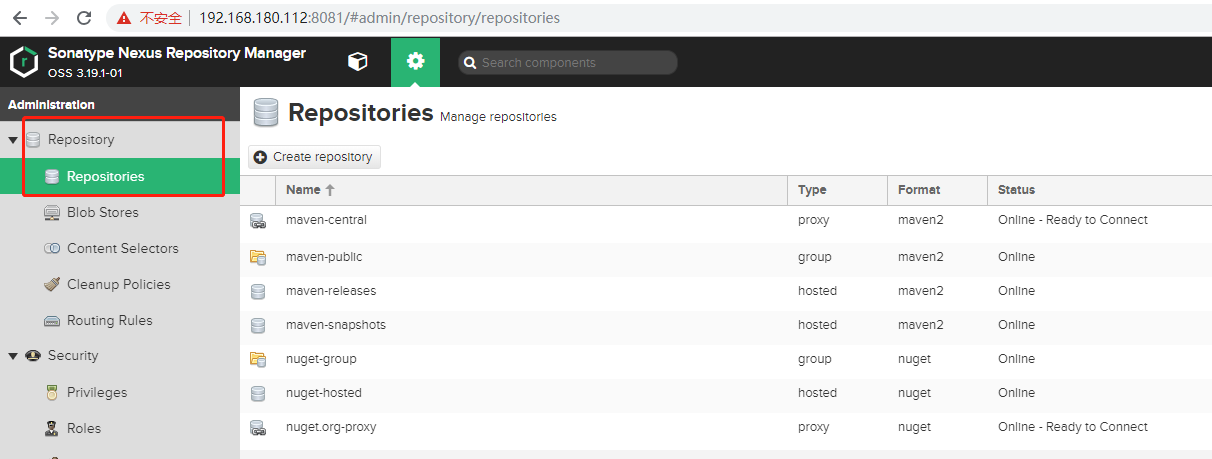
登录
默认admin密码在容器里面
[root@topcheer nexus-data]# docker exec -it b4d0c5712512 /bin/bash

bash-4.4$

bash-4.4$

bash-4.4$ cd /

bash-4.4$ ls -l

total 16

lrwxrwxrwx.   1 root  root     7 Aug 12  2018 bin -> usr/bin

dr-xr-xr-x.   2 root  root     6 Aug 12  2018 boot

drwxr-xr-x.  15 root  root  3100 Nov  6 08:16 dev

drwxr-xr-x.   1 root  root    66 Nov  6 08:03 etc

-rwxr-xr-x.   1 root  root  2120 Oct  9 16:17 help.1

drwxr-xr-x.   2 root  root     6 Aug 12  2018 home

lrwxrwxrwx.   1 root  root     7 Aug 12  2018 lib -> usr/lib

lrwxrwxrwx.   1 root  root     9 Aug 12  2018 lib64 -> usr/lib64

drwxr-xr-x.   2 root  root    21 Oct  9 16:17 licenses

drwx------.   2 root  root     6 Sep 16 12:24 lost+found

drwxr-xr-x.   2 root  root     6 Aug 12  2018 media

drwxr-xr-x.   2 root  root     6 Aug 12  2018 mnt

drwxr-xr-x.  16 nexus nexus 4096 Nov  6 08:16 nexus-data

drwxr-xr-x.   1 root  root    22 Oct  9 16:17 opt

dr-xr-xr-x. 334 root  root     0 Nov  6 08:16 proc

dr-xr-x---.   1 root  root    23 Sep 16 12:29 root

drwxr-xr-x.   1 root  root    18 Oct  9 16:16 run

lrwxrwxrwx.   1 root  root     8 Aug 12  2018 sbin -> usr/sbin

drwxr-xr-x.   2 root  root     6 Aug 12  2018 srv

dr-xr-xr-x.  13 root  root     0 Nov  6 08:09 sys

drwxrwxrwt.   1 root  root    30 Nov  6 08:04 tmp

-rwxr-xr-x.   1 root  root   341 Oct  9 16:17 uid_entrypoint.sh

-rwxr-xr-x.   1 root  root   267 Oct  9 16:17 uid_template.sh

drwxr-xr-x.   1 root  root    81 Sep 16 12:25 usr

drwxr-xr-x.   1 root  root    24 Nov  6 08:04 var

bash-4.4$ pwd

/

bash-4.4$ cd nexus-data/

bash-4.4$ ls -l

total 32

-rw-r--r--.   1 nexus nexus   36 Nov  6 08:05 admin.password

drwxr-xr-x.   3 nexus nexus   21 Nov  6 08:05 blobs

drwxr-xr-x. 296 nexus nexus 8192 Nov  6 08:16 cache

drwxr-xr-x.   6 nexus nexus  113 Nov  6 08:04 db

drwxr-xr-x.   3 nexus nexus   36 Nov  6 08:08 elasticsearch

drwxr-xr-x.   3 nexus nexus   45 Nov  6 08:04 etc

drwxr-xr-x.   2 nexus nexus    6 Nov  6 08:04 generated-bundles

drwxr-xr-x.   2 nexus nexus   33 Nov  6 08:04 instances

drwxr-xr-x.   3 nexus nexus   19 Nov  6 08:04 javaprefs

drwxr-xr-x.   2 nexus nexus    6 Nov  6 08:04 kar

-rw-r--r--.   1 nexus nexus    1 Nov  6 08:16 karaf.pid

drwxr-xr-x.   3 nexus nexus   18 Nov  6 08:04 keystores

-rw-r--r--.   1 nexus nexus   14 Nov  6 08:16 lock

drwxr-xr-x.   4 nexus nexus  125 Nov  6 08:17 log

drwxr-xr-x.   2 nexus nexus    6 Nov  6 08:04 orient

-rw-r--r--.   1 nexus nexus    5 Nov  6 08:16 port

drwxr-xr-x.   2 nexus nexus    6 Nov  6 08:04 restore-from-backup

drwxr-xr-x.   9 nexus nexus 4096 Nov  6 08:16 tmp

bash-4.4$ cat admin.password

8e7256d8-b6e4-4ea6-b5ca-2f0979493119bash-4.4$
登陆以后修改密码为admin1234
查看仓库

在项目中配置私服
拷贝public仓库地址
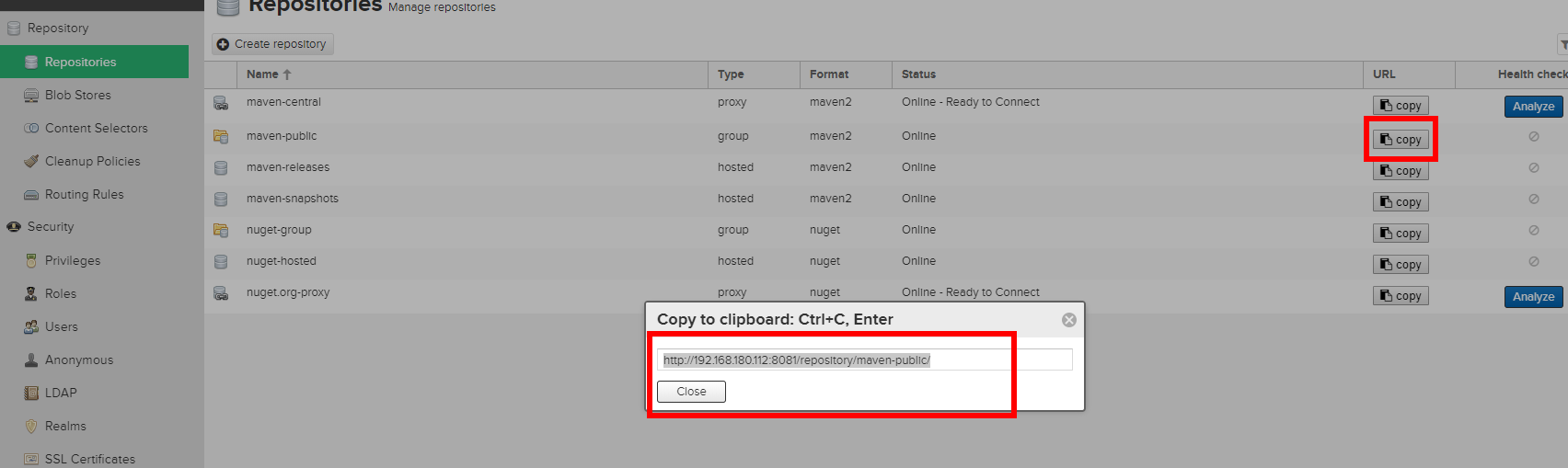
配置到你本地maven的settings文件
注意:是public group仓库地址而不是releases或snapshots仓库,public默认包含了这两个仓库
<profile>

        <id>dev</id>

        <repositories>

            <repository>

                <id>nexus</id>

                <url>http://nexus.topcheer.xyz:8081/nexus/content/groups/public/</url>

                <releases>

                    <enabled>true</enabled>

                </releases>

                <snapshots>

                    <enabled>true</enabled>

                </snapshots>

            </repository>

        </repositories>

        <pluginRepositories>

            <pluginRepository>

                <id>public</id>

                <name>Public Repositories</name>

                <url>http://nexus.topcheer.xyz:8081/nexus/content/groups/public/</url>

            </pluginRepository>

        </pluginRepositories>

    </profile>
  <activeProfiles>

      <activeProfile>dev</activeProfile>

    </activeProfiles>
配置maven settings文件的服务器用户名密码
注意:id为私服中releases和snapshots仓库名,必须一致
<server>

      <id>docker-hub</id>

      <username>admin</username>

      <password>Harbor12345</password>

    </server>

     <server>

        <id>maven-releases</id>

        <username>admin</username>

        <password>admin123</password>

      </server>

      <server>

        <id>maven-snapshots</id>

        <username>admin</username>

        <password>admin123</password>

      </server>
在项目父pom文件中配置部署环境,注意id及URL必须与nexus仓库对应
<distributionManagement>

        <repository>

            <id>maven-releases</id>

            <name>Nexus Release Repository</name>

            <url>http://192.168.180.112:8081/repository/maven-releases/</url>

        </repository>

        <snapshotRepository>

            <id>maven-snapshots</id>

            <name>Nexus Snapshot Repository</name>

            <url>http://192.168.180.112:8081/repository/maven-snapshots/</url>

        </snapshotRepository>

    </distributionManagement>
重新打开项目,对需要的模块进行deploy
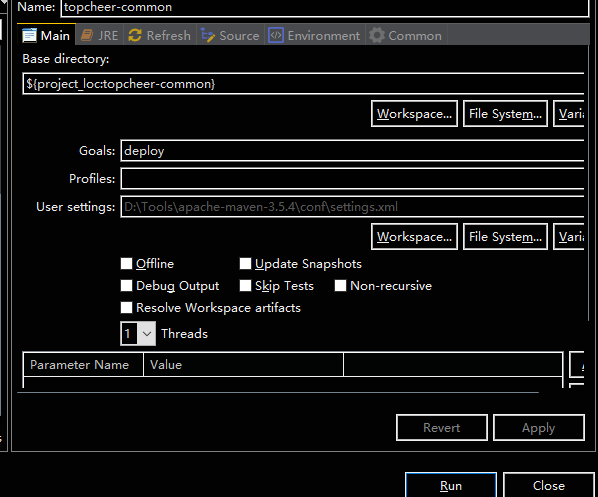
结果:

Maven私服:Docker安装nexus3的更多相关文章
- maven私服nexus安装
maven私服nexus安装 1.nexus特性 1.1.nexus私服实际上是一个javaEE的web 系统 1.2.作用:用来管理一个公司所有的jar包,实现项目jar包的版本统一 1.3.jar ...
- docker 安装 nexus3 初始密码不再是admin123
最近在docker上安装 nexus3 ,参照之前博客都提示 初始密码是admin/admin123 但是登录的时候出现如下提示: 很显然提示 admin用户的密码在/nexus-data/admi ...
- gradle 项目构建以及发布maven 私服&& docker 私服构建发布
1. 项目结构 2. 代码说明 a. Dockerfile docker 构建的 FROM openjdk:8-jre-alpine WORKDIR /appdemo/ COPY build/di ...
- Windows下使用Nexus搭建Maven私服(安装)
一.下载Nexus 下载OSS最新版:https://www.sonatype.com/download-oss-sonatype 老版本:https://support.sonatype.com/h ...
- maven 私服 nexus 安装
1.去官方下载他的免费版,人民称为oss版(这一步自行百度去官网解决),官网:https://www.sonatype.com/ 2.下载好后,解压是两个文件夹: 3.配置环境变量: 4.安装生成w ...
- 基于Docker搭建Maven私服Nexus,Nexus详解
备注:首先在linux环境安装Java环境和Docker,私服需要的服务器性能和硬盘存储要高一点,内存不足可能到时启动失败,这里以4核8GLinux服务器做演示 一:基于Docker安装nexus3 ...
- Docker 搭建 Nexus3 私服 | 基本操作
1 Docker 安装 Nexus3 1.1 创建目录 在硬盘上创建 Nexus3 的主目录: mkdir -p /Users/yygnb/dockerMe/nexus3 为该目录添加权限: chmo ...
- Maven私服(Repository Manager) - Nexus安装和使用(详细过程)
Maven私服的安装和使用. (注:原创文章,引用请注明来自Clement-Xu的博客!) Maven私服(即Repository Manager)的主要作用: 减少从远方仓库下载的次数,节省带宽.提 ...
- docker安装应用
1.docker安装oracle docker search oracle docker pull wnameless/oracle-xe-11g docker run -d -p 9090:8080 ...
随机推荐
- VMware 虚拟化编程(12) — VixDiskLib Sample 程序使用
目录 目录 前文列表 vixDiskLibSample 安装 Sample 程序 Sample 程序使用方法 前文列表 VMware 虚拟化编程(1) - VMDK/VDDK/VixDiskLib/V ...
- 多进程---multiprocessing/threading/
一.多进程:multiprocessing模块 多用于处理CPU密集型任务 多线程 多用于IO密集型任务 Input Ouput 举例: import multiprocessing,threadin ...
- 【ABAP系列】SAP ABAP 模拟做成像windows一样的计算器
公众号:SAP Technical 本文作者:matinal 原文出处:http://www.cnblogs.com/SAPmatinal/ 原文链接:[MM系列]SAP ABAP 模拟做成像wind ...
- ETROBOT——审题
参加了比赛,但是总要理解比赛相关的东西,发现以前瞎写的东西有人看,并且还有挺多人看的,所以打算继续在这里面,做记录. 源: http://www.etrobo.jp/2018/gaiyou/intro ...
- 69.x的平方根
class Solution: def mySqrt(self, x: int) -> int: if x < 2: return x left, right = 1, x//2 whil ...
- Mac013--Docker安装
一.Docker安装教程 参考:http://www.runoob.com/docker/macos-docker-install.html 可应用brew命令安装,也可自定义下载安装. 应用brew ...
- Linq查询语法(2)
转:http://www.cnblogs.com/knowledgesea/p/3897665.html 1.简单linq查询 var ss = from r in db.Am_recProSchem ...
- java8 stream 用法收集
public class Test1 { public static void main(String[] args) { List<Integer> numbers = new Arra ...
- git 中添加用户名和密码
git 中添加用户名和密码:https://blog.csdn.net/qq_28602957/article/details/52154384 在使用git时,如果用的是HTTPS的方式,则每次提交 ...
- Eclipse打包可执行jar包操作步骤
1.右键点击工程,选择Export…,进入页面 2.弹出对话框,选择Java->Runnable JAR file ,点击Next>,页面显示jar包的输出路径,配置为jmeter的/li ...