
springboot2集成redis5报错:io.lettuce.core.RedisException: io.lettuce.core.RedisConnectionException: DENIED Redis is running in protected
报错信息如下:
Caused by: io.lettuce.core.RedisException: io.lettuce.core.RedisConnectionException: DENIED Redis is running in protected mode because protected mode is enabled, no bind address was specified, no authentication password is requested to clients. In this mode connections are only accepted from the loopback interface. If you want to connect from external computers to Redis you may adopt one of the following solutions: 1) Just disable protected mode sending the command 'CONFIG SET protected-mode no' from the loopback interface by connecting to Redis from the same host the server is running, however MAKE SURE Redis is not publicly accessible from internet if you do so. Use CONFIG REWRITE to make this change permanent. 2) Alternatively you can just disable the protected mode by editing the Redis configuration file, and setting the protected mode option to 'no', and then restarting the server. 3) If you started the server manually just for testing, restart it with the '--protected-mode no' option. 4) Setup a bind address or an authentication password. NOTE: You only need to do one of the above things in order for the server to start accepting connections from the outside.
at io.lettuce.core.LettuceFutures.awaitOrCancel(LettuceFutures.java:129)
at io.lettuce.core.FutureSyncInvocationHandler.handleInvocation(FutureSyncInvocationHandler.java:69)
at io.lettuce.core.internal.AbstractInvocationHandler.invoke(AbstractInvocationHandler.java:80)
at com.sun.proxy.$Proxy84.setex(Unknown Source)
at org.springframework.data.redis.connection.lettuce.LettuceStringCommands.setEx(LettuceStringCommands.java:230)
... 72 more
报错说得很详细,说明redis是以受保护的模式在运行,没有指定地址,也没有设置密码,只能使用环回接口。 如果想连接外部的计算机,可以采用以下措施之一:
1. 使用 "CONFIG SET protected-mode no" 设置
2. 修改redis.conf 配置文件,然后重启服务
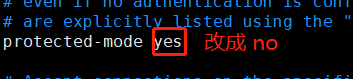
3. 如果仅是为了测试,在启动redis服务时,加上 “--protected-mode no ”
./redis-server ./redis.conf --protected-mode no
4. 绑定明确的地址,或者设计密码
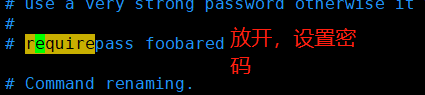
经过测试,确实可以!!!
springboot2集成redis5报错:io.lettuce.core.RedisException: io.lettuce.core.RedisConnectionException: DENIED Redis is running in protected的更多相关文章
- redis问题解决 Caused by: io.lettuce.core.RedisException: io.lettuce.core.RedisConnectionException: DENIED Redis is running in protected mode because protected mode is enabled, no bind address was specifie
1找到redis的配置文件 redis.conf vim redis.conf 修改 protected-mode yes 改为 protected-mode no 注释掉 #bin 127.0.0 ...
- error) DENIED Redis is running in protected mode because protected mode is enabled报错
官网地址:https://redis.io/download 官方安装文档如下: Installation Download, extract and compile Redis with: $ wg ...
- 2017.7.10 Redis报错:DENIED Redis is running in protected mode
参考来自: java 客户端链接不上redis解决方案 DENIED Redis is running in protected mode 完整错误信息: Caused by: redis.clien ...
- 【Redis】【报错】redis.exceptions.ResponseError: DENIED Redis is running in protected mode
(一)报错前提 写flask 项目的时候,因为连接了私有云中的redis地址指定了IP host,启动项目的时候报错 (二)解决方法 首先要切换到root用户 root@:/etc/redis# pw ...
- Redis报错:DENIED Redis is running in protected mode
转:Redis使用认证密码登录 Redis默认配置是不需要密码认证的,也就是说只要连接的Redis服务器的host和port正确,就可以连接使用.这在安全性上会有一定的问题,所以需要启用Redis ...
- 解决使用jedis连接是报DENIED Redis is running in protected mode错误
DENIED Redis is running in protected mode because protected mode is enabled, no bind address was spe ...
- SpringBoot2整合Shiro报错 UnavailableSecurityManagerException: No SecurityManager accessible to the calling code 【已解决】
SpringBoot集成Shiro报错 UnavailableSecurityManagerException: No SecurityManager accessible to the callin ...
- eclipse连接远程Hadoop报错,Caused by: java.io.IOException: 远程主机强迫关闭了一个现有的连接。
eclipse连接远程Hadoop报错,Caused by: java.io.IOException: 远程主机强迫关闭了一个现有的连接.全部报错信息如下: Exception in thread & ...
- Ambari集成Kerberos报错汇总
Ambari集成Kerberos报错汇总 作者:尹正杰 版权声明:原创作品,谢绝转载!否则将追究法律责任. 一.查看报错的配置信息步骤 1>.点击Test Kerberos Client,查看相 ...
随机推荐
- oracle 数据迁移之数据泵的基本使用
oracle相同数据库下跨schema的表迁移—expdp/impdp 需求:将GUIDO用户下的表迁移到SCOTT用户下 select * from dba_role_privs where GRA ...
- html基础与表格的理解·
1.静态网页与动态网页的区别:是否访问数据库 2.超文本:超文本是指超出文本的范围,可以插入声音视频,表格图片等 3.标记语言与网页结构:标记语言就是标签,网页结构包含<html>< ...
- 测开之路七十五:linux常用命令
常用命令: ls:列出文件或目录 pwd:展示当前所在的目录 mkdir:创建目录 mkdir -p :创建连续的目录 cd:切换目录 vi:编辑内容,点i开始编辑,输入::wq保存 cat 显示文件 ...
- Vagrant 手册之 box - 创建基础 box
原文地址 有一种特殊的 box 被称为"base box".这些 box 包含 Vagrant 运作所需的最低限度,通常不是对现有的 Vagrant 环境("base b ...
- CET-6 分频周计划生词筛选(番外篇:百词斩)
点我阅读 番外-百词斩 2016.09.18 12:00pm transverse counterpart accessory cult gorgeous sediment assimilate st ...
- jQuery提交表单的几种方式
方式一: $.post('../Ajax/GoodsAjax.ashx?cmd=getGsList', function (result) { var result = eval('(' + re ...
- 20190825 On Java8 第十三章 函数式编程
第十三章 函数式编程 函数式编程语言操纵代码片段就像操作数据一样容易. 虽然 Java 不是函数式语言,但 Java 8 Lambda 表达式和方法引用 (Method References) 允许你 ...
- ELMO,BERT和GPT简介
1.Contextualized Word Embedding 同样的单词有不同的意思,比如下面的几个句子,同样有 “bank” ,却有着不同的意思.但是用训练出来的 Word2Vec 得到 “ban ...
- UI自动化处理文件上传
UI自动化处理文件上传 import win32guiimport win32con def set_uploader(self, file_path): sleep(2) self.file_pat ...
- Spring学习(七)--Spring MVC的高级技术
一.Spring MVC配置的替代方案 我们已经了解如何通过AbstractAnnotationConfigDispatcherServlet- Initializer快速搭建了Spring MVC环 ...